
When it comes to video production, having the right PTZ camera controller can make all the difference. With advancements on the horizon for 2026, you’ll want to explore the top options available that promise seamless integration, intuitive controls, and robust compatibility. Each model brings unique features to the table, ensuring you find the perfect fit for your needs. So, what should you consider when making your choice? Let’s take a closer look.
AVKANS PowerJoy PTZ Camera Joystick Controller

If you’re looking for a reliable solution for worship services or live streaming events, the AVKANS PowerJoy PTZ Camera Joystick Controller is an excellent choice. This IP NDI PTZ camera controller features a 5-inch LCD screen, offering a live preview at up to 1080p resolution. With support for multiple protocols, including VISCA and Pelco, you can easily control up to 100 network cameras. Plus, its Power over Ethernet functionality simplifies setup. You’ll appreciate the intuitive controls for pan, tilt, zoom, and advanced features like auto tracking. The included NDI license further enhances its versatility, making it ideal for seamless video production.
Best For: The AVKANS PowerJoy PTZ Camera Joystick Controller is best for churches and organizations looking to enhance their live streaming and video production capabilities.
Pros:
- Supports multiple protocols, allowing compatibility with various camera brands.
- Intuitive controls for pan, tilt, zoom, and advanced features like auto tracking.
- Power over Ethernet (PoE) simplifies setup with a single cable for power and connectivity.
Cons:
- Limited control of certain camera functions (Iris, Color, AutoTracking, Menu, and WB) when using NDI protocol.
- The controller may require some technical knowledge for optimal setup and use.
- The 5-inch LCD screen may be small for users who prefer larger displays for live previews.
FoMaKo KC608 Pro NDI PTZ Camera Controller
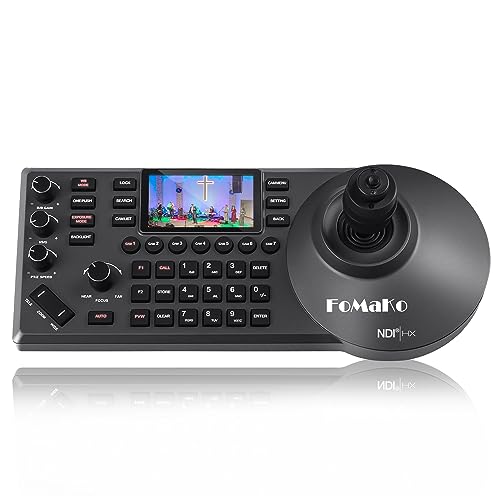
The FoMaKo KC608 Pro NDI PTZ Camera Controller stands out as an ideal choice for professionals in video production who demand precision and ease of use. With its ergonomic design, built-in LCD preview, and PoE power, you’ll find it comfortable to use for long periods. The 4D precision joystick lets you control up to 255 PTZ cameras effortlessly, while supporting various protocols like VISCA and NDI|HX2. Setup is straightforward, requiring only one LAN cable. Trusted by over 20,000 customers, it comes with a 3-year warranty and 24/7 expert support, ensuring you get the assistance you need when you need it.
Best For: Professionals in video production and live streaming who seek a reliable and user-friendly PTZ camera controller.
Pros:
- Ergonomically designed for comfortable, extended use with a built-in LCD preview.
- Supports multiple camera control protocols and can manage up to 255 PTZ cameras.
- Backlight support and easy setup with just one LAN cable enhance usability in various environments.
Cons:
- May require a learning curve for those unfamiliar with PTZ camera control systems.
- The weight of 3.85 pounds might be cumbersome for some users during long sessions.
- Limited to compatibility with specific live video streaming software, which may not suit all users.
Tenveo PTZ Camera and Controller Bundle for Live Streaming
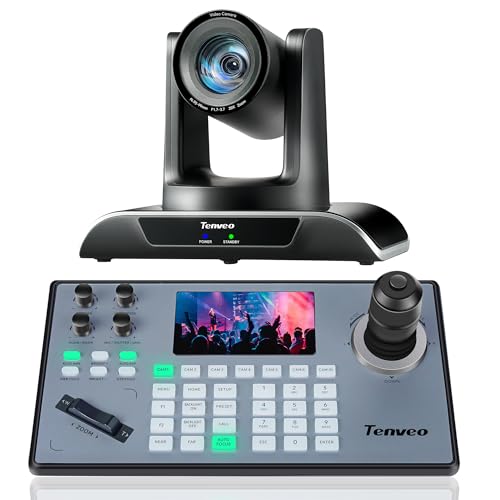
For those looking to elevate their live streaming experience, the Tenveo PTZ Camera and Controller Bundle stands out with its impressive 20X optical zoom and AI auto tracking features. This bundle includes the VHD20H camera, capable of delivering FHD 1080P at 60FPS, and a user-friendly joystick controller with a real-time preview on a 5-inch LCD screen. It’s perfect for various applications like church services, online education, and live events. Plus, with lifetime technical support and a 30-day money-back guarantee, you can invest confidently in enhancing your video production setup. This bundle truly combines quality and versatility.
Best For: This product is best for churches, educational institutions, and professionals looking to enhance their live streaming and video production capabilities.
Pros:
- High-quality video with FHD 1080P at 60FPS and 20X optical zoom for clear and detailed imagery.
- AI auto tracking feature ensures subjects are always in focus during recordings or live streams.
- Comprehensive compatibility with various operating systems and applications makes it versatile for many uses.
Cons:
- No built-in microphone, requiring external audio solutions for complete live streaming setups.
- The joystick controller may have a learning curve for users unfamiliar with PTZ camera controls.
- Higher initial investment compared to basic cameras, which may not be suitable for all budgets.
Canon RC-IP100 Remote PTZ Camera Controller

Designed with video production professionals in mind, the Canon RC-IP100 Remote PTZ Camera Controller offers an impressive 7” touch screen and a smooth zoom lever, making it an essential tool for capturing high-quality footage. You can control up to 100 Canon cameras effortlessly, including one via a serial port. Its intuitive interface allows you to set up and operate 100 presets with ease. With responsive zoom and joystick controls, you’ll confidently manage pan, tilt, and zoom movements. Included in the package are the controller, AC adapter, and necessary cables, ensuring you’re ready to go right out of the box.
Best For: Video production professionals who require precise control over multiple Canon PTZ cameras for high-quality footage capture.
Pros:
- Intuitive 7” touch screen enhances ease of use for quick adjustments and configurations.
- Supports up to 100 cameras, allowing for extensive multi-camera setups in large production environments.
- Smooth zoom lever and joystick controls provide responsive and precise movement for optimal camera operation.
Cons:
- Limited to Canon cameras, which may not be suitable for users with diverse camera brands.
- Requires a learning curve for users unfamiliar with remote camera operation systems.
- Price point may be high, making it less accessible for smaller production teams or individual users.
Tenveo NDI PTZ Camera Joystick Controller

Looking for a reliable solution to streamline your live productions? The Tenveo NDI PTZ Camera Joystick Controller is your answer. With a 7-inch LCD Quad-Screen, you can monitor up to four camera feeds simultaneously, ensuring you never miss a moment. Its 4D joystick allows for smooth PTZ adjustments, making it perfect for events like church services and live streams. Plus, it supports various protocols, ensuring compatibility with an array of equipment. With features like AI Auto Tracking and precise recording capabilities, you’ll elevate your video production to new heights. Enjoy excellent customer support and a three-year warranty for peace of mind.
Best For: The Tenveo NDI PTZ Camera Joystick Controller is best for professionals in live streaming, video production, and event management who require seamless control over multiple PTZ cameras.
Pros:
- Offers real-time monitoring of up to 4 camera feeds with a 7-inch LCD Quad-Screen.
- Compatible with various protocols (NDI, VISCA, Onvif, Pelco-D/P) for versatile integration.
- Provides a 3-year warranty and lifetime technical support for added security and assistance.
Cons:
- Requires a firmware upgrade for AI Auto Tracking feature, which may be an extra step for some users.
- Quad-Screen supports lower resolution (720P30) compared to the main view (1080P30).
- Limited to control of 255 PTZ cameras, which may not be sufficient for very large setups.
PTZ Controller Camera with 5 Inch LCD Screen

The Hsility PTZ Controller Camera with a 5 Inch LCD screen stands out as an excellent choice for professionals in video production who need precise control over multiple PTZ cameras. Its ergonomic design features a 4D joystick and knob buttons, making it easy to adjust PTZ and zoom functions. With support for up to 999 devices, you can manage numerous cameras effortlessly. The tough aluminum alloy construction guarantees durability, while compatibility with standard network protocols and Linux systems broadens its usability. Ideal for various settings such as courts and educational institutions, this controller enhances your video production workflow considerably.
Best For: Professionals in video production and security monitoring who require precise control over multiple PTZ cameras.
Pros:
- Multi-compatible with standard network protocols and Linux systems, enhancing usability across various platforms.
- Ergonomic design with a 4D joystick and knob buttons allows for easy and intuitive control of PTZ and zoom functions.
- Durable construction made of tough aluminum alloy ensures long-lasting performance and resistance to scratches and damage.
Cons:
- Weighty design at 2.2 pounds may be less portable for on-the-go usage.
- 480p resolution on the LCD screen may not meet the expectations of users seeking higher display quality.
- Limited warranty information may leave some customers uncertain about long-term support.
FoMaKo PTZ Camera Controller (KC606)

For anyone involved in live video production, the FoMaKo PTZ Camera Controller (KC606) stands out with its intuitive 4D joystick and 3-inch LCD screen, making camera operation seamless and efficient. You’ll appreciate its simple setup with a single LAN connection and customizable buttons for quick shortcuts. It effortlessly controls multiple PTZ cameras, perfect for capturing multi-angle shots during events. Plus, it’s compatible with various protocols, ensuring flexibility across different setups. With a 3-year warranty and 24/7 expert support, you can trust that you’re investing in a reliable solution for professional AV streaming and broadcasting.
Best For: The FoMaKo PTZ Camera Controller (KC606) is best for professionals in live video production looking for an efficient and user-friendly solution for controlling multiple PTZ cameras.
Pros:
- Intuitive 4D joystick and customizable buttons for seamless camera operation.
- Easy setup with a single LAN connection allows for quick deployment in various settings.
- Supports multiple protocols and can control several cameras simultaneously for versatile video production.
Cons:
- May require additional upgrades for full NDI functionality.
- Limited to specific protocols, which could restrict compatibility with some camera models.
- The 3-inch LCD screen may be too small for some users who prefer larger displays for monitoring.
Tenveo NDI PTZ Camera Controller for Live Streaming and Video Production
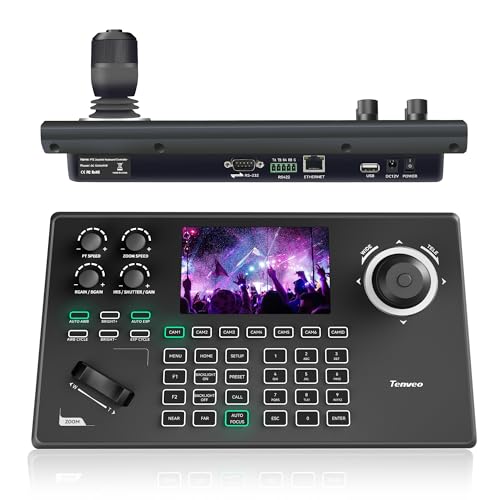
Designed with versatility in mind, the Tenveo NDI PTZ Camera Controller (KB200MAX) is perfect for video producers who demand seamless control over multiple cameras during live events. Its 5-inch LCD preview screen and 4D joystick assure precise PTZ movements, while built-in NDI licensing simplifies camera management. You can easily configure network settings and access internal camera options via the OSD Menu. With support for numerous protocols and the ability to control up to 255 cameras, this controller excels in various environments. Plus, Tenveo’s three-year warranty and lifetime technical support guarantee you’ll be well taken care of throughout your production journey.
Best For: The Tenveo NDI PTZ Camera Controller is best for video producers and live event organizers seeking efficient multi-camera control and seamless streaming capabilities.
Pros:
- Versatile Control: Supports multiple control protocols and can manage up to 255 PTZ cameras, making it ideal for diverse production environments.
- User-Friendly Interface: The 5-inch LCD preview screen and 4D joystick allow for precise and intuitive PTZ movements.
- Robust Support: Comes with a three-year warranty, lifetime technical assistance, and a 30-day money-back guarantee for peace of mind.
Cons:
- Compatibility Limitations: Requires specific versions of Tenveo Cameras and PTZ Controller software for optimal performance.
- Learning Curve: Users may need time to familiarize themselves with the various features and settings available.
- Bulkiness: The controller’s size may be less portable compared to more compact alternatives.
Tenveo NDI PTZ Camera Joystick Controller

Offering an intuitive 4D joystick control, the Tenveo NDI PTZ Camera Joystick Controller is perfect for live event operators looking to enhance their video production experience. With its 5” LCD screen for real-time preview, you can easily manage up to 255 PTZ cameras. The joystick allows smooth panning, tilting, zooming, and focusing, while supporting various protocols like NDI and Visca. Setup is a breeze, thanks to PoE and multiple connection options. Ideal for large conferences or church events, Tenveo also backs you with a 3-year warranty and responsive customer support, ensuring peace of mind while you create seamless productions.
Best For: Live event operators, churches, and organizations looking to enhance their video production capabilities with intuitive camera control.
Pros:
- Intuitive 4D joystick control for smooth panning, tilting, and zooming, allowing for precise adjustments during live events.
- Supports multiple protocols including NDI and Visca, ensuring compatibility with a wide range of PTZ cameras and equipment.
- Comes with a 3-year warranty and lifetime technical support, providing peace of mind for users.
Cons:
- Limited to controlling up to 255 cameras, which may not be sufficient for very large productions with more extensive camera setups.
- Requires a power source for PoE, which may necessitate additional infrastructure considerations for some users.
- Initial setup might be complex for those unfamiliar with camera protocols and connectivity options.
EVERSECU Mini Analog PTZ Camera Keyboard with 4D Joystick

The EVERSECU Mini Analog PTZ Camera Keyboard with 4D Joystick is perfect for video production professionals who need precise control over multiple PTZ cameras. With its 3-Axis joystick and twist zoom, you’ll enjoy accurate maneuvering. You can control up to 255 cameras using the Pelco Protocol over RS485, ensuring seamless operation. The compact design allows for wall mounting, while features like lightning protection enhance reliability. An LCD screen keeps you informed about protocol and settings. Weighing just 0.91 kg and operating on 12 volts, this controller is a powerful tool that blends functionality and convenience for your video projects.
Best For: Video production professionals seeking precise control over multiple PTZ cameras.
Pros:
- Compact design allows for easy wall mounting and saves space.
- 3-Axis joystick with twist zoom provides accurate maneuvering for enhanced camera control.
- Supports up to 255 cameras using Pelco Protocol, ensuring seamless operation across multiple units.
Cons:
- Limited to analog cameras, which may not be suitable for all users.
- Requires RS485 wiring, potentially complicating installation for some setups.
- No wireless operation as it relies on corded electric power, restricting placement options.
Factors to Consider When Choosing a PTZ Camera Controller
When choosing a PTZ camera controller, you’ll want to take into account several key factors. Compatibility with your camera brand, the control protocols it supports, and its user interface design can greatly impact your workflow. Additionally, think about the connectivity options and power supply requirements to make sure everything runs smoothly.
Compatibility With Camera Brands
Choosing a PTZ camera controller that’s compatible with your specific camera brand can greatly impact your video production’s efficiency. First, verify the controller supports the communication protocols your camera uses, like VISCA, Pelco-D, or NDI, for seamless integration. Next, check if it can manage the number of cameras you plan to use; some can handle up to 255, while others are limited. Look for both IP-based and serial control options to connect various camera types easily. Additionally, consider controllers with firmware upgrades to keep up with future camera models. Finally, opt for user-friendly controls and interfaces to streamline operations across different brands, guaranteeing a smoother workflow during live events.
Control Protocols Supported
Selecting a PTZ camera controller means considering not just brand compatibility but also the control protocols supported. Look for controllers that support multiple protocols like VISCA, Pelco-D, and Pelco-P, as they allow seamless communication with various camera brands. If you’re aiming for network-based production, controllers with NDI protocol enhance your flexibility in managing cameras. Additionally, verify compatibility with RS232, RS422, and RS485 connections for both digital and analog systems. Onvif protocol support is essential for integrating IP cameras and video management systems. Finally, controllers that support multiple protocols can manage up to 255 cameras simultaneously, perfect for extensive multi-camera setups during live productions.
User Interface Design
While evaluating PTZ camera controllers, you’ll find that a user-friendly interface design is essential for efficient operation. A simplified layout allows you to access features like pan, tilt, zoom, and presets quickly. Ergonomic designs with strategically placed buttons, such as 4D joysticks, enhance comfort during long sessions and boost operational efficiency. Look for clear displays, like LCD screens, that provide real-time feedback on camera settings, which is vital for effective monitoring. Customizable buttons and shortcuts let you tailor the interface to your specific needs, streamlining your workflow. Additionally, a responsive touch screen can enhance interactivity, making it easier to control multiple cameras seamlessly. Prioritize these features to maximize your video production experience.
Connectivity Options Available
Connectivity options are essential when it comes to PTZ camera controllers, as they directly impact your setup’s flexibility and efficiency. Many controllers offer Ethernet (IP) connections with Power over Ethernet (PoE), simplifying installation by powering devices through a single cable. Look for controllers that support multiple protocols like VISCA, Pelco-D/P, and Onvif, ensuring compatibility with various PTZ cameras. You’ll find RS232, RS422, and RS485 connections useful for reliable wired control over long distances. If you prefer wireless operation, some controllers provide Wi-Fi connectivity for seamless integration with networked systems. Finally, consider controllers that allow simultaneous control of multiple cameras, as this feature can greatly enhance your operational efficiency in multi-camera environments.
Power Supply Requirements
When choosing a PTZ camera controller, understanding power supply requirements is essential to guarantee smooth operation. Many controllers utilize Power over Ethernet (PoE), which simplifies installation by allowing power and data to travel through a single Ethernet cable. Verify you check the specific voltage requirements, typically ranging from 12V to 48V, as this varies by model. Consider the total power consumption, especially if you’re connecting multiple cameras; you want to confirm the power source can handle the load. Backup power options are also important for uninterrupted operation during live events. Finally, some controllers allow connection to an external power supply, giving you flexibility for installation and ensuring consistent performance in diverse environments.