
As a professional filmmaker, you know that having the right tools can make or break your project. In 2026, video monitors with waveform capabilities are essential for achieving precision in exposure and color grading. With a variety of options available, you’ll want to choose monitors that combine high brightness, Full HD resolution, and advanced features. Let’s explore the top contenders that stand out in this competitive landscape and could elevate your filmmaking experience.
FEELWORLD F5 Prox 5.5 Inch Field Camera Monitor

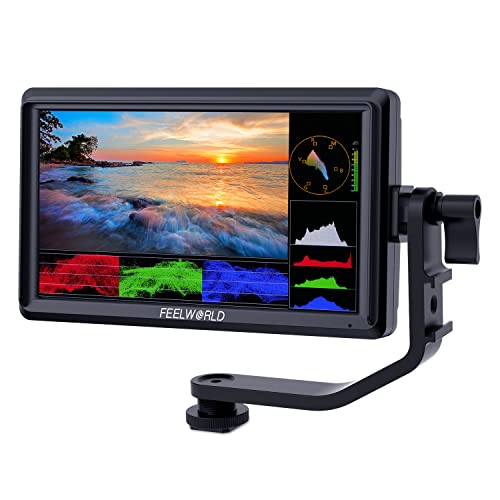
If you’re a filmmaker seeking a reliable external monitor, the FEELWORLD F5 Prox 5.5 Inch Field Camera Monitor stands out with its ultra-bright 1600nits display. This monitor enhances visibility, making it perfect for outdoor filming or travel vlogs. You’ll appreciate the built-in tools like focus peaking, waveform, and histogram, which help you achieve precise focus and exposure, reducing the chance of costly reshoots. Plus, it’s compatible with various cameras and mounts securely on rigs or tripods. With included accessories like a sunshade and battery, you’ll have everything you need for seamless shooting on location.
Best For: Filmmakers and content creators who need a reliable and bright external monitor for outdoor shooting and precise focus and exposure control.
Pros:
- Ultra-bright 1600nits display ensures visibility even in direct sunlight.
- Built-in focus and exposure tools minimize the need for reshoots.
- Compatible with various camera types and mounts securely on different setups.
Cons:
- The 5.5-inch screen may be small for some users looking for larger displays.
- Battery life may vary depending on usage and settings.
- Additional accessories may be required for specific shooting setups not included in the package.
NEEWER F700 7″ Camera Field Monitor

The NEEWER F700 7″ Camera Field Monitor stands out with its impressive 2000nit brightness, making it an exceptional choice for filmmakers who often work in varying lighting conditions. Its 7-inch IPS touch screen offers a sharp 1920×1080 resolution and a 160° ultra-wide viewing angle. You’ll appreciate the extensive connectivity options, including 4K HDMI loop in/out support. With professional monitoring features like waveform, false color, and 15 preloaded 3D LUTs, you can guarantee your footage looks perfect. Plus, it supports NP-F batteries for reliable power, and the built-in cooling fans enhance durability. It’s designed for flexibility and efficiency on set.
Best For: Filmmakers and video professionals seeking a high-quality, portable monitor with advanced features for accurate footage monitoring in various lighting conditions.
Pros:
- 2000nit brightness ensures visibility even in bright outdoor settings.
- Wide range of professional monitoring functions including false color, waveform, and customizable LUTs for precise color grading.
- Flexible power options with NP-F battery support and Type C charging capability enhance usability on set.
Cons:
- Weight may be cumbersome for some users, especially when combined with batteries.
- No included SD card for firmware upgrades may require additional purchases.
- DC power cable not included, which could be inconvenient for some users.
FEELWORLD FW568 6 inch DSLR Camera Field Monitor
Designed specifically for filmmakers, the FEELWORLD FW568 6-inch DSLR camera field monitor stands out with its impressive Full HD 1920×1080 resolution and lightweight build at just 175g. You’ll love the 32 customizable LUTs that let you preview your creative vision in real-time. With advanced features like waveform monitoring, false color, and focus assist, you can guarantee accurate exposure and focus during shoots. It supports 4K HDMI input/output, making it compatible with various cameras. The package includes a Micro HDMI cable, sunshade, and tilt arm, but remember to grab a compatible battery separately for ideal use.
Best For: Filmmakers and photographers seeking a lightweight, high-quality monitor for accurate image preview and focus during shoots.
Pros:
- High resolution: Offers Full HD 1920×1080 resolution for clear and detailed images.
- Customizable: Supports up to 32 LUTs for real-time creative previews.
- Advanced features: Includes waveform monitoring, false color, and focus assist for improved shooting accuracy.
Cons:
- No battery included: Requires separate purchase of a compatible battery for operation.
- Limited connectivity options: Lacks a type-c interface which may limit some users.
- Used version available: The used version has a smaller 5.5-inch screen and fewer features compared to the new model.
VILTROX DC-X3 6 inch Touchscreen Camera Field Monitor

Filmmakers looking for a reliable and bright field monitor will appreciate the VILTROX DC-X3’s impressive 2000 Nit brightness, ensuring visibility even in challenging lighting conditions. With a 60Hz refresh rate and 1920×1080 resolution, this monitor delivers stunning clarity. Its 160° ultra-wide viewing angle allows you to see the picture quality from various perspectives. Equipped with versatile input options like 4K HDMI and 3G-SDI, you can enjoy lossless HD transmission. The intuitive touchscreen and customizable shortcut keys make operation a breeze, while triple power options enhance portability for any shoot. Plus, its durable aluminum body stands up to demanding environments.
Best For: Filmmakers and videographers seeking a high-brightness field monitor for outdoor shooting conditions.
Pros:
- True 2000 Nit brightness ensures excellent visibility in bright environments.
- Versatile input options (4K HDMI and 3G-SDI) provide lossless HD transmission.
- Intuitive touchscreen interface with customizable shortcut keys for easy operation.
Cons:
- Weighs 2.89 pounds, which may be heavier than some competitors.
- Limited to a 60Hz refresh rate, which may not satisfy high frame rate needs.
- Price may be higher compared to entry-level monitors.
VILTROX DC-A1 7 inch HD Camera Monitor

With a stunning brightness of 2800 nits, the VILTROX DC-A1 7 inch HD Camera Monitor stands out as an essential tool for filmmakers who need reliable visibility in challenging lighting conditions. Its 1920×1080 resolution and 170° viewing angle guarantee crisp images from any perspective. You’ll appreciate the extensive connectivity options, including 4K HDMI input/output and a 3.5mm audio jack for monitoring. The monitor’s professional features like False Color, Waveform, and customizable LUTs enhance your shooting experience. Plus, with a user-friendly touchscreen and compact design, it’s perfect for on-the-go filming. Get ready to elevate your production quality!
Best For: Filmmakers and content creators seeking a high-quality, portable monitor with advanced features for effective shooting in various lighting conditions.
Pros:
- Bright 2800 nits display ensures excellent visibility even in bright environments.
- Extensive connectivity options, including 4K HDMI and audio monitoring capabilities.
- User-friendly touchscreen interface with customizable features for enhanced usability.
Cons:
- Battery life may vary depending on usage, potentially requiring extra batteries for long shoots.
- The power input cable is not included, necessitating additional purchases for some users.
- The weight and size may be less convenient for those needing ultra-portable solutions.
VILTROX DC-X3 Touchscreen FHD IPS Camera Monitor

The VILTROX DC-X3 Touchscreen FHD IPS Camera Monitor stands out for its impressive 2000-nit brightness, making it an ideal choice for filmmakers working in bright conditions. With a 6-inch Full HD 1920x1080p display and a 60Hz refresh rate, you’ll enjoy clear visuals from a 160-degree viewing angle. It comes packed with professional monitoring tools like audio meters, histograms, and full waveforms. Plus, the USB 3DLUT input allows for customizable color grading. Connectivity options include SDI and 4K HDMI, while active cooling guarantees reliable performance during extended shoots. It’s the perfect all-in-one solution for on-set and post-production excellence.
Best For: Filmmakers and video professionals who require a high-brightness monitor for outdoor shooting and advanced color grading capabilities.
Pros:
- Exceptional brightness of 2000 nits ensures visibility in bright environments.
- Comprehensive monitoring tools such as histograms and vectorscopes enhance the filming process.
- Active cooling system provides reliable performance during long shoots.
Cons:
- Limited screen size at 6 inches may not be ideal for all users.
- Higher price point compared to basic monitors could be a barrier for beginners.
- Potential learning curve for users unfamiliar with advanced monitoring features.
FEELWORLD LUT7 7″ FHD IPS Touchscreen Camera Field Monitor

For those seeking a high-performance field monitor, the FEELWORLD LUT7 stands out with its stunning 2200 nit brightness, making it perfect for outdoor shoots where sunlight can often wash out screens. This 7” FHD IPS touchscreen monitor boasts a resolution of 1920×1200 and a 160° viewing angle, ensuring clear visuals from any position. With HDMI compatibility for 4K input and real-time 3D LUT support, you’ll easily manage color grading. It includes essential monitoring tools like waveform and focus peaking, plus a lightweight design at just 1 pound, making it an excellent choice for any filmmaker on the go.
Best For: Filmmakers and videographers looking for a high-brightness, portable monitor for outdoor shooting and real-time color grading.
Pros:
- High brightness of 2200 nit ensures visibility even in direct sunlight.
- Lightweight design at just 1 pound makes it easy to carry and mount.
- Includes essential monitoring tools for professional video production.
Cons:
- Battery life of 2.5 hours may require additional batteries for extended shoots.
- Some users may find the touchscreen sensitivity less responsive in certain conditions.
- Limited to HDMI input/output, which may restrict compatibility with certain devices.
Portkeys PT5 II 5″ Touchscreen Camera Field Monitor

If you’re a filmmaker seeking precision in your shots, the Portkeys PT5 II 5″ Touchscreen Camera Field Monitor delivers essential features like advanced waveform functions. With a Full HD resolution of 1920 x 1080 and a wide color gamut, you’ll enjoy stunning visuals. Its lightweight design, at just 0.28 lb, makes it easy to carry, while the 5-inch OCR Full-Fit screen provides a 178° viewing angle. The monitor supports various power options and includes versatile tools like Luma Waveform, RGB Waveform, and customizable guides. Plus, you get a one-year warranty for peace of mind.
Best For: Filmmakers and videographers who require a portable and feature-rich monitor for precise shooting and color accuracy.
Pros:
- Lightweight and portable design at only 0.28 lb, making it easy to transport.
- Advanced waveform functions including Luma and RGB Waveform for precise color and exposure control.
- Full HD resolution of 1920 x 1080 with a wide viewing angle for clear and stunning visuals.
Cons:
- Batteries not included, requiring additional purchase for power options.
- Limited input/output support with a maximum of 4K30P.
- One-year warranty may not be sufficient for heavy users or professionals needing extended support.
FEELWORLD S55 V3 6 Inch Camera Field Monitor

Filmmakers seeking a compact yet powerful monitor will find the FEELWORLD S55 V3 6 Inch Camera Field Monitor an ideal choice. With a sharp 1920×1080 resolution, it’s perfect for gimbals and lightweight setups. The monitor supports custom LUTs and advanced features like waveform monitoring, false color, and focus assist, ensuring precise shooting. Plus, it connects via 4K HDMI to DSLRs and camcorders, allowing for seamless integration with on-set equipment. You’ll appreciate the included tilt arm for 360° rotation, enhancing installation flexibility. The package comes complete with essential accessories, making it a convenient choice for any filmmaker’s toolkit.
Best For: Filmmakers and content creators looking for a compact, high-resolution monitor to enhance their shooting experience with lightweight camera setups and gimbals.
Pros:
- Supports custom LUTs for real-time preview, enhancing creative control during filming.
- Compact and lightweight design, ideal for portable setups and gimbals.
- Includes essential accessories such as a tilt arm for flexible installation and a sunshade for outdoor shooting.
Cons:
- Limited battery life due to the F550 battery capacity of 2200mAh, potentially requiring frequent recharges.
- May not be suitable for larger productions that require multiple high-resolution monitors.
- Some users may find the 6-inch screen size limiting for detailed monitoring compared to larger monitors.
VILTROX 5.5 Inch 4K HDMI Field Monitor (DC-550 Pro)

The VILTROX 5.5 Inch 4K HDMI Field Monitor (DC-550 Pro) stands out with its remarkable 1200 nits brightness, making it an ideal choice for filmmakers who often work in bright outdoor environments. Weighing just 2.13 pounds, it’s lightweight and portable. With a resolution of 1920 x 1080 and versatile aspect ratios, you’ll enjoy exceptional clarity. The touchscreen LCD, combined with user-friendly physical controls, simplifies navigation. Plus, advanced video tools like waveform and focus peaking enhance your shooting precision. You can even load custom LUTs via SD card, making it a powerful asset for any professional filmmaker.
Best For: Filmmakers and videographers who require a high-brightness monitor for precise shooting in bright outdoor conditions.
Pros:
- Exceptional Brightness: At 1200 nits, it offers clear visibility even in sunlight.
- Lightweight and Portable: Weighs only 2.13 pounds, making it easy to transport.
- Advanced Video Tools: Equipped with features like waveform, focus peaking, and custom LUT support for enhanced filming accuracy.
Cons:
- Limited Native Resolution: While it supports 4K input, the native resolution is only 1920 x 1080.
- Battery Life Concerns: High brightness may lead to quicker battery drainage during extended use.
- Price Point: It may be on the higher end of the budget for amateur filmmakers.
Factors to Consider When Choosing a Video Monitor With Waveform
When choosing a video monitor with waveform, you’ll want to take into account several key factors. Screen size and brightness can greatly impact your viewing experience, while input/output options guarantee compatibility with your gear. Don’t forget to reflect on monitoring features and battery life, as these elements play an essential role in your shooting setup.
Screen Size Considerations
Choosing the right screen size for your video monitor can greatly impact your filming experience, especially when using waveform tools. Monitors typically range from 5 to 7 inches, with larger sizes enhancing visibility for detailed tasks. A 7-inch monitor generally provides a much better viewing experience, particularly in outdoor settings, making it easier for you to adjust focus and exposure. While 5-inch monitors are more portable and ideal for gimbal-mounted setups, they can struggle in bright conditions. Larger displays offer more space for visual tools, improving readability and precision. Ultimately, consider your shooting environment; expansive outdoor settings often necessitate larger monitors to guarantee visibility and accuracy throughout your project.
Brightness Levels Needed
Selecting a video monitor with the right brightness level is essential for guaranteeing visibility in diverse lighting conditions. For indoor use, a monitor with around 400 nits might suffice, but if you’re shooting outdoors, aim for at least 1000 nits to guarantee clear visibility in daylight. Monitors boasting 2000 nits or more not only enhance outdoor usability but also come with advanced features that benefit professional filmmakers. Additionally, consider a model with adjustable brightness settings that adapt to ambient light; this can improve comfort during long shoots. Ultimately, think about your specific shooting environment and choose a brightness level that meets your needs for focus accuracy and exposure monitoring in varying light conditions.
Input/Output Connectivity Options
After determining the right brightness levels for your shooting environment, the next key aspect is input/output connectivity options. Make sure your video monitor has HDMI 2.0 or higher to handle 4K input/output, supporting resolutions up to 4096x2160p. If you’re working on professional projects, look for 3G-SDI inputs and outputs for lossless HD transmission. A 3.5mm headphone jack is also essential for audio monitoring, ensuring sound quality during filming. Additionally, monitors with loop-through connections simplify setups in multi-camera scenarios. Finally, check compatibility with various battery types and power options, like NP-F series batteries or DC inputs, for flexibility during shoots. These connectivity features will greatly enhance your filming experience.
Monitoring Features Required
When you’re in the market for a video monitor, it’s vital to prioritize monitoring features that enhance your filming capabilities, especially waveform tools. Look for monitors that provide both luma and RGB waveforms, as they help you analyze brightness and color distribution, fundamental for accurate exposure and color correction. False color features are also beneficial, allowing you to identify overexposed and underexposed areas through color-coded indicators. Additionally, monitors with customizable 3D LUT support can let you preview color grading choices in real-time, aiding your creative decisions. Advanced models might offer extra tools like histograms, vectorscopes, and audio meters, giving you a thorough monitoring experience important for professional video production.
Battery Life Expectations
While you might focus on features like waveform tools and color accuracy, battery life is another essential aspect to take into account when choosing a video monitor. Battery life can vary greatly; for instance, models with NP-F750 batteries may last about 2.4 hours individually or up to 4.8 hours when using two. Look for monitors that support Type-C charging for quicker charging and extended use. Built-in cooling systems can also impact battery life, as active cooling consumes more power. Many monitors allow for simultaneous battery and DC power use, which helps during long shoots. Finally, keep in mind that higher brightness levels, like 2000 nits, can reduce battery life compared to those with lower brightness ratings.
Build Quality and Design
Choosing a video monitor involves more than just evaluating its technical features; the build quality and design play crucial roles in its performance on set. You’ll want a monitor made from durable materials that can handle the rigors of filming, ensuring it lasts through multiple shoots. Lightweight construction is also essential, making it easier to mount without adding excess weight. Consider dimensions that fit your shooting needs, allowing for easy transport and flexible mounting in tight spaces. Look for user-friendly controls, like intuitive touchscreens or accessible buttons, for quick adjustments while filming. Finally, check for heat dissipation features, such as built-in cooling systems, to prevent overheating and maintain peak performance during extended use.
Price and Budget Range
Maneuvering the price spectrum for video monitors with waveform functionality can be challenging, with options ranging from around $200 to over $1,000. When you’re selecting a monitor, think about your budget in relation to features. Higher-end models often come with advanced tools like waveform displays, vectorscopes, and customizable LUTs, which can be essential for professional use. However, budget monitors might fall short in brightness and resolution, affecting performance in bright environments. Also, check for included accessories; monitors that come with batteries, mounts, or cables can offer better value. Finally, don’t forget to read customer reviews to guarantee the monitor meets your performance expectations relative to its price. Balancing cost and functionality is key to making a smart purchase.