
If you’re in the market for a video switcher with recording capabilities in 2026, you’ve got a lot of options to evaluate. Each model brings unique features tailored to different needs, from professional productions to personal streaming. Understanding what sets these devices apart can help you make an informed choice. Let’s explore the top contenders and what they have to offer, so you can find the perfect match for your setup.
Tenveo 4K60FPS HDMI Video Switcher Mixer

If you’re a content creator looking for a powerful yet user-friendly solution for live streaming and recording, the Tenveo 4K60FPS HDMI Video Switcher Mixer stands out. With four HDMI and SDI inputs, you can effortlessly switch between multiple cameras. Its 5.5-inch FHD screen offers easy navigation, and you can engage in dual live streaming across major platforms like YouTube and Twitch. The USB recording feature guarantees seamless integration, while advanced audio processing provides professional quality. Plus, with a three-year warranty and lifetime support, you can feel confident in your investment for all your streaming needs.
Best For: Content creators and live streamers seeking a versatile and user-friendly video switcher for multi-camera productions.
Pros:
- Supports dual live streaming across major platforms, enhancing audience reach.
- Advanced audio processing capabilities for professional sound quality.
- Ergonomic design with a 5.5-inch FHD screen for easy navigation and control.
Cons:
- May require a learning curve for beginners unfamiliar with video switchers.
- Limited to 1080P recording for USB, potentially restricting high-resolution recording options.
- The price point may be higher compared to basic switchers on the market.
Osee GoStream Duet 8 ISO Video Switcher

The Osee GoStream Duet 8 ISO Video Switcher stands out as an exceptional choice for professionals involved in live streaming, such as educators and event organizers. With eight channels, it offers diverse input options, including 4K-HDMI, SDI, and NDI HX. You can record all video inputs and audio files directly to an SSD, guaranteeing high-quality playback. The audio features, including XLR inputs and studio-grade preamps, enhance your sound quality. Its user-friendly layout supports various applications, from podcasts to live events. Plus, multilingual customer service assures you get help when you need it, making this switcher an excellent investment for your streaming needs.
Best For: The Osee GoStream Duet 8 ISO Video Switcher is best for live streaming professionals, including educators, event organizers, and content creators seeking high-quality video and audio production capabilities.
Pros:
- Multiple input options allow for versatile connections with various cameras and devices.
- High-quality audio features, including XLR inputs and studio-grade preamps, enhance sound clarity.
- User-friendly layout with configurable video windows and graphics support for diverse applications.
Cons:
- Requires firmware upgrade for simultaneous use of all 8 channels from both SDI and HDMI inputs.
- Relatively heavy and may not be as portable for on-the-go streaming needs.
- Customer rating of 4.3 out of 5 stars indicates some users may have experienced issues.
Osee GoStream Deck HDMI Pro Live Streaming Video Mixer

For content creators seeking a versatile solution, the Osee GoStream Deck HDMI Pro Live Streaming Video Mixer stands out with its impressive connectivity options. With 4 HDMI inputs and 2 outputs, you can easily connect multiple media sources. Its audio control features, including adjustable knobs and professional effects, guarantee high-quality sound. You’ll appreciate the ability to stream to three platforms simultaneously via Ethernet or through USB with software like OBS. The built-in menu system allows for seamless live production control, while graphics enhancements, like green screen support, elevate your content. It’s a powerful tool for any serious streamer!
Best For: Content creators and live streamers looking for a versatile and feature-rich video mixing solution.
Pros:
- Offers extensive connectivity options with multiple HDMI inputs and outputs, enhancing versatility.
- Professional audio control features ensure high-quality sound for live streaming and recording.
- Supports simultaneous streaming to multiple platforms, increasing reach and audience engagement.
Cons:
- Some features may require a learning curve for users unfamiliar with live production equipment.
- The price point may be higher compared to basic streaming solutions, which could be a barrier for beginners.
- Limited portability due to its design and possible dependence on external power sources.
FoMaKo 4-Channel HDMI Live Streaming Switcher (KC601 Pro)

Ideal for content creators and live event producers, the FoMaKo 4-Channel HDMI Live Streaming Switcher (KC601 Pro) boasts a 5.5-inch FHD LCD screen that combines multiple functions—encoder, switcher, monitor, and USB recorder—into one compact device. With four HDMI inputs supporting up to 1080P at 60FPS, it’s perfect for various applications like weddings and corporate events. You can stream to three destinations simultaneously, and it works seamlessly with platforms like YouTube and Zoom. Plus, the T-bar control and customizable scenes elevate your live production. Enjoy peace of mind with a 3-year warranty and 24/7 expert support.
Best For: Content creators, live event producers, and educators looking for a versatile and compact live streaming solution.
Pros:
- Supports up to 4 HDMI inputs with a maximum resolution of 1080P at 60FPS, making it suitable for high-quality streaming.
- Allows simulcasting to three destinations simultaneously, enhancing reach and engagement during live events.
- Comes with a 3-year warranty and 24/7 expert support, ensuring reliability and assistance when needed.
Cons:
- Does not support 4K resolution, which may limit its appeal for users seeking ultra-high-definition streaming.
- The compact design may lead to a limited number of physical controls compared to larger switchers.
- Customizable scenes and advanced video effects may require a learning curve for new users.
Touch-S 10.1” Touchscreen Video Switcher
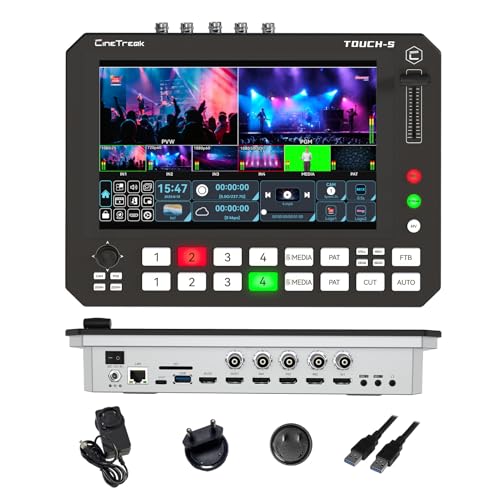
Packed with a 10-inch full touchscreen and a redesigned user interface, the Touch-S 10.1” Touchscreen Video Switcher simplifies live production for content creators and event producers alike. You’ll appreciate its dual rows of physical shortcut keys for quick switching, making it perfect for dynamic environments. With 4 HDMI and 4 SDI input ports, you can easily customize your setup. The unique Super Source Mode lets you display up to four video sources simultaneously, while supporting landscape and portrait orientations guarantees adaptability for any platform. Plus, the multimedia channel boosts versatility by integrating external media seamlessly.
Best For: Content creators, event producers, and live streamers looking for an intuitive and versatile video switching solution.
Pros:
- Intuitive Control: The 10-inch touchscreen and physical shortcut keys facilitate quick and easy switching during live productions.
- Flexible Input Options: With 4 HDMI and 4 SDI input ports, users can customize and adapt their setups to various sources.
- Super Source Mode: Allows simultaneous display of up to four video sources, enhancing production creativity and flexibility.
Cons:
- Limited Output Ports: The number of outputs may be restrictive for larger setups that require multiple feeds.
- Power Consumption Concerns: While power-efficient, it may still require substantial battery life for extended mobile use.
- Learning Curve: Users unfamiliar with touchscreen interfaces may experience a learning curve when adjusting to the new user interface.
Stream 1 Live Streaming Switcher with HDMI & AUX Inputs
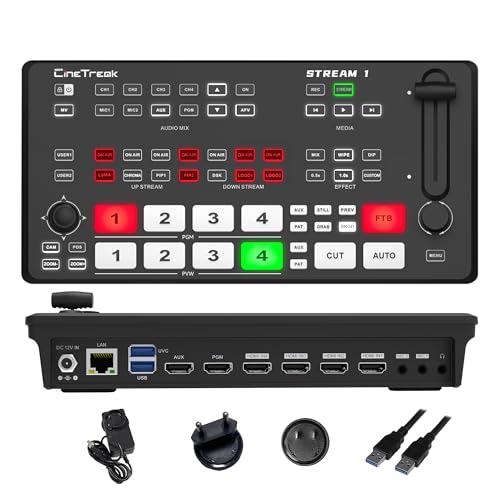
The Stream 1 Live Streaming Switcher stands out with its impressive ability to support up to four HDMI inputs and an AUX channel, making it an excellent choice for content creators who need versatile connectivity options. You’ll love the built-in PTZ control for managing up to four cameras and the dual RTMP streaming for broadcasting to two destinations simultaneously. With high-bitrate Full HD recording and customizable picture-in-picture layouts, you can produce professional-quality content effortlessly. Plus, the 30 changeover effects enhance your live streams, ensuring they’re engaging and polished. Weighing just 2.23 pounds, it’s portable and perfect for on-the-go streaming.
Best For: Content creators and streamers who require versatile connectivity and professional-quality live broadcasting capabilities.
Pros:
- Supports multiple HDMI inputs and AUX channel for diverse media integration.
- Built-in PTZ control allows easy management of up to four cameras.
- Offers high-bitrate Full HD recording and a variety of transition effects for polished production.
Cons:
- Limited to 4 HDMI inputs, which may not suffice for larger setups.
- May require additional setup time for new users unfamiliar with streaming technology.
- Wireless IP control may face connectivity issues depending on the network environment.
Blackmagic Design ATEM Mini Pro ISO HDMI Live Stream Switcher Bundle

For those seeking a versatile solution for multicamera live streaming, the Blackmagic Design ATEM Mini Pro ISO HDMI Live Stream Switcher Bundle stands out with its ability to record up to five separate H.264 video streams in real time. You’ll appreciate its intuitive interface, offering multiple shifts like Cut and Mix, alongside advanced keying options. With a built-in 6-input audio mixer and 4-camera multiview, it enhances production quality effortlessly. The bundle includes essential cables and ties for quick setup. Ideal for broadcasts, education, and eSports, this switcher is your all-in-one solution for professional streaming needs.
Best For: The Blackmagic Design ATEM Mini Pro ISO HDMI Live Stream Switcher Bundle is best for content creators, educators, and businesses looking for a professional-grade solution for multicamera live streaming.
Pros:
- Versatile recording capabilities with the ability to record up to five separate H.264 video streams simultaneously.
- User-friendly interface with various transitions and keying options for enhanced production quality.
- Built-in audio mixer allows for seamless integration of multiple audio sources.
Cons:
- Limited HDMI inputs may restrict the number of cameras that can be used simultaneously.
- Requires additional setup and knowledge of live streaming technology, which may be challenging for beginners.
- Potentially high cost compared to simpler streaming solutions, which may not be justified for casual users.
Mixer Plus Compact Video Switcher with Built-in Screen

Ideal for content creators on the go, the Mixer Plus Compact Video Switcher boasts a built-in 4-inch display that enhances live streaming and production flexibility. With four HDMI inputs, you can effortlessly switch between multiple cameras without any latency. Its ultra-compact design makes it easy to transport, while advanced features like PTZ camera control, chroma key, and customizable changes elevate your production quality. Plus, the multi-view monitoring lets you check all inputs at a glance. Weighing just 3 pounds, this powerful switcher is perfect for events, online classes, and content creation on platforms like YouTube and Zoom.
Best For: Content creators, live streamers, and educators looking for a portable and versatile video switching solution.
Pros:
- Ultra-Compact Design: Easy to transport and set up for on-the-go productions.
- Multi-Camera Switching: Zero-latency switching with four HDMI inputs for seamless transitions.
- Advanced Features: Includes PTZ camera control, chroma key, and multi-view monitoring for enhanced production quality.
Cons:
- Limited Screen Size: The built-in 4-inch display may be too small for detailed monitoring.
- Weight Limitations: While portable, some users may prefer a lighter option for extensive travel.
- Price Point: Higher cost compared to basic switchers may not fit all budgets.
FoMaKo KC800 4K HDMI Video Mixer Switcher
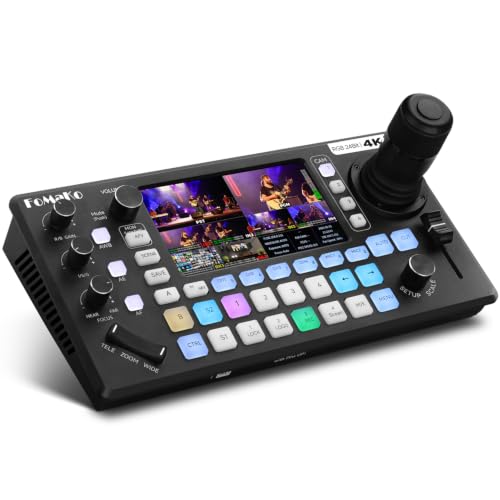
Looking for a versatile video switcher that elevates your streaming and recording game? The FoMaKo KC800 4K HDMI Video Mixer Switcher is perfect for you. With 4K 60FPS input and 1080p 60FPS output, it guarantees stunning visuals. Its integrated 4D joystick PTZ controller and 5.5″ LCD screen enhance usability. You’ll appreciate the Pro XLR audio inputs and 6-channel mixing system for exceptional sound quality. Plus, you can record directly to USB or SD card in various formats. Stream on multiple platforms seamlessly, making it an essential tool for your video production needs. Enjoy user-friendly operation and expert support!
Best For: Content creators, live streamers, and video producers seeking high-quality video mixing and audio capabilities for professional streaming and recording.
Pros:
- High-quality video output with 4K 60FPS input and 1080p 60FPS output ensures vibrant visuals.
- Versatile audio options with Pro XLR inputs and a 6-channel mixing system for superior sound control.
- User-friendly design with a 5.5″ LCD screen and comprehensive shortcut system for easy operation.
Cons:
- Limited to 4K input only; output is capped at 1080p, which may not meet the needs of those requiring higher output resolutions.
- Potential learning curve for users unfamiliar with advanced video mixing and streaming equipment.
- Price point may be higher compared to basic video switchers, which could be a consideration for budget-conscious users.
RØDE RØDECaster Video – Professional Video Switcher and Audio Interface

The RØDE RØDECaster Video stands out as an exceptional choice for content creators and live streamers who demand professional-level quality in both video and audio. With six video inputs supporting 1080p60 resolution, you can easily create seven customizable scenes. Its ultra-low-noise Revolution Preamps guarantee pristine audio from XLR microphones. You can stream directly to platforms or record to external USB storage, including ISO recording for flexible post-editing. Innovative features like Inspect Mode and intelligent auto-switching elevate your production experience. Weighing just 2.81 pounds, it’s compatible with multiple operating systems, making it a versatile addition to your setup.
Best For: Content creators and live streamers seeking professional-quality video and audio production capabilities.
Pros:
- Allows for customizable multi-source scenes with six video inputs and 1080p60 resolution.
- High-quality audio capture with ultra-low-noise Revolution Preamps for XLR microphones.
- Supports streaming to major platforms and recording to external USB storage for flexible editing.
Cons:
- Limited to corded electric power source, which may restrict mobility.
- Heavier than some portable alternatives, making it less ideal for on-the-go setups.
- May have a learning curve for users unfamiliar with professional video switchers and interfaces.
Factors to Consider When Choosing a Video Switcher With Recording
When choosing a video switcher with recording capabilities, you’ll want to contemplate several key factors. Look at the input options and compatibility with your existing gear, as well as the recording quality and format that meets your needs. Don’t forget to evaluate streaming capabilities, audio input features, and how user-friendly the interface is for your workflow.
Input Options and Compatibility
Choosing the right video switcher hinges on understanding its input options and compatibility with your video sources. Start by considering the number of input options available, like HDMI, SDI, USB, and NDI, to guarantee everything connects seamlessly. It’s also essential to look for switchers that support multiple resolutions, such as 4K and 1080p, to match various cameras and media playback devices.
Additionally, check for support of streaming protocols like RTMP, RTSP, and SRT to boost your live streaming capabilities. Don’t forget about audio inputs—confirm the switcher can handle XLR and 3.5mm connections for professional microphones. Finally, evaluate the ability to record multiple channels at once, whether through built-in storage or external USB devices, for smooth post-production editing.
Recording Quality and Format
Recording quality and format play an essential role in your video production process. When choosing a video switcher, consider options ranging from standard definition to high-definition formats, with many supporting 4K resolution at 60 frames per second for remarkable clarity. Common formats like MP4, H.264, and H.265 offer efficient compression while preserving quality, making them ideal for playback. Pay attention to bitrate, as higher bitrates—up to 16 Mbps—yield better quality but require more storage space. Additionally, look for switchers that provide dual or multi-channel recording, allowing you to capture multiple streams simultaneously. Finally, guarantee compatibility with external storage devices like USB drives or SD cards, especially those supporting capacities up to 2TB for seamless recording and playback.
Streaming Capabilities
As you explore video switchers, streaming capabilities are vital to your decision-making process. First, consider the number of simultaneous streaming outputs; some switchers let you stream to multiple platforms like YouTube, Facebook, and Twitch concurrently. Look for a device that supports various streaming protocols such as RTMP, RTSP, and NDI to guarantee compatibility across different systems. High-definition resolution is imperative, so aim for at least 4K or 1080p at 60 FPS to maintain quality during live broadcasts. Dual live streaming capabilities are also beneficial, allowing you to send content to two destinations without sacrificing performance. Finally, consider switchers with UVC streaming options for easier integration with PC-based streaming software, optimizing your production workflow.
Audio Input Features
When evaluating video switchers, the audio input features can greatly influence your production quality. Look for models with multiple audio input options like XLR, 3.5mm, and USB ports, giving you the flexibility to connect professional microphones and various audio sources. If you plan to use condenser microphones, choose switchers that offer phantom power capabilities for ideal sound capture. Advanced audio mixing systems allow you to control different audio channels in real-time, adjusting volume and applying effects as needed. Some switchers support multiple independent audio inputs, enabling you to mix separately for better sound control during live productions. Finally, integrated audio interfaces let you record audio alongside video, ensuring synchronization for post-production or live streaming.
User Interface and Controls
Having a solid audio setup is just one part of creating a seamless production; the user interface and controls on a video switcher play an equally essential role in ensuring smooth operation. A touchscreen interface can greatly enhance your experience, providing intuitive control and easy navigation during live productions. Consider switchers with physical shortcut keys alongside the touchscreen, as they enable faster switching and management of video sources. Look for dedicated buttons for frequently used features like audio controls and changes to streamline operation and ease the learning curve. Customizable layouts and scene presets are invaluable for quickly recalling specific configurations. Finally, user-friendly designs with clear status indicators can greatly reduce errors, ensuring a smoother, more professional performance.
Support and Warranty Options
Choosing a video switcher with recording capabilities means considering support and warranty options that can save you from potential headaches down the line. Look for a warranty period; many models offer a 3-year limited warranty and a 30-day money-back guarantee, which provides peace of mind. It’s vital to find options with lifetime technical support, important for troubleshooting during live productions. Some switchers even offer free online training and 24/7 expert assistance, enhancing your efficiency. Additionally, consider models that include remote setup assistance for easier configuration. Finally, make sure the manufacturer provides multilingual customer service, especially if you’re working in diverse environments. This extensive support will make your experience smoother and more effective.