
When it comes to professional video production, selecting the right rackmount video switcher can greatly impact your output quality. You need a switcher that supports various formats and offers features like dual live streaming and advanced audio processing. With so many options available, it’s essential to identify which models stand out. Let’s explore the top contenders that could elevate your production game.
Osee GoStream Duet 8 ISO Video Switcher

If you’re looking for a versatile video switcher that can handle multiple input sources, the Osee GoStream Duet 8 ISO is an excellent choice for professionals in live streaming, education, and event production. With eight channels, it supports various inputs like 4K-HDMI, SDI, and NDI HX. You can record all video inputs and program output directly to SSDs, ensuring high-quality playback. Its audio capabilities, including two XLR inputs, provide professional sound quality. Plus, the multi-source layout allows for creative graphics overlays, making it perfect for any production scenario. With its user-friendly design, you’ll find it easy to elevate your content.
Best For: Professionals in live streaming, education, event production, and content creators looking for a versatile video switcher with multiple input options.
Pros:
- Supports a wide range of input sources, including 4K-HDMI, SDI, and NDI HX.
- High-quality recording capabilities with PGM and 8-channels ISO recording to SSD.
- User-friendly design with a multi-source layout and graphics overlay options for diverse production scenarios.
Cons:
- Firmware upgrade is required for simultaneous use of all 8-channel inputs.
- Slightly heavier than some competing models, weighing 2.95 pounds.
- Limited built-in playback options with only 2 video players available.
MT-VIKI 4K HDMI Matrix Switch 8X8
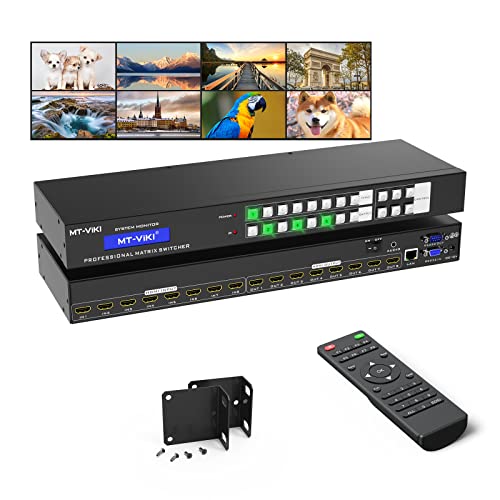
The MT-VIKI 4K HDMI Matrix Switch 8X8 is ideal for professionals who require seamless routing of multiple 4K HDR sources to various display devices. It supports up to eight HDMI inputs and outputs, allowing you to mirror signals or route them independently. With multiple control options like IR remote, RS232, and WEB GUI, managing your setup is a breeze. The switch also supports various audio formats, including Dolby and DTS, and features 8KV ESD protection for added durability. Compact at 19.5 x 7.25 x 3.95 inches, it fits perfectly in a standard 1U rack, making it a versatile choice for your production needs.
Best For: Professionals seeking a reliable and efficient solution for routing multiple 4K HDR HDMI sources to various display devices.
Pros:
- Multiple control options including IR remote, RS232, and WEB GUI for easy management.
- Supports a wide range of audio formats such as Dolby AC3 and DTS for versatile audio output.
- Compact design that fits perfectly in a standard 1U rack, saving space in professional setups.
Cons:
- Limited to 10 meters transmission distance for input/output cables, which may require high-quality cables for optimal performance.
- No mention of 4K@60Hz support, which could be a limitation for some high-end applications.
- Weight of 5.79 pounds may be cumbersome for some users when integrating into existing setups.
RØDE RØDECaster Video – Professional Video Switcher and Audio Interface

For content creators seeking a versatile solution for multi-camera setups, the RØDE RØDECaster Video stands out with its six video inputs, including both HDMI and USB options. This professional video switcher and audio interface supports 1080p60 resolution and lets you create seven customizable multi-source scenes. You’ll appreciate the high-quality audio capture from XLR microphones via its ultra-low-noise preamps. Stream directly to major platforms or record to external USB storage devices for added flexibility. With features like Inspect Mode and intelligent auto-switching, this device enhances your production workflow, making it a top choice for any serious content creator.
Best For: Content creators and professionals looking for a comprehensive video switching and audio interface solution for multi-camera productions.
Pros:
- High-quality audio capture with ultra-low-noise Revolution Preamps for XLR microphones.
- Supports streaming to major platforms and recording to external USB storage devices for flexibility.
- Innovative features like Inspect Mode and intelligent auto-switching enhance production workflow.
Cons:
- Slightly heavier than some portable alternatives, weighing 2.81 pounds.
- Limited to 1080p60 resolution, which may not meet the needs of those requiring 4K capabilities.
- Best suited for users familiar with audio and video production, potentially steep learning curve for beginners.
Osee GoStream Deck HDMI Pro Live Streaming Video Mixer Switcher

Experience seamless live streaming with the Osee GoStream Deck HDMI Pro Live Streaming Video Mixer Switcher, designed specifically for content creators and professionals seeking high-quality production capabilities. With 4 HDMI inputs, 2 outputs, and versatile Type-C ports, you can connect multiple media sources effortlessly. Stream to three platforms simultaneously while enjoying professional audio controls and effects. The intuitive hard control panel, combined with a built-in menu system, guarantees smooth operation during live events. Plus, with features like graphics overlays and multi-window functionality, your productions will stand out. It’s the perfect tool for dynamic and engaging live streaming experiences.
Best For: Content creators and professionals looking for a reliable, high-quality live streaming solution with advanced production features.
Pros:
- Versatile Connectivity: Offers multiple HDMI inputs and outputs along with Type-C ports for easy integration of various media sources.
- Professional Audio Control: Equipped with advanced audio features, including EQ and effects, ensuring high-quality sound during live streams.
- User-Friendly Interface: The hard control panel and built-in menu system facilitate smooth operation, making it accessible for both beginners and experienced users.
Cons:
- Learning Curve: The extensive features may require time to master, especially for newcomers to live streaming.
- Limited Simultaneous Streaming Options: While it supports streaming to three platforms, some users may need more flexibility for additional channels.
- Potential Hardware Constraints: Users may need to invest in additional equipment, such as cameras and microphones, to maximize the system’s capabilities.
Osee GoStream Duet Live Stream Video Mixer Switcher

Designed with versatility in mind, the Osee GoStream Duet Live Stream Video Mixer Switcher is an ideal choice for content creators who need to manage multiple video sources seamlessly. Weighing just 2.2 pounds and measuring 4.2 x 10.6 x 1.94 inches, it’s compact yet powerful. You can connect up to four SDI and four HDMI sources, plus utilize USB-type C and NDI HX. With support for three streaming platforms simultaneously, you can engage audiences effectively. Enjoy features like Chroma Key and various changes, all while using familiar software like OBS and Vmix. It’s truly an affordable professional solution.
Best For: Content creators and streamers looking for an affordable yet professional solution to manage multiple video sources seamlessly.
Pros:
- Versatile Input Options: Connects up to four SDI and four HDMI sources, plus USB-type C and NDI HX.
- Simultaneous Streaming: Supports streaming to up to three platforms at once, enhancing audience engagement.
- User-Friendly Software Compatibility: Works with popular streaming software like OBS and Vmix, making it easy to integrate into existing setups.
Cons:
- Limited Weight Capacity: While compact, the lightweight design may raise concerns about durability during transport.
- Requires Firmware Updates: To access full features, users must download the latest firmware, which may be inconvenient.
- No Built-in Recording: Lacks direct recording capabilities, necessitating additional equipment for capturing streams.
Tenveo 4K60FPS HDMI Video Switcher Mixer

The Tenveo 4K60FPS HDMI Video Switcher Mixer stands out as an ideal choice for live streamers and content creators seeking flexibility and high-quality production. With 4 HDMI and 4 SDI inputs, plus dual live streaming capabilities, you can effortlessly manage multiple camera feeds. The 5.5-inch FHD screen allows for easy operation, while advanced audio processing guarantees crystal-clear sound. You’ll appreciate the 36 shift effects and customizable settings for seamless integration with platforms like YouTube and Twitch. Plus, the 3-year warranty and lifetime technical support provide peace of mind, making this mixer a smart investment for your production needs.
Best For: Live streamers and content creators looking for a versatile and high-quality video production solution.
Pros:
- Supports dual live streaming and multiple camera feeds for enhanced production flexibility.
- Advanced audio processing and video effects ensure professional-quality output.
- Comes with a 3-year warranty and lifetime technical support for added peace of mind.
Cons:
- The 5.5-inch screen may be too small for some users during complex operations.
- Initial setup may require a learning curve for those unfamiliar with video switchers.
- Limited to 1080P recording output for USB, which may not meet all high-resolution needs.
Roland V-8HD HD Video Switcher for Live Events

For anyone involved in live events, the Roland V-8HD HD Video Switcher stands out with its ability to mix up to eight HDMI sources seamlessly. Weighing just 5.1 pounds, it’s portable yet powerful, featuring a five-layer effects engine for stunning visuals. The built-in multi-viewer display lets you monitor everything effortlessly, while the AUX output provides a separate video feed. Automated switching options, along with an 18-channel audio mixer, streamline your production process. With a solid customer rating of 4.5 stars, the V-8HD is a reliable choice for streaming and corporate presentations, ensuring professional-quality results every time.
Best For: The Roland V-8HD is best for event producers and live streamers seeking a versatile, high-quality video switching solution.
Pros:
- Versatile Input Options: Mix up to 8 HDMI sources for dynamic presentations.
- User-Friendly Features: Automated switching and a built-in multi-viewer display enhance ease of use.
- High-Quality Audio Mixing: An 18-channel digital audio mixer offers extensive control over sound.
Cons:
- Limited Output Formats: Supports only specific frame rates, which may not suit all needs.
- Weight Considerations: While portable, it may still be heavier than some users prefer for travel.
- Upcoming Software Updates: Some features, like the new chroma key engine, are not yet available.
Roland Professional A/V V-1HD HD Video Switcher

If you’re looking for a versatile and user-friendly solution for live events or presentations, the Roland Professional A/V V-1HD HD Video Switcher stands out with its four HDMI inputs. It supports 1080p, 1080i, and 720p resolutions, allowing you to connect various equipment seamlessly. The large back-lit buttons guarantee easy operation, even in low light, while the Picture in Picture and split functions enhance your presentations. With a built-in 12-channel audio mixer, you can synchronize audio and video effortlessly. Plus, the on-screen menu and T-Fader make adjustments straightforward, giving you professional-quality results with minimal hassle.
Best For: The Roland Professional A/V V-1HD HD Video Switcher is best for event organizers, educators, and professionals seeking a reliable and user-friendly video switching solution for live presentations.
Pros:
- Versatile compatibility with multiple HDMI inputs supports a variety of devices and video resolutions.
- Professional switching features including Picture in Picture and split functions enhance the quality and engagement of presentations.
- Integrated audio mixer allows for seamless audio and video synchronization, making it ideal for live events.
Cons:
- Limited to HDMI inputs, which may restrict connectivity with older equipment that uses other video formats.
- May require a learning curve for users unfamiliar with video switchers or audio mixing.
- Higher price point compared to basic switchers, which may not be suitable for users with limited budgets.
Blackmagic Design ATEM Mini Pro HDMI Live Stream Switcher (SWATEMMINIBPR)

Designed for those who need a robust solution for live streaming, the Blackmagic Design ATEM Mini Pro HDMI Live Stream Switcher (SWATEMMINIBPR) excels in multicamera setups. With four HDMI inputs, you can effortlessly switch between multiple sources, enhancing your production quality. It offers various transitions like cuts and wipes, plus upstream keying options for creative effects. The built-in audio mixer simplifies sound management, ensuring your streams sound as good as they look. Whether you’re broadcasting events or creating educational content, this switcher provides the features necessary for professional-grade productions, making it an excellent choice for any serious videographer.
Best For: The Blackmagic Design ATEM Mini Pro HDMI Live Stream Switcher is best for videographers and content creators seeking a professional solution for multicamera live streaming.
Pros:
- Versatile Multicam Support: Allows seamless switching between up to four HDMI inputs, suitable for various production environments.
- Integrated Audio Mixer: Built-in 6-input, 2-channel audio mixer simplifies sound management, enhancing audio quality in live streams.
- Creative Transition Options: Offers a variety of transitions and keying effects, enabling dynamic and engaging livestream presentations.
Cons:
- Limited HDMI Inputs: Only supports four HDMI inputs, which may be restrictive for larger productions.
- No Built-in Recording: Lacks internal recording capabilities, requiring external devices for recording streamed content.
- Complex Setup for Beginners: The advanced features may be overwhelming for novice users unfamiliar with live streaming technology.
Video Switcher for Live Streaming Multi Camera Mixer

The Neolive R2 Plus Video Switcher stands out as an ideal choice for content creators who need a reliable multi-camera mixer for live streaming. With 1080P resolution at 60Hz, you’ll enjoy crystal-clear video. It features four HDMI inputs and two outputs, allowing easy multiview monitoring. The 5.5-inch LCD screen and joystick control make it simple to manage PTZ cameras. Plus, you can stream seamlessly on platforms like TikTok and YouTube while recording high-quality footage. Its versatile applications range from gaming to weddings, ensuring you can create stunning productions effortlessly. With a solid customer rating, it’s a dependable choice for any event.
Best For: Content creators and live streamers looking for a reliable multi-camera mixer with high-quality video capabilities.
Pros:
- Supports multicam live streaming on popular platforms like TikTok, YouTube, and Facebook.
- Chroma key and transition effects enhance production quality for a professional look.
- Compact and lightweight design makes it easy to transport and set up for various events.
Cons:
- Limited HDMI outputs may restrict the number of cameras for larger productions.
- Customer rating of 4.0 out of 5 stars indicates some room for improvement based on user feedback.
- Warranty information not readily available, which may concern some buyers looking for additional protection.
Factors to Consider When Choosing a Rackmount Video Switcher
When choosing a rackmount video switcher, you’ll want to evaluate several key factors. Think about the variety of input options you need, as well as how flexible the control methods are. Don’t overlook audio capabilities, streaming features, and the size and weight of the unit, since these can greatly impact your setup.
Input Options Variety
Choosing a rackmount video switcher with a wide variety of input options can greatly enhance your production’s flexibility. Look for models that support HDMI, SDI, USB, and IP protocols, allowing you to connect various video sources like cameras, computers, and media players seamlessly. It’s essential to have a switcher that handles multiple formats, including 4K and HD, to adapt to different production needs. The ability to accept simultaneous inputs from multiple sources lets you create more complex, dynamic productions, utilizing various camera angles and media types. Additionally, compatibility with streaming protocols like RTMP and NDI guarantees you can easily integrate the switcher into any broadcasting or live streaming setup, enhancing your overall production quality.
Control Methods Flexibility
Having a range of input options is just the beginning; how you control those inputs can greatly impact your production’s efficiency and effectiveness. Rackmount video switchers offer various control methods, including hard buttons, IR remotes, RS232, LAN ports, and web GUIs. This flexibility allows you to choose between manual control, automated switching, or remote management, making it easier to adapt in live event settings. Utilizing local LAN control with dedicated software streamlines operations and integrates seamlessly with your network. Some models even support third-party control systems, enabling customizable setups tailored to your specific needs. Plus, built-in GUIs and software compatibility cater to different user preferences, enhancing overall usability and making your production smoother.
Audio Capabilities Importance
Audio capabilities can make or break your production, so it’s essential to evaluate them when selecting a rackmount video switcher. High-quality audio features, like XLR inputs and studio-grade preamps, guarantee professional sound capture. If you plan on using condenser microphones, look for a switcher with phantom power supply for added flexibility. Integrated audio mixers with multiple channels allow for seamless mixing, keeping your sound synchronized during live events. Advanced processing options, such as EQ and dynamic range control, enhance audio quality and maintain consistency across sources. Don’t overlook dedicated audio control buttons and monitoring outputs, as they enable real-time adjustments, giving you the control needed to manage audio levels effectively during your production.
Streaming Features Compatibility
When it comes to live production, streaming features can greatly impact your workflow and audience reach. You’ll want a video switcher that supports simultaneous streaming to multiple platforms, allowing connections to three or more destinations via Ethernet or USB. Make sure it’s compatible with popular streaming software like OBS or vMix to seamlessly integrate into your existing setup. Built-in streaming capabilities, such as direct RTMP support, can simplify going live without extra hardware. Look for features like automatic switching based on audio inputs to enhance efficiency and reduce manual work. Finally, opt for switchers that support various streaming protocols like SRT, NDI, and RTSP for versatility and compatibility across different network environments and camera sources.
Size and Weight Considerations
Choosing the right size and weight for your rackmount video switcher is essential for peak performance and compatibility with your setup. First, check the dimensions to guarantee it fits your existing rack space, as many models come in standard 1U or 2U configurations. The weight, ranging from 2 to 6 pounds, can affect portability and installation ease, especially in mobile setups or smaller venues. Remember that a larger switcher may offer better airflow but will require more rack space. Compact options can save space but might limit features. Finally, assess the switcher’s weight against your rack’s load capacity to avoid overloading and guarantee stability during operation, allowing for a smooth production experience.
Price and Warranty Options
Understanding the price and warranty options of rackmount video switchers is crucial for making an informed decision that meets your needs. Prices can range from about $200 for basic models to several thousand for professional-grade devices, so evaluate what features are essential for you. Warranty options vary, with many manufacturers offering one to three years of coverage. Look for reviews that highlight warranty satisfaction, as they often reflect the manufacturer’s reliability. Some switchers even offer extended warranties or service plans, providing extra peace of mind for critical events. Always consider the overall value proposition, weighing the features against the price to guarantee long-term satisfaction and cost-effectiveness in your selection.