
When you’re gearing up for a concert, the right video switcher can make all the difference in your live production. With various models available, each offering unique features and capabilities, it’s essential to choose one that fits your specific needs. Whether you’re looking for multi-streaming options or seamless integration with your video sources, the options are plentiful. Discover which video switchers can elevate your concert experience and keep your audience engaged.
Tenveo 4K HDMI Video Switcher Mixer

The Tenveo 4K HDMI Video Switcher Mixer is perfect for concert producers and live event organizers who need seamless multi-camera integration and high-quality streaming capabilities. With four HDMI and SDI inputs, it allows you to switch between multiple cameras effortlessly. You can stream in 4K60FPS, ensuring your audience enjoys stunning visuals. Plus, its professional audio processing features let you adjust volume and effects for each channel. The user-friendly 5.5-inch FHD screen simplifies operation, while dual recording options save your content for easy playback. With lifetime support and a 30-day money-back guarantee, it’s a reliable choice for your live productions.
Best For: The Tenveo 4K HDMI Video Switcher Mixer is best for concert producers and live event organizers seeking high-quality streaming and multi-camera integration.
Pros:
- High-quality streaming: Supports 4K60FPS resolution for stunning visuals.
- User-friendly interface: Features a 5.5-inch FHD screen for easy operation.
- Comprehensive audio processing: Allows for fine-tuning of audio channels for professional sound quality.
Cons:
- Limited HDMI input: Only four HDMI inputs may restrict multi-camera setups for larger events.
- Learning curve: New users may require time to fully understand all features and settings.
- Price point: May be considered expensive for casual users or smaller productions.
Osee GoStream Deck HDMI Pro Live Streaming Video Mixer

If you’re looking to elevate your live concert streaming experience, the Osee GoStream Deck HDMI Pro Live Streaming Video Mixer is an outstanding choice. With 4 HDMI inputs and 2 outputs, you can easily connect multiple media sources. The mixer features a hard control panel, making your live production seamless. You can also stream to three platforms simultaneously, enhancing your reach. With professional audio effects and recording capabilities, you’ll guarantee exceptional sound quality. Plus, the graphics options, including overlays and keyers, let you create stunning visuals. Enjoy multilingual customer service for any support you might need.
Best For: Live streamers and content creators looking for a versatile and professional-grade video mixing solution.
Pros:
- Offers multiple HDMI inputs and outputs for connecting various media sources and displays.
- Simultaneously streams to three platforms, increasing audience reach and engagement.
- Includes professional audio effects and recording capabilities for high-quality sound.
Cons:
- May have a steep learning curve for beginners unfamiliar with video mixing equipment.
- Requires a stable internet connection for optimal streaming quality.
- Higher price point compared to entry-level streaming devices.
Mixer Plus Compact Video Switcher with Built-in Screen

Looking for a compact solution to manage multiple camera feeds during live events? The Mixer Plus Compact Video Switcher is your go-to choice. With four HDMI inputs and a built-in 4-inch display, it’s perfect for live streaming and on-the-go production. You’ll enjoy zero-latency switching and 30 customizable changeover effects, making it ideal for multi-camera setups. Monitor all your input sources simultaneously, thanks to its Multi View capabilities. Plus, customizable output signals let you tailor your production needs. Lightweight at just 3 pounds, it’s designed for portability without sacrificing functionality. Enhance your live production experience with the Mixer Plus!
Best For: Live streamers, event organizers, and educators looking for a compact and efficient video switching solution.
Pros:
- Ultra-compact design makes it highly portable for on-the-go production.
- Zero-latency switching ensures seamless transitions between camera feeds.
- Multi View monitoring allows for real-time previews of all input sources.
Cons:
- Limited to 4 HDMI inputs, which may not suffice for larger setups.
- The 4-inch built-in display may be too small for detailed monitoring.
- Customization options might require a learning curve for new users.
RGBlink mini-Edge SDI Pro Live Streaming Video Mixer Switcher

For content creators and event planners seeking a versatile solution, the RGBlink mini-Edge SDI Pro Live Streaming Video Mixer Switcher stands out with its robust capabilities. It supports 4×4K HDMI and 4×3G SDI inputs, making it perfect for various sources. The 5.5″ screen and PTZ control enhance your live production, while the 8-channel audio mixer allows for seamless audio integration. With dual 2K HDMI outputs and built-in UVC USB streaming, you can easily connect to platforms like Zoom and YouTube. Plus, remote scene switching and audio management via TAO Cloud streamline your workflow, ensuring a professional finish every time.
Best For: Content creators, event planners, and remote production teams looking for a comprehensive live streaming solution.
Pros:
- Versatile input options with support for 4×4K HDMI and 4×3G SDI, accommodating various equipment.
- Integrated PTZ camera control and a built-in audio mixer enhance multi-camera productions and audio integration.
- Remote production capabilities with TAO Cloud for seamless scene switching and audio management.
Cons:
- The 5.5″ screen may be small for some users during complex live productions.
- Limited to specific streaming protocols; advanced users may require more customization options.
- Potential learning curve for those unfamiliar with live streaming equipment and software.
Blackmagic Design ATEM 1 M/E Constellation HD Live Production Switcher

The Blackmagic Design ATEM 1 M/E Constellation HD Live Production Switcher stands out as an exceptional choice for large-scale events, thanks to its 10-channel SDI/HDMI switching capabilities. With support for up to 7 layers and a 28-channel digital audio mixer, it allows you to create dynamic productions effortlessly. You’ll appreciate the DVE for smooth shifts and keyers, as well as multiview monitoring for thorough oversight. Ideal for concerts and festivals, it offers extensive camera placement options. Its full front panel control, along with talkback functionality, guarantees smooth communication and operation, making it a top pick for live productions.
Best For: Professionals managing large-scale live events such as concerts, sports, and festivals who require advanced switching and monitoring capabilities.
Pros:
- 10-channel SDI/HDMI switching allows for seamless transitions between multiple video sources.
- Comprehensive audio mixing with a 28-channel digital audio mixer enhances sound quality for live productions.
- Multiview monitoring provides real-time oversight of all inputs, simplifying production management.
Cons:
- Complexity may be overwhelming for beginners or those unfamiliar with live production switchers.
- Cost may be prohibitive for smaller productions or budget-conscious users.
- Size and weight could be a challenge for portability and setup in smaller venues.
FoMaKo 4K HDMI Video Mixer Switcher (M6)

Designed for professional live streaming, the FoMaKo 4K HDMI Video Mixer Switcher (M6) stands out with its impressive 10.1-inch FHD LCD screen and 5-channel capabilities, making it an ideal choice for concert productions. You’ll appreciate its 4K 60FPS input and 1080p 60FPS output, along with four HDMI and SDI inputs for versatile connectivity. The integrated PTZ camera control and customizable configurations streamline your setup. Plus, with dual network streaming and broadcast-grade recording, you can capture and share your event seamlessly. Backed by a 3-year warranty and lifetime support, the M6 guarantees reliability and performance in every production.
Best For: Professional live streamers and production teams looking for high-quality video mixing capabilities with robust features.
Pros:
- Versatile Connectivity: Offers multiple HDMI and SDI inputs for flexible integration with various video sources.
- Advanced Features: Includes dual PIP, LOGO overlays, and an extensive range of transition effects for dynamic productions.
- User-Friendly Control: Integrated PTZ camera control and customizable configurations enhance operational efficiency.
Cons:
- Weight: At 2.1kg, it may be less portable compared to lighter alternatives.
- Learning Curve: The extensive features may require time to master for new users.
- Price Point: Higher-end features may come with a premium cost, which might not suit all budgets.
C1 4*HDMI Video Mixer Switcher with 5inch Screen

Looking for a versatile solution to manage multiple camera feeds during live events? The C1 4*HDMI Video Mixer Switcher with a 5-inch screen is perfect for you. It allows control of up to four PTZ cameras, providing seamless switching and adjustments for zoom, focus, and iris. You can stream to platforms like YouTube and Facebook, even broadcasting to two simultaneously. With advanced features like chroma keying, over 30 transition effects, and a user-friendly interface, you’ll create professional-grade content effortlessly. Plus, its sophisticated audio mixing guarantees first-rate sound quality to elevate your production experience.
Best For: The C1 4*HDMI Video Mixer Switcher is best for professional event organizers and content creators looking to manage multiple camera feeds and elevate their live streaming quality.
Pros:
- Supports control of up to 4 PTZ cameras for seamless live event management.
- Offers live streaming to multiple platforms simultaneously with high-quality recording.
- Features advanced video production tools like chroma keying and customizable transition effects.
Cons:
- May require a learning curve for users unfamiliar with video mixing technology.
- Limited screen size may hinder detailed monitoring during complex productions.
- Higher initial investment compared to basic video switchers on the market.
FoMaKo 5.5 Inch FHD LCD Screen HDMI Live Streaming Switcher (KC601 Pro)

If you’re seeking a reliable and versatile solution for live streaming events, the FoMaKo 5.5 Inch FHD LCD Screen HDMI Live Streaming Switcher (KC601 Pro) stands out with its ability to support up to four HDMI inputs at 1080P and 60FPS. This switcher integrates an encoder, monitor, and USB recorder, making it perfect for weddings, sports, and corporate events. You can stream to three platforms simultaneously, and its user-friendly T-bar allows for intuitive control. With customizable scenes and over 20 changeover effects, this switcher enhances your production quality. Plus, you’ll benefit from a 3-year warranty and lifetime technical support.
Best For: Those seeking a comprehensive and user-friendly live streaming solution for events such as weddings, sports, and corporate functions.
Pros:
- Supports multiple platforms: Stream to three destinations simultaneously, enhancing reach and engagement.
- User-friendly design: Features a T-bar for intuitive control and customizable scenes for tailored productions.
- Comprehensive support: Comes with a 3-year warranty, 30-day money-back guarantee, and lifetime technical support.
Cons:
- Limited resolution: Does not support 4K streaming, limiting high-definition options for some users.
- Potential learning curve: While user-friendly, new users may need time to master all advanced features and effects.
- No built-in storage: Requires external USB recording for saving streams, which may add complexity to setup.
FoMaKo 4K HDMI Video Mixer Switcher (M1)

For live event producers and concert organizers seeking seamless video integration, the FoMaKo 4K HDMI Video Mixer Switcher (M1) stands out with its ability to handle multiple video sources while delivering stunning output quality. With inputs for 4K at 60FPS and outputs at 1080p, it accommodates various devices through six video sources. Its audio features, including smart mixing and independent channel control, guarantee professional sound. Plus, you can stream to two platforms simultaneously, making it perfect for live broadcasts. With intuitive controls and a robust support system, the M1 elevates your production without the hassle.
Best For: Live event producers and concert organizers looking for a versatile and high-quality video mixing solution.
Pros:
- Supports multiple video inputs, including 4K and 1080P sources, enhancing flexibility in production.
- Professional audio features with smart mixing and independent channel control ensure superior sound quality.
- Ability to stream to two platforms simultaneously, expanding reach and audience engagement.
Cons:
- May require a learning curve for users unfamiliar with video mixing equipment.
- Limited to 1080p output resolution, which might not meet the needs of all high-end productions.
- Dependency on a stable internet connection for multi-streaming capabilities can be a potential drawback.
Stream 1 Live Streaming Switcher with HDMI & AUX Inputs
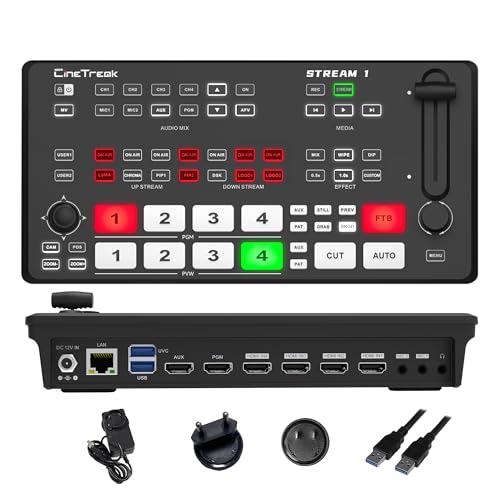
The Stream 1 Live Streaming Switcher stands out as an ideal choice for concert producers and live event organizers who demand flexibility and high-quality production in their broadcasts. With 4 HDMI inputs and an AUX channel, you can easily access your media library while utilizing real-time output capabilities. Its dual RTMP streaming allows you to broadcast simultaneously to two destinations, supporting both landscape and portrait orientations. The built-in PTZ control for up to 4 cameras enhances your production, while customizable picture-in-picture layouts and over 30 changeover effects elevate your live show. With a compact design, it’s perfect for on-the-go streaming.
Best For: Concert producers and live event organizers seeking flexibility and high-quality production for their broadcasts.
Pros:
- Supports simultaneous dual RTMP streaming to two destinations, enhancing broadcasting reach.
- Built-in PTZ control for up to 4 cameras enables dynamic and versatile production options.
- Over 30 transition effects and customizable picture-in-picture layouts for professional-quality live shows.
Cons:
- Limited to 4 HDMI inputs, which may not be sufficient for larger productions.
- Requires technical knowledge for optimal use of advanced features such as PTZ control and RTMP streaming.
- Compact design may limit cooling and lead to potential overheating during extended use.
Factors to Consider When Choosing a Video Switcher for Concerts
When choosing a video switcher for concerts, you’ll want to contemplate several key factors. Think about the input and output options that fit your setup, along with the streaming capabilities you need. Don’t forget to evaluate audio mixing features and the overall usability to guarantee a smooth performance.
Input and Output Options
Choosing a video switcher for concerts requires careful consideration of input and output options, as these features directly impact your production’s flexibility and quality. Start by evaluating the number of HDMI and SDI inputs; a higher count offers greater flexibility for connecting multiple camera sources. Look for support for 4K or high-definition inputs to guarantee the best visual quality during performances. Evaluate output options like HDMI and USB streaming to ensure compatibility with various platforms. Don’t overlook auxiliary input options for additional audio sources, which can enhance the overall sound quality. Finally, verify the switcher allows for real-time monitoring of inputs and outputs, essential for managing live productions effectively and making quick adjustments as needed.
Streaming Capabilities and Protocols
Streaming capabilities and protocols play a critical role in selecting the right video switcher for concerts. Look for switchers that support simultaneous multi-streaming, allowing you to broadcast to platforms like YouTube, Facebook, and Twitch for a wider audience reach. Confirm compatibility with various streaming protocols, such as RTMP, RTMPS, and NDI, to facilitate real-time streaming and maintain high video quality. The switcher’s ability to handle high-resolution inputs, like 4K at 60FPS, and output formats, like 1080P, is essential for live performances. Check for built-in USB streaming options to connect easily with software like OBS and vMix. Finally, evaluate recording capabilities, such as simultaneous recording to USB or SD cards, for archiving performances effectively.
Audio Mixing Features
Selecting a video switcher for concerts goes beyond just video capabilities; audio mixing features are equally important for a seamless production. Look for switchers that offer multiple audio inputs, like XLR and line inputs, to handle various sound sources and microphones. Advanced audio mixing capabilities, including equalization, compression, and delay adjustment, can greatly enhance sound quality and synchronization. A dedicated audio mixer with independent channel control allows for precise volume and effects adjustments, perfect for live sound production. Confirm your switcher supports real-time audio mixing with features like Automatic Level Control (ALC) and smart noise reduction for clarity in dynamic environments. Finally, monitoring outputs, such as headphone jacks, are essential for live audio monitoring and adjusting levels effectively during performances.
Control and User Interface
When you’re in the heat of a concert, having a user-friendly control interface can make all the difference in your video production. An intuitive setup lets you quickly access key functions like switching and audio mixing. Opt for hard control panels with physical buttons and faders; they provide tactile feedback, enabling seamless management without digging through menus. Multi-view monitoring options are essential, allowing you to preview multiple camera feeds simultaneously for smooth changes. Additionally, look for customization options that let you set shortcut keys and programmable macros, streamlining your workflow during live performances. Finally, remote control features via smartphone or PC offer flexibility, letting you manage video switching and camera controls from various spots within the venue.
Portability and Design Factors
As you gear up for a concert, portability and design factors play a significant role in your choice of video switcher. Look for lightweight models, ideally under 5 pounds, that are easy to transport. Compact dimensions, around 8 x 8 x 3 inches, guarantee you can fit the switcher into tight spaces without losing functionality. A built-in screen, like a 5.5-inch FHD display, lets you monitor in real-time, minimizing setup time and enhancing mobility. Ergonomic control panels with intuitive layouts allow for quick access to important functions, essential during fast-paced events. Finally, durable construction is important to withstand the rigors of transportation and frequent use, making sure your switcher remains reliable throughout your concert series.