
Long HDMI cables can be difficult to route and unreliable over extended distances. The right extender sends a clean signal through Cat5e, Cat6, or Cat7 cabling while preserving the resolution, audio, and control features your home theater needs.
We selected 10 HDMI extenders for home theaters that cover common setups, from a single TV or projector to multi-display systems with IR control, ARC, EDID, PoC, and matrix switching.
Best 10 Hdmi Extenders for Home Theaters Picks for 2026
Best Overall
AV Access 4K60 HDBaseT ARC Extender

- 4K@60Hz with HDR over Cat6a/7
- ARC, S/PDIF, and audio de-embedding
- Bi-directional PoC, IR, and RS232 control
Best For: Feature-rich home theater installations
Best 4K30 Value
OREI HDMI Extender with Loop-Out

- 4K30 up to 131 feet over Cat cable
- Local HDMI loop-out and EDID copy
- One-way IR and single-adapter PoC
Best For: Affordable 4K30 home theater extension
Best Compact Option
Techigher Self-Powered HDMI Repeater

- 4K@60Hz extension up to 80 feet
- No external power adapter required
- Supports HDR10, Dolby Vision, and HDCP 2.2
Best For: Short-range gaming and VR setups
Best for Multi-Room Runs

- Up to 230 feet at 1080p
- 4K30 extension over Cat5e through Cat7
- Loop-out, IR, EDID, and POC included
Best For: Long-distance 1080p and 4K30 distribution
Multi-Display Value Pick
1x6 1080p HDMI Extender Splitter

- Distributes one source to six displays
- Extends 1080p signals up to 165 feet
- Includes EDID control and POC power delivery
Best For: 1080p multi-display home theaters and projector systems
4K Long-Range Pick
4K60 HDMI Over Ethernet Extender
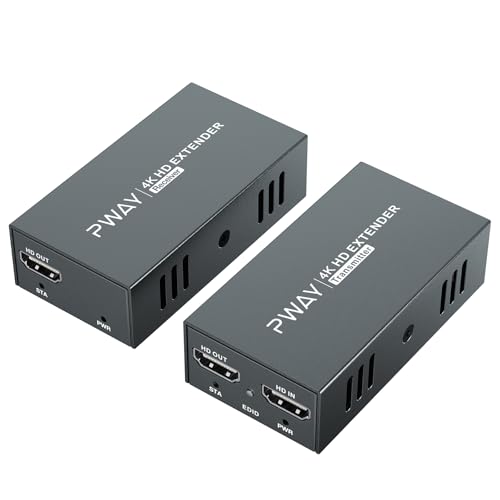
- Supports 4K60 with 4:4:4 color and HDR10
- Reaches up to 200 feet over CAT cable
- Includes local loop-out and transmitter-side POC
Best For: Long-distance 4K home theater and gaming installations
Advanced Distribution Pick
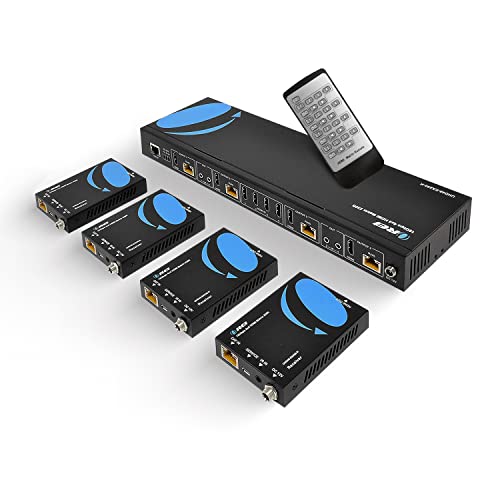
- Routes four sources to four remote displays
- Supports 4K60 over distances up to 230 feet
- Adds IR, RS-232, EDID, and local loop-outs
Best For: Multi-source, multi-display home theater installations
Best Long-Range Pick
4K HDMI Extender Over Ethernet

- 4K at 30Hz and 1080p at 60Hz over Ethernet cable
- 1080p transmission reaches up to 230 feet
- Loop-out, IR, EDID, and POC power features
Best For: Long-distance single-display home theater setups
Best for Two Displays

- Sends one source to two remote displays
- Adds a local HDMI loop-out for a third screen
- POC, reverse IR, and dual EDID management
Best For: Mirrored content across two remote home theater displays
Best for Multi-Screen Setups

- Distributes one source to four remote displays
- Local loop-out supports up to five synchronized screens
- POC powers receivers through CAT cable
Best For: Large mirrored home theater and multi-screen installations
Best Overall – AV Access 4K60 HDBaseT ARC Extender
For demanding home theaters, this AV Access model is one of the more capable HDMI extenders for home theaters. It carries 4K at 60Hz with HDR support over Cat6a/7, while adding ARC, S/PDIF, audio de-embedding, IR, and RS232 control.
Best For: Home theater installations that need smooth 4K60 video, flexible audio routing, and long-distance Cat6a/7 extension.
Pros:
- Supports 4K@60Hz 4:4:4 up to 131 feet over Cat6a/7.
- Handles HDR10, HLG, Dolby Vision, and HDR10+.
- Includes ARC, S/PDIF, HDMI audio de-embedding, IR, and RS232.
- Bi-directional PoC can power both ends through one adapter.
Cons:
- eARC is not supported.
- 4K distance is shorter than the maximum 1080p range.
- It is not a network or IP transmission device.
Choose this extender when picture smoothness and audio flexibility matter more than minimizing cost. Its HDBaseT design and broad control features make it especially suitable for a planned, permanent installation.
Best 4K30 Value – OREI HDMI Extender with Loop-Out
The OREI EX-170C is a practical choice among HDMI extenders for home theaters when 4K30 performance is sufficient. It sends uncompressed video over a single Cat5e/6/7 cable and adds local loop-out monitoring, EDID copying, one-way IR, and PoC.
Best For: Home theaters and multi-room setups using 4K30 sources that benefit from local monitoring and simpler cabling.
Pros:
- Extends 4K@30Hz up to 131 feet and 1080p up to 230 feet.
- HDMI loop-out supports local display monitoring.
- EDID copy helps optimize display compatibility.
- One-way IR and PoC reduce installation complexity.
Cons:
- Does not support 4K@60Hz.
- Uses HDMI 1.4 and HDCP 1.4.
- Not compatible with HDMI ARC.
This is a sensible budget-oriented extender for standard 4K playback, CCTV, or presentation systems. It is less suitable for high-frame-rate gaming or a theater built around newer 4K60 equipment.
Best Compact Option – Techigher Self-Powered HDMI Repeater
This compact Techigher repeater takes a different approach to HDMI extenders for home theaters: it connects directly between two HDMI cables and requires no external power adapter. It supports 4K60 over a shorter total run, making it convenient for nearby displays, gaming setups, and VR connections.
Best For: Short HDMI cable extensions for gaming consoles, VR headsets, Blu-ray players, and nearby home theater displays.
Pros:
- Supports 4K@60Hz over a total distance of up to 80 feet.
- Self-powered design requires no external adapter.
- Compact metal housing helps limit signal interference.
- Supports HDR10, Dolby Vision, and HDCP 2.2.
Cons:
- It is limited to shorter runs than Cat-cable extenders.
- Requires certified HDMI 2.0 cables for 4K transmission.
- Signal flow is unidirectional and it does not upscale resolution.
Use this repeater when you want a simple inline solution without installing Ethernet-style cabling. Its short-range design is convenient, but it lacks the audio-routing, remote-control, and long-distance features of full transmitter-and-receiver systems.
Best for Multi-Room Runs – 4K30 HDMI Over Cat Extender
This Cat-cable extender is designed for longer installations where 4K30 video is adequate. It supports HDMI over Cat5e through Cat7, includes loop-out and IR control, and uses POC to simplify wiring in home theaters, conference rooms, and other distributed AV setups.
Best For: Multi-room home theater and commercial-style installations needing long 1080p runs or moderate-distance 4K30 extension.
Pros:
- Reaches up to 130 feet at 4K30 and up to 230 feet at 1080p.
- Supports Cat5e, Cat6, Cat6a, and Cat7 cabling.
- Loop-out enables local content monitoring.
- Includes IR control, EDID management, and POC.
Cons:
- Does not support 4K@60Hz.
- HDMI 1.4 does not provide native HDR support.
- Performance depends on cable quality and connected devices.
This model makes sense when installation distance and cable flexibility are priorities. For modern 4K gaming or HDR-focused theaters, a 4K60 extender would be a better match; for 1080p distribution, its longer reach is more compelling.
Multi-Display Value Pick – 1×6 1080p HDMI Extender Splitter
For home theaters that need to send one source to several screens, this HDMI extender for home theaters combines six-way distribution with Cat5e/Cat6 transmission. It supports up to 165 feet and includes two local HDMI loop-outs, making it practical for nearby and remote displays.
Best For: 1080p home theaters, projector systems, classrooms, and digital signage setups with multiple displays.
Pros:
- Distributes one HDMI source to up to six displays.
- Supports 1080p at 60Hz and 3D video over distances up to 165 feet.
- EDID modes help manage resolution and audio compatibility.
- POC technology powers the included receivers through the network cable.
Cons:
- Limited to 1080p rather than 4K output.
- Requires T568B-standard Ethernet cabling for stable transmission.
- The package includes four receivers, despite the six-display distribution description.
This is a sensible choice when broad 1080p distribution matters more than 4K performance. Its loop-outs, EDID controls, and receiver power delivery can simplify a multi-screen installation.
4K Long-Range Pick – 4K60 HDMI Over Ethernet Extender
This HDMI extender for home theaters is designed for high-resolution installations that need a longer cable run. It carries uncompressed 4K at 60Hz with 4:4:4 color and HDR10 support over CAT5e, CAT6, or CAT7 cable for distances up to 200 feet.
Best For: 4K home theaters, gaming setups, streaming devices, Blu-ray players, and ceiling-mounted displays or projectors.
Pros:
- Supports 4K at 60Hz with 4:4:4 color and HDR10.
- Extends HDMI signals up to 200 feet over standard network cable.
- Loop-out enables local monitoring while the signal is extended.
- POC requires power only at the transmitter side.
Cons:
- Provides one transmitter and one receiver rather than multi-display distribution.
- The supplied notes do not specify advanced audio-format support.
- Requires compatible CAT5e/CAT6/CAT7 cabling and installation.
Choose this model when 4K60 image quality and a 200-foot reach are the priorities. Its local loop-out is useful for monitoring, while transmitter-side power can make distant display installations cleaner.
Advanced Distribution Pick – 4K 4×4 HDMI Extender Matrix
For a home theater with several sources and displays, this HDMI extender for home theaters offers four inputs and four extended outputs over CAT5e/6/7 cable. It supports 4K at 60Hz, includes local loop-outs, and adds IR, RS-232, EDID, and downscaling features for more involved AV systems.
Best For: Advanced home theaters using multiple Blu-ray players, game consoles, satellite receivers, or media players across several displays.
Pros:
- Routes four HDMI sources to four remote outputs over distances up to 230 feet.
- Supports 4K at 60Hz, HDMI 2.0, and HDCP 2.2/1.4.
- Provides four local HDMI loop-outs and 1080p downscaling.
- Includes IR control, RS-232, EDID management, and 7.1-channel audio pass-through.
Cons:
- More complex and costly to install than a simple point-to-point extender.
- The supplied product information has an inconsistency about the included receiver count.
- IR output ports follow the HDMI input rather than the HDMI output.
This is the strongest fit for a feature-rich, multi-source distribution system rather than a basic living-room connection. Its longer reach, control options, loop-outs, and downscaling provide useful flexibility for sophisticated installations.
Best Long-Range Pick – 4K HDMI Extender Over Ethernet
For shoppers comparing HDMI extenders for home theaters, this KVZOO model is a practical choice when you need to send one HDMI signal to a distant display. It supports 4K at 30Hz over CAT5e/CAT6/CAT6A/CAT7 cable, with 1080p transmission reaching up to 230 feet.
Best For: Home theaters, classrooms, offices, churches, and outdoor screens that need long-distance HDMI distribution.
Pros:
- Extends 4K at 30Hz up to 130 feet, or up to 164 feet with CAT6/7 cable.
- Supports 1080p at 60Hz up to 230 feet.
- Includes HDMI loop-out, IR control, EDID cloning, and POC power delivery.
- Mounting holes and included international power adapters simplify installation.
Cons:
- Maximum 4K refresh rate is 30Hz.
- HDMI 1.4 does not support native HDR.
- Best results require high-quality CAT6, CAT6A, or CAT7 cable.
This is a flexible extender for a single remote display, especially where cable runs are long and a local monitor is also useful. Its loop-out and IR features add convenience, while the 4K limitations make it better suited to standard 4K home theater playback than high-refresh gaming.
Best for Two Displays – 1×2 4K HDMI Extender Splitter
If your home theater needs to feed two remote screens from one source, this 1×2 splitter extender offers a straightforward solution. It sends 4K at 30Hz or 1080p at 60Hz over CAT5/5e/CAT6/CAT6A/CAT7 cable and also provides a local HDMI loop-out.
Best For: Home theater systems, multi-TV installations, conference rooms, classrooms, and small digital signage setups.
Pros:
- Distributes one HDMI source to two remote displays plus one local display.
- Reaches up to 132 feet at 4K or 230 feet at 1080p.
- POC powers the receivers through the Ethernet cables using one transmitter-side adapter.
- Includes reverse IR control, dual EDID management, indicator lights, and a reset button.
Cons:
- 4K output is limited to 30Hz.
- Requires Ethernet cable runs to each remote receiver.
- Its one-source design is not intended for independent content on each display.
The 1×2 layout is well suited to mirrored viewing, such as showing the same movie or game on two screens. POC reduces power-cable clutter, while EDID controls and status indicators can make troubleshooting easier during installation.
Best for Multi-Screen Setups – 1×4 4K HDMI Extender Splitter
For larger home theater or entertainment spaces, this 1×4 extender splitter distributes one HDMI source to four remote displays over CAT5e/CAT6/CAT6A/CAT7 cable. It supports 4K at 30Hz, 1080p at 60Hz, and a local loop-out for up to five synchronized screens.
Best For: Multi-room home theaters, sports viewing areas, retail displays, classrooms, churches, and other synchronized multi-screen installations.
Pros:
- Supports four remote receivers plus one local HDMI loop-out.
- Transmits 4K up to 132 feet, or 1080p up to 230 feet.
- POC supplies power to all four receivers through the CAT cable runs.
- Provides reverse IR, dual EDID controls, status indicators, and a reset key.
Cons:
- 4K transmission is limited to 30Hz.
- All connected displays receive synchronized content from the same source.
- Four remote locations require separate Ethernet cable runs.
This model makes sense when a single player, set-top box, PC, or DVR needs to serve several screens at once. Its five-display capacity and POC design reduce wiring complexity, but it is best for mirrored layouts rather than independently controlled zones.
How We Picked These Hdmi Extenders for Home Theaters
We compared the selected models by supported resolution and refresh rate, transmission distance, cable compatibility, installation features, and system flexibility. We also considered whether each unit supports useful home theater functions such as infrared control, ARC, EDID management, power over cable, loop output, signal splitting, or matrix switching.
Distance claims depend on cable quality, termination, interference, and the source and display equipment. Treat the listed range as a maximum under suitable conditions rather than a guarantee for every installation.
Quick Comparison
- Best for premium long-distance setups: Choose a 4K 60Hz HDBaseT model with ARC and broad control support.
- Best for basic single-display runs: A compact 4K extender over Cat5e or Cat6 is usually the simplest solution.
- Best for multiple displays: Use a 1×2, 1×4, or 1×6 splitter when one HDMI source must feed several screens.
- Best for flexible multi-source systems: A 4×4 HDMI matrix can route different sources to different displays.
- Best for short cable problems: An HDMI repeater or signal booster may be enough when the existing run is only moderately long.
Key Buying Factors for Hdmi Extenders for Home Theaters
Resolution, Refresh Rate, and HDR
Confirm that the extender supports the signal you actually use. A 4K 30Hz unit may work for movies but can be unsuitable for 4K gaming or high-frame-rate video. For smoother motion and compatible devices, look for 4K at 60Hz and verify color format, HDR, and bandwidth specifications.
Distance and Network Cabling
Most of these products use twisted-pair Ethernet cable as a point-to-point transport path, not as a standard network connection. Cat6 or Cat6a cable is a sensible choice for longer runs and higher-bandwidth signals. Avoid routing the cable alongside power wiring where possible.
Audio and Control Features
ARC can simplify audio return to an AV receiver or soundbar, while IR extension lets you control a source from the remote display. EDID helps source and display devices negotiate compatible formats. Check connector placement and included accessories before installation.
Power and Expansion
PoC can reduce the number of power adapters required between transmitter and receiver. For several displays, confirm whether every output must show the same source or whether independent switching is required. Choose a matrix rather than a splitter when each screen needs separate source selection.
Who Should Buy Which Hdmi Extenders for Home Theaters?
Choose a basic single-output extender for a living-room TV, projector, or display located away from the source. Pick a 4K 60Hz model for modern streaming devices, UHD Blu-ray players, and gaming consoles. A splitter is better for mirrored displays such as a TV and projector, while a matrix suits a dedicated theater, media room, or whole-home setup with multiple sources. If your run is short and the problem is occasional signal loss, try a repeater before installing a full transmitter-and-receiver system.