
Running HDMI across a room, building, or equipment rack can quickly exceed the cable’s practical distance. The best HDMI extender over Ethernet systems use Cat5e, Cat6, or better cabling to carry video farther while adding useful features such as IR control, EDID management, loop-out ports, and power over cable.
These 10 options cover everyday 1080p installations, 4K systems, extended 230- to 400-foot runs, and HDMI-over-IP applications. Compare resolution, bandwidth, cable requirements, and control features before choosing a model for your setup.
Best 10 Hdmi Extender Over Ethernet Picks for 2026
Best Value 1080p Pick

- 1080p at 60Hz up to 164 feet
- PoC power with adapter included
- EDID copy and plug-and-play setup
Best For: Full HD home, classroom, and office AV installations
Best 4K30 Feature Set

- 4K30 up to 131 feet and 1080p up to 230 feet
- HDMI loop out for local display monitoring
- IR, PoC, and EDID copy included
Best For: Feature-rich home theater and commercial AV installations
Best for 4K60

- 4K60 4:4:4 video at 18Gbps
- Bi-directional PoC simplifies installation
- HDCP 2.2, IR, Dolby Vision, and HD audio support
Best For: 4K gaming, streaming, home theater, and presentations
Best for Local Monitoring

- 4K30 up to 131 feet and 1080p up to 230 feet
- HDMI loop out supports a local display
- IR, EDID, and one-way PoC included
Best For: AV, classroom, signage, and CCTV setups needing local monitoring
Best 4K Value

- 4K/60Hz HDR and 18Gbps support
- 230ft range over Cat6/7
- PoC requires power at transmitter only
Best For: 4K indoor installations needing a tidy, point-to-point connection
Best Budget 1080p Pick

- 1080p@60Hz transmission up to 196ft
- EDID copy improves source-display matching
- Supports Cat5e/6/7 and 3D
Best For: Affordable Full HD point-to-point installations
Best Long-Range 4K

- 4K/60Hz HDR and Dolby Vision support
- 400ft HDBaseT range
- Two-way IR, RS-232, loop-out, and PoC
Best For: Large or professional AV installations requiring long-distance 4K control
Best 4K All-Rounder

- 4K@30Hz up to 130 feet
- HDMI loop-out and IR control
- POC requires one power adapter
Best For: Home theaters and dual-display installations
Best for Network Distribution
OREI HD-EXC330-K HDMI over IP Extender

- Up to 492 feet over CAT6
- Supports 1080p and 1920×1200@60Hz
- Can distribute through a 1G switch
Best For: Commercial AV and multi-display networks
Best Audio and EDID Support
- 4K@30Hz to 130 feet
- EDID copy and one-way IR
- Supports advanced multichannel audio
Best For: Home cinema and flexible AV setups
Best Value 1080p Pick – Steetek HT202P HDMI Extender
If you need a straightforward hdmi extender over ethernet for Full HD equipment, the Steetek HT202P sends 1080p video and audio up to 164 feet over one Cat5e, Cat6, or Cat7 cable. Its EDID copy feature helps the source and display agree on compatible settings.
Best For: Home, classroom, office, and commercial AV setups that need reliable 1080p extension without software or drivers.
Pros:
- Supports 1080p at 60Hz and 3D up to 164 feet.
- PoC sends power to the receiver through the Ethernet cable, with an adapter included.
- EDID copy helps improve display compatibility.
Cons:
- Limited to 1080p rather than 4K resolution.
- Designed for direct point-to-point connections, not network-switch distribution.
This is a practical choice when Full HD performance matters more than 4K support. The included power adapter and single-cable installation can also help reduce wiring around remote displays.
Best 4K30 Feature Set – OREI EX-165C+ HDMI Extender
The OREI EX-165C+ is a flexible hdmi extender over ethernet for installations that need 4K at 30Hz, long 1080p range, and remote source control. It uses one direct CAT6 connection and adds loop-out functionality for a local display.
Best For: Home theaters, conference rooms, classrooms, digital signage, and multi-display AV setups using compatible HDMI 1.4 equipment.
Pros:
- Extends 4K at 30Hz up to 131 feet or 1080p up to 230 feet.
- HDMI loop out supports local monitoring and cascading.
- Includes one-way IR pass-through, PoC, and EDID copy.
Cons:
- Does not support 4K at 60Hz.
- Requires a direct CAT5e/CAT6 connection; switches and routers are not recommended.
Choose this model when loop out and IR control are as important as resolution. Its 4K30 limit makes it less suitable for high-refresh 4K gaming or video, but it offers a useful feature combination for conventional AV installations.
Best for 4K60 – AV Access 4KEX60-H2 Extender
For smoother high-resolution content, the AV Access 4KEX60-H2 is a hdmi extender over ethernet that supports 4K at 60Hz with 4:4:4 color and 18Gbps bandwidth. It can extend 4K60 up to 115 feet over Cat6/6a/7, while 1080p reaches up to 164 feet.
Best For: 4K streaming, gaming, home theater, and presentation systems using compatible HDMI 2.0 and HDCP 2.2 equipment.
Pros:
- Supports 4K at 60Hz, 4:4:4, 8-bit video and 18Gbps bandwidth.
- Bi-directional PoC allows power from either end with one adapter.
- Includes IR control and supports Dolby Vision and advanced HD audio formats.
Cons:
- 4K60 range is limited to 115 feet.
- Not compatible with PoE switches and does not support ARC.
This is the strongest fit in the group for demanding 4K content, especially where refresh rate and color detail matter. Confirm cable quality, device compatibility, and the available distance before installation.
Best for Local Monitoring – OREI EX-170C HDMI Extender
The OREI EX-170C combines 4K30 extension with local monitoring, making it a useful hdmi extender over ethernet for home theaters, classrooms, presentations, and CCTV-related installations. It sends 4K at 30Hz up to 131 feet or 1080p up to 230 feet over one Cat5e, Cat6, or Cat7 cable.
Best For: Installations that need a remote display plus a local display, along with IR control and one-adapter PoC.
Pros:
- Supports 4K at 30Hz up to 131 feet and 1080p up to 230 feet.
- HDMI loop out enables local display monitoring.
- Includes IR pass-through, EDID copy, and one-way PoC.
Cons:
- Does not support 4K at 60Hz.
- Not compatible with HDMI ARC.
- Requires a direct CAT5e/CAT6 connection rather than a network switch or router.
The EX-170C is a sensible option when monitoring the source locally is a priority. Its 4K30 ceiling is adequate for many AV and signage systems, but users seeking high-refresh 4K should choose a 4K60 model instead.
Best 4K Value – OREI 230ft HDMI Extender
If you need an hdmi extender over ethernet for a home theater, conference room, or monitoring setup, this OREI model offers 4K/60Hz transmission over a single Cat6, Cat6A, or Cat7 cable. Its PoC design requires power only at the transmitter, helping keep installation tidy.
Best For: 4K indoor installations up to approximately 230 feet where simple wiring and one-sided power are priorities.
Pros:
- Supports 4K@60Hz, HDR10+, Dolby Digital, HDCP 2.2, and 18Gbps bandwidth.
- Extends HDMI up to 230 feet over Cat6/6A/7 cable with zero latency.
- Compact metal housing, plug-and-play setup, and 1-year warranty.
Cons:
- Provides one-way IR rather than the two-way IR found on more advanced models.
- Designed for indoor use and does not list network-switch or router support.
This is a strong fit when you want modern 4K support and a straightforward point-to-point connection without powering both ends. Confirm that the 230-foot range and one-way IR meet your installation needs.
Best Budget 1080p Pick – 196ft HDMI Cat Extender
This HDMI extender over ethernet is a practical choice for sending 1080p video and audio up to 196 feet through oxygen-free copper Cat6 cable. EDID copying helps the source and display negotiate a compatible picture and sound signal.
Best For: Budget-conscious 1080p video conferences, classrooms, LED displays, and home theater connections.
Pros:
- Transmits 1080p@60Hz up to 196 feet with claimed lossless, low-latency performance.
- EDID copy function helps match the source to the display.
- Supports Cat5e, Cat6, and Cat7 cabling, plus 3D and HDCP features.
Cons:
- Maximum listed resolution is 1080p, not 4K.
- Network switches and routers are not supported.
- Best results call for oxygen-free copper Cat6 cable.
Choose this model for dependable Full HD distribution when 4K is not required. Its EDID feature adds useful compatibility assistance, but the direct cable connection limits it to point-to-point setups rather than network-based distribution.
Best Long-Range 4K – OREI 400ft HDBaseT Extender
For demanding installations, this HDBaseT HDMI extender over ethernet sends 4K video up to 400 feet over Cat5e, Cat6, or Cat7 cable. It adds two-way IR, HDMI loop-out, RS-232 control, CEC, and PoC, making it better suited to integrated AV systems than basic extenders.
Best For: Long-distance 4K distribution in professional AV systems, conference spaces, commercial displays, and large home theaters.
Pros:
- Supports 4K@60Hz, HDR10+, Dolby Vision, HDCP 2.2, and 18Gbps bandwidth.
- 400-foot range with HDBaseT zero-latency transmission.
- Includes two-way IR, RS-232, HDMI loop-out, CEC, and one-adapter PoC operation.
Cons:
- Transmitter and receiver are model-matched and are not interchangeable with other HDBaseT units.
- Its broader control features may be unnecessary for simple residential connections.
- Requires compatible Cat5e/6/7 cabling and a direct installation rather than a network switch.
This is the most capable option here for long cable runs and system control. The 400-foot reach and extensive control support justify choosing it for larger installations, while simpler setups may not need its added features.
Best 4K All-Rounder – PWAY HT275 HDMI Extender
If you need an hdmi extender over ethernet for both local and remote viewing, the PWAY HT275 combines 4K video support, IR control, HDMI loop-out, and power over cable in one installation-friendly kit. It can reach up to 130 feet at 4K@30Hz or 230 feet at 1080p over a single Cat6 cable.
Best For: Home theaters, meeting rooms, and setups requiring a local preview plus a remote display.
Pros:
- Supports 4K@30Hz and common lower resolutions.
- HDMI loop-out enables local monitoring while extending the signal.
- IR control works from the receiver side.
- POC lets the receiver draw power through the Ethernet cable.
Cons:
- 4K transmission is limited to 130 feet and 30Hz.
- Longer 230-foot operation is specified for 1080p.
The HT275 is a practical choice when you want 4K capability without giving up convenient features such as loop-out, remote control, and simplified power wiring.
Best for Network Distribution – OREI HD-EXC330-K HDMI over IP Extender
The OREI HD-EXC330-K is an hdmi extender over ethernet designed for longer Full HD runs and network-based distribution. It sends 1080p or up to 1920×1200@60Hz over CAT6, and a compatible 1G network switch can distribute one source to multiple displays.
Best For: Conference rooms, classrooms, digital signage, restaurants, and commercial AV systems using CAT6 network infrastructure.
Pros:
- Transmits up to 492 feet/150 meters over CAT6.
- Supports 1080p and up to 1920×1200@60Hz.
- HDMI loop-out supports a local display.
- Includes IR cables for source control from the receiver location.
Cons:
- Requires a compatible 1G network switch for multi-display distribution.
- It is intended for Full HD rather than 4K output.
- Network compatibility may vary with existing equipment and configurations.
Choose this model when distance and scalable distribution matter more than 4K resolution. Its network-oriented design fits structured commercial installations particularly well.
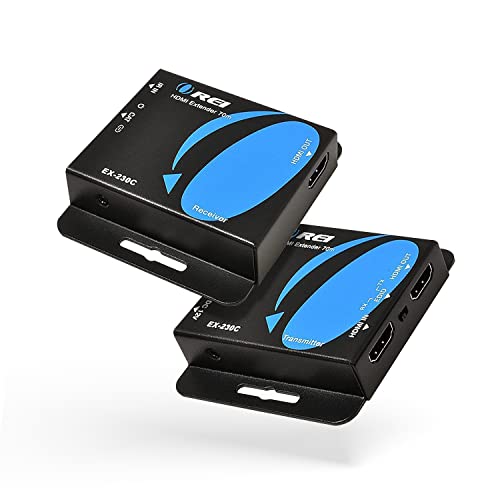
Best Audio and EDID Support – OREI EX-230C 4K HDMI Extender
For buyers comparing an hdmi extender over ethernet with broader format support, the OREI EX-230C offers 4K@30Hz up to 130 feet and 1080p up to 230 feet over CAT6 or CAT7. It also includes one-way IR, HDMI loop-out, EDID copying, and power over cable.
Best For: Home cinema, gaming, business, and education setups that need flexible resolution and audio compatibility.
Pros:
- Supports 4K@30Hz, 2K@60Hz, and 1080p at longer distances.
- POC powers both units from one transmitter-side adapter.
- EDID Copy allows local or remote EDID selection.
- Supports audio formats up to PCM 7.1, Dolby TrueHD, and DTS-HD.
Cons:
- 4K operation is limited to 130 feet at 30Hz.
- A shielded Ethernet cable is recommended for best signal quality.
- IR control is one-way.
The EX-230C stands out for users who need more control over display negotiation and audio formats. It is a strong fit for home cinema or mixed-source installations, provided the cable run matches its resolution limits.
How We Picked the Best Hdmi Extender Over Ethernet
We focused on the specifications that most affect real installations: supported resolution and refresh rate, maximum transmission distance, required network cable, bandwidth, HDCP compatibility, and installation features. We also considered whether each system supports power over cable (PoC), infrared control, EDID management, loop-out video, HDR, CEC, or RS-232.
The selection includes point-to-point extenders for straightforward source-to-display connections and HDMI-over-IP hardware for systems that may need network distribution. Distance claims are typically based on ideal cable quality and installation conditions, so actual results can vary with connectors, patch panels, interference, and cable length.
Quick Comparison
- Best for basic 1080p runs: Choose a model rated for 1080p at 60Hz when you need dependable Full HD video without 4K bandwidth.
- Best for standard 4K: Look for 4K at 30Hz support, especially for signage, streaming devices, and general viewing.
- Best for smooth 4K: A 4K at 60Hz, 18Gbps extender is the better choice for gaming, desktop use, and high-frame-rate content.
- Best for long distances: HDBaseT and selected 230- to 400-foot systems are designed for extended cable runs, but they require careful cable planning.
- Best for multiple displays: HDMI-over-IP models can scale over a LAN, while point-to-point units are simpler for one source and one display.
Key Buying Factors for an Hdmi Extender Over Ethernet
Resolution, Refresh Rate, and Bandwidth
Check the exact combination rather than looking only for “4K.” Many extenders support 4K at 30Hz, while 4K at 60Hz generally requires substantially more bandwidth. For gaming or computer monitors, confirm that the extender supports the desired refresh rate, color format, and HDR standard.
Cable Type and Distance
Cat5e may be sufficient for some 1080p and shorter 4K installations, but Cat6 or Cat6a is often the safer choice for higher bandwidth and longer runs. Keep the cable within the manufacturer’s rated distance, and avoid unnecessary couplers or low-quality patch cables.
Control and Compatibility Features
IR passthrough lets you control a source from the display location. EDID helps the source and display negotiate compatible video settings, while HDCP support matters for protected content. Loop-out is useful when the source must feed a local monitor as well as a remote display. PoC can reduce outlet requirements, but verify which transmitter or receiver supplies power.
Point-To-Point or HDMI Over IP
A conventional transmitter-and-receiver kit is usually the easiest option for a single connection. HDMI-over-IP hardware is more appropriate when video must travel through a network or reach multiple endpoints, but it may require network configuration and compatible switches.
Who Should Buy Which Hdmi Extender Over Ethernet?
Choose a basic 1080p extender for classrooms, conference rooms, security displays, or older equipment. Select a 4K at 30Hz model for everyday Ultra HD playback where 60Hz is not essential. For gaming, modern PCs, and fluid 4K video, prioritize 4K at 60Hz and 18Gbps support.
For large homes, offices, venues, or commercial installations, consider a longer-range HDBaseT model with two-way IR, CEC, HDR, or RS-232 if those controls are part of the system design. If you need flexible distribution across several displays, an HDMI-over-IP extender is the better platform. Before ordering, confirm the source and display connectors, cable category, distance, power arrangement, and protected-content requirements.