
Choosing your first video switcher can feel complicated when product listings mix HDMI, SDI, 4K, streaming, and audio features. The right model should match your cameras, display, workflow, and comfort level without adding unnecessary setup hurdles.
These 10 options cover simple HDMI switchers, touchscreen models, portable systems, and more advanced units for creators who expect to expand. Use the guide below to compare compatibility, controls, streaming features, and value before buying.
Best 10 Video Switchers for Beginners Picks for 2026
Feature-Rich Pick

- Four HDMI inputs with dual HDMI outputs
- Records, streams, and plays back media
- Includes audio mixing and graphics tools
Best For: Multi-camera productions that need room to grow
Professional Upgrade

- Handles up to eight HDMI sources
- Built-in preview monitor and AUX output
- Includes advanced effects and 18-channel audio
Best For: Growing live-event and presentation setups
Simple Streaming Choice

- Four HDMI inputs for multi-source switching
- USB output works as a computer webcam
- Includes transitions and picture-in-picture layouts
Best For: Solo streaming with OBS or similar software
Touchscreen Beginner Pick

- Five inputs include HDMI and SDI
- 10.1-inch touchscreen multi-view display
- Adds effects, audio mixing, and USB streaming
Best For: Beginners who want hands-on multi-camera control
Most Beginner-Friendly
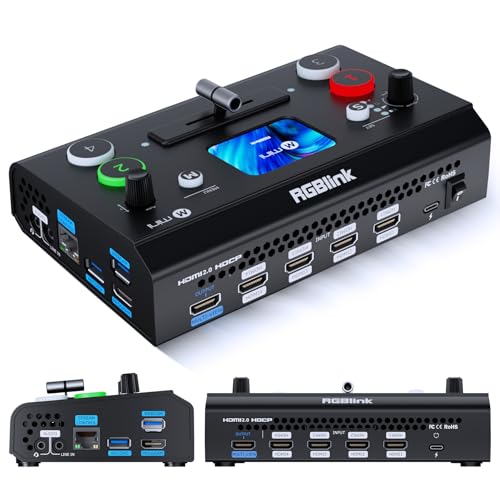
- Four HDMI inputs with a 2.1-inch touch screen
- Dual 1080p HDMI output and UVC webcam mode
- Optional recording, chroma key, and PTZ features
Best For: New creators building a compact multi-camera streaming setup
Best Simple HDMI Mixer
RIJER 4-Channel Video Switcher

- Four HDMI inputs and two HDMI outputs
- Supports 4K/30Hz input and 1080p/60Hz output
- Includes digital audio mixing and PIP modes
Best For: Basic multi-source HDMI streaming and recording setups
Best Advanced Upgrade

- 10-inch screen with HDMI and SDI input support
- PTZ control, recording, playback, and dual RTMPS streaming
- Keying, customizable PIP, and over 30 transitions
Best For: Growing multi-camera productions using HDMI, SDI, or PTZ cameras
Best Compact Pick
Mixer Plus 4-Input Video Switcher

- Built-in 4-inch multiview screen
- Four HDMI inputs with zero-latency switching
- PIP, keying, PTZ control, and customizable AUX output
Best For: Portable multi-camera streaming, classes, Zoom, and small events
Best All-in-One Pick

- 4K HDMI inputs with HDMI and USB source support
- Records to USB and SD cards simultaneously
- Includes audio mixing, PTZ control, and remote browser operation
Best For: Growing creators and small teams producing streams, events, and recordings
Best Simple Pick

- Four HDMI and four SDI inputs with NDI HX3 support
- 5.5-inch display, recording, and dual-platform streaming
- Advanced PTZ control with presets and cruise tracks
Best For: Churches, studios, conferences, and expanding multi-camera productions
Feature-Rich Pick – Osee GoStream Deck HDMI Pro
For beginners comparing video switchers for beginners, the Osee GoStream Deck is a strong choice when you want room to grow beyond basic camera switching. It combines four HDMI inputs with recording, audio controls, graphics overlays, and direct streaming features in a compact control surface.
Best For: Multi-camera podcasts, churches, conferences, weddings, and creators who want built-in recording and streaming flexibility.
Pros:
- Four HDMI inputs and two HDMI outputs support multi-camera production and monitoring.
- Includes audio inputs, headphone monitoring, EQ, limiter, and fader controls.
- Can stream to three platforms, record to SD or USB SSD, and play back MP4 files.
- Supports chroma key, picture-in-picture, lower thirds, macros, and landscape or portrait streaming.
Cons:
- The many connections and production features may take time for a complete beginner to learn.
- Its advanced control panel may be more than needed for simple one-camera streams.
The GoStream Deck is a versatile beginner-friendly starting point for users who expect their productions to become more sophisticated. Its built-in controls reduce dependence on a computer, while the included PC software adds flexibility when needed.
Professional Upgrade – Roland V-8HD
The Roland V-8HD is suited to beginners who want a more advanced HDMI workflow from the start. With eight HDMI inputs, built-in preview monitoring, audio mixing, and preset-based automation, it handles larger live productions without requiring a separate preview display.
Best For: Presentations, live events, broadcasts, and multi-source setups using several HDMI cameras or devices.
Pros:
- Accepts up to eight HDMI sources in a compact design.
- Built-in multi-view preview monitor helps with source monitoring.
- Provides five-layer effects, keying, still graphics, AUX output, and automated switching.
- Includes an 18-channel digital audio mixer with effects and sync delay.
Cons:
- Its large input capacity and professional feature set may be excessive for a simple beginner setup.
- It is heavier and less compact than some entry-level switchers.
The V-8HD is a capable long-term option for users who anticipate adding cameras, presentation sources, or more complex routing. Beginners may need extra time to learn its deeper effects, audio, and automation controls, but the built-in monitor makes day-to-day operation more manageable.
Simple Streaming Choice – RGBlink Mini
The RGBlink Mini is a practical entry point for video switchers for beginners, especially solo streamers who want straightforward computer connectivity. Its four HDMI inputs, USB webcam output, built-in transitions, and picture-in-picture layouts cover the essentials without requiring a large production setup.
Best For: Solo creators and new streamers using OBS, vMix, or social-media streaming platforms.
Pros:
- Four HDMI inputs support multi-camera or multi-device setups.
- USB 3.0 output is recognized by a computer as a webcam for streaming software.
- Offers 14 transition effects and nine picture-in-picture layouts.
- Can be controlled remotely through a LAN connection from a phone or computer.
Cons:
- Onboard recording is not included; the notes specify Mini-Pro or higher models for that feature.
- It provides fewer advanced production and audio controls than larger switchers.
The RGBlink Mini keeps the basic workflow approachable: connect HDMI sources, send the USB output to a computer, and switch between shots. It is a sensible fit for beginners who already plan to use streaming software and do not need standalone recording.
Touchscreen Beginner Pick – FEELWORLD L4 Video Mixer
The FEELWORLD L4 makes video switching approachable with a built-in 10.1-inch touchscreen, tactile buttons, and a T-bar. For beginners exploring video switchers for beginners, its combination of four HDMI inputs, one SDI input, multi-view monitoring, and USB 3.0 streaming offers a clear path from simple camera switching to more polished live production.
Best For: Beginners running multi-camera streams, presentations, church services, weddings, sports, e-learning, or live commerce.
Pros:
- Five-input design combines four HDMI inputs with one SDI input.
- Large touchscreen provides multi-view monitoring and direct control.
- Includes 13 transitions, chroma key, logo overlays, and picture-in-picture.
- USB 3.0 supports direct streaming to a PC, while two-channel audio mixing adds sound control.
Cons:
- The 1.46 kg unit may be less convenient for highly portable setups.
- Its broader feature set may require practice before beginners use every control confidently.
The L4 is a well-rounded option when ease of control and on-device monitoring matter. The touchscreen and physical controls simplify live switching, while SDI support and production effects give users useful flexibility as their setup expands.
Most Beginner-Friendly – RGBlink Mini V3
For beginners comparing video switchers for beginners, the RGBlink Mini V3 offers a compact setup with four HDMI inputs, a 2.1-inch touch screen, and a physical T-bar. It supports dual 1080p HDMI output, UVC webcam mode, and optional features such as recording, chroma key, and PTZ control through TAO Cloud licensing.
Best For: New creators building a compact multi-camera streaming or recording setup.
Pros:
- Four HDMI inputs support multi-camera productions.
- Touch screen and T-bar provide accessible hands-on control.
- UVC webcam mode works with streaming platforms through USB.
- Supports USB recording, PIP layouts, chroma key, and transition effects, with some features requiring activation.
Cons:
- Some advanced functions require optional TAO Cloud licensing.
- Activation requires a firmware update, Ethernet connection, and account binding.
- A 35W or higher USB-C power adapter is recommended for stable operation.
The Mini V3 is a practical entry point when size and straightforward controls matter. Buyers should account for the setup steps and optional licensing before choosing it for a more advanced production workflow.
Best Simple HDMI Mixer – RIJER 4-Channel Video Switcher
The RIJER 4-channel mixer is a straightforward option for beginners evaluating video switchers for beginners. It accepts four HDMI sources, outputs 1080p at 60Hz, and includes two HDMI outputs for monitoring program and preview feeds. Its integrated digital audio mixer and multiple switching modes add useful control for live streams and recordings.
Best For: Beginners who need a basic HDMI mixer for cameras, computers, or video players.
Pros:
- Four HDMI inputs handle several common source devices.
- Supports 4K/30Hz input with 1080p/60Hz output.
- Two HDMI outputs allow real-time viewing and previewing.
- Includes audio mixing, seamless switching, gradual display, PIP, and dual-screen modes.
Cons:
- Its stated output resolution is limited to 1920×1080 at 60Hz.
- The supplied notes do not specify recording, streaming, or PTZ-control functions.
This model focuses on essential HDMI switching and audio management rather than a broad production feature set. It may suit beginners who want a simple, monitor-friendly mixer without needing advanced camera-control tools.
Best Advanced Upgrade – CINETREAK Stream Master SDI
The CINETREAK Stream Master SDI is a more advanced choice among video switchers for beginners, especially for users planning to grow into studio-style production. It combines a 10-inch monitoring screen with HDMI and SDI inputs, PTZ control, dual RTMPS streaming, recording, playback, and customizable PIP layouts.
Best For: Beginners with ambitious multi-camera, SDI, PTZ, or live-production plans.
Pros:
- Large 10-inch screen includes multi-view monitoring.
- Supports mixed HDMI and SDI sources, with up to four of each listed.
- Built-in VISCA PTZ control supports up to four cameras.
- Offers recording, playback, dual-destination RTMPS streaming, keying, and over 30 transitions.
Cons:
- The larger feature set may be more than a first-time user needs.
- NDI functionality is listed as coming in a future update.
- Its standalone form factor and 1.78 kg weight make it less portable than compact switchers.
The Stream Master SDI provides substantial room to expand, but its extensive controls and connectivity are better suited to beginners who expect their production needs to become more demanding. Confirm the current NDI update status if that feature is important to your workflow.
Best Compact Pick – Mixer Plus 4-Input Video Switcher
If you are comparing video switchers for beginners, the Mixer Plus offers a relatively approachable way to move into multi-camera production. Its four HDMI inputs, built-in 4-inch multiview screen, customizable transitions, and preset scenes provide useful control without requiring a separate monitoring display.
Best For: Beginners who want a portable HDMI switcher for YouTube, online classes, Zoom sessions, and small events.
Pros:
- Built-in 4-inch screen provides real-time multiview monitoring.
- Supports up to four HDMI sources with zero-latency switching.
- Includes practical tools such as PIP, chroma key, luma key, DSK, and logo overlay.
- Customizable AUX output and four user-defined scene presets add flexibility.
Cons:
- Limited to HDMI-connected sources.
- Its four-input design may be restrictive for larger productions.
- Advanced PTZ and keying features may take time for first-time users to learn.
The built-in monitor is the main beginner-friendly advantage, since it lets you check sources, program, preview, and audio meters from the switcher itself. It is a practical choice when portability and straightforward HDMI connectivity matter more than extensive expansion.
Best All-in-One Pick – FoMaKo M1 4K Video Mixer
For beginners who want room to grow, the FoMaKo M1 combines switching, streaming, recording, audio mixing, and PTZ control in one unit. It accepts multiple HDMI and USB sources, supports 4K input, and offers direct USB, SD card, or network-based production options.
Best For: New creators and small production teams seeking an all-in-one switcher for live streams, events, weddings, and music videos.
Pros:
- Accepts four HDMI inputs plus two USB inputs, with support for webcam and NDI HX input.
- Supports 4K input while delivering 1080p output.
- Can record simultaneously to USB and SD cards.
- Provides two mic/line inputs, audio delay adjustment, ALC, PTZ control, and browser-based remote control.
Cons:
- The broad feature set may feel complex for someone new to live production.
- NDI functionality is described as upgradeable rather than automatically included.
- Output resolution is limited to 1080p 60fps despite 4K input support.
The M1 is more capable than a basic HDMI switcher, especially if you need recording, audio management, and streaming in the same workflow. Beginners should expect a steeper learning curve, but the extra inputs and production tools can reduce the need for an immediate upgrade.
Best Simple Pick – Tenveo PC500 Video Switcher
The Tenveo PC500 is a strong option for beginners who expect their productions to become more advanced. It combines four HDMI and four SDI inputs, a 5.5-inch display, multiview monitoring, streaming, recording, and PTZ camera control in a more professional-oriented package.
Best For: Beginners entering church, studio, conference, event, or other multi-camera production who want SDI and network features for future expansion.
Pros:
- Supports four HDMI inputs, four SDI inputs, USB input, and NDI HX3.
- Accepts 4K60 input and outputs 1080p60.
- Offers USB/SD recording, dual-platform streaming, and UVC output for software such as OBS.
- Controls up to four PTZ cameras with presets, cruise tracks, and network discovery.
Cons:
- The professional feature set may be overwhelming for a first-time operator.
- Its 1080p60 output does not match the maximum 4K60 input resolution.
- SDI, NDI, SRT, RTMP, RTSP, and PTZ workflows require compatible equipment and setup.
Compared with simpler video switchers for beginners, the PC500 offers substantially more connectivity and production depth. It makes the most sense if you already use—or plan to adopt—SDI, PTZ, or network-based video, rather than for a basic two-camera home setup.
How We Picked the Best Video Switchers for Beginners
We focused on features that make a switcher easier to learn and more useful over time: straightforward source selection, practical monitoring, reliable video support, manageable audio controls, and compatibility with common cameras and streaming equipment. The list includes HDMI-focused units for simple setups as well as SDI-capable models for longer cable runs and more demanding production environments.
We also considered built-in screens, multiview output, USB or network streaming, PTZ support, input and output resolution, and portability. Because “beginner” can mean anything from a webcam-based class to a three-camera livestream, the best choice depends on your equipment and production goals.
Quick Comparison
| What to Compare | Best For | What to Watch |
|---|---|---|
| HDMI inputs | Home studios, classes, gaming, and short cable runs | HDMI cables are less suited to long professional runs |
| SDI inputs | Events, studios, and extended cable distances | Requires SDI-compatible cameras or converters |
| Built-in screen | Portable setups and faster source monitoring | Small displays may be difficult to read from a distance |
| USB or network streaming | Direct broadcasting to a computer or platform | Confirm supported formats and software compatibility |
| 4K input support | Modern cameras and future expansion | Many switchers still output the program feed at 1080p |
Key Buying Factors for Video Switchers for Beginners
Inputs and Camera Compatibility
Start by counting the cameras and other sources you intend to connect. Four HDMI inputs are enough for many beginner multi-camera productions, while SDI inputs are useful for professional cameras and longer cable runs. Check the exact supported resolutions and frame rates rather than assuming that a “4K” label means every input and output operates at 4K.
Ease of Switching and Monitoring
Large source buttons, a multiview display, preview/program controls, and a built-in screen can make live switching much less stressful. Beginners should prioritize clear feedback and simple controls over a long list of advanced effects.
Streaming, Recording, and Audio
If you plan to stream without a separate computer, look for an encoder, USB output, or network streaming support. Confirm whether the unit handles the platforms and connection type you use. Audio mixing is equally important: check for microphone inputs, level controls, headphone monitoring, and audio-follow-video or mix-minus features if you need them.
Resolution, Latency, and Expansion
Match the switcher to your cameras, capture hardware, and display. A 1080p60 workflow is often the simplest and most reliable starting point. Choose 4K input support if you are upgrading cameras soon, but do not pay for it if your entire setup is limited to 1080p.
Who Should Buy Which Video Switchers for Beginners?
Choose a compact HDMI model if you need an affordable system for online classes, presentations, gaming, or a small home studio. A touchscreen switcher can be a good middle ground when you want easier monitoring and more direct access to settings. Buyers planning events, longer cable runs, or professional cameras should consider an SDI-capable unit.
For creators who want to stream directly, prioritize models with built-in encoding or dependable USB/network output. If you expect to add PTZ cameras, more sources, or remote control later, select a model with suitable control and expansion support now. The best Video Switchers for Beginners are not necessarily the most advanced; they are the ones that support your current workflow while leaving a practical path to grow.