
Choosing among today’s 4K video switchers depends on more than resolution. Input types, output limits, audio connections, recording options, and streaming controls can determine whether a switcher fits a compact creator setup or a demanding production workflow.
We compare 10 options across HDMI and SDI support, camera capacity, monitoring, PTZ control, ISO recording, and live-streaming features to help you match the hardware to your cameras, venue, and production goals.
Best 10 4K Video Switchers Picks for 2026
Best Budget-Friendly Pick

- Four HDMI inputs for multicamera production
- Built-in streaming, recording, and multiview
- Integrated transitions, keyers, and audio mixing
Best For: HDMI-based livestreaming, education, presentations, and esports
Best 4K Feature Set

- 4K60 input and 4K loop-through
- Four-camera PTZ control with presets
- RTMP, RTMPS, UVC, recording, and advanced audio
Best For: Professional HDMI productions, churches, studios, and PTZ workflows
Best for Mixed Camera Sources

- Accepts SDI, HDMI, USB-C, NDI HX, and playback sources
- Supports landscape and portrait production
- Includes keying, PIP, transitions, and three-platform streaming
Best For: Mixed SDI/HDMI live events, portrait streams, and flexible productions
Best for PTZ Streaming Workflows
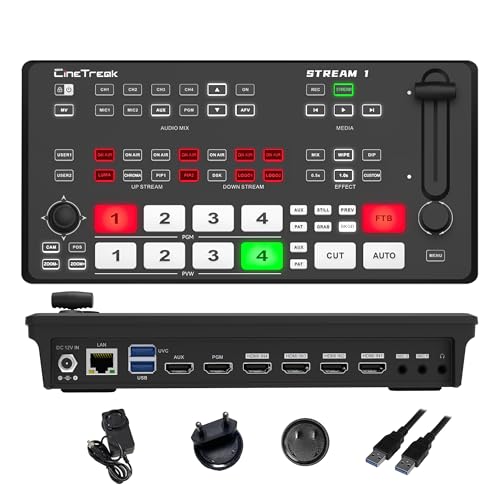
- Four HDMI inputs plus AUX media access
- PTZ control for up to four VISCA cameras
- Recording, PIP, keying, and dual RTMPS streaming
Best For: HDMI live streams with PTZ cameras and portrait production
Flexible HDMI Production Hub

- Four HDMI inputs with dual HDMI outputs and MultiView
- Audio mixing, SD/SSD recording, and MP4 playback
- Triple-platform streaming with portrait and landscape modes
Best For: HDMI-based podcasts, events, worship, and conferences
Compact Touchscreen 4K Switcher
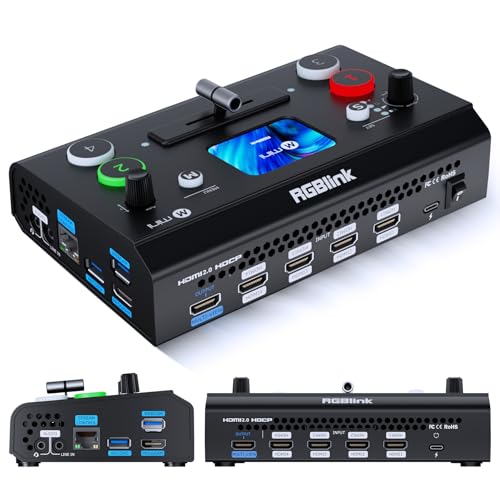
- Four HDMI inputs with dual 1080p HDMI outputs
- 2.1-inch touchscreen, T-bar, and UVC webcam mode
- Recording and selected effects require optional TAO Cloud activation
Best For: Portable HDMI streaming and entry-level multi-camera setups
Hybrid ISO Production Workhorse

- Four HDMI 2.0 and four 3G-SDI inputs in one switcher
- Records eight ISO feeds plus the program output
- XLR audio, network video, and triple RTMP streaming
Best For: Hybrid HDMI/SDI events and productions needing ISO recording
Best All-in-One PTZ Solution
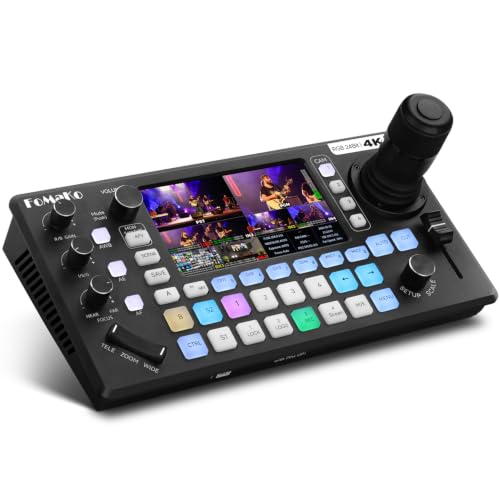
- Four 4K HDMI inputs with 1080p60 output
- Built-in PTZ joystick and AI tracking
- USB/SD recording plus six-channel audio
Best For: Solo operators and church or event productions
Best Portable Kit

- Four HDMI/SDI inputs with dual HDMI outputs
- Built-in 14-inch monitor and mounting plates
- AC, DC, or USB power-bank operation
Best For: Mobile livestreaming and field production
Best Hybrid SDI/HDMI Workflow

- Four SDI and four HDMI inputs
- 4K60 input with 1080p60 output
- NDI|HX3, IP streaming, PTZ control, and recording
Best For: Professional hybrid-camera live production
Best Budget-Friendly Pick – Blackmagic ATEM Mini Pro
The Blackmagic Design ATEM Mini Pro is a practical choice for creators seeking compact 4k video switchers for multicamera streaming, education, presentations, or esports. It combines four HDMI inputs with built-in streaming, recording, multiview, and audio mixing in a lightweight chassis.
Best For: Multicamera livestreams, business presentations, education, and training setups using HDMI cameras.
Pros:
- Four HDMI inputs with 10-bit 4:2:2 video support.
- Built-in streaming, recording, and four-camera multiview.
- Includes multiple transition effects, keyers, and a six-input audio mixer.
Cons:
- HDMI-only connectivity limits compatibility with SDI sources.
- Its listed output is HDMI rather than a dedicated SDI or network video output.
Choose this model when you want a compact, established workflow with strong switching and streaming fundamentals. It is especially appealing for HDMI-based productions that do not require extensive PTZ control or advanced 4K output features.
Best 4K Feature Set – FoMaKo KC602 4K Video Mixer
The FoMaKo KC602 stands out among 4k video switchers for its 4K60 input support, 4K loop-through, PTZ control, and integrated display. It is designed for operators who want a hands-on control surface, flexible streaming options, and more advanced audio connectivity.
Best For: Churches, studios, and professional live productions using multiple HDMI cameras and PTZ systems.
Pros:
- Accepts 4K60 input and provides 4K loop-through alongside 1080p60 output.
- Controls up to four PTZ cameras and stores nine presets.
- Supports RTMP, RTMPS, USB UVC streaming, recording, and extensive audio mixing.
- Built-in 5.5-inch display and physical controls support hands-on operation.
Cons:
- Final output is specified as 1080p60 rather than 4K.
- The broad feature set may be more than a simple HDMI switching setup requires.
The KC602 is a strong fit when 4K acquisition, PTZ operation, and audio control matter more than a minimal interface. Its 4K loop-through is useful for monitoring or backup recording while producing a 1080p live output.
Best for Mixed Camera Sources – Osee GoStream Duet
Osee GoStream Duet Multiple Camera SDI and HDMI Live Stream Video Mixer Switcher
Check Price On AmazonThe Osee GoStream Duet is a versatile option among 4k video switchers for productions that combine SDI, HDMI, USB-C, NDI HX, and playback sources. Its built-in interface, computer software, and broad keying and transition tools make it suitable for flexible live-event workflows.
Best For: Live events and streamers who need SDI and HDMI connectivity, portrait support, and multiple streaming methods.
Pros:
- Supports up to four SDI, four HDMI, USB-C, NDI HX, and media playback sources.
- Offers landscape and portrait input and output support.
- Includes luma, chroma, pattern keying, PIP, DSK, and multiple transition types.
- Can stream to up to three platforms through Ethernet or supported software workflows.
Cons:
- The listed warranty is one year.
- NDI HX requires the latest firmware to unlock the included license.
Consider the GoStream Duet when source flexibility is a priority. Its combination of SDI, HDMI, NDI HX, portrait production, and software-based control gives it broader reach than a basic HDMI-only switcher.
Best for PTZ Streaming Workflows – CINETREAK Stream 1
The CINETREAK Stream 1 is a capable choice for buyers comparing 4k video switchers with integrated PTZ control, recording, playback, and portrait streaming. It accepts up to four HDMI sources plus an AUX channel and supports production features suited to online broadcasts.
Best For: HDMI-based live streams that need PTZ camera control, dual-destination streaming, and landscape or portrait output.
Pros:
- Provides up to four HDMI inputs, an AUX channel, PGM output, and AUX output.
- Supports 4K input on HDMI 1 and HDMI 2.
- Controls up to four VISCA PTZ cameras with PC or smartphone access.
- Includes recording, playback, PIP, chroma/luma keying, and more than 30 transitions.
Cons:
- Recording is specified as high-bitrate Full HD rather than 4K.
- Only HDMI 1 and HDMI 2 are specifically identified as supporting 4K input.
The Stream 1 makes sense for operators who want a self-contained HDMI production hub with PTZ and streaming controls. Its portrait orientation and dual RTMPS destinations add useful flexibility for social and live-event distribution.
Flexible HDMI Production Hub – GoStream Deck HDMI Pro
The Osee GoStream Deck is a practical choice among 4k video switchers for creators who need four HDMI sources, built-in audio controls, recording, and direct streaming. Its physical control panel, landscape and portrait support, and multi-platform streaming features suit productions that need hands-on operation without relying entirely on a computer.
Best For: Podcasts, conferences, worship services, weddings, education, and multi-camera live events using HDMI equipment.
Pros:
- Four HDMI inputs and two HDMI outputs support multi-camera setups with MultiView monitoring.
- Offers audio inputs, headphone monitoring, EQ, limiter, and fader controls.
- Records to an SD card or USB SSD and can play MP4 files during production.
- Supports streaming to up to three platforms and includes keying, overlays, and portrait mode.
Cons:
- Its connectivity is centered on HDMI rather than SDI.
- Some expanded control features require the companion software or control module.
The GoStream Deck combines a broad feature set with a familiar hardware workflow. It is especially appealing when audio handling, graphics, recording, and direct streaming matter as much as switching between cameras.
Compact Touchscreen 4K Switcher – RGBlink Mini V3
The RGBlink Mini V3 is a compact option for buyers comparing 4k video switchers for entry-level multi-camera production. It provides four HDMI inputs, a touchscreen, T-bar control, dual 1080p HDMI outputs, and UVC webcam connectivity, while several advanced functions are available through optional TAO Cloud activation.
Best For: Portable HDMI productions, beginner live streamers, webcam-style broadcasts, and creators who want touchscreen control.
Pros:
- Four HDMI inputs accommodate multi-camera or mixed HDMI-source setups.
- The 2.1-inch touchscreen and physical T-bar provide direct control in a compact design.
- Supports dual HDMI output, UVC webcam mode, PIP layouts, chroma key, and transition effects.
- Can record to USB drives up to 2TB when the recording feature is activated.
Cons:
- Recording and selected advanced features require optional TAO Cloud licensing.
- It requires a 35W or higher USB-C power adapter for stable performance.
- Users should check the manual for camera compatibility and follow the firmware and cloud-activation setup steps.
The Mini V3 prioritizes portability and straightforward control. Its licensing model means buyers should confirm which features they need before purchasing, but the core HDMI switching and UVC workflow make it versatile for smaller productions.
Hybrid ISO Production Workhorse – GoStream Duet 8 ISO
The Osee GoStream Duet 8 ISO is designed for demanding productions that need more than basic switching. As one of the more production-focused 4k video switchers, it combines four HDMI 2.0 inputs, four 3G-SDI inputs, 8-channel ISO recording, professional XLR audio, network video support, and simultaneous streaming to up to three RTMP destinations.
Best For: Event crews, churches, podcasts, panels, and hybrid productions using both HDMI and SDI cameras.
Pros:
- Combines four HDMI inputs supporting up to 4K60 signals with four SDI inputs.
- Records eight individual ISO feeds plus the program output for editing or recovery.
- Includes XLR and 3.5mm audio connections, phantom power, gain, EQ, compression, and limiting.
- Supports NDI|HX, SRT, RTMP, UVC webcams, browser overlays, layered graphics, and triple streaming.
Cons:
- Outputs are limited to 1080p even though HDMI inputs support 4K60.
- Its broader feature set may be more than needed for simple two-camera streaming.
- At three pounds, it is less lightweight than compact HDMI-only switchers.
The Duet 8 ISO stands out when workflow protection and input flexibility are priorities. Its ISO recording, hybrid HDMI/SDI design, and built-in audio tools make it a strong fit for productions that need reliable post-production options as well as live output.
Best All-in-One PTZ Solution – FoMaKo KC800 4K HDMI Switcher
The FoMaKo KC800 is one of the most integrated 4k video switchers for solo operators who need camera control, audio mixing, recording, and streaming in one unit. It accepts four 4K HDMI sources, includes a built-in 4D PTZ joystick, and outputs at up to 1080p60.
Best For: Churches, weddings, corporate events, and multi-camera productions managed by a small crew or solo operator.
Pros:
- Controls up to four PTZ cameras with VISCA/VISCA-over-IP, presets, and AI tracking.
- Includes four 4K HDMI inputs, HDMI outputs, UVC connectivity, and multiple audio inputs.
- Records directly to USB or SD card without requiring a computer.
- Supports simultaneous streaming to three platforms plus one UVC feed.
Cons:
- Program output is specified at 1080p60 rather than 4K.
- Its extensive controls and routing options may require setup time.
The KC800 stands out when PTZ control and production flexibility matter as much as video switching. Its joystick, AI features, six-channel audio system, and PC-free recording make it a strong choice for streamlined live production.
Best Portable Kit – Osee GoStream Duet Kit
The Osee GoStream Duet Kit is a practical option among 4k video switchers for mobile crews that want an integrated monitor and mounting system. The kit combines the switcher with a 14-inch display, four HDMI/SDI inputs, USB connectivity, and flexible power options in a portable package.
Best For: Mobile livestreaming, field production, and crews that need a transportable switching setup with built-in monitoring.
Pros:
- Includes a 14-inch 1080×1920 monitor, silent fan, and three expandable cheese plates.
- Accepts four HDMI/SDI sources and provides two HDMI outputs for program and multiview use.
- Supports USB cameras and software such as OBS, vMix, and Zoom.
- Can run from AC, DC, or a USB power bank, with USB power output for accessories.
Cons:
- The supplied notes do not specify 4K input or output resolution.
- At about 5 kg, it is portable but not an ultra-light setup.
This kit is compelling when portability and deployment speed are priorities. Its monitor, mounting plates, varied power choices, and HDMI/SDI connectivity reduce the amount of extra equipment needed for on-location streaming.
Best Hybrid SDI/HDMI Workflow – Tenveo PC500 4K60 Switcher
The Tenveo PC500 is designed for professional workflows that mix SDI, HDMI, USB, and network video. As 4k video switchers go, it is especially versatile on the input side, supporting four SDI inputs and four HDMI inputs, including two HDMI inputs at 4K60, while producing 1080p60 output.
Best For: Churches, studios, conferences, classrooms, and productions using both SDI and HDMI cameras with network streaming.
Pros:
- Combines four SDI inputs with four HDMI inputs and supports 4K60 input on two HDMI ports.
- Offers NDI|HX3, SRT, RTMP, RTSP, and USB UVC streaming options.
- Includes PTZ camera control, presets, AI tracking triggers, and web-browser management.
- Supports dual recording to SD card, USB disk, or HDD and can use recordings as auxiliary sources.
Cons:
- Output is limited to 1080p60 despite some 4K60 input support.
- The broader broadcast feature set may be more than a simple streaming setup needs.
The PC500 is a strong fit for installations that need format flexibility and network production tools. Its SDI/HDMI combination, PTZ management, multiple streaming protocols, and recording features make it suited to more demanding live environments.
How We Picked These 4K Video Switchers
We focused on practical capabilities that affect real-world multi-camera production: supported input formats, HDMI or SDI connectivity, maximum output resolution, onboard screens, audio I/O, streaming and recording functions, PTZ support, and ease of operation. The lineup includes compact switchers for creators as well as larger units with professional connections and expanded control.
Because many products accept 4K input but output at 1080p, we distinguish between 4K pass-through or input support and true 4K program output. That distinction matters for anyone building a high-resolution production or using a switcher primarily for live streaming.
Quick Comparison
| Best For | Look For |
|---|---|
| Simple HDMI streaming | Compact design, USB output, integrated streaming controls |
| Four-camera production | At least four HDMI inputs, multiview, reliable switching |
| Professional installations | SDI, XLR audio, longer cable runs, robust control |
| PTZ camera workflows | Joystick control, camera protocols, presets, or AI tracking |
| Post-production flexibility | ISO recording, onboard storage, USB or SD media support |
Key Buying Factors for 4K Video Switchers
Inputs and Signal Compatibility
Start with your current cameras and likely upgrades. HDMI is common on consumer and mirrorless cameras, while SDI is favored for longer cable runs and installed systems. Check connector counts, supported frame rates, and whether all inputs accept 4K at the frame rate you use.
Output Resolution and Streaming
A switcher may accept 4K sources while producing a 1080p program feed. That is often ideal for streaming, since many platforms and workflows use 1080p, but it may not suit a 4K recording or display pipeline. Also verify USB webcam output, RTMP support, recording formats, and simultaneous stream options.
Audio, Monitoring, and Control
Built-in screens and multiview outputs make switching easier without an external monitor. For microphones and mixers, compare 3.5mm, RCA, and XLR connectivity. PTZ joystick control is valuable when cameras are mounted remotely, while chroma key, playback, and graphics tools can reduce the need for extra equipment.
Recording and Expansion
Consider whether you need a program recording, ISO recordings from individual cameras, or both. Confirm storage media, file formats, USB-C behavior, and the number of available outputs before buying.
Who Should Buy Which 4K Video Switchers?
Choose a compact HDMI model if you stream from a desk, classroom, church, or small studio and want a straightforward setup. A four-input HDMI switcher is a better fit for creators using several cameras while keeping cabling and operation simple.
Buy an SDI-capable unit for event production, houses of worship, studios, or venues where cameras are far from the control position. Models with XLR audio and hardware PTZ controls make more sense for permanent or semi-professional installations.
For productions that need editing flexibility, select a switcher with ISO recording. If your priority is high-resolution monitoring or delivery, carefully confirm whether the device offers 4K program output rather than only 4K input support. Finally, leave room for future cameras, audio sources, and streaming destinations so your purchase does not become a bottleneck after your setup grows.