
A capable field monitor can make camera work faster and more precise by giving you a larger image, clearer focus tools, and better visibility than a camera’s built-in display. Models in this roundup range from compact 5.5-inch screens to bright 7-inch monitors designed for outdoor shooting.
When comparing camera field monitors with recording, pay close attention to brightness, HDMI support, touchscreen controls, LUT compatibility, power options, and whether the monitor truly includes an onboard recorder or is primarily a viewing and monitoring display.
Best 10 Camera Field Monitors with Recording Picks for 2026
Bright Touchscreen Pick
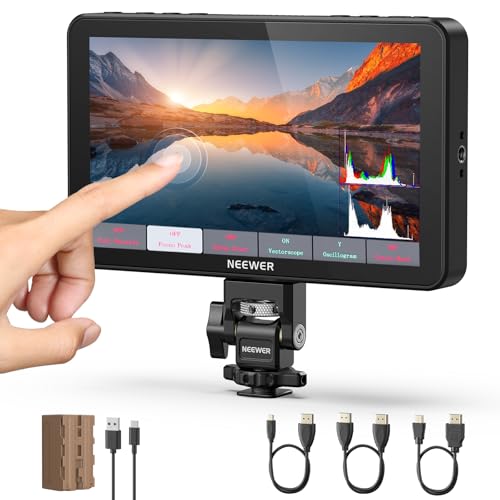
- 2000-nit 7-inch touchscreen with auto backlight
- 4K HDMI loop-through and custom LUT support
- Includes 5200mAh NP-F750 battery
Best For: Outdoor shoots and detailed on-set monitoring
Lightweight Starter Choice

- Lightweight 300g 7-inch IPS display
- Core focus and exposure assistance tools
- Includes two batteries, sunshade, and HDMI cables
Best For: Beginners and lightweight handheld or gimbal rigs
High-Brightness Feature Set

- 2400-nit touchscreen with ambient-light sensor
- 4K HDMI loop-through and professional scopes
- Includes two NP-F750 batteries
Best For: Bright outdoor shooting and extended field sessions
Compact Modern Workflow

- 6-inch 1200-nit screen with 4K HDMI support
- Built-in 22.2Wh battery and five-level fan
- Screenshot overlay for repeatable framing
Best For: Solo creators and newer mirrorless or cinema cameras
Bright Outdoor Monitoring

- 2000-nit 1080p touchscreen
- 4K HDMI loop in and out
- Custom 3D LUT and pro scopes
Best For: Outdoor production and advanced HDMI monitoring
Lightweight Daylight Setup

- 1000-nit matte anti-glare screen
- 4K30p HDMI input and audio output
- 278g body with three mounting sides
Best For: Portable DSLR and mirrorless camera rigs
Compact Touch Monitoring
FEELWORLD F5 PROX 5.5-Inch Monitor

- 1600-nit display for outdoor visibility
- Waveform, histogram, false color, and peaking
- Compact mounting for rigs and gimbals
Best For: Portable creator and gimbal setups
Best High-Brightness Pick

- 1200-nit 5.5-inch touchscreen
- Waveform, LUT, HDR, and focus tools
- 4K HDMI in/out with flexible power
Best For: Outdoor filmmakers needing advanced monitoring and LUT support
Best Lightweight Pro Monitor

- 6-inch Full HD IPS display
- 1200-nit brightness for outdoor work
- Waveform, vectorscope, histogram, and LUT preview
Best For: Mobile creators using cameras, gimbals, or stabilizers
Best Beginner-Friendly Large Screen
FEELWORLD FW759 7-inch Monitor

- Large 7-inch IPS viewing area
- Useful focus and exposure aids
- 4K HDMI input and NP-F battery support
Best For: Indoor creators who want an affordable larger monitoring view
Bright Touchscreen Pick – NEEWER F700 7-inch Monitor
For camera field monitors with recording setups that need clear outdoor viewing and detailed exposure checks, the NEEWER F700 combines a bright 7-inch touchscreen with professional monitoring tools. Its 2000-nit display, 4K HDMI loop-through, custom LUT support, and included 5200mAh NP-F750 battery make it a versatile choice for DSLR, mirrorless, and other HDMI-equipped cameras.
Best For: Outdoor shoots, filmmakers who want extensive monitoring tools, and rigs needing HDMI loop output.
Pros:
- Very bright 2000-nit IPS touchscreen with automatic or manual backlight control
- Includes waveform, vectorscope, histogram, false color, zebras, HDR, and focus peaking
- Supports 4K HDMI loop in/out, headphone monitoring, and up to 60 custom LUT files
- Includes a 5200mAh NP-F750 battery and offers USB-C charging
Cons:
- Heavier with the battery installed than compact monitor options
- SD card and DC power cable are not included
- Built-in cooling fans may add noise in especially quiet recording environments
The F700 is a strong all-around monitor when visibility and on-set image evaluation matter more than minimum weight. Its broad toolset and power flexibility are particularly useful for longer, more demanding productions.
Lightweight Starter Choice – FEELWORLD FW759 Pro
The FEELWORLD FW759 Pro is a straightforward option for camera field monitors with recording rigs where low weight and beginner-friendly controls are priorities. Its 7-inch 1280×800 IPS screen provides a larger view than a camera’s built-in display, while exposure and focus tools help with framing and image checks.
Best For: Beginners, vloggers, interviews, gimbal rigs, and indoor or shaded-location shooting.
Pros:
- Lightweight 300g design suits handheld and gimbal setups
- Includes histogram, zebra, focus assist, and false color tools
- Flexible NP-F battery, DC, and USB-C power options
- Package includes two F550 batteries, sunshade, and multiple HDMI cables
Cons:
- 400-nit brightness is less suited to strong direct sunlight than brighter models
- 1280×800 resolution is lower than the 1920×1080 displays in the other featured monitors
- Its listed connectivity is centered on a single HDMI connection rather than loop-through output
This monitor keeps a rig light and supplies the essential tools needed to improve framing, focus, and exposure. It is best suited to creators who want a complete, approachable kit rather than advanced 4K loop-through features.
High-Brightness Feature Set – NEEWER F600 7-inch Monitor
Among camera field monitors with recording workflows, the NEEWER F600 stands out for its 2400-nit screen and automatic ambient-light adjustment. It delivers a 1920×1080 touchscreen, 4K HDMI loop in/out, professional scopes, custom LUT loading, and two included NP-F750 batteries for extended field use.
Best For: Bright outdoor production, creators needing long battery flexibility, and crews using LUTs or detailed scopes.
Pros:
- 2400-nit display with an ambient light sensor for automatic brightness adjustment
- Includes waveform, RGB-related monitoring tools, vectorscope, histogram, false color, zebras, and HDR
- Supports 4K HDMI loop-through and real-time headphone audio monitoring
- Includes two NP-F750 batteries and adjustable multi-level fan cooling
Cons:
- Its glossy screen finish may create reflections in some lighting conditions
- DC power cable and SD card are not included
- Fan operation adds another consideration for quiet locations
The F600 is the strongest fit here when maximum screen brightness and included battery capacity are key considerations. It offers a substantial feature set for outdoor monitoring without requiring a separate sun hood.
Compact Modern Workflow – FEELWORLD P6XL 2026
The FEELWORLD P6XL is a compact choice for camera field monitors with recording setups built around newer mirrorless and compact cinema cameras. Its 6-inch 1200-nit 4K HDMI display adds a built-in battery, five-level fan control, dual touch and wheel operation, custom LUT support, and a screenshot overlay workflow for matching repeated shots.
Best For: Solo creators, newer HDMI camera systems, interviews, product videos, and repeatable multi-take setups.
Pros:
- Supports commonly used HDMI formats up to 4K 30P and 1080P 60P
- Integrated 22.2Wh battery reduces reliance on bulky external NP-F batteries
- Five-level adjustable fan helps manage heat during longer or brighter shoots
- Screenshot overlay assists with matching framing and subject placement between takes
Cons:
- 1200-nit brightness is lower than the 2000-nit and 2400-nit options featured here
- The integrated battery is specified for approximately two hours at maximum brightness with the fan at level 5
- USB-C power requires a compatible charger or power bank and supported charging protocol
The P6XL prioritizes portability and a modern solo-shooting workflow over maximum brightness. Its reference-frame overlay, built-in power, and adjustable cooling make it especially practical for product demonstrations, interviews, and repeated setups.
Bright Outdoor Monitoring – NEEWER F700 7-Inch Monitor
For creators seeking camera field monitors with recording support, the NEEWER F700 is a bright, feature-rich monitoring option for cameras with HDMI output. Its 2000-nit touchscreen, 4K HDMI loop-through, and professional exposure tools are particularly useful when framing and judging footage in changing light.
Best For: Outdoor shoots, filmmakers who need detailed monitoring tools, and multi-device HDMI setups.
Pros:
- Very bright 7-inch 1920×1080 touchscreen with manual and automatic backlight control.
- Supports HDMI input and loop output for compatible signals up to 4K.
- Includes waveform, vectorscope, false color, zebras, histogram, focus peaking, HDR, and audio monitoring.
- Supports custom 3D LUT uploads and flexible NP-F, USB-C, and DC power options.
Cons:
- Its larger feature set and two-battery configuration make it heavier than compact monitors.
- NP-F batteries, DC cable, headphones, and SD card are not all included as standard components noted here.
The F700 stands out when brightness, image-analysis tools, and power flexibility matter more than minimal rig weight. Its loop-through connection and LUT support also give it room to grow with a more advanced production setup.
Lightweight Daylight Setup – Portkeys HD7H 7-Inch Monitor
The Portkeys HD7H is a practical choice among camera field monitors with recording support for shooters who want a lightweight on-camera display. Its 1000-nit matte screen, sunshade, and core focus and exposure tools help improve visibility without adding much weight to a DSLR or mirrorless rig.
Best For: Mobile shoots, lightweight camera rigs, and users who need basic professional monitoring tools in bright conditions.
Pros:
- Lightweight 278-gram design with a 7-inch matte screen and removable sunshade.
- Supports HDMI signals up to 4K30p and provides headphone audio monitoring.
- Offers histogram, false color, focus peaking, zoom, and anamorphic de-squeeze options.
- Three-sided 1/4-inch mounting threads support flexible rig and tripod placement.
Cons:
- Native resolution is 1280×720 rather than Full HD.
- Battery is not included, so an NP-F battery or compatible 7.4–24V DC power source must be supplied separately.
The HD7H prioritizes portability and glare control over a high-resolution display. It is a sensible fit for run-and-gun work where low weight, mounting flexibility, and essential monitoring aids are more important than advanced connectivity.
Compact Touch Monitoring – FEELWORLD F5 PROX 5.5-Inch Monitor
The FEELWORLD F5 PROX offers a compact way to add a larger, brighter screen to a DSLR, mirrorless, or cinema camera. For shoppers comparing camera field monitors with recording support, its 1600-nit display and focus and exposure tools make it especially useful for outdoor filming, interviews, vlogs, and handheld production.
Best For: Solo creators, vloggers, gimbal users, and filmmakers who want a bright monitor in a compact form factor.
Pros:
- 1600-nit 5.5-inch display is designed for visible outdoor monitoring.
- Provides focus peaking, waveform, histogram, and false-color tools for exposure and focus checks.
- Supports LUT preview for viewing a filming look when shooting Log.
- Mounts to rigs, cages, gimbals, tripods, and handheld setups.
Cons:
- The supplied notes do not specify recording, HDMI resolution, or detailed connectivity features.
- Its 5.5-inch screen is smaller than the 7-inch displays offered by the other listed monitors.
The F5 PROX is best viewed as a bright, portable monitoring upgrade rather than a recording-focused device. Its compact size and essential image-analysis tools should appeal to creators who need better visibility without significantly changing their camera balance.
Best High-Brightness Pick – VILTROX DC-550 Pro II
For camera field monitors with recording setups that need strong daylight visibility and advanced image checks, the VILTROX DC-550 Pro II combines a 1200-nit touchscreen with Full HD resolution, 4K HDMI loop-through, and a broad set of exposure and focus tools.
Best For: Outdoor filmmakers and creators who want LUT support, detailed monitoring tools, and flexible power options.
Pros:
- 1200-nit 5.5-inch IPS touchscreen is designed for bright shooting environments.
- Includes waveform, vectorscope, histogram, false color, focus assist, HDR, and custom 3D LUT support.
- Accepts NP-F battery, DC input, or USB-C power-bank power, with an NP-F550 battery included.
- Supports 4K HDMI input and output plus headphone monitoring.
Cons:
- The 5.5-inch display is smaller than the 6- and 7-inch alternatives in this roundup.
- Its feature-rich design may be more than beginners need.
The DC-550 is the most capable choice here for bright-location production and color-conscious workflows. Its supplied battery, sunshade, cables, and one-year replacement service also make it a well-equipped starting package.
Best Lightweight Pro Monitor – FEELWORLD FW568 PRO
The FEELWORLD FW568 PRO is a practical option for camera field monitors with recording rigs that need a larger Full HD view without excessive weight. Its 1200-nit screen, 4K HDMI input/output, and exposure tools suit both outdoor and mobile production.
Best For: Videographers, vloggers, and gimbal users who need daylight visibility and reliable focus and exposure checks.
Pros:
- 6-inch 1920×1080 IPS display provides a clearer view than many built-in camera screens.
- 1200-nit brightness helps maintain visibility in direct sunlight.
- Waveform, vectorscope, RGB histogram, focus assist, and LUT preview support precise monitoring.
- Supports NP-F battery or USB-C power and can output DC 8.4V to power a compatible camera.
Cons:
- The supplied notes do not specify the included NP-F battery capacity.
- Its listed weight is higher than the stated 204g portable-design claim, so buyers should verify the final rig weight.
With its bright panel and professional monitoring aids, the FW568 PRO balances portability and production features well. The camera power output is particularly useful when simplifying a compact rig.
Best Beginner-Friendly Large Screen – FEELWORLD FW759 7-inch Monitor
For creators who prioritize a larger viewing area, the FEELWORLD FW759 offers a 7-inch IPS screen for framing and focus checks in camera field monitors with recording setups. It supports 4K HDMI input and includes straightforward tools for everyday video work.
Best For: Beginners, vloggers, and indoor creators filming tutorials, interviews, livestreams, and product videos.
Pros:
- 7-inch screen gives a substantially larger composition view than a typical camera display.
- Focus peaking, histogram, false color, overexposure warning, zoom, safe frame, and audio meter support more confident shooting.
- Works with DSLR cameras, mirrorless cameras, camcorders, gimbals, cages, tripods, and video rigs with HDMI output.
- Includes a sunshade and supports NP-F series batteries.
Cons:
- The 400-nit display is less suited to direct sunlight than the 1200-nit models.
- Its 1280×800 resolution is lower than the Full HD displays in the other two options.
- The larger 7-inch format may add more bulk to small camera rigs.
The FW759 is a sensible value-oriented choice when screen size matters more than maximum brightness or resolution. It is especially well matched to controlled indoor setups and creators who want simple, useful monitoring aids.
How We Picked the Best Camera Field Monitors with Recording
We selected these monitors by comparing the features that matter most during production: screen size, resolution, brightness, HDMI compatibility, focus and exposure tools, touchscreen usability, LUT support, build practicality, and portability. The list includes options for DSLR and mirrorless users, run-and-gun shooters, studio setups, and outdoor video work.
One important distinction is recording capability. Many products marketed alongside Camera Field Monitors with Recording are external displays rather than true video recorders. Verify the listing and specifications carefully if you need ProRes, DNx, or another onboard recording format.
Quick Comparison
- Best for bright outdoor work: Look for a 1,200-nit or brighter display, with 2,000- and 2,400-nit models offering the most visibility in direct sunlight.
- Best all-around size: A 7-inch monitor provides a comfortable viewing area without being excessively large on a compact rig.
- Best for lightweight rigs: A 5.5- or 6-inch monitor reduces weight and is easier to position on a gimbal or small camera cage.
- Best for detailed framing: Prioritize 1,920×1,080 resolution, focus peaking, zoom, false color, zebras, and waveform tools where available.
- Best for simple monitoring: Basic 400-nit models can suit indoor interviews, studio work, and budget-conscious users.
Key Buying Factors for Camera Field Monitors with Recording
Brightness and Screen Size
Brightness is critical outdoors, while screen size affects framing comfort and rig balance. A sun hood can help, but it does not replace a genuinely bright panel. For daylight production, prioritize at least 1,000 nits when your budget and power setup allow.
Resolution and Monitoring Tools
A Full HD panel makes small focus errors easier to spot. Useful tools include focus peaking, image magnification, zebras, false color, histogram, waveform, vectorscope, and aspect-ratio guides. LUT support is valuable when monitoring log footage, but it does not change the footage recorded by the camera.
Inputs, Outputs, and Compatibility
Check the camera’s HDMI size, output resolution, frame-rate limits, and whether the monitor supports loop-through. Some monitors accept 4K signals but display them at 1080p or 720p. Confirm cable requirements and make sure the monitor’s input matches your camera before buying.
Power and Mounting
Battery compatibility affects total operating cost and convenience. Also check for DC input, battery plates, mounting threads, included cables, and the position of shortcut buttons. A monitor that is technically capable but awkward to power or adjust can slow down a shoot.
Who Should Buy Which Camera Field Monitors with Recording?
Outdoor filmmakers and event shooters should favor the brightest 7-inch options, especially when direct sunlight and fast reframing are common. Run-and-gun creators may prefer a compact 5.5- or 6-inch touchscreen that keeps the rig light. Studio and interview users can save money with a lower-brightness monitor if the display will remain under controlled lighting.
Users seeking Camera Field Monitors with Recording should confirm that the selected model has actual recording hardware rather than only HDMI monitoring features. If recording is essential, compare supported codecs, media types, maximum resolution, frame rates, and whether recording starts reliably from the camera’s HDMI trigger.