
If you need a reliable way to project worksheets, books, hands-on demos, or artwork, a document camera with HDMI connection is one of the easiest tools to add to your setup.
We focused on models that make classroom teaching, remote presenting, and live demonstrations simpler with strong image quality, fast switching, and practical connectivity.
Best 10 Document Camera with HDMI Connection Picks for 2026
Wireless HDMI Flexibility
IPEVO VZ-X 3-Mode Document Camera

- Wi-Fi, HDMI, and USB connectivity
- HD at 1080p in HDMI/Wi-Fi; near 4K in USB
- 9-12 hour battery with built-in LED light
Best For: Teachers and presenters who want wireless freedom with HDMI output.
Large-Format 4K Capture
INSWAN INS-2 UHD 4K Doc Camera

- 13MP sensor with 4K UHD output
- A3 capture with dual autofocus and LED light
- Plug-and-play support for major platforms
Best For: Large documents, artwork, and classroom presentations.
HDMI Classroom Connector
TreasLin 15MP HDIM Document Camera
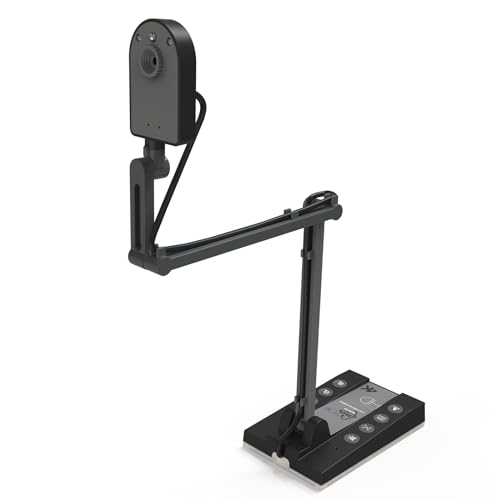
- HDMI output for TV, monitor, or projector
- 15MP sensor with up to 4K@15Hz capture
- A3 coverage with built-in LED and TF card slot
Best For: Teachers who need easy HDMI output and broad OS compatibility.
Versatile USB Teaching Cam

- 8MP capture with 2448P ultra HD resolution
- Works as a document camera and webcam
- Foldable alloy stand with mic, LED light, and autofocus
Best For: Remote teachers and presenters who want an all-in-one USB camera.
Hybrid Projection Pick
JOYUSING V500-4k 13MP HDMI/USB Document Camera

- Direct HDMI/VGA output without a computer
- 13MP camera with 4K/30fps and autofocus
- Includes HDMI cable, USB cable, remote, and adapter
Best For: Teachers and presenters who need flexible HDMI and USB use
Premium Classroom Choice
IPEVO VZ-R Ultra HDMI/USB Document Camera

- HDMI and USB dual mode for flexible setups
- 13MP imaging with 4K HDMI and Sony CMOS
- Built-in LED light and tactile image controls
Best For: Educators and meeting hosts wanting premium HDMI sharing
Budget-Friendly Teaching Pick
JOYUSING V508 8MP Triple-Mode Camera

- HDMI, VGA, and USB support for flexible use
- 8MP capture with autofocus and 100x digital zoom
- 5-stage dimmable LED lighting for low-light rooms
Best For: Teachers who want an affordable HDMI projection option
Ultra-Portable USB Pick

- 8MP capture up to 3264 x 2448
- Up to 30 fps at Full HD
- USB model for Mac, Windows, Chromebook
Best For: Teachers and presenters needing a compact USB document camera for demos and remote instruction
HDMI Dual-Mode Choice
JOYUSING V513 13MP Document Camera

- HDMI/USB dual-mode support
- 13MP capture up to 4160 x 3120
- Works with or without a computer
Best For: Buyers who want HDMI connectivity and standalone flexibility for classroom projection
High-Speed Conference Pick
AVer M11-8M USB HDMI Document Camera

- USB and HDMI connectivity
- 1080p+ at 60fps for smooth video
- 20x zoom with built-in mic and LED light
Best For: Users who want a premium all-rounder for classrooms, meetings, and recording
Wireless HDMI Flexibility – IPEVO VZ-X 3-Mode Document Camera
If you want a document camera with HDMI connection that can move easily between a classroom display, a projector, and a computer workflow, the IPEVO VZ-X is built for that kind of flexibility. It supports Wi-Fi, HDMI, and USB, with HD output in Wi-Fi and HDMI mode and near 4K capture in USB mode.
Best For: Teachers, presenters, and hybrid users who need wireless freedom plus direct HDMI output.
Pros:
- Offers three connectivity modes: Wi-Fi, HDMI, and USB.
- Captures in 1920 x 1080 in Wi-Fi and HDMI mode, and up to 3264 x 2448 in USB mode.
- Built-in LED light helps illuminate the viewing area.
- Battery life is rated for 9-12 hours, which supports full class or presentation sessions.
Cons:
- HDMI and wireless modes do not deliver the same near-4K detail as USB mode.
- At 2.6 pounds, it is not the lightest option for frequent travel.
Overall, the VZ-X stands out if you need a document camera that can switch between HDMI display use and wireless teaching without locking you into one setup. Its adjustable stand, battery power, and onboard controls make it especially practical for live presentations.
Large-Format 4K Capture – INSWAN INS-2 UHD 4K Doc Camera
The INSWAN INS-2 is a strong document camera with HDMI connection alternatives for users who prioritize image quality and large-format capture in a classroom or exhibition setting. It records 4K Ultra HD video from a 13MP sensor and is designed for A3-sized materials, two-page spreads, and artwork.
Best For: Educators and art instructors who need clear, large-area capture for detailed presentations.
Pros:
- 13MP sensor captures 4K Ultra HD at 3840 x 2160 at 30 fps.
- Supports A3-size documents with a flexible multi-joint arm.
- Built-in LED, anti-glare sheet, brightness control, and dual-mode autofocus improve presentation clarity.
- Plug-and-play support works with Windows, Mac, iPad, and Chromebook.
Cons:
- Connectivity is USB-based rather than HDMI directly.
- It is aimed more at stationary classroom use than portable setups.
If your main goal is crisp overhead imaging for large pages, artwork, or teaching demos, the INS-2 is a dependable pick. It favors presentation quality and broad compatibility over simple travel convenience.
HDMI Classroom Connector – TreasLin 15MP HDIM Document Camera
This document camera with HDMI connection is designed for teachers who want a straightforward way to switch from a computer workflow to a TV, monitor, or projector. The TreasLin model supports up to 4K at 15Hz, includes a 15MP sensor, and covers A3-size materials for lessons, meetings, and live broadcasts.
Best For: Teachers and presenters who want HDMI output plus flexible USB-C classroom use.
Pros:
- Supports HDMI connection to a TV, monitor, or projector.
- 15MP CMOS sensor outputs up to 4K@15Hz or 1080P@30Hz.
- Covers A3-size documents and includes built-in LED light.
- Works with Windows, Mac, Chrome OS, Linux, and major video apps.
Cons:
- 4K mode is limited to 15Hz, which is less fluid than 30Hz options.
- USB-C adapter is required for Mac use in conferencing setups.
For classrooms that need a simple HDMI-capable overhead camera with strong resolution and broad compatibility, this TreasLin unit checks many boxes. The TF card slot also adds a useful storage option when using HDMI mode.
Versatile USB Teaching Cam – 4K 8MP USB Document Camera
If you want a document camera with HDMI connection alternatives for everyday teaching, this 8MP model emphasizes flexible classroom use, webcam functionality, and easy setup. It supports 2448P ultra HD detail, a foldable alloy stand, and broad compatibility with Windows, Mac, Chromebook, and Linux.
Best For: Educators and remote presenters who want a compact document camera and webcam in one.
Pros:
- 8MP imaging with 2448P ultra HD resolution for sharp document display.
- Multi-joint design supports top view, side view, and selfie mode.
- Works as both a document camera and webcam, with a built-in microphone.
- Includes auto focus, 3-level LED fill light, and mirror/flip control.
Cons:
- This is a USB device, so it does not include direct HDMI connectivity in the supplied details.
- Best suited to desk-based use rather than large-format specialty imaging.
This is a practical pick if you want one camera for teaching, meetings, and recording without a complicated setup. Its foldable frame and webcam features make it especially useful for users who need versatility more than specialist classroom hardware.
Hybrid Projection Pick – JOYUSING V500-4k 13MP HDMI/USB Document Camera
If you want a document camera with HDMI connection that can also plug into a computer, the JOYUSING V500-4k is built for flexible classrooms and remote lessons. Its direct HDMI output lets you send images to a TV, monitor, or projector without a computer, while USB support keeps it useful for conferencing, teaching, and recording.
Best For: Teachers and presenters who want one camera for direct HDMI projection and computer-based use.
Pros:
- Direct HDMI, VGA, and USB modes for broad setup flexibility
- 13MP sensor with up to 4K/30fps and 1080p/60fps capture
- Autofocus plus 100x digital zoom for detailed close-ups
- 3-level dimmable LED lighting helps in darker rooms
Cons:
- Software download is required for some computer-based features
- Heavier than some compact document cameras at 2 kg
Overall, the V500-4k is a practical pick if HDMI-first presentation matters but you still want Windows and macOS compatibility for recording or online teaching. The included HDMI cable, USB cable, remote, and adapter make it easier to get started right away.
Premium Classroom Choice – IPEVO VZ-R Ultra HDMI/USB Document Camera
The IPEVO VZ-R Ultra is a strong document camera with HDMI connection for classrooms that need simple direct sharing to an IFP, TV, monitor, or projector. It also supports USB mode for software-based teaching, making it a good fit when you want both stand-alone presentation and computer-connected workflows.
Best For: Educators and meeting hosts who want a high-resolution HDMI document camera with dual-mode flexibility.
Pros:
- HDMI and USB dual mode for direct display or computer use
- 13MP imaging with up to 4K HDMI and 4096 x 3072 USB capture
- Sony CMOS sensor for fast focusing, noise reduction, and vibrant color
- Built-in LED light and tactile controls for real-time adjustments
Cons:
- Digital zoom is not included
- Optional scanner upgrade module is sold separately
This model stands out if you value image quality and classroom-friendly controls alongside HDMI convenience. The durable stand and included Visualizer software support make it a polished option for teaching, demonstrations, and online meetings.
Budget-Friendly Teaching Pick – JOYUSING V508 8MP Triple-Mode Camera
If you need a document camera with HDMI connection for basic teaching or live projection, the JOYUSING V508 covers the essentials without adding much complexity. It can connect directly to a projector or monitor, and its USB support keeps it usable for Windows, Mac, and Chromebook workflows.
Best For: Teachers who want an affordable HDMI document camera for projection and recording.
Pros:
- HDMI, VGA, and USB connectivity for multiple setup options
- 8MP sensor with live image capture up to 3264 x 2448
- Autofocus and 100x digital zoom help with close inspection
- 5-stage dimmable LED lighting supports darker rooms
Cons:
- Lower resolution than 13MP alternatives
- Some features rely on the included software download
The V508 is a sensible value choice when direct HDMI projection matters more than top-end imaging. Its included cables and remote make setup straightforward for classrooms, distance learning, and simple video recording.
Ultra-Portable USB Pick – IPEVO V4K 8MP Document Camera
If you want a document camera with HDMI connection features in your roundup but mainly need a reliable USB model for classroom demos or remote teaching, the IPEVO V4K is built for crisp overhead capture. Its 8MP sensor, fast autofocus, and high frame rate make it a practical fit for live presentations, especially when you need smooth switching between handouts, books, and small objects.
Best For: Teachers and presenters who want a lightweight USB document camera for live demos, conferencing, and distance learning.
Pros:
- 8MP sensor captures up to 3264 x 2448 detail
- Up to 30 fps at Full HD helps keep live streaming smooth
- Fast autofocus reduces interruptions when changing materials
- Works with Mac, Windows, and Chromebook setups
Cons:
- USB connectivity only, not HDMI
- No zoom feature listed
- Best performance depends on meeting system requirements
Overall, this is a strong no-fuss choice if your priority is image quality and broad software compatibility rather than direct HDMI output. The adjustable multi-jointed stand and compact design also make it a practical everyday classroom tool.
HDMI Dual-Mode Choice – JOYUSING V513 13MP Document Camera
If you’re shopping for a document camera with HDMI connection support, the JOYUSING V513 is the most direct match in this group. It works with or without a computer, offers HDMI/USB connectivity, and pairs a 13MP sensor with 4K live streaming for lessons, presentations, and recording.
Best For: Buyers who want HDMI connectivity and standalone flexibility for classroom projection or desktop use.
Pros:
- HDMI/USB dual-mode connectivity
- 13MP camera with up to 4160 x 3120 capture
- Streams up to 4K at 30 fps for smooth live projection
- Works with and without a computer on Windows and macOS
Cons:
- Heavier than simpler USB-only models at 1.8 kg
- Software setup requires downloading from Joyusing
- Large shooting area may take more desk space
For anyone prioritizing HDMI output, this model stands out because it can handle both direct projection and computer-based workflows. The autofocus, LED light, and multi-jointed stand round out a feature set suited to teaching and real-time document sharing.
High-Speed Conference Pick – AVer M11-8M USB HDMI Document Camera
The AVer M11-8M is a versatile document camera with HDMI connection support, making it a strong fit when you need both presentation and webcam-style use in one device. With 1080p+ video at 60fps, 20x zoom, and easy USB or HDMI hookup, it is designed for smooth teaching, recording, and remote conferencing.
Best For: Users who want a premium all-rounder for classrooms, video meetings, and quick switching between overhead and webcam modes.
Pros:
- USB and HDMI connectivity for flexible setup
- 1080p+ video at a seamless 60fps
- 20x zoom helps show fine details clearly
- Built-in microphone and LED light add convenience
Cons:
- Heavier than compact travel-focused document cameras
- Digital zoom may be more than casual users need
- Features may be more than basic home setups require
If you want a polished document camera with HDMI connection options and strong compatibility across major platforms, this AVer model delivers. Its foldable design and support for Zoom, Teams, OBS, and more make it especially appealing for users who move between teaching, presenting, and recording.
How We Picked the Best Document Camera with HDMI Connection
To narrow the field, we looked for models that fit real teaching and presentation workflows first. That means dependable HDMI output, clear image quality, usable autofocus or manual focus control, and enough flexibility for laptops, displays, interactive flat panels, and projectors. We also considered ease of setup, lighting support, recording or conferencing compatibility, and whether the camera is practical for daily use rather than just impressive on paper.
Quick Comparison
In this group, some models are best for direct display to a classroom screen, while others are better for hybrid teaching or webcam-style use. USB-only options are typically simpler for computer-based workflows, but a Document Camera with HDMI Connection is usually the better choice when you want low-latency projection to a monitor, TV, or projector without depending on software.
Key Buying Factors for a Document Camera with HDMI Connection
Image Quality and Resolution
Higher resolution can help with fine print, science specimens, and small text, but sensor quality and focus behavior matter just as much. Look for a camera that stays sharp across different distances and lighting conditions.
Connectivity and Compatibility
Check whether the HDMI output is standalone or part of a multi-mode design with USB or wireless support. If you plan to connect to a display directly, confirm the cable type, power requirements, and whether the camera works smoothly with your existing projector, monitor, or panel.
Lighting and Capture Area
Built-in LED lights are useful in dim classrooms or evening setups. Also consider the capture size if you regularly show A4, A3, or oversized materials.
Ease of Use
Teachers and presenters should prioritize simple controls, stable arms or stands, quick autofocus, and intuitive switching between display and webcam-style use.
Who Should Buy Which Document Camera with HDMI Connection?
Choose a Document Camera with HDMI Connection if you want fast, direct projection for lessons, demos, or conferences. Educators who need a simple classroom display should favor models with strong HDMI support and easy setup. Hybrid instructors and remote presenters may want multi-mode connectivity for both screen sharing and live calls. If portability matters, look for a lighter design and fewer setup steps. If you often show detailed objects or printed materials, prioritize resolution, focus performance, and a well-lit viewing area over extra software features.
For most buyers, the best choice is the one that matches how you teach or present every day: direct HDMI output for simplicity, or dual- and tri-mode flexibility for broader use.