
A digital picture frame with cloud storage makes it easy to keep family photos, travel shots, and milestone moments updated from anywhere. Instead of transferring files manually, you can send new images straight from your phone.
Below, we focus on frames that are simple to set up, easy to share with, and practical for everyday use—whether you want a thoughtful gift or a low-maintenance home display.
Best 10 Digital Picture Frame with Cloud Storage Picks for 2026
Editor’s Pick

- Free unlimited cloud storage with no subscription
- Send photos from phone through the app
- 1080p 10.1-inch touchscreen with auto on/off
Best For: Parents and grandparents who want easy family photo sharing
Most Established App Ecosystem

- Share photos by app, web, or email
- Secure U.S.-based cloud storage with encryption
- Multi-user access and auto-rotation features
Best For: Families wanting flexible sharing options and secure cloud access
Best Metal Build

- Free unlimited cloud storage with no subscription
- Premium metal body with rose gold finish
- Anti-glare 10.1-inch touchscreen and remote sharing
Best For: Buyers wanting a premium-looking frame with cloud sharing
Best Value Family Frame
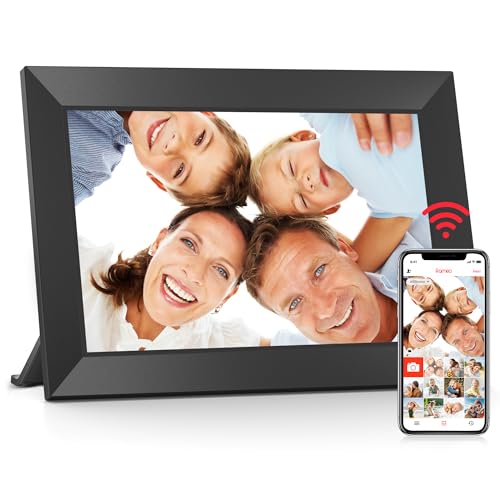
- Free Frameo app for remote photo and video sharing
- Built-in 32GB memory plus Micro SD support
- 10.1-inch IPS touchscreen with easy settings
Best For: Families wanting an easy gift frame with built-in storage
Premium Cloud-First Frame
Pix-Star LUX 10.4" Wi-Fi Digital Picture Frame

- Unlimited free cloud storage
- Remote-manage up to 25 frames
- App, email, USB, SD, and cloud sharing
Best For: Families wanting unlimited cloud storage and remote sharing
Large Touchscreen Family Frame
15.6" Frameo WiFi Digital Picture Frame

- 15.6-inch Full HD touchscreen
- 64GB storage for about 100,000 photos
- Frameo app for private family sharing
Best For: Large-screen gifting and easy private photo sharing
Balanced Cloud Sharing Frame
Anna Bella 10.1" WiFi Digital Picture Frame
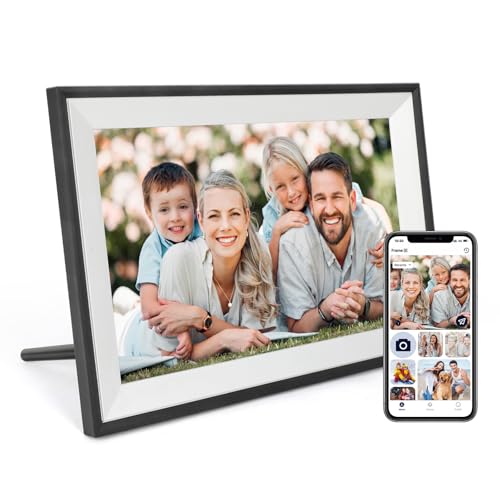
- AiMOR app for wireless sharing
- 32GB storage with 128GB SD expansion
- IPS display with auto-rotate and light sensor
Best For: Families seeking simple app sharing in a compact frame
Compact Cloud Family Frame

- App and email sharing over Wi-Fi
- 10.1-inch touch screen with auto-rotate
- 32GB storage for around 80,000 photos
Best For: Gift buyers who want a compact, simple cloud frame
Editor’s Pick – Aura 10" HD WiFi Frame
If you want a digital picture frame with cloud storage that feels polished and easy for the whole family, the Aura 10″ HD WiFi frame is a strong choice. It offers free unlimited cloud storage, app-based sharing from your phone, and a setup that’s meant to be quick for non-technical users.
Best For: Parents and grandparents who want a simple, premium-looking frame for everyday photo sharing.
Pros:
- Free unlimited cloud storage with no subscription required
- Easy photo and video sending from a phone through the app
- Auto on/off and smart display features for convenient daily use
- 10.1-inch 1080p touchscreen with a clean black finish
Cons:
- No built-in memory capacity is listed in the supplied details
- Designed around cloud/app sharing rather than offline-heavy workflows
Overall, this Aura frame stands out for its combination of unlimited cloud storage, straightforward sharing, and gift-friendly design. It’s a practical pick if you want the display to stay easy to manage after setup.
Most Established App Ecosystem – Nixplay 10.1" HD Touch Frame
The Nixplay is a well-known digital picture frame with cloud storage features built around simple app, web, and email sharing. If you want flexible ways to upload photos and videos, plus secure storage and multi-user access, this model is built for that kind of family use.
Best For: Families that want multiple ways to share memories into one connected frame.
Pros:
- Supports sharing via app, web app, or direct email
- Secure U.S.-based cloud storage with end-to-end encryption
- Multi-user access and the ability to manage multiple frames in one app
- Useful extras like auto-rotation, activity sensor, and touch screen
Cons:
- Resolution is listed as 720p, not 1080p
- Cloud storage is secure, but the notes do not call it unlimited
This frame makes sense if flexibility matters more than sheer display resolution. Its mix of app, email, and web uploads can make it easier to keep a family frame updated from anywhere.
Best Metal Build – ARZOPA D10 Rose Gold Frame
For shoppers comparing a digital picture frame with cloud storage, the ARZOPA D10 stands out with free unlimited cloud storage and a metal body. It combines direct phone sharing, touchscreen controls, and extra convenience features like weather, location, and wall mounting support.
Best For: Buyers who want a more premium-looking metal frame with strong sharing features.
Pros:
- Free unlimited cloud storage with no subscription required
- Metal frame construction with a rose gold finish
- HD IPS anti-glare touchscreen with 1280×800 resolution
- Supports remote sharing, member invitations, and TF card expansion
Cons:
- Cloud storage relies on the app and Wi-Fi for sharing
- Some advanced extras may be more than casual users need
ARZOPA is a strong fit if you care about both presentation and functionality. The metal build and broad feature set make it feel more upscale while still keeping sharing simple.
Best Value Family Frame – BIGASUO Frameo 10.1" 32GB
The BIGASUO Frameo is a practical digital picture frame with cloud storage-style sharing through the free Frameo app. It’s built for quick setup, family sharing from anywhere, and everyday use with a responsive touchscreen and built-in storage.
Best For: Families who want an easy-to-use gift frame with local storage and remote sharing.
Pros:
- Free Frameo app lets you upload photos and videos from anywhere
- Built-in 32GB memory with Micro SD card expansion support
- 10.1-inch IPS touchscreen with 1280×800 resolution
- Includes useful display settings like auto-rotate, slideshow, and sleep mode
Cons:
- The notes do not mention unlimited cloud storage
- Plastic frame material feels less premium than metal alternatives
If you want a straightforward family frame that balances features and ease of use, BIGASUO is a solid option. It covers the essentials well and adds enough storage flexibility for regular photo updates.
Premium Cloud-First Frame – Pix-Star LUX 10.4" Wi-Fi Digital Picture Frame
If you want a digital picture frame with cloud storage that feels built for ongoing family sharing, the Pix-Star LUX stands out with lifetime free cloud backup and remote management for multiple frames. It is designed for easy photo delivery from app, email, cloud services, USB, or SD card, while the 10.4-inch no-glare IPS display keeps images looking natural.
Best For: Families who want unlimited cloud storage, remote control, and flexible sharing without subscription fees.
Pros:
- Unlimited free cloud storage with no subscription required
- Can manage up to 25 Pix-Star frames remotely
- 10.4-inch 4:3 IPS no-glare display preserves original photo composition
- Multiple transfer options: app, email, Google Photos, Dropbox, OneDrive, Flickr, USB, and SD card
Cons:
- Smaller display than larger 15.6-inch frames
- Uses button controls instead of a touchscreen
- Premium feature set may be more than casual users need
This is a strong pick if your priority is long-term cloud-backed photo sharing with broad input options and remote control. The motion sensor, weather, calendar, and media extras add convenience, but the main appeal is the unlimited storage and flexible family sharing.
Large Touchscreen Family Frame – 15.6" Frameo WiFi Digital Picture Frame
For shoppers comparing a digital picture frame with cloud storage, this 15.6-inch Frameo model focuses on private app sharing plus a large Full HD display. It combines 64GB built-in storage with SD and USB support, making it a practical choice if you want both wireless sending and plenty of room for a large photo collection.
Best For: Buyers who want a large touchscreen frame with easy private sharing and ample local storage.
Pros:
- Large 15.6-inch 1920 x 1080 IPS Full HD touchscreen
- 64GB built-in storage, with room for about 100,000 photos
- Frameo app lets family and friends send photos and short videos remotely
- Supports SD cards and USB flash drives for import, export, and backup
Cons:
- Only supports 2.4GHz Wi-Fi
- App video uploads are limited to 15 seconds
- USB port does not support direct computer photo transfer
This frame makes sense if screen size and easy family sharing matter more than advanced cloud features. The large display, touchscreen controls, and flexible storage options make it especially appealing for a living room or gifting use case.
Balanced Cloud Sharing Frame – Anna Bella 10.1" WiFi Digital Picture Frame
If you want a digital picture frame with cloud storage in a compact size, the Anna Bella 10.1-inch model offers simple app-based sharing and enough built-in memory for a substantial photo library. It pairs Wi-Fi sharing through the AiMOR app with auto-rotate, light-sensing brightness adjustment, and expandable storage for more flexibility.
Best For: Families wanting a straightforward cloud-connected frame with good display quality and easy setup.
Pros:
- AiMOR app supports wireless photo and short video sharing from Android and iOS
- 32GB storage plus support for up to 128GB SD expansion
- 1280 x 800 IPS display with wide viewing angles and accurate color reproduction
- Auto-rotate and built-in light sensor help the frame adapt to placement and lighting
Cons:
- Wi-Fi support is limited to 802.11 b/g/n networks
- Smaller screen than 15.6-inch alternatives
- Software uses AiMOR, not Frameo, which may matter if you already use that ecosystem
Overall, this is a practical middle-ground option for everyday family photo sharing. It does not emphasize unlimited cloud storage like some premium frames, but it does offer dependable wireless sharing, solid image quality, and useful automatic display features.
Large Family Sharing Frame – 15.6" Frameo Touchscreen
If you want a digital picture frame with cloud storage for a big, easy-to-see display, this 15.6-inch Frameo model is built around simple sharing and everyday convenience. It lets you send photos and videos through the Frameo app over 2.4GHz Wi-Fi, while also supporting SD card, USB, and USB-C transfer for times when you want to load images locally.
Best For: Families who want a large, giftable frame with both cloud sharing and offline transfer options.
Pros:
- 15.6-inch 1080p IPS touchscreen gives a large, clear viewing area.
- Frameo app supports instant photo and video sharing from anywhere.
- 32GB built-in storage plus support for external SD card or USB drive.
- Works with non-Wi-Fi transfer methods, which is helpful for less techy users.
Cons:
- Only supports 2.4GHz Wi-Fi.
- External SD card and USB drive are not included.
- Large size may be more than some desks or shelves need.
This is a practical choice if you want a roomy display and flexible transfer options in one package. The mix of app sharing, local imports, and wall-mount/tabletop placement makes it especially easy to fit into family routines.
Compact Cloud Family Frame – Classic 10 Brown 10.1"
This digital picture frame with cloud storage is a strong pick if you want a smaller, easy-to-use frame that keeps family updates flowing. The Dragon Touch Classic 10 receives photos and videos through Wi-Fi using the app or email, and its touch screen interface keeps setup and day-to-day use straightforward.
Best For: Gift buyers and families who want a compact cloud-connected frame that’s simple to manage.
Pros:
- Cloud sharing via app and email makes remote updates convenient.
- 10.1-inch touch screen is user-friendly for all ages.
- 32GB built-in storage holds around 80,000 photos.
- Auto-rotate, sleep mode, and wall-mount support add flexibility.
Cons:
- Wi-Fi sharing only works on 2.4GHz networks.
- Smaller 10.1-inch screen may feel limited next to larger frames.
- Best suited to casual display use rather than a premium large-format setup.
For shoppers who value convenience over size, this model covers the essentials well. It combines cloud updates, simple controls, and generous storage in a frame that’s easy to place almost anywhere.
High-Capacity Sharing Frame – 15.6" 64GB AiMOR
If you’re comparing a digital picture frame with cloud storage for a larger photo library, this 15.6-inch model stands out with its 64GB built-in memory and AiMOR app sharing. It’s designed for fast wireless uploads of photos and short videos, while the touchscreen and auto-rotate features help it fit into everyday home use.
Best For: Users who want a large frame with more internal storage and easy remote sharing.
Pros:
- 64GB built-in storage supports 80,000+ photos.
- 15.6-inch 1080p IPS touchscreen offers a large, sharp display.
- AiMOR app supports wireless photo and short video sharing from anywhere.
- Wall-mountable and desktop-friendly with auto-rotation.
Cons:
- Short videos are limited to 15 seconds through the app.
- Wi-Fi frame still depends on wireless setup for cloud-style sharing.
- May be larger than needed if you just want a small bedside display.
This is a well-rounded option if storage capacity matters as much as sharing convenience. The larger screen, 64GB memory, and multi-user sharing make it a practical fit for families who send a lot of pictures back and forth.
How We Picked the Best Digital Picture Frame with Cloud Storage
We prioritized models that make sharing simple, offer dependable Wi-Fi connectivity, and provide enough storage or cloud access for regular updates. We also looked for clear displays, responsive touch controls, and useful extras like auto-rotation, motion sensing, and no-subscription cloud features.
Quick Comparison
The biggest differences among these frames are screen size, display quality, storage approach, and sharing method. Smaller 10- to 10.4-inch options are better for desks, nightstands, and gifting, while 15.6-inch models create a stronger wall or shelf presence and are easier to view from across a room. If you want a Digital Picture Frame with Cloud Storage for frequent family sharing, pay close attention to app quality and upload limits.
Key Buying Factors for a Digital Picture Frame with Cloud Storage
Screen Size and Resolution
A larger display works well for group photos and shared living spaces, but resolution matters just as much. Look for at least HD on smaller frames and Full HD on larger models to keep photos sharp.
Storage and Sharing
Some frames rely on internal memory, while others emphasize cloud access or app-based sharing. If you plan to update albums often, choose a frame that supports easy remote sending and enough built-in storage for offline playback.
Display Finish and Viewing Angles
Anti-glare or no-glare screens help in bright rooms, and IPS panels usually provide better color and wider viewing angles. That matters if the frame will sit in a sunny kitchen, office, or family room.
Ease of Use
Touchscreen controls, auto-rotation, motion sensors, and simple setup can make a big difference, especially for older relatives or gift recipients who want a low-hassle experience.
Who Should Buy Which Digital Picture Frame with Cloud Storage?
If you want the easiest gifting experience, choose a compact frame with app-based sharing and a clean setup. If you need a centerpiece for the living room, a 15.6-inch Full HD model is usually the better pick. For families who send photos often, look for the most flexible cloud-sharing system and generous storage. If subscription fees are a concern, focus on no-subscription models with free cloud access or robust internal memory.
In short, the best choice depends on where the frame will live, how often you plan to upload photos, and whether convenience or screen size matters more. A good Digital Picture Frame with Cloud Storage should make sharing feel effortless, not like another device to manage.