
A great digital frame should make it easy for grandparents to see new photos from the whole family without extra effort. The best models are simple to set up, clear to view, and reliable day to day.
In this roundup, we focused on frames that balance easy sharing, useful screen sizes, and features that make gifting straightforward for busy families.
Best 10 Digital Picture Frame for Grandparents Picks for 2026
Easy-to-Use Family Sharing
Skylight Frame 10-Inch WiFi Touchscreen

- Plug in, connect to Wi-Fi, and start sharing
- 10-inch Full HD color touchscreen
- Gift Mode and cloud storage simplify setup
Best For: Grandparents who want easy family photo sharing
Premium Connected Sharing
Nixplay 10.1-Inch HD Touch Frame

- Upload by app, web app, or email
- Multi-user sharing works across multiple frames
- Secure cloud storage with encryption
Best For: Families wanting premium sharing features
Cloud Storage Without Fees

- Free unlimited cloud storage, no subscription
- Send photos from phone over Wi-Fi
- 1080p display with auto on/off
Best For: Grandparents who want no-fee cloud sharing
Feature-Packed Family Frame
FRAMEO 10.1-Inch Smart WiFi Frame

- Private photo and short-video sharing via app
- 32GB built-in memory with micro SD support
- Extras include weather, clock, and calendar sync
Best For: Grandparents who want lots of useful features
Premium Large-Format Sharing

- 15.6-inch Full HD IPS display
- Frameo app sharing plus video support
- 32GB storage with SD, USB, and USB-C options
Best For: Grandparents who want a large, vivid frame with easy family sharing
Easy Setup Family Frame
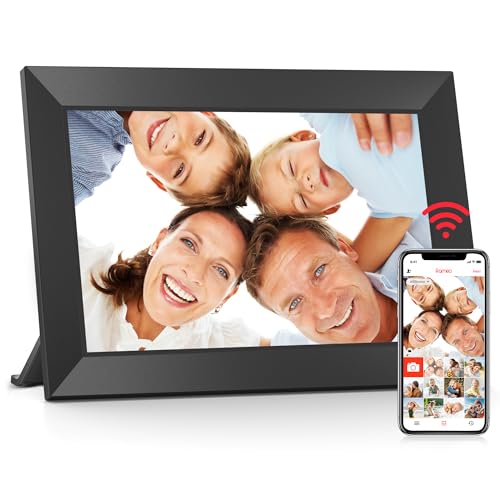
- 10.1-inch touchscreen with easy setup
- Frameo app for secure photo and video sharing
- 32GB memory with micro SD expansion
Best For: Grandparents who want a smaller, easy-to-use shared photo frame
Storage-Heavy Shared Display

- 15.6-inch Full HD touchscreen
- 64GB storage for about 100,000 photos
- App sharing plus SD, USB, and video sound support
Best For: Grandparents who want a large frame with lots of storage and video playback
Compact shared-photo frame

- 10.1-inch HD IPS touch display
- Invite-only photo sharing via Frameo app
- 32GB storage with microSD support
Best For: Grandparents who want a compact, easy-touch frame for private family photo sharing.
Large room-viewing frame

- 15.6-inch Full HD IPS touchscreen
- 64GB storage with SD and USB support
- Private sharing through the Frameo app
Best For: Grandparents who want a big, bright screen with easy remote photo sharing.
Gift-ready memory keeper
BIGASUO 15.6" Frameo Photo Display

- 15.6-inch Full HD IPS touchscreen
- 64GB storage for 100,000+ photos
- Preload photos and share via Frameo
Best For: Grandparents who want a gift-ready frame with lots of storage and straightforward app sharing.
Easy-to-Use Family Sharing – Skylight Frame 10-Inch WiFi Touchscreen
If you want a digital picture frame for grandparents that keeps setup simple, the Skylight Frame is built around plug-and-play sharing. Just connect it to Wi-Fi, choose a Skylight email address, and start sending photos and videos from anywhere. The 10-inch touchscreen and cloud-based storage make it easy to use without dealing with SD cards.
Best For: Grandparents who want a straightforward frame that family members can update remotely.
Pros:
- Easy setup with Wi-Fi and a unique email address
- Full HD 10-inch color touchscreen
- Cloud-based storage, so no SD card is needed
- Gift Mode helps preload photos before unboxing
Cons:
- Wi-Fi is required to receive or upload new photos
- Offline mode only works with existing photos already on the frame
Overall, this is a practical choice if your main priority is making family photo sharing effortless. It’s designed to be simple for older relatives while still giving family members an easy way to keep the frame updated.
Premium Connected Sharing – Nixplay 10.1-Inch HD Touch Frame
The Nixplay frame is a strong digital picture frame for grandparents if you want a polished display with flexible sharing options. It supports uploads through the app, web app, or email, and the multi-user setup makes it easy for several family members to contribute. The touch screen, auto-rotation, and activity sensor add convenience once it’s in place.
Best For: Families who want a premium-feeling frame with secure cloud sharing and multiple ways to upload photos.
Pros:
- Uploads via app, web, or direct email
- Multi-user access and management for multiple frames
- Auto-rotation, AI face centering, and activity sensor
- Secure U.S.-based cloud storage with encryption
Cons:
- Resolution is listed as 720p rather than full HD
- More feature-rich than a basic frame, so it may feel less minimal
For families who want broad sharing flexibility and added smart features, this model stands out. It balances an easy gifting experience with tools that make ongoing photo updates simple from almost any device.
Cloud Storage Without Fees – Aura 10-Inch HD WiFi Frame
If you’re shopping for a digital picture frame for grandparents and want a clean, modern option, Aura focuses on simple phone-to-frame sharing. It offers free unlimited cloud storage with no subscription, and photos can be sent from a smartphone over Wi-Fi. The frame also includes auto on/off support and a 1080p display for crisp viewing.
Best For: Grandparents and families who want unlimited cloud storage without an ongoing fee.
Pros:
- Free unlimited cloud storage with no subscription
- Send photos directly from a phone over Wi-Fi
- 1080p display for sharp image quality
- Auto on/off adds convenience
Cons:
- Sharing is centered on smartphone use, so it may suit app-based users best
- Does not emphasize extra display features like touch controls in the notes
This frame is a good fit if you want to avoid subscription costs while keeping photo sharing simple. Its combination of cloud storage, high-resolution display, and easy sending makes it especially appealing for ongoing family gifting.
Feature-Packed Family Frame – FRAMEO 10.1-Inch Smart WiFi Frame
The FRAMEO smart frame is a feature-heavy digital picture frame for grandparents who want more than basic photo display. Family members can send photos and short videos through the Frameo app, while the 10.1-inch IPS touchscreen supports easy viewing from different angles. Built-in memory, auto-rotate, and extras like weather, clock, and calendar features make it versatile for everyday use.
Best For: Grandparents who like extra display features, family interaction, and organized photo sharing.
Pros:
- Send photos and short videos privately through the Frameo app
- 10.1-inch IPS touch screen with 1280×800 resolution
- Built-in 32GB memory plus micro SD expansion support
- Extras include weather, clock, calendar sync, and collage mode
Cons:
- Video clips are limited to 15 seconds
- It includes many settings, which may be more than some users need
This is a versatile option if you want a frame that can do more than simply cycle through photos. Its mix of private sharing, memory expansion, and useful screen features makes it well suited to active family use.
Premium Large-Format Sharing – 15.6" Frameo Touchscreen
If you’re shopping for a digital picture frame for grandparents, this 15.6-inch Frameo model is built for easy family sharing and a bigger, easier-to-see display. The Full HD IPS screen, touch controls, and support for photos or videos make it a strong pick when you want a simple setup with plenty of room for memories.
Best For: Grandparents who want a large, vivid frame that can receive photos and videos from family near or far.
Pros:
- 15.6-inch 1920 x 1080 Full HD IPS display for a sharp, colorful viewing experience
- Frameo app support lets family send photos and videos remotely over 2.4GHz Wi-Fi
- 32GB built-in storage plus SD card, USB, and USB-C transfer options for offline use
- Touchscreen controls, auto-rotate, sleep mode, and greeting/react features add flexibility
Cons:
- Only supports 2.4GHz Wi-Fi, not 5GHz networks
- Some transfer methods require compatible FAT32-formatted media
- Large size may be more than some buyers need for a small table or shelf
Overall, this is a practical choice if screen size and remote sharing matter most. It combines a generous display with multiple ways to load photos, which helps make it accessible for grandparents and convenient for the rest of the family.
Easy Setup Family Frame – 10.1" Frameo Photo Display
This digital picture frame for grandparents focuses on straightforward sharing in a compact size. The 10.1-inch touchscreen, Frameo app support, and 32GB memory make it a useful everyday option if you want family photos to arrive quickly without a complicated setup.
Best For: Grandparents who prefer a smaller, simple-to-use frame with remote photo sharing.
Pros:
- Frameo app allows secure photo and video sharing from iOS or Android devices
- 10.1-inch IPS touchscreen is designed to be user-friendly and easy to operate
- 32GB built-in memory with micro SD card expansion adds storage flexibility
- Helpful features like auto-rotate, brightness adjustment, sleep mode, and album creation
Cons:
- Smaller 10.1-inch screen may feel limited compared with larger frames
- Resolution is 1280 x 800, not full HD
- Wi-Fi sharing is the main convenience feature, so it’s less hands-on than USB-only frames
For most families, this model offers a balanced mix of ease of use and useful smart features. It’s especially appealing when you want a dependable frame that grandparents can enjoy without needing a lot of technical effort.
Storage-Heavy Shared Display – 15.6" Uhale FHD Frame
When choosing a digital picture frame for grandparents, this Uhale model stands out for its large storage and easy remote sharing. The 15.6-inch Full HD touchscreen, built-in speaker, and 64GB memory make it a good fit for families who want lots of photos on display and occasional videos with sound.
Best For: Grandparents who want a large frame with lots of built-in storage and video playback.
Pros:
- 15.6-inch 1920 x 1080 IPS Full HD touchscreen offers a large, clear viewing area
- 64GB built-in storage can hold about 100,000 photos, with SD card and USB support for backup or import
- Uhale app lets family send photos and videos remotely over Wi-Fi
- Built-in speaker supports videos with sound, plus adjustable brightness, volume, and sleep mode
Cons:
- App video uploads are limited to 2 minutes
- Larger SD/USB capacities may not work properly; 32GB is recommended for best compatibility
- Feature-rich controls may be more than some users need if they only want basic photo display
This frame is a strong choice if storage and a bigger screen are top priorities. It gives families plenty of room to keep adding memories while still offering straightforward app-based sharing for grandparents to enjoy.
Compact shared-photo frame – Frameo 10.1" WiFi Touch Frame
If you want a digital picture frame for grandparents that is easy to use and simple to keep updated, this 10.1-inch Frameo model is a practical pick. It lets family members send photos and short videos remotely through the Frameo app, while the touch screen and clear HD display make everyday viewing straightforward.
Best For: Grandparents who want a compact, easy-touch frame for private family photo sharing.
Pros:
- Frameo app lets invited family and friends send photos and up to 15-second videos from anywhere.
- 10.1-inch IPS HD touch screen is designed to be intuitive and easy to navigate.
- 32GB built-in storage holds over 80,000 photos and supports microSD card backup.
- Includes extra features like calendar sync, collage mode, weather, clock, and sleep settings.
Cons:
- App-based video uploads are limited to 15 seconds.
- MicroSD compatibility is limited to cards up to 32GB formatted as FAT32 for best results.
- The screen is smaller than the 15.6-inch alternatives in this roundup.
This is a solid choice if you value a simpler, smaller frame with privacy-focused sharing and enough storage for a large family photo library. It is especially appealing as a gift-ready option for seniors who want photos without extra fuss.
Large room-viewing frame – Frameo 15.6" FHD Touch Frame
This digital picture frame for grandparents is a strong choice if you want a larger display and easy remote sharing. The 15.6-inch Frameo frame combines Full HD resolution, touch controls, and private app-based sharing so family members can keep photos and short videos flowing in from anywhere.
Best For: Grandparents who want a big, bright screen with easy remote photo sharing.
Pros:
- Large 15.6-inch 1920 x 1080 IPS Full HD touchscreen shows photos with vivid color and wide viewing angles.
- 64GB built-in memory stores about 100,000 photos and supports SD cards plus USB flash drives.
- Frameo app sharing is private and secure, with support for photos and up to 15-second videos.
- Extra features include auto-rotate, slideshow, weather, clock, brightness adjustment, and sleep mode.
Cons:
- Wi-Fi setup only supports 2.4GHz networks.
- App video uploads are capped at 15 seconds.
- Best compatibility notes recommend 32GB SD/USB storage, since some 64GB or 128GB media may not work reliably.
For families that want a larger screen that is easier to see from across a room, this model stands out. It offers the biggest display in this list along with the most versatile storage options for everyday use.
Gift-ready memory keeper – BIGASUO 15.6" Frameo Photo Display
If you are shopping for a digital picture frame for grandparents and want a gift that feels personal, this BIGASUO 15.6-inch model is built for easy sharing and large-scale photo storage. It uses the Frameo app for private remote uploads and pairs that with a Full HD touchscreen that makes family moments look clear and bright.
Best For: Grandparents who want a gift-ready frame with lots of storage and straightforward app sharing.
Pros:
- Frameo app allows private sharing of photos and videos from anywhere with added captions.
- 15.6-inch 1920×1080 IPS touchscreen provides vivid Full HD viewing with wide angles.
- 64GB storage holds 100,000+ photos, with SD card and USB drive import options.
- Gift-friendly setup includes the ability to preload photos and videos before gifting.
Cons:
- Video uploads through the Frameo app are limited to 15 seconds.
- Best compatibility notes recommend 32GB SD or USB media, since larger sizes may not work reliably.
- USB support is for flash drives only, not computer photo transfer.
This model is a good fit if you want a large, modern frame that can be filled with a huge photo library before it is even unwrapped. Its combination of storage, app sharing, and preload-friendly setup makes it a thoughtful long-distance family gift.
How We Picked the Best Digital Picture Frame for Grandparents
For this Digital Picture Frame for Grandparents guide, we prioritized ease of use first. That means straightforward setup, intuitive touch controls, dependable Wi-Fi sharing, and displays that are easy to read from across a room. We also looked for practical storage options, auto-rotation, and strong app or cloud support so family members can send photos with minimal friction.
Quick Comparison
Smaller 10.1-inch frames are usually the simplest and most affordable choice, especially for a bedside table or kitchen counter. Larger 15.6-inch frames are better when you want a more visible display in a living room or common area. Frames with Full HD screens generally look sharper, while models with generous built-in storage or unlimited cloud access can be easier for families who share lots of photos.
Key Buying Factors for a Digital Picture Frame for Grandparents
Ease of Setup
Choose a frame that can be installed quickly and managed remotely. The best options let one family member handle setup, then make it easy for others to send photos later.
Screen Size and Clarity
For older viewers, a larger screen and good brightness can make a big difference. If the frame will be viewed from several feet away, a 15.6-inch display may be worth it. For smaller spaces, a 10.1-inch model is usually enough.
Photo Sharing Method
Look at how photos are sent: app, email, cloud, or shared album. A good Digital Picture Frame for Grandparents should let family members add photos quickly without requiring the recipient to do much at all.
Storage and Subscriptions
Some frames offer built-in storage, while others rely more on cloud services. Check whether ongoing fees apply. For many buyers, no-subscription storage or free cloud support is a major advantage.
Orientation, Auto-On/off, and Mounting
Auto-rotation helps photos look right in portrait or landscape mode. Auto-on/off is also useful for daily routines, and wall-mount or tabletop placement options can make the frame easier to fit into the home.
Who Should Buy Which Digital Picture Frame for Grandparents?
If you want the simplest gift possible, a 10.1-inch Wi-Fi frame with strong app support is usually the best starting point. If visibility matters most, pick a larger 15.6-inch frame with Full HD resolution. If your family shares photos often, choose a model with large storage or unlimited cloud access. And if you’re buying for grandparents who are not tech-savvy, prioritize easy setup, responsive touch controls, and a clear interface over extra features they may never use.
In short, the best frame is the one that makes family photos feel effortless to receive, enjoy, and keep updated all year long.