
If you want to preserve aging slide collections, choosing the right scanner matters more than chasing the highest spec sheet number. The best options balance resolution, color accuracy, and simple handling so you can turn boxes of memories into usable digital files.
This roundup of the best high resolution scanner for old slides focuses on models that make archiving easier for families, hobbyists, and anyone digitizing a lifetime of photos.
Best 10 High Resolution Scanner for Old Slides Picks for 2026
Budget-Friendly All-in-One

- 22MP output for slides and negatives
- 5" LCD for previewing and simple edits
- Saves to SD/SDHC and connects to PC/Mac/TV
Best For: Easy home scanning of mixed slide collections
Premium 35mm Scanner

- Up to 7200 dpi for 35mm slides
- Infrared dust and scratch detection
- Includes SilverFast Ai Studio 9 and IT8 target
Best For: Detailed 35mm slide scanning with color calibration
Easy Large-Screen Scanner

- Supports 135mm, 110mm, and 126mm formats
- 7" display with tilting photo-frame style design
- Saves directly to SD/SDHC cards
Best For: Quick stand-alone scanning of mixed family archives
High-Detail Standalone Pick

- 24MP output for slides and film
- 5" LCD with HDMI viewing support
- On-device brightness and RGB adjustments
Best For: Standalone scanning with simple controls and good detail
Detail-first film scanner
7200 DPI 35mm Film Detail Pick

- 7200 DPI optical resolution for fine detail
- 48-bit output and strong dynamic-range capture
- SilverFast SE Plus bundle included
Best For: Archiving 35mm slides and negatives with maximum detail
Easy standalone scanner
Easy No-Computer Slide Converter
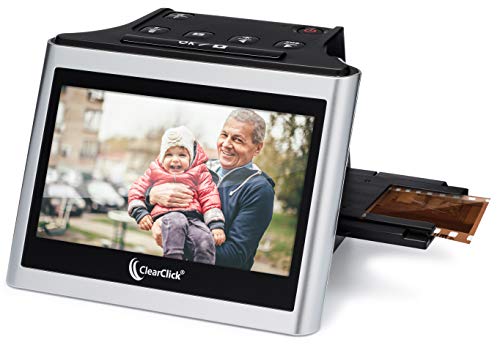
- Scans 35mm, 110, and 126 slides and negatives
- 5-inch LCD preview screen with real-time viewing
- No computer or drivers required
Best For: Simple digitizing of mixed slide and negative formats
Touchscreen batch scanner

- 7-inch touch display for preview and editing
- Quick-feed tray speeds up batch scanning
- USB and HDMI support easy sharing
Best For: Fast, user-friendly scanning with on-device editing
Premium Batch Scanner
Plustek OpticFilm 135i for 35mm Slides

- 7200 dpi output for slides and negatives
- Infrared channel helps with dust and scratches
- Scans four slides or six frames at once
Best For: People digitizing many 35mm slides who want high-detail batch scanning
Budget Standalone Picker
DIGITNOW! 135 Film Slide Scanner

- Standalone scanner saves to SD card
- 2.4-inch LCD makes adjustments easy
- 1800 DPI for 35mm slides and negatives
Best For: Casual users who want simple no-computer slide scanning
Touchscreen All-Rounder

- 5-inch touchscreen for preview and editing
- 13MP sensor with 22MP interpolation
- Works with 135, 126, and 110 formats
Best For: Home archivers with mixed slide and negative collections
Budget-Friendly All-in-One – Kodak Slide N Scan 22MP
If you want a high resolution scanner for old slides that’s easy to use at home, this KODAK model is a practical pick. It scans 135, 110, and 126 slides and negatives, offers a 22MP output, and lets you preview, edit, and save directly to an SD card without a complicated setup.
Best For: Home users who want a simple, compact scanner for mixed slide and negative collections.
Pros:
- 22MP digital output with support for 135, 110, and 126 slides and negatives
- 5″ LCD screen makes previewing and basic editing straightforward
- Quick-loading film trays help speed up scanning sessions
- Saves directly to SD or SDHC card and can connect to PC, Mac, or TV
Cons:
- SD card is not included
- Not designed for 35mm-only workflow flexibility like a dedicated film scanner
This is a strong choice if convenience matters more than advanced scanning controls. It handles the essentials well and keeps the process simple for turning old slide boxes into digital files.
Premium 35mm Scanner – Plustek OpticFilm 8200i AI
For buyers seeking a high resolution scanner for old slides with more control, the Plustek OpticFilm 8200i AI is aimed at 35mm film and slides. It offers up to 7200 dpi resolution, infrared dust and scratch detection, and bundled SilverFast Ai Studio 9 with an IT8 calibration target for more precise color work.
Best For: Enthusiasts who scan 35mm slides and want higher-end detail and color accuracy tools.
Pros:
- Up to 7200 dpi resolution for detailed 35mm scans
- Infrared channel helps detect dust and scratches on color negatives and slides
- Includes SilverFast Ai Studio 9 and an IT8 calibration target
- Supports HDRi output for 64-bit color or 32-bit grayscale workflows
Cons:
- Infrared dust removal does not work for black-and-white negatives
- Limited to 35mm film and slides
This model is better suited to users who care about scan quality and post-processing control than speed or simplicity. If your archive is mostly 35mm slides, it stands out for detail and color management.
Easy Large-Screen Scanner – Kodak Slide N Scan Max
If you want a high resolution scanner for old slides that’s simple to operate, the KODAK Slide N Scan Max focuses on fast, everyday digitizing. It supports 135mm, 110mm, and 126mm slides and negatives, saves straight to SD or SDHC cards, and produces up to 4208 x 3120 files from its 13MP CMOS sensor with 22MP interpolation.
Best For: Families with mixed slide and negative collections who want quick scanning without a computer.
Pros:
- Supports 135mm, 110mm, and 126mm slides and negatives
- Large 7″ display and tilting design make viewing flexible
- Saves directly to SD/SDHC cards up to 32GB
- One-touch editing keeps the workflow simple
Cons:
- SD/SDHC card is not included
- Digital interpolation is used to reach 22MP output
This is a solid option when ease of use and fast handling matter most. It’s especially appealing if you want a stand-alone scanner that can double as a display while you work through a photo archive.
High-Detail Standalone Pick – Magnasonic FS71 24MP
The Magnasonic FS71 is a good fit if you’re looking for a high resolution scanner for old slides without relying on a computer. It converts 135, 126, and 110 slides, plus several film formats, into 24MP JPEG files, and the built-in 5″ LCD makes it easy to review scans and make basic adjustments on the device.
Best For: Users who want a self-contained scanner for slides and film with easy on-device controls.
Pros:
- 24MP output for high-resolution digital JPEG files
- Supports 135, 126, and 110 slides as well as multiple film formats
- 5″ LCD and HDMI output provide flexible viewing options
- Brightness and RGB color correction can be adjusted on the scanner
Cons:
- SD card is not included
- Designed for straightforward adjustments rather than advanced editing software
For a plug-and-play style workflow, this scanner covers the key basics well. It is a practical choice if you want solid resolution, quick scans, and minimal setup.
Detail-first film scanner – 7200 DPI 35mm Film Detail Pick
If you want a high resolution scanner for old slides and 35mm negatives, the Plustek OpticFilm 8100 is built for detail-focused digitizing. Its 7200 DPI optical resolution and 48-bit output are aimed at producing very large, print-ready files, while the CCD sensor and LED light source are designed to preserve shadow and highlight detail.
Best For: Users who want maximum detail from 35mm slides and negatives, especially for large prints or archival-quality scans.
Pros:
- 7200 DPI and 69 MP-equivalent output for high-detail scans
- 48-bit color depth and dynamic range support shadow and light detail
- Includes SilverFast SE Plus software bundle for scanning and image processing
- Supports Windows and Mac, with a free carry bag included
Cons:
- Designed for 35mm film and slide mounts only
- Requires a computer and driver/software setup
- Less convenient than all-in-one scanners with built-in screens
For buyers who prioritize resolution over convenience, this is the most detail-oriented option in the group. It makes the most sense when your old slides are worth careful restoration, large-format printing, or long-term archiving.
Easy standalone scanner – Easy No-Computer Slide Converter
The ClearClick Virtuoso 2.0 is a practical high resolution scanner for old slides if you want a simple, standalone workflow. It scans 35mm, 110, and 126 film plus 50mm slides to 22MP interpolated files, and the large 5-inch LCD lets you preview scans in real time without needing a computer.
Best For: Anyone who wants a straightforward, no-computer scanner for mixed old slide and negative formats.
Pros:
- Standalone use with no computer or drivers required
- 5-inch preview screen makes it easy to check scans as you go
- Works with 35mm, 110, and 126 negatives plus 50mm slides
- Includes mini HDMI output for viewing on a TV
Cons:
- 22MP is interpolated rather than a stated optical resolution
- SD card is not included
- Not aimed at advanced control or software-based editing
This model is less about maximum technical detail and more about convenience and compatibility. It is a strong fit for users digitizing family slides in several formats and who prefer an easy, self-contained scanner.
Touchscreen batch scanner – Touchscreen Batch Scan Pick
The HP Film & Slide Scanner is a good high resolution scanner for old slides if you value an easy touchscreen workflow more than raw optical specs. Its 7-inch LCD touch display, built-in editing tools, and quick-feed tray are designed to make previewing, correcting, and batching old slides and negatives simple on the device itself.
Best For: Users who want a user-friendly touchscreen scanner for quick batch digitizing and on-device editing.
Pros:
- 7-inch touch LCD allows previewing, editing, and viewing on the scanner
- Quick-feed tray with 50mm adapter supports fast batch scanning
- Built-in tools let you crop and adjust brightness, color, and size
- USB and HDMI connections add transfer and display flexibility
Cons:
- 13MP sensor and 1200 dpi are lower than dedicated high-resolution film scanners
- Best suited to 35mm, 135, 126, and 110 formats rather than wider film types
- More convenience-focused than precision-focused
Compared with the other options here, this HP model leans hard into ease of use and workflow speed. It is a sensible choice if your priority is quickly converting old slides into shareable digital files without relying on outside software.
Premium Batch Scanner – Plustek OpticFilm 135i for 35mm Slides
If you want a high resolution scanner for old slides with a focus on detail and batch efficiency, the Plustek OpticFilm 135i is built for serious 35mm archiving. Its 7200 dpi output, built-in infrared channel, and 5-element lens are aimed at delivering cleaner scans with better edge stability and dust/scratch detection.
Best For: Users digitizing lots of 35mm slides and film who want high resolution and batch scanning support.
Pros:
- 7200 x 7200 dpi resolution for 35mm negatives and mounted slides
- Built-in infrared channel helps detect dust and scratches
- Scans four slides or six film frames at once with included holders
- Supports third-party editing software export
Cons:
- Designed specifically for 35mm film formats, not broader media types
- Panoramic film holder is optional
- Requires a computer and Windows 7 minimum system support
For buyers who want maximum scan detail from 35mm archives, this model is the most specialized option here. It leans heavily toward quality and workflow efficiency rather than simplicity, which makes it a strong fit for larger slide conversion projects.
Budget Standalone Picker – DIGITNOW! 135 Film Slide Scanner
The DIGITNOW! 135 Film Negative Scanner is a simple high resolution scanner for old slides if you want standalone operation without computer software. It saves directly to an SD card, uses a built-in LCD, and supports 1800 DPI scanning for quick conversion of 35mm slides and negatives.
Best For: Users who want an easy, no-computer slide scanner for occasional home digitizing.
Pros:
- Standalone design saves scans directly to SD card
- Includes a 2.4-inch TFT LCD for on-device adjustments
- Supports 35mm film and slides with rapid feeder
- Can also connect by USB to a computer
Cons:
- 1800 DPI is much lower than premium film scanners
- Works best with SD cards up to 32GB SDHC
- Basic 5/10MP class hardware is less suited to restoration-level detail
This is a practical pick if convenience matters more than maximum scan quality. It is better suited to quick digitizing and sharing than to preserving every possible detail from older slides.
Touchscreen All-Rounder – HP FS500 Film & Slide Scanner
The HP Film & Slide Scanner HPFS500 is a versatile high resolution scanner for old slides that balances ease of use with solid image capture. Its 5-inch touch screen, quick-load tray, and 13MP sensor with 22MP interpolation make it a convenient choice for converting multiple film formats to digital files.
Best For: Home users who want a user-friendly scanner for mixed slide and negative collections.
Pros:
- 5-inch all-angle LCD touch screen for previewing and editing on device
- 13MP sensor with 22MP interpolation for clearer scans
- Supports 135, 126, and 110 slides and negative strips
- USB-C powered and saves directly to SD card
Cons:
- Resolution is listed by sensor/interpolation rather than very high optical DPI
- Best suited to consumer archiving, not advanced restoration workflows
- Requires SD card storage for saving scans
For buyers who want a modern, easy-to-use scanner without dealing with computer-only workflows, this HP model is well-rounded. It offers more flexibility than basic standalone units while staying straightforward for everyday slide digitizing.
How We Picked the Best High Resolution Scanner for Old Slides
For a High Resolution Scanner for Old Slides, we looked at real-world digitizing priorities first: usable image quality, supported formats, workflow speed, and how much manual correction the scanner may require afterward. We also considered display size, batch scanning features, and whether the software or onboard controls make the process smooth for beginners.
Quick Comparison
The easiest scanners are usually flatbed-style or all-in-one units with a built-in screen and simple save-to-card workflow. Dedicated 35mm scanners tend to deliver stronger detail and better optical performance, especially for users who want more control over sharpening, color adjustment, and file output. If your archive is mixed-format, an all-in-one model may be the better fit; if you are focused on 35mm slides and want the highest quality, a dedicated film scanner is often the stronger choice.
Key Buying Factors for a High Resolution Scanner for Old Slides
Resolution and Real Detail
Higher stated resolution is helpful, but optical quality matters more than marketing claims. Look for scanners that are known to capture fine grain, textural detail, and clean edges without excessive noise or digital smoothing.
Supported Slide and Film Formats
Make sure the scanner handles the formats in your archive, whether that includes 35mm slides, negatives, 110, 126, or Super 8. If your collection is varied, broad compatibility can save time and reduce the need for multiple devices.
Workflow Speed and Ease of Use
Built-in LCD screens, batch conversion, and direct-to-SD saving can simplify large projects. For hundreds of slides, automation and a clear interface are often more valuable than advanced manual controls.
Software and Editing Flexibility
Some users want quick scans they can store and share immediately, while others need compatibility with third-party software for restoration work. If color correction, dust removal, and archival editing matter, check the software ecosystem before buying.
Who Should Buy Which High Resolution Scanner for Old Slides?
If you want the simplest path for family archiving, choose an all-in-one model with a screen and easy controls. If your priority is maximum detail from 35mm slides, a dedicated high-end film scanner is usually the better match. If you have a large mixed-format collection, pick a scanner that supports multiple frame sizes so you can keep the project moving without switching tools.
In short, the best choice depends on whether you value speed, versatility, or the most precise digitization possible for preserving old slides.