
Old slides and negatives can fade fast, but the right scanner makes it easy to turn them into shareable digital files. This roundup focuses on the best options for fast, practical home archiving.
If you want a Wolverine film and slide scanner or a comparable all-in-one model, the picks below prioritize image quality, supported film formats, screen usability, and simple saving workflow.
Best 10 Wolverine Film and Slide Scanner Picks for 2026
Compact Everyday Film Scanner
KODAK Slide N Scan Film & Slide Scanner

- 22MP output with a 5-inch LCD
- Handles 135, 110, and 126 film/slides
- Saves directly to SD or SDHC cards
Best For: People digitizing mixed family slides and negatives at home
Fast Standalone Converter
Wolverine Titan 8-in-1 Film to Digital
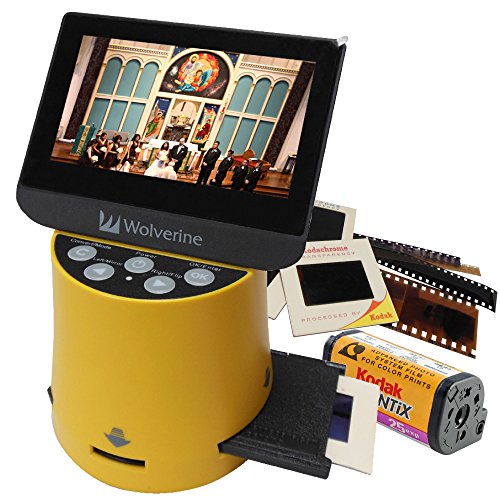
- Converts supported film in about three seconds
- Works with 35mm, 127, 126, 110, and APS
- No computer or software required
Best For: People who want fast, standalone scanning across multiple formats
Large-Screen Archive Scanner

- Large tilting display for easier viewing
- Supports 135, 110, and 126 formats
- Direct-to-SD scanning with one-touch editing
Best For: Home archiving with a larger screen and simple workflow
High-Resolution All-in-One Scanner
Magnasonic FS71 24MP Film Scanner

- 24MP output with a 5-inch LCD
- Supports film, slides, and Super 8
- Onboard editing with no computer needed
Best For: Buyers who want detailed scans and simple standalone operation
Editor’s Choice
AMBIR FS550-TS Touch Screen Scanner

- 48MP CMOS sensor for detailed scans
- Handles 35mm, 110, 126, Super 8, and 8mm
- 5-inch touch screen with PictureStudio software
Best For: Users who want a simple touch-screen scanner with bundled editing software for mixed film and slide formats.
Best Value
KODAK SCANZA Compact Film & Slide Scanner

- Converts 35mm, 126, 110, Super 8, and 8mm
- 3.5-inch LCD with adjustable brightness
- Adapters, cables, and cleaning brush included
Best For: Buyers who want a compact scanner with fast one-touch operation and plenty of included accessories.
Runner-Up
Wolverine Titan 8-in-1 Film Converter Bundle
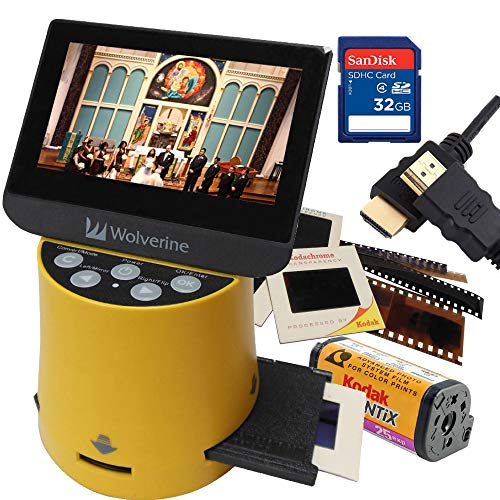
- 20MP converter for quick three-second scans
- Supports 35mm, 127, 126Kpk, 110, and APS
- Bundle adds SD card, HDMI cable, and brush
Best For: Shoppers who want a Wolverine-branded converter bundle with useful extras right in the box.
Compact All-in-One Film Converter
KODAK Mini Digital Film & Slide Scanner

- Supports multiple film formats including Super 8
- Easy-load adapters speed up scanning
- Saves to SD card or TV for viewing
Best For: Users who want a compact, simple scanner for mixed old film formats
Large-Screen Batch Scanner
HP Film & Slide Scanner 7" Touch LCD

- 7-inch touch screen for preview and editing
- Quick-feed tray supports batch scanning
- USB and HDMI outputs for easy sharing
Best For: Beginners who want a large touchscreen and fast loading for batches
USB-C Touchscreen Slide Digitizer
HP Film & Slide Scanner HPFS500

- 5-inch touchscreen for preview and editing
- 13MP sensor with 22MP interpolation
- USB-C powered with SD-card saving
Best For: Users who want a compact touchscreen scanner with modern connectivity
Compact Everyday Film Scanner – KODAK Slide N Scan Film & Slide Scanner
If you want a Wolverine film and slide scanner alternative for simple home archiving, this KODAK model keeps the process straightforward. It handles 135, 110, and 126 negatives plus slides, shows previews on a 5-inch LCD, and saves directly to an SD or SDHC card.
Best For: Home users who want an easy, standalone scanner for mixed slide and negative collections.
Pros:
- 22MP output with a 5-inch LCD for quick previewing and editing
- Supports color and black-and-white negatives in 135, 110, and 126 formats
- Direct SD/SDHC saving keeps the workflow computer-light
- Includes film holders, cleaning brush, USB, and HDMI cables
Cons:
- SD or SDHC card is not included
- Maximum card support is 32GB
This is a practical pick if you want a simple scanner for family archives and value an easy load tray over advanced manual controls. It is built for convenience first, with enough resolution and connectivity to handle most basic digitizing jobs.
Fast Standalone Converter – Wolverine Titan 8-in-1 Film to Digital
If you’re comparing a Wolverine film and slide scanner for speed and format flexibility, the Titan is built around quick standalone conversion. It supports 35mm, 127, 126, 110, and APS slides and negatives, and its 4.3-inch screen plus HDMI output make it easy to review scans without a computer.
Best For: Users who want a fast, no-computer scanner for multiple film formats.
Pros:
- Converts supported films in about three seconds
- Handles 35mm, 127, 126, 110, and APS media
- Stand-alone operation requires no computer or software
- HDMI output lets you view images on a TV in hi-definition
Cons:
- HDMI cable is not included
- Screen size is smaller than some larger-display scanners
The Titan stands out when speed matters and you have a mixed collection to process. It favors fast loading and simple operation, making it a strong choice for anyone who wants digital files without a complicated setup.
Large-Screen Archive Scanner – KODAK Slide N Scan Max
For buyers looking for a Wolverine film and slide scanner-style workflow with a larger viewing area, this KODAK Slide N Scan Max focuses on easy batch-style digitizing. It supports 135, 110, and 126 slides and negatives, saves directly to SD or SDHC cards, and tilts for flexible viewing or photo frame use.
Best For: Users who want a bigger display and easy direct-to-card scanning for family archives.
Pros:
- Large 7-inch class design with tilting view angle for flexible use
- Supports 135mm, 110mm, and 126mm negatives and slides
- Direct SD/SDHC saving avoids needing a computer
- One-touch editing simplifies resizing and color adjustments
Cons:
- SD/SDHC card is not included
- Primary resolution is tied to a 13MP CMOS sensor with 22MP interpolation
This model makes sense if you want a straightforward scanner with a larger, more adaptable screen for reviewing images. It is designed to keep scanning simple while still offering solid resolution and universal film support for common home collections.
High-Resolution All-in-One Scanner – Magnasonic FS71 24MP Film Scanner
If you’re shopping for a Wolverine film and slide scanner alternative that emphasizes resolution and convenience, the Magnasonic FS71 is built for fast, standalone digitizing. It converts 35mm, 110, 126, and Super 8 film plus 135, 126, and 110 slides into JPEG files, with a 5-inch LCD and HDMI output for easy viewing.
Best For: Users who want high-resolution scans and simple onboard controls without needing a PC.
Pros:
- 24MP digital output for detailed JPEG files
- Supports film and slide formats including Super 8
- No computer, software, or driver installation required
- Adjust brightness, RGB color correction, flip, and mirror on the scanner
Cons:
- SD card is not included
- Uses a compact built-in memory setup rather than a full workstation-style interface
The FS71 is a good fit if you want a self-contained scanner that balances image detail with easy operation. Its fast-loading trays and onboard editing make it especially practical for converting older family media one batch at a time.
Editor’s Choice – AMBIR FS550-TS Touch Screen Scanner
If you want a Wolverine film and slide scanner alternative that focuses on ease of use and high-resolution archiving, the AMBIR FS550-TS is built for converting 35mm, 110, 126, Super 8, and 8mm film plus slides into digital images. Its 48MP CMOS sensor, 5-inch touch screen, and included PictureStudio software make it a practical pick for home digitizing and basic restoration.
Best For: Users who want a simple touch-screen scanner with bundled editing software for mixed film and slide formats.
Pros:
- Scans a wide range of film and slide formats with included adapters.
- 48MP CMOS sensor is geared toward sharp, vivid scans for archiving and enlargements.
- 5-inch LCD touch screen makes previews and settings quick to manage.
- Can save to onboard memory or SD card and also transfer to a computer.
Cons:
- Resolution is listed as 300 dpi in the product details.
- Windows and Mac compatibility is limited to newer operating systems.
- Some users may prefer a larger display for reviewing scans.
This scanner leans toward convenience and versatility rather than raw complexity, which makes it a strong everyday choice for digitizing family media. The included software and touch controls add value if you want an all-in-one workflow.
Best Value – KODAK SCANZA Compact Film & Slide Scanner
The KODAK SCANZA is a strong Wolverine film and slide scanner option if you want quick conversion and a familiar, straightforward interface. It converts 35mm, 126, 110, Super 8, and 8mm negatives and slides to JPEG files, and it includes adapters, a cleaning brush, and cables for both Mac and PC use.
Best For: Buyers who want a compact scanner with fast one-touch operation and plenty of included accessories.
Pros:
- Converts multiple film formats to JPEG in seconds.
- 3.5-inch bright LCD with adjustable brightness and tilt.
- Includes multiple film inserts, adapters, cleaning brush, and cables.
- Supports SD cards up to 128GB for saving scans.
Cons:
- SD card is not included.
- Does not convert film formats outside the listed 35mm, 126, 110, Super 8, and 8mm types.
- Minimum system requirement listed is Windows 7.
This model is best when you want a fast, self-contained scanner that minimizes setup time. Its included extras and simple controls make it especially appealing for casual digitizing jobs.
Runner-Up – Wolverine Titan 8-in-1 Film Converter Bundle
If you specifically want a Wolverine film and slide scanner, the Titan 8-in-1 bundle is the most direct fit in this roundup. It converts 35mm, 127, 126Kpk, 110, and Advantex APS slides and negatives into digital files in three seconds, and the bundle adds a 32GB SD card, HDMI cable, cleaning brush, and multi-voltage adapter.
Best For: Shoppers who want a Wolverine-branded converter bundle with useful extras right in the box.
Pros:
- Wolverine-branded unit with 20MP high-resolution conversion.
- Handles several film and slide formats, including 35mm, 127, 126Kpk, 110, and Advantex APS.
- Bundle includes a 32GB SD card, HDMI cable, and cleaning brush.
- Multi-voltage AC adapter makes it easier to use in different regions.
Cons:
- Screen size is 4.3 inches, smaller than some alternatives.
- Only one HDMI port is listed in the details.
- Some buyers may want more detail on editing or advanced controls.
This bundle stands out for convenience and compatibility, especially if you already want a Wolverine model and do not want to source accessories separately. It is a practical pick for quick home conversion jobs.
Compact All-in-One Film Converter – KODAK Mini Digital Film & Slide Scanner
If you want a Wolverine film and slide scanner alternative that keeps things simple, this KODAK mini scanner is built for fast home digitizing. It handles 135, 126, 110, Super 8, and monochrome negatives and slides, and lets you scan, view, edit, convert, and save without a complicated setup.
Best For: Casual users who want a compact, easy-load scanner for mixed film formats and quick transfers.
Pros:
- Supports 135, 126, 110, Super 8, and monochrome film and slides
- 2.4-inch LCD with dedicated scan and home buttons for simple navigation
- Easy-load adapters help speed up continuous scanning sessions
- Can save to SD card or view images on a TV
Cons:
- Internal memory is limited to 128MB, so SD card use is important
- Smaller screen than larger touch-display scanners
- Best suited to straightforward home use rather than advanced editing
Overall, this is a practical pick if you want a portable film-to-digital converter with broad format support and minimal fuss. Its strength is convenience, especially for users who value quick loading and direct saving over a larger interface.
Large-Screen Batch Scanner – HP Film & Slide Scanner 7" Touch LCD
This Wolverine film and slide scanner alternative is aimed at buyers who want a bigger screen and a more guided workflow. The HP FilmScan 7-inch model previews, edits, and displays scans directly on the device, while the quick-feed tray and 50mm adapter make batch scanning easier for common slide and negative formats.
Best For: Beginners and families who want a large touchscreen scanner with quick-feed loading and built-in editing.
Pros:
- 7-inch color touch LCD makes previewing and editing easy on-device
- 13MP CMOS sensor captures color and black-and-white images
- Quick-feed tray supports batch scanning of 135, 126, and 110 formats
- USB and HDMI outputs add flexible transfer and TV viewing options
Cons:
- Larger footprint than compact scanners
- Resolution is listed at 1200 dpi in the details, which may matter to detail-focused buyers
- Heavier than smaller tabletop units
In practice, this model stands out for its roomy touchscreen and easy workflow, which should appeal to users digitizing a lot of family film. If you want a scanner that doubles as a gallery viewer and keeps most steps on-device, it is a strong option.
USB-C Touchscreen Slide Digitizer – HP Film & Slide Scanner HPFS500
For shoppers comparing a Wolverine film and slide scanner with a more modern connection and a smaller touchscreen, the HPFS500 keeps the process straightforward. It converts 135, 126, and 110 slides and negatives to digital, with a 5-inch all-angle touch screen for previewing, editing, and gallery display right on the unit.
Best For: Users who want a compact touchscreen scanner with USB-C power and direct SD-card saving.
Pros:
- 5-inch touch screen supports preview, editing, and gallery mode
- 13MP sensor with 22MP interpolation for captured detail
- Quick-load tray handles 135, 126, and 110 formats
- USB-C powered and able to save directly to SD card
Cons:
- Smaller display than 7-inch scanner models
- Limited to the supported film sizes listed in the notes
- Best for straightforward conversion rather than complex editing
This is a sensible middle-ground choice if you want a modern, compact scanner with easy power options and on-device control. It should fit well for home users who value convenience and a smaller footprint over a larger screen.
How We Picked the Best Wolverine Film and Slide Scanner
We focused on real-world usefulness: supported film types, output resolution, display quality, conversion speed, and how easy each unit is to operate without a computer. We also favored models that make it simple to save files directly to SD cards or transfer them for editing later.
Quick Comparison: What Matters Most
Some scanners are built for speed and simplicity, while others give you more control over image adjustments or support for more formats. A larger screen can make framing easier, but higher resolution and better film handling usually matter more if you care about keeping detail from older originals.
Key Buying Factors for a Wolverine Film and Slide Scanner
Film and Slide Compatibility
Check whether the scanner handles 35mm, 126, 110, APS, Super 8, or 8mm, depending on your archive. If you have mixed collections, broader compatibility saves you from buying multiple devices.
Resolution and Output Quality
For basic sharing, lower resolutions may be fine. For restoration, printing, or long-term archiving, look for higher effective resolution and strong color correction. A Wolverine Film and Slide Scanner style device should balance detail with easy operation.
Screen Size and Workflow
Touchscreens and larger LCDs make previewing, cropping, and aligning frames much easier. If you plan to scan a lot at once, a simple feed system and straightforward controls can save time and reduce mistakes.
Storage and Connectivity
Most buyers will want SD card support, USB transfer, or direct computer compatibility. HDMI output can also help if you prefer a larger preview while scanning.
Who Should Buy Which Wolverine Film and Slide Scanner?
If you want the easiest path to digitizing a family archive, choose a model with a large screen and broad format support. If your collection is mostly one film type and you value speed, a compact scanner may be enough. For heavier use or mixed-format collections, step up to a scanner with more manual control, better display quality, and stronger conversion features.
In short, the best choice depends on whether you value convenience, format flexibility, or higher-end scanning performance most.