
Choosing a camera monitor with camera control can speed up your workflow, improve framing, and give you a clearer view outdoors or on a busy set. The right model should balance brightness, touch responsiveness, compatibility, and the control features you actually need.
In this roundup, we focus on monitors that make shooting easier for mirrorless, DSLR, and video creators, whether you want a compact on-camera display or a brighter field monitor for serious production.
Best 10 Camera Monitor with Camera Control Picks for 2026
High-Brightness Touch Control
Osee G7 Pro 7'' Camera Monitor

- 3000-nit screen for bright outdoor use
- Touchscreen control for supported cameras
- 3G-SDI and 4K HDMI in/out
Best For: Outdoor filmmakers who want bright monitoring and hands-on camera control
Lightweight Touchscreen Pick

- 1500-nit HDMI monitor with HDR support
- USB-C compatibility for modern cameras
- Touch sliders for WB, ISO, aperture, and shutter
Best For: Mirrorless and DSLR users who want a light monitor with quick setting access
Compact Touch Control
Portkeys LH5C 5.4" Camera Monitor

- Touchscreen control for many Sony, Canon, and Panasonic cameras
- 800-nit IPS panel with included sunshade
- Freeze-frame overlay and LUT support
Best For: Creators who want compact camera control plus strong monitoring tools
Bright Touch Monitor
VILTROX DC-550 5.5" Field Monitor

- 1200-nit daylight-viewable touchscreen
- Waveform, vector, histogram, and false color
- 4K HDMI in/out with audio monitoring
Best For: Shooter who want a bright monitor with core exposure tools
Wired Control All-Rounder
Portkeys LH7C 7" 1000nit Touch Monitor
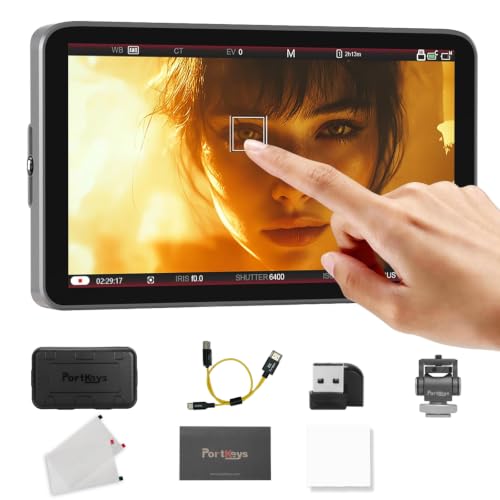
- Wired touchscreen camera control
- 1000-nit 7-inch IPS panel
- 2-in-1 cable with 4K input support
Best For: Wired control setups that need a bright, lightweight monitor
Bright Budget Workhorse
NEEWER F700 7" 2000nit Touch Monitor

- 2000-nit 7-inch touchscreen
- 4K HDMI loop in/out
- Includes 2 batteries and cable
Best For: Bright outdoor monitoring with useful pro tools
Wireless Control Pick
Portkeys LH7P 7'' Wireless Control Monitor

- Built-in wireless camera control
- One-to-many control for up to 4 monitors
- 4K HDMI in with freeze frame and LUTs
Best For: Remote camera control and multi-monitor workflows
Pro-Grade Compact 4K Monitor
VILTROX DC550 Pro II with Camera Control

- 1400-nit 5.5-inch touchscreen for outdoor visibility
- Direct camera control plus one-click recording
- Waveform, vectorscope, LUT, and onion skin tools
Best For: Creators who need a bright compact monitor with direct camera control
Workflow-Focused Touch Monitor
Portkeys LH5C Wireless Control Monitor

- Touchscreen control for aperture, ISO, shutter, and WB
- Freeze frame overlay for continuity and matching shots
- Waveform, LUTs, and anamorphic tools included
Best For: Shoots that need touchscreen control and continuity tools
Bright Vertical Creator Monitor
VILTROX DC-550 PRO II Camera Control

- 1400-nit screen with HDMI 2.0 4K@60 support
- USB-C and Wi-Fi camera control for key settings
- Vertical UI, onion skin, and customizable scopes
Best For: Short-form and field creators who need bright control-focused monitoring
High-Brightness Touch Control – Osee G7 Pro 7'' Camera Monitor
If you want a camera monitor with camera control that can handle bright exteriors and keep your hands on the rig, the Osee G7 Pro is built for that workflow. Its touchscreen supports key camera settings over Type-C, while the 3000-nit panel and 3G-SDI/4K HDMI I/O make it a strong fit for field use.
Best For: Outdoor shooters and hybrid filmmakers who want touchscreen camera control plus a very bright monitor.
Pros:
- 3000-nit brightness and reflection-reduced coating help in sunlight.
- Touchscreen camera control supports WB, ISO, aperture, shutter, record, and touch focus on supported models.
- 3G-SDI and 4K HDMI in/out give it flexible camera and rig compatibility.
- Monitoring tools include waveform, histogram, vectorscope, false color, and 3D LUT support.
Cons:
- Camera control requires a Type-C connection and NP-F battery power.
- Control and touch-focus support only cover specific camera models.
- At 7 inches and 1.76 pounds, it is less compact than smaller on-camera monitors.
Overall, this is a practical choice if brightness and camera-side control matter more than compact size. It feels aimed at serious shooting setups where the monitor needs to do more than just display an image.
Lightweight Touchscreen Pick – Atomos Shinobi II 4K Monitor
The Atomos Shinobi II is a camera monitor with camera control features that focuses on everyday exposure and color adjustments instead of heavy rigging. Its USB-C compatibility, touchscreen sliders, and lightweight build make it a simple option for mirrorless and DSLR users who want quick access to settings on set.
Best For: Creators who want a lightweight monitor with fast touchscreen access to core camera settings.
Pros:
- Touchscreen sliders provide immediate control for white balance, aperture, shutter angle, and ISO.
- USB-C compatibility is designed for broad use with modern mirrorless and DSLR cameras.
- 1500-nit brightness and HDR/HLG/PQ support improve visibility and previewing.
- Compact 5-inch, 210-gram design is easy to mount and carry.
Cons:
- It is HDMI-based, so it lacks the extra I/O flexibility of SDI-equipped monitors.
- Screen size is smaller than 5.4- to 7-inch alternatives.
- The notes emphasize settings control, not advanced camera-control compatibility lists.
If you want a straightforward field monitor that stays light while giving you quick touchscreen access to key exposure settings, this one fits well. It is a clean, practical pick for run-and-gun shooting.
Compact Touch Control – Portkeys LH5C 5.4" Camera Monitor
The Portkeys LH5C is a camera monitor with camera control aimed at shooters who want direct touchscreen access without moving to a larger rig. It supports wired control for many Sony, Canon, and Panasonic models, and its 5.4-inch panel, sunshade, and freeze-frame tools make it useful for both indoor and outdoor work.
Best For: Shooters who want compact, cross-brand touchscreen control with strong monitoring tools.
Pros:
- Direct touchscreen control supports many Sony, Canon, and Panasonic cameras.
- 800-nit IPS screen includes an included sunshade for outdoor visibility.
- Freeze frame with overlay comparison helps with shot matching and continuity.
- Pro tools include waveform, histogram, audio meters, false color, and up to 20 custom LUTs.
Cons:
- Brightness is lower than 1200- to 3000-nit competitors for harsh sunlight.
- Touch focus tracking is currently limited to Sony in the listed notes.
- It tops out at 4K30p input, which may not suit every workflow.
This is a smart middle-ground monitor if you want reliable camera control in a smaller body. It looks especially useful for creators who value monitoring tools and continuity features as much as live control.
Bright Touch Monitor – VILTROX DC-550 5.5" Field Monitor
The VILTROX DC-550 is a practical camera monitor with camera control features for shooters who need a bright display and full-size monitoring tools. It does not focus on camera control in the notes, but it does deliver 1200-nit visibility, touchscreen operation, and a solid set of exposure and color aids for production work.
Best For: Filmmakers who want a bright touchscreen monitor with useful on-set image tools.
Pros:
- 1200-nit brightness and 5.5-inch IPS panel are suited to daylight viewing.
- Touchscreen operation makes menu navigation and monitoring easier.
- Professional tools include waveform, vector graph, histogram, false color, and focus assist.
- 4K HDMI in/out and 3.5mm audio monitoring support flexible shooting setups.
Cons:
- The supplied notes do not list camera-control functions like aperture or ISO adjustment.
- It is larger and heavier than some smaller field monitors.
- Brightness is strong, but below the 3000-nit class for extreme sun.
For buyers focused more on dependable monitoring than direct camera control, the DC-550 is easy to understand and easy to justify. It gives you the core tools most crews need without complicating the setup.
Wired Control All-Rounder – Portkeys LH7C 7" 1000nit Touch Monitor
If you want a camera monitor with camera control that keeps your rig compact, the Portkeys LH7C is built for wired operation and direct touchscreen control. It combines a 7-inch 1000-nit panel with HDMI input, 4K support, and camera-specific control compatibility for a wide range of Sony, Canon, and Panasonic bodies.
Best For: Shooters who want wired camera control, a bright 7-inch monitor, and lightweight rig-friendly setup.
Pros:
- Wired touchscreen camera control for many Sony, Canon, and Panasonic models
- 1000-nit 7-inch IPS display with 10-bit color and 3D LUT output
- Includes a 2-in-1 control cable and supports 4K 30P input
- Lightweight 245g body with NP-F and 7-24V DC power options
Cons:
- Control is wired rather than wireless
- Battery is not included
- Only one HDMI port is listed
Overall, the LH7C is a practical choice if you prioritize clean cable-managed control over wireless convenience. Its strong monitoring tools and lightweight design make it well suited to compact cinema, mirrorless, and gimbal setups.
Bright Budget Workhorse – NEEWER F700 7" 2000nit Touch Monitor
The NEEWER F700 is a camera monitor with camera control style workflow support aimed at users who need a very bright screen and practical monitoring tools. Its 7-inch 2000-nit IPS panel, HDMI loop in/out, and built-in exposure and focus aids make it a versatile on-camera option for demanding shooting environments.
Best For: Shooters who need a very bright 7-inch monitor with strong monitoring tools and flexible power options.
Pros:
- 2000-nit 7-inch touchscreen is useful in bright outdoor conditions
- 4K HDMI loop in/out with headphone monitoring support
- Includes waveform, vectorscope, false color, peaking, HDR, and custom 3D LUT upload
- Comes with 2 NP-F750 batteries and a cable
Cons:
- Does not list direct camera control functions like shutter or record control
- Heavier than lighter compact monitors when batteries are attached
- Cooling fans may be a consideration in very quiet setups
If brightness and monitoring tools matter more than built-in camera control, the F700 is a strong value-focused pick. It covers the core needs of field monitoring well and adds enough flexibility to fit both handheld and tripod rigs.
Wireless Control Pick – Portkeys LH7P 7'' Wireless Control Monitor
For a camera monitor with camera control that emphasizes remote operation, the Portkeys LH7P stands out with built-in wireless control for supported cameras. It pairs that function with a 7-inch 1000-nit touchscreen, 4K HDMI input, and a full set of monitoring tools for solo shooters or small crews.
Best For: Creators who want wireless camera control plus a feature-rich 7-inch field monitor.
Pros:
- Built-in wireless camera control for many Sony, Canon, Nikon, Panasonic, and BMPCC models
- One-to-many control can operate up to 4 Portkeys monitors within 50 meters
- 4K HDMI in and 1080p 60 out with freeze frame and 3D LUT support
- Includes histogram, waveform, vectorscope, peaking, zebras, and anamorphic de-squeeze
Cons:
- NP-F battery is not included
- Wireless control is limited to supported camera models
- Brightness is 1000 nits, which is lower than some competing daylight monitors
The LH7P is the best fit here if wireless control is the main reason you want a monitor upgrade. It combines remote camera operation with a strong feature set, making it especially attractive for streamlined solo or multi-monitor workflows.
Pro-Grade Compact 4K Monitor – VILTROX DC550 Pro II with Camera Control
If you want a camera monitor with camera control that also works as a serious on-set display, the VILTROX DC550 Pro II is built around speed and visibility. Its 5.5-inch 1400-nit touchscreen, HDMI 2.0 4K@60 input, and wireless plus USB-C camera control make it a practical pick for solo shooters who need to stay off the camera menus.
Best For: Sony, Canon, Nikon, and Fujifilm users who want a bright, compact monitor with direct control and full monitoring tools.
Pros:
- 1400-nit 5.5-inch FHD touchscreen stays readable outdoors.
- Supports direct camera control for shutter, aperture, ISO, white balance, and one-click recording.
- Customizable waveform, histogram, vectorscope, peaking, zebra, and safe frame tools.
- Includes onion skin, 3D LUT import, and vertical UI support for short-form shooting.
Cons:
- Camera control compatibility is limited to supported Sony, Canon, Nikon, and Fujifilm models.
- 5.5-inch screen may feel compact for users who prefer larger monitoring.
Overall, this is a strong all-in-one field monitor if you want bright viewing, detailed exposure tools, and built-in control from the monitor itself. It is especially appealing for creators who shoot outdoors, in vertical formats, or on fast-moving sets.
Workflow-Focused Touch Monitor – Portkeys LH5C Wireless Control Monitor
The Portkeys LH5C is a camera monitor with camera control aimed at streamlined production work. It combines wired touchscreen control, a bright 5.4-inch display, and practical filmmaking tools like freeze-frame overlay and anamorphic support, making it a useful choice when you want more than just basic monitoring.
Best For: Filmmakers who want touchscreen camera control, accurate monitoring, and overlay tools for continuity or multi-camera work.
Pros:
- Touchscreen camera control for aperture, ISO, shutter speed, and white balance.
- Freeze frame overlay helps with composition matching and continuity.
- 800-nit IPS display with sunshade, Rec.709 coverage, and 10-bit color depth.
- Includes waveform, histogram, audio meters, 3D LUT support, and anamorphic de-squeeze.
Cons:
- Brightness is lower than some competing ultra-bright field monitors.
- Listed 4K input is limited to 4K30p.
For crews that value control and workflow tools over maximum brightness, the LH5C is a thoughtful production monitor. Its overlay and framing features stand out for narrative shoots, commercials, and setups where repeatability matters.
Bright Vertical Creator Monitor – VILTROX DC-550 PRO II Camera Control
This VILTROX DC-550 PRO II is a camera monitor with camera control designed for creators who shoot both standard and vertical content. With 1400 nits of brightness, HDMI 2.0 4K@60 support, and control over key camera settings through USB-C or Wi-Fi, it fits fast-paced shooting where menu diving slows you down.
Best For: Short-form creators, field shooters, and stop-motion users who want bright monitoring plus direct control from the monitor.
Pros:
- Direct camera control for aperture, shutter, ISO, white balance, focus mode, and shutter trigger.
- 1400-nit 5.5-inch display is built for outdoor visibility.
- Customizable waveform, histogram, vectorscope, and RGB parade tools.
- Onion skin and vertical UI support make it useful for stop-motion and TikTok-style framing.
Cons:
- Camera control depends on compatible USB-C or Wi-Fi supported setups.
- 5.5-inch screen size is compact for users who want a larger on-camera display.
This model is especially appealing if you want a feature-rich monitor that handles both exposure tools and creator-friendly vertical workflows. It is a practical choice when brightness, control, and flexible framing matter in one compact unit.
How We Picked the Best Camera Monitor with Camera Control
We prioritized models that combine reliable monitoring with practical camera control, strong visibility in real-world lighting, and useful exposure tools. We also looked at screen size, brightness, touchscreen performance, HDMI connectivity, recording workflow fit, and how well each monitor suits common creator setups.
Quick Comparison
If you want maximum outdoor visibility, look for higher-nit 7-inch options. If portability matters more, a 5-inch or 5.4-inch monitor may be easier to rig on a compact camera. Touchscreen operation and menu-driven control can be a major advantage, especially when you need faster access to focus, framing, and camera settings without reaching for the body.
Key Buying Factors for a Camera Monitor with Camera Control
Compatibility and Control Support
Not every Camera Monitor with Camera Control works with every brand or model. Check whether the monitor supports your camera through wired or wireless control and confirm the exact functions you need, such as record start/stop, aperture, shutter, ISO, or focus adjustments.
Brightness and Screen Size
Brightness matters most outdoors. Around 800 to 1000 nits is workable in many situations, but 1200 to 2000+ nits is better for daylight shooting. Larger screens are easier to judge focus on, while smaller monitors stay lighter and more travel-friendly.
Image Tools and Workflow Features
Useful features include waveform, focus peaking, false color, 3D LUT support, HDR viewing, and HDMI loop in/out. These tools help you expose accurately and maintain a smooth workflow whether you are shooting interviews, run-and-gun content, or multicam work.
Power and Mounting
Battery type, power draw, and mounting flexibility can affect how practical a monitor is on a real rig. A good monitor should be easy to power, easy to tilt or rotate, and secure enough for handheld, gimbal, or cage-based setups.
Who Should Buy Which Camera Monitor with Camera Control?
Choose a bright 7-inch model if you shoot outdoors often, need a larger image for focus, or want a more production-ready display. Pick a compact 5-inch class monitor if you value a lighter rig and faster mobility. If you use supported Sony, Canon, Panasonic, or Nikon bodies and want fewer menu dives, prioritize a monitor with robust wired or wireless camera control. Creators who film vertical content should also consider models with a vertical UI or flexible orientation features.
In short, the best choice depends on your camera system, shooting environment, and how much control you want at the monitor versus at the camera body.