
If you want faster focusing, simpler menu navigation, and a cleaner on-camera workflow, a camera monitor with touch screen focus control can make a big difference.
This roundup highlights models for mirrorless shooters, creators, and run-and-gun filmmakers who need a practical external display with touch-to-focus convenience.
Best 10 Camera Monitor with Touch Screen Focus Control Picks for 2026
Touch-Control Hybrid Monitor
Portkeys LH5C 5.4" 4K Touch Monitor
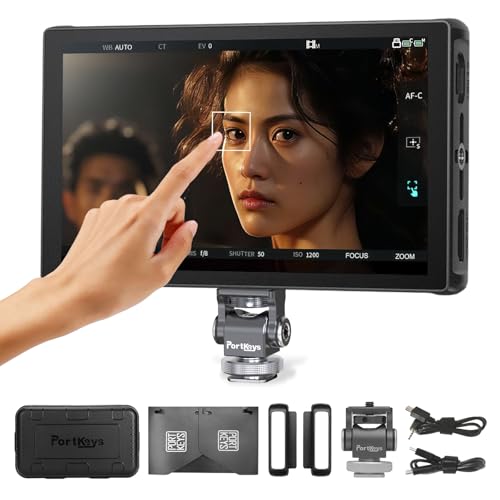
- Direct touchscreen camera control
- 800-nit IPS screen with sunshade
- Freeze frame and pro monitoring tools
Best For: Hybrid shooters needing touch focus control and camera settings control
Bright Everyday Touch Monitor
Atomos Shinobi II 5" HDR Monitor

- 1500-nit HDR touchscreen
- On-screen sliders for key settings
- Lightweight and USB-C compatible
Best For: Creators needing a bright, portable monitor for quick camera adjustments
Pro Brightness SDI Monitor
Portkeys BM5IV WR 5.5" 2000nit Monitor

- 2000-nit touchscreen display
- Wired and wireless camera control
- HDMI plus 3G SDI workflow support
Best For: Multi-camera production teams needing bright touch control and SDI
Creative Workflow Touch Monitor
VILTROX DC-550 PRO II 5.5" Monitor

- 1400-nit touchscreen display
- USB/Wi-Fi remote camera control
- Onion skin and pro exposure tools
Best For: Stop-motion and solo shooters needing wireless control with touch monitoring
Bright touch-focus monitor
5.5" 2000nit Touch Focus Monitor

- 2000-nit 5.5-inch IPS display
- Wireless touch focus for select cameras
- Lightweight 285g aluminum build
Best For: Run-and-gun shooters needing bright monitoring and touch focus
Creator-focused control monitor
5.5" 4K60 Touch Monitor with Control

- Direct camera control over USB-C or Wi-Fi
- HDMI 2.0 with 4K@60 support
- Vertical UI and onion skin tools
Best For: Creators and solo shooters working in vertical or stop-motion formats
Large-screen wireless monitor
7" Wireless Touch Focus Monitor
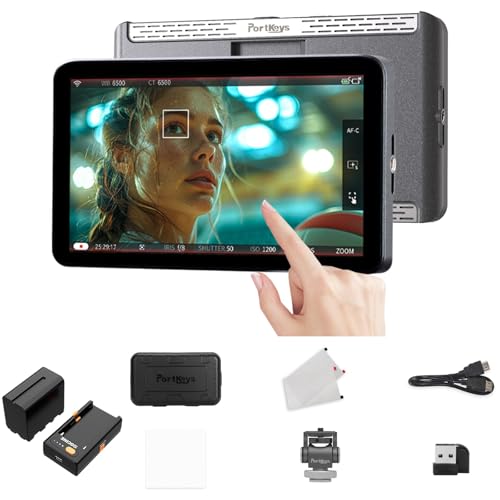
- 7-inch 1080p touchscreen
- Wireless control for many camera brands
- One-to-many control for up to 4 monitors
Best For: Operators who want a larger display and broad wireless camera support
Brightest Pick

- 2000-nit 7-inch IPS display
- Peak focus, waveform, zebras, HDR
- Two NP-F750 batteries included
Best For: Outdoor shooters who need bright touch control and pro monitoring tools
Control-Focused Pick
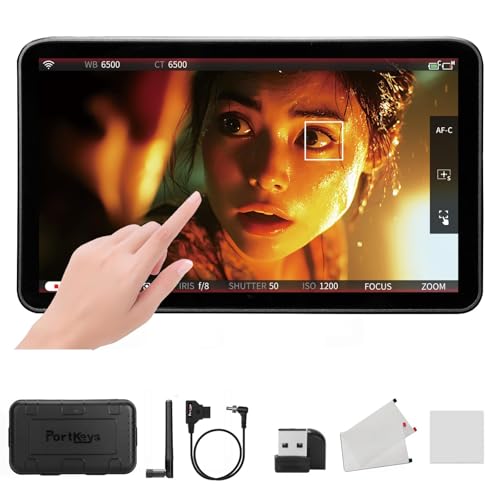
- 1000-nit REC.709 calibrated display
- Touch focus frame and wireless camera control
- Supports control across major camera brands
Best For: Users who want touch focus and camera control in one monitor
Compact Pick

- 5.5-inch IPS touchscreen with 4K HDMI I/O
- Exposure, focus, and 3D LUT tools
- Compact size for lightweight rigs
Best For: Creators who want a smaller touch monitor for flexible rigging
Touch-Control Hybrid Monitor – Portkeys LH5C 5.4" 4K Touch Monitor
If you want a camera monitor with touch screen focus control that also handles camera settings, the Portkeys LH5C is built for practical run-and-gun use. It supports direct touchscreen control for select Sony, Canon, and Panasonic cameras, while the 5.4-inch 800-nit panel and included sunshade make it easier to monitor outdoors.
Best For: Shooters who want touch focus control plus direct camera parameter control in a compact field monitor.
Pros:
- Touchscreen camera control for compatible Sony, Canon, and Panasonic models
- 800-nit 5.4-inch IPS display with included sunshade for outdoor use
- Freeze frame overlay helps with continuity and shot matching
- Includes waveform, histogram, focus peaking, zebra, false color, and LUT support
Cons:
- Some focus-tracking features are brand-specific or still limited by firmware support
- Only one HDMI port, so it is less flexible than larger production monitors
- Battery is not included
The LH5C stands out if you value on-monitor control and a lightweight build over maximum brightness or large-screen monitoring. It is a strong all-around option for compact camera rigs that still need serious exposure and focus tools.
Bright Everyday Touch Monitor – Atomos Shinobi II 5" HDR Monitor
The Atomos Shinobi II is a practical camera monitor with touch screen focus control-style access to common shot adjustments through its on-screen sliders. Its 1500-nit HDR display and lightweight body make it a good fit for bright-location work, especially when you want fast access to white balance, aperture, shutter speed, and ISO.
Best For: Creators who want a bright, lightweight monitor for quick touchscreen exposure and camera setting adjustments.
Pros:
- 1500-nit HDR touchscreen is strong for outdoor visibility
- On-screen sliders let you adjust common camera settings quickly
- USB-C compatibility broadens support with modern mirrorless and DSLR cameras
- Lightweight design suits portable rigs
Cons:
- Does not list SDI connectivity, so it is HDMI-focused
- Touch controls are centered on settings adjustment, not advanced camera control lists
- Only one HDMI port and one USB-C port
Shinobi II is best when you want a bright, simple monitoring solution that speeds up everyday adjustments. It leans more toward responsive control and visibility than toward a full toolkit of cinema-focused extras.
Pro Brightness SDI Monitor – Portkeys BM5IV WR 5.5" 2000nit Monitor
For users searching for a camera monitor with touch screen focus control and serious brightness, the Portkeys BM5IV WR brings a 2000-nit panel, touchscreen operation, and both wired and wireless camera control. It is especially useful if you switch between camera brands or need SDI workflow support on set.
Best For: Multi-camera productions that need bright monitoring, touch focus control, and broad camera compatibility.
Pros:
- 2000-nit touchscreen is well suited to bright environments
- Supports wired and wireless camera control across many brands
- 3G SDI input/output plus HDMI adds production flexibility
- Split-screen monitoring, LUT loading, and freeze frame tools expand workflow options
Cons:
- Heavier than smaller on-camera monitors
- More complex feature set may be more than casual shooters need
- Battery is not included
The BM5IV WR is the most production-oriented option in this group, with brightness and connectivity that suit demanding sets. If you need touch control plus broader camera compatibility and SDI support, it is a strong centerpiece monitor.
Creative Workflow Touch Monitor – VILTROX DC-550 PRO II 5.5" Monitor
The VILTROX DC-550 PRO II is a solid camera monitor with touch screen focus control features and a strong emphasis on creative workflow tools. With 1400 nits of brightness, USB/Wi-Fi camera control, and onion skin support, it is especially appealing for stop-motion, timelapse, and controlled solo shoots.
Best For: Stop-motion creators and solo shooters who want wireless camera control and onion skin support.
Pros:
- 1400-nit 5.5-inch touchscreen is bright enough for many outdoor setups
- USB and Wi-Fi camera control support remote adjustments
- Onion skin function is useful for stop-motion and frame-by-frame work
- Includes 3D LUT, false color, focus peaking, waveform, vectorscope, and zebra tools
Cons:
- Not the brightest monitor in the group if you work in harsh sunlight
- Wireless control may be unnecessary for users who only need basic monitoring
- Only one HDMI input is listed
This monitor stands out for creators who want more than basic focus control. Its onion skin feature and wireless camera access make it particularly practical for precise, repeatable shooting styles.
Bright touch-focus monitor – 5.5" 2000nit Touch Focus Monitor
If you want a camera monitor with touch screen focus control that stays usable in harsh daylight, the Portkeys LH5P II is built for exactly that kind of set. Its 5.5-inch, 2000-nit IPS panel is easy to see outdoors, and the touchscreen supports wireless touch focus plus camera parameter adjustments on select Sony and Canon bodies.
Best For: Run-and-gun shooters, gimbal rigs, and crews who need bright viewing plus touch-to-focus control.
Pros:
- 2000-nit 5.5-inch display remains visible in bright sun.
- Wireless touch focus and camera control for select Sony and Canon cameras.
- Includes wired LANC/USB-C control support for a wide range of cinema and mirrorless models.
- Lightweight 285g CNC aluminum design suits handheld, shoulder, and gimbal setups.
Cons:
- Camera control compatibility is limited to supported models listed by the manufacturer.
- Battery is not included.
The LH5P II is a strong fit if you need a compact monitor that combines bright outdoor visibility with practical touch focus workflow. Its overlay, LUT, waveform, and freeze-frame tools add real production value without making the rig bulky.
Creator-focused control monitor – 5.5" 4K60 Touch Monitor with Control
The VILTROX DC-550 PRO II is a camera monitor with touch screen focus control aimed at creators who want fast on-set adjustments and a flexible display layout. It combines direct camera control over USB-C or Wi-Fi with a 5.5-inch 1400-nit touchscreen, plus vertical UI support for social-first shooting.
Best For: Creators, solo shooters, and stop-motion users who want camera control, vertical framing, and built-in creative tools.
Pros:
- Direct camera control for aperture, shutter, ISO, white balance, focus mode, and shutter trigger.
- HDMI 2.0 supports up to 4K@60 with loop-out.
- Onion skin is useful for stop-motion and frame matching.
- Vertical UI and adjustable guides suit TikTok, Reels, and Shorts workflows.
Cons:
- At 1400 nits, it is bright but not the brightest option in this group.
- Heavier than some 5.5-inch monitors at 2.2 pounds.
This model stands out if you want a monitor that does more than just display a feed. The customizable scopes, color tools, and included accessories make it a practical all-in-one option for creators who value speed and flexibility.
Large-screen wireless monitor – 7" Wireless Touch Focus Monitor
If you need a larger camera monitor with touch screen focus control, the Portkeys LH7P gives you a 7-inch display with wireless camera operation built in. Its 1000-nit touchscreen is daylight-viewable, and the wireless module supports touch focus and remote control across a wide list of compatible cameras.
Best For: Operators who prefer a larger 7-inch screen and want wireless control across multiple camera systems.
Pros:
- 7-inch 1920 x 1080 touchscreen gives more viewing space than compact monitors.
- Wireless control supports many Sony, Canon, Panasonic, Blackmagic, Nikon, and other models.
- One-to-many control can manage up to 4 Portkeys monitors within 50 meters.
- Includes LUT loading and core exposure/focus assist tools like waveform, false color, peaking, and zebra.
Cons:
- Brightness is 1000 nits, which is lower than some competing daylight-focused monitors.
- Some features require a firmware update before use.
The LH7P is a sensible pick when screen size and wireless control matter more than ultra-compact form factor. It offers a broad feature set for monitoring, calibration, and coordinated multi-monitor workflows.
Brightest Pick – 7" 2000nit Touch Monitor
If you want a camera monitor with touch screen focus control that stays usable in bright locations, the NEEWER F700 is built for that job. Its 7-inch 1080p IPS panel reaches 2000 nits, adds touch operation, and includes peak focus plus other exposure tools for on-set checking.
Best For: Shooters who need a very bright on-camera monitor with touch control, focus assist, and long shooting support.
Pros:
- 2000-nit 7-inch IPS screen is strong for outdoor viewing.
- Touch controls can be turned off, and key shortcuts stay available.
- Includes peak focus, waveform, zebras, HDR, histogram, and 3D LUT support.
- Ships with two NP-F750 batteries and supports multiple power options.
Cons:
- Bulkier than smaller 5.5-inch monitors.
- DC cable is not included for every setup.
- Heavier with batteries installed.
Overall, the F700 is a strong choice when brightness, monitoring tools, and battery flexibility matter more than keeping the rig minimal. It fits well for DSLR and video assist use where readable focus control and dependable daytime visibility are priorities.
Control-Focused Pick – 7" Calibrated Touch Monitor
The PortKeys LS7P is a camera monitor with touch screen focus control aimed at users who want both image checking and camera operation in one place. Its 7-inch IPS touchscreen offers 1000 nits of brightness, REC.709 calibration, and touch focus frame control for quick point selection.
Best For: Crews that want on-monitor camera control plus touch focus in a calibrated 7-inch display.
Pros:
- 1000-nit brightness is suitable for outdoor monitoring.
- Touch focus frame lets you tap to move focus points quickly.
- Wireless camera control works with major brands including Sony, Canon, Nikon, Panasonic, BMD, RED, and ARRI.
- Can control up to four compatible PortKeys monitors within 50m.
Cons:
- Brightness is lower than some ultra-bright field monitors.
- Major firmware update requires a forced reset and data backup.
- Best features depend on compatible camera control support.
In practice, the LS7P stands out if you want a monitor that does more than display an image. The touch focus and wireless control features make it especially useful for streamlined solo or small-team shooting.
Compact Pick – 5.5" Touch Field Monitor
The GODOX GM55 is a compact camera monitor with touch screen focus control that keeps things simple on smaller rigs. It uses a 5.5-inch IPS touch display, supports 4K HDMI input and loop out, and includes exposure, focus, and 3D LUT features for practical day-to-day monitoring.
Best For: Creators who want a smaller touch monitor with basic pro monitoring tools and flexible power options.
Pros:
- Compact 5.5-inch size is easier to carry on lightweight rigs.
- Touchscreen menu control makes settings fast to adjust.
- Supports 4K HDMI input and loop out for simple monitoring setups.
- Built-in 3D LUT support and exposure/focus tools help with pre-shoot checks.
Cons:
- 410-nit brightness is much lower than brighter field monitors.
- Smaller screen gives less viewing space than 7-inch models.
- Best suited to controlled lighting rather than harsh daylight.
The GM55 makes sense if you value portability and touchscreen convenience over maximum brightness. It is a straightforward external monitor for videography, especially when you want quick access to focus and exposure tools without adding much size.
How We Picked the Best Camera Monitor with Touch Screen Focus Control
We focused on monitors that combine usable touch control, strong brightness for outdoor shooting, dependable 4K HDMI support, and features that matter on real sets such as camera control, LUT support, and sturdy builds. Priority went to options that are easy to mount, quick to operate, and suitable for both handheld and rigged workflows.
Quick Comparison
Most buyers will choose between compact 5.5-inch monitors for portability and 7-inch models for easier framing and menu visibility. Higher-nit screens are better for daylight use, while HDMI loop-through, SDI support, and camera-control functions are more useful for advanced rigs and multicam setups. If you need a Camera Monitor with Touch Screen Focus Control for solo shooting, pick a model with responsive touch menus and reliable focus-assist tools.
Key Buying Factors for Camera Monitor with Touch Screen Focus Control
Brightness and Screen Size
Brightness is one of the biggest differences between models. Around 1000 nits is workable in many conditions, while 1400 to 2000 nits is better for outdoor shooting. Smaller screens are lighter and easier to balance; larger screens make critical focus and exposure checks easier.
Touch Accuracy and Camera Control
Touch-to-focus is only useful if the interface is responsive and the supported camera list matches your body. Check compatibility carefully, especially if you want direct control over focus, shutter, recording, or exposure settings.
Connectivity and Monitoring Tools
Look for HDMI 4K input support, and consider loop-out if you need to feed another display or recorder. Features like LUT loading, waveform-style exposure tools, false color, zebra, and focus peaking help you judge the image more confidently.
Power and Build
Battery type, power draw, and mounting strength matter more than many first-time buyers expect. Lightweight monitors suit gimbals and handheld rigs, while metal housings and secure buttons are preferable for heavier production use.
Who Should Buy Which Camera Monitor with Touch Screen Focus Control?
Creators who prioritize portability should lean toward compact 5.5-inch models with touch focus and strong camera-control support. Travel filmmakers and outdoor shooters should favor brighter screens. If you work on a larger rig, do interviews, or want a more comfortable viewing area, a 7-inch monitor is often the better choice. For buyers who need a Camera Monitor with Touch Screen Focus Control mainly for solo content creation, social video, or fast-moving event work, choose the simplest interface with the most compatible camera controls rather than the longest feature list.