
School concerts, assemblies, sports days, and graduation ceremonies all benefit from a camera setup that is quick to deploy and simple to run. The best options balance image quality, reliable audio, flexible mounting, and portable design.
This roundup focuses on solutions that can handle live streaming, classroom-style coverage, and event recording without turning setup into a production nightmare.
Best 10 Portable Camera System for School Events Picks for 2026







School Event Live Streaming Pick – AVKANS GO 4K Wireless Camera
If you need a portable camera system for school events that can handle live streaming, recording, and flexible connections, the AVKANS GO is built for that kind of workflow. It offers 4K video, wireless control, HDMI/USB/RTMP/NDI/SRT options, and simultaneous streaming plus ISO recording, which makes it practical for assemblies, sports, and performances.
Best For: Streaming school games, performances, and assemblies with multiple output options.
Pros:
- 4K Ultra HD recording and live streaming
- Streams and records simultaneously to micro SD
- Works with Wi‑Fi, wired Ethernet, and mobile data
- Offers HDMI, USB, RTMP, NDI, and SRT support
Cons:
- Micro SD card is not included
- No image stabilization listed
- Best results are recommended on Wi‑Fi or Ethernet rather than relying on mobile data alone
Overall, this is a strong pick if your school events need a more serious streaming setup instead of a basic camcorder. The wide-angle lens, zoom, and app-based controls add flexibility, while the recording and broadcast features help keep post-event editing simple.
Classroom Demo Workhorse – THUSTAR 8MP Document Camera
For a portable camera system for school events focused on demonstrations, speeches, and lessons, the THUSTAR document camera is a practical choice. It is designed for plug-and-play use on Windows, macOS, and Chrome OS, with 8MP image capture, built-in dual microphones, and LED lighting that helps in tricky indoor lighting.
Best For: Showing worksheets, objects, and classroom demos on a live display or video call.
Pros:
- 8MP output with up to 2448P video capture
- Foldable, A3-size design for easy carrying and setup
- 3-level LED lighting helps in bright or dim rooms
- Built-in dual microphones and broad device compatibility
Cons:
- Primarily designed as a document camera, not a general-purpose event camcorder
- Uses USB rather than wireless streaming
- Manual image inversion and focus workflow may take a little setup
This is a smart classroom-first option when the goal is clear overhead visuals rather than room-wide coverage. It is especially useful for teachers who want a compact tool that can handle lessons, demonstrations, and remote instruction with minimal friction.
Pocket Recording Option – CGXUED Portable Video Recorder
If you want a simple portable camera system for school events, the CGXUED pocket recorder keeps the process easy. It is compact, includes a 32GB card, and starts recording with one button, which makes it a straightforward choice for quick clips, volunteer coverage, or low-pressure event capture.
Best For: Quick, grab-and-go recording of school moments without a complicated setup.
Pros:
- Very compact pocket-sized design
- One-button recording with no app or QR setup
- Includes a 32GB memory card
- Up to 7 hours of battery life
Cons:
- Video quality is positioned as practical rather than DSLR-level
- No image stabilization listed
- Single-purpose design offers fewer live-production features than streaming cameras
This model makes the most sense when convenience matters more than advanced control. It is best viewed as an easy handheld recorder for capturing events, behind-the-scenes moments, or student activities without requiring a full camera rig.
Compact Teaching Camera – Gawervan 3-in-1 USB Doc Camera
The Gawervan is a versatile portable camera system for school events when your priority is demonstrations, lessons, and live teaching support. It switches between document camera and webcam use, offers a 360° lens, and keeps setup simple with USB plug-and-play compatibility for Windows, Mac, and Chromebook.
Best For: Teachers who need one compact camera for lessons, live demos, and remote classroom use.
Pros:
- 3-in-1 use as document camera, webcam, and visualizer
- 360° lens with 1080P live demo capture
- Foldable, compact, travel-ready design
- Dual built-in mics and broad OS compatibility
Cons:
- Manual focus instead of autofocus
- Not designed for wireless streaming
- Best suited to desk or teaching surfaces rather than wide event coverage
For classrooms and school presentations, this is a practical, low-fuss tool that focuses on clarity and convenience. It is a good fit when you need to show documents or objects clearly without bringing in a more complex video setup.
Wireless Multi-Camera Streaming Pick – Mevo Start Wireless Live Streaming Camera
If you need a portable camera system for school events, the Mevo Start is built for simple multi-angle streaming and recording without a lot of cables. It shoots in 1080p HD, works over Wi-Fi or LTE, and can be controlled from the Mevo Multicam app for a more polished setup at assemblies, performances, and games.
Best For: School crews that want an easy wireless setup for live streaming and recording events from multiple angles.
Pros:
- Streams and records in 1080p HD with support for up to three Mevo Start cameras.
- Wireless app control includes Auto-Director for easier operation.
- Built-in battery supports up to six hours of use, or you can plug in for continuous power.
- Can capture audio through the built-in microphone or external sound sources.
Cons:
- Video resolution is limited to 1080p rather than 4K.
- Depends on Wi-Fi or LTE for the intended streaming workflow.
- Best suited to controlled event coverage rather than rugged outdoor use.
The Mevo Start stands out if ease of use matters more than maximum resolution. For schools that want a compact, app-controlled streaming camera system, it offers a practical balance of portability, battery life, and multi-camera flexibility.
Budget All-In-One Camcorder – 2.7K Video Camera Camcorder QHD
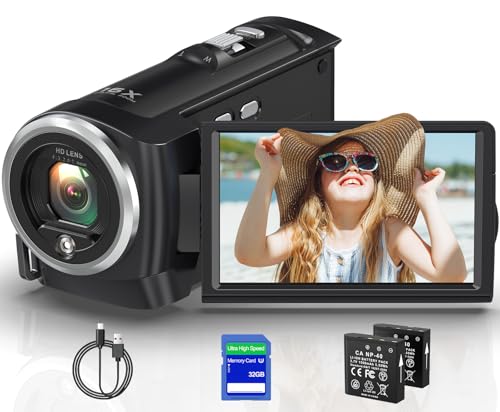
For a portable camera system for school events on a tighter budget, this 2.7K camcorder covers the basics with built-in recording features and a ready-to-use 32GB card. It offers 2.7K video, 16X digital zoom, a 270-degree rotating screen, and recording while charging, which can be handy for longer programs or performances.
Best For: Families or school groups that want an inexpensive, self-contained camcorder for straightforward event recording.
Pros:
- Records in 2.7K and includes a 32GB memory card to get started quickly.
- Comes with two batteries and supports recording while charging.
- 270-degree rotating screen adds flexibility for handheld shooting.
- Built-in LED fill light can help in lower-light situations.
Cons:
- Uses 16X digital zoom rather than optical zoom.
- External microphone support is mentioned, but the mic is not included.
- Stability and image processing are basic compared with more advanced streaming cameras.
This model is a practical entry-level option when you want a simple camcorder instead of a full streaming system. It is best for capturing school events where convenience, included accessories, and low cost matter most.
Auto-Tracking Sideline Camera – XbotGo Falcon AI Action Camera
If your school events center on sports, the XbotGo Falcon is a portable camera system for school events that focuses on AI auto-tracking and instant live streaming. It records in 4K, uses a dual-lens design for smarter tracking, and is meant to follow players and the ball during soccer, basketball, and football coverage.
Best For: Sports teams, coaches, and parents who want automated 4K coverage of games and practices.
Pros:
- AI auto-tracking is designed to follow players and the ball automatically.
- Records in 4K with a dual-lens system for improved tracking performance.
- Built-in Wi-Fi supports instant live streaming and sharing.
- Compact all-in-one design reduces the need for extra gear.
Cons:
- MicroSD card is required for recording and is sold separately.
- No image stabilization is listed.
- Battery is not included.
The Falcon is the most specialized option here for sports-heavy school coverage. If you want automated tracking and 4K video instead of a general-purpose camcorder, this is the strongest fit.
Wireless Livestream Pick – Mevo Start 1080p Live Streaming Camera
If you need a portable camera system for school events, the Mevo Start is a simple way to stream assemblies, plays, and competitions without a bulky setup. It records and streams in 1080p HD, works over Wi-Fi or LTE via a smartphone, and can be managed from the Mevo app for quick control on the go.
Best For: Schools or families that want an easy, compact live-streaming camera with app-based control.
Pros:
- 1080p HD video with a compact, 8.2-ounce design
- Wireless control through the smartphone app with Auto-Director features
- Can stream via Wi-Fi, Ethernet, or a phone’s LTE network
- Supports multicam setups with up to three Mevo Start cameras
Cons:
- Fixed focus and no image stabilization
- Built-in battery life is listed at about 6 hours
- Best suited to streaming workflows rather than traditional camcorder use
The Mevo Start stands out when your priority is straightforward live streaming rather than manual camera control. Its biggest strengths are portability, wireless flexibility, and the ability to expand into a multicam setup later.
AI Tracking Upgrade – EMEET PIXY Wireless 4K PTZ Camera
The EMEET PIXY Wireless is a strong portable camera system for school events when you want higher-resolution capture and hands-free tracking. It records in 4K, uses AI auto tracking and gesture control, and can be managed wirelessly from a phone or computer for flexible event coverage.
Best For: Multi-angle school events, performances, and sports where 4K quality and auto-tracking matter.
Pros:
- 4K video with a dual-lens design for AI tracking
- Gesture control makes hands-free operation easier
- Wireless control from phone or PC with multicam support
- Built-in 48kHz mic and 3.5mm jack for external audio
Cons:
- More feature-heavy than a basic point-and-shoot setup
- Wide feature set may be more than needed for simple recording
- Compact design is portable, but still geared toward streaming workflows
For school events that move quickly or need a more polished presentation, this camera offers useful automation and higher detail than many portable options. The included carrying case and long battery life also make it easier to bring along for extended programs.
Starter Camcorder Value – 4K Vlogging Camcorder with Batteries
This compact camcorder is a practical portable camera system for school events if you want a ready-to-use kit without adding accessories right away. It records in 4K/30fps, includes two batteries and a 32GB SD card, and can switch to webcam mode for livestreaming when needed.
Best For: Budget-friendly school event recording, family use, and beginner-friendly shooting.
Pros:
- 4K/30fps video plus 42MP photo capture
- Includes 32GB SD card, two batteries, remote, and carrying bag
- 3″ 270° rotating screen helps with framing and self-shooting
- Webcam mode works for simple live streaming and video calls
Cons:
- 18X zoom is digital, not optical
- Tripod and external microphone are not included
- Better suited to basic recording than advanced streaming setups
As an all-in-one starter package, this camcorder is appealing when you want to film school plays, graduations, or sports without buying extras separately. The included accessories make it easy to start quickly, though it is less specialized than the other two options here.
How We Picked the Best Portable Camera System for School Events
For a Portable Camera System for School Events, we prioritized easy setup, dependable connectivity, clear audio options, and enough image quality to handle indoor stages and outdoor fields. We also looked for models that can be moved between classrooms, gyms, and auditoriums without requiring a dedicated AV team.
Systems that support wireless streaming, USB or HDMI output, app control, and practical zoom were given extra weight because they offer more flexibility for school use.
Quick Comparison
The most useful way to compare these picks is by use case. Some are better for live streaming assemblies or performances, while others are stronger as document cameras, camcorders, or sports-focused recorders. If you need one setup for multiple jobs, prioritize models with broad compatibility and simple controls.
Key Buying Factors for Portable Camera System for School Events
Portability and Setup Speed
Choose a system that can be packed, mounted, and powered up quickly. Lightweight bodies, foldable designs, and USB power options make a big difference when staff are moving between events.
Video Quality and Zoom
Look for at least solid Full HD performance, with 4K or high-resolution capture if you want more room to crop or stream to larger displays. Optical zoom or effective digital zoom helps when the subject is far from the camera, such as on a stage or field.
Audio and Connectivity
Built-in microphones are useful for casual use, but external audio support or stronger onboard mics are better for speeches and performances. For live coverage, check for Wi-Fi, HDMI, USB, RTMP, or app-based streaming options.
Control and Framing
Auto-tracking, remote control, wide-angle lenses, and rotating screens can reduce the need for constant manual adjustment. That matters when one person is managing the camera while also coordinating an event.
Who Should Buy Which Portable Camera System for School Events?
If you need a flexible livestreaming setup for assemblies or announcements, choose a wireless model with strong output options and app control. If your priority is classroom instruction or presenting handouts, a document camera style pick is often the easiest fit. For gym games, field days, and action-heavy events, an auto-tracking or sports-oriented camera is usually the smartest choice.
For schools that want one Portable Camera System for School Events to cover multiple scenarios, the best value usually comes from a model that combines reliable connectivity, simple operation, and enough zoom to adapt from close-up instruction to distant stage coverage.