
Choosing a video camera for school auditorium use is really about balancing zoom, image quality, audio handling, and ease of operation. School events are often filmed from the back of the room, under mixed lighting, with little time for a complicated setup.
That’s why the best options here focus on practical performance: strong optical zoom, dependable low-light results, flexible outputs for streaming or recording, and controls that work well for staff or volunteers.
Best 10 Video Camera for School Auditorium Picks for 2026






AI Auto-Tracking PTZ – TONGVEO 20X Optical Zoom Conference Camera
If you need a video camera for school auditorium use, this TONGVEO PTZ model is built for fixed-install coverage, live streaming, and presenter tracking. The 20X optical zoom helps keep stage speakers clear from the back of the room, while AI auto tracking can follow one person or frame multiple people automatically. HDMI and USB 3.0 make it easy to drop into a streaming or AV setup.
Best For: Schools, churches, and auditoriums that want automated framing and long-zoom capture.
Pros:
- AI tracking supports single-person tracking and multi-person auto framing.
- 20X optical zoom keeps distant subjects sharp without digital zoom loss.
- HDMI and USB 3.0 outputs are plug-and-play for Zoom, OBS, vMix, and Teams.
- 255 presets and smooth PTZ control make scene changes fast.
Cons:
- Records at 1080p rather than 4K.
- Stationary PTZ setup is less portable than a handheld camcorder.
For schools that need reliable auditorium coverage with minimal operator input, this camera focuses on automation and flexible connectivity over consumer-style portability. It is a practical fit when your priority is keeping speakers framed cleanly from a fixed position.
Pro 4K Camcorder – Canon XA60 20x Zoom Camcorder
For a video camera for school auditorium production where image quality and sound control matter, the Canon XA60 brings compact pro features into a manageable camcorder body. It records 4K UHD or Full HD, uses a 20x optical zoom lens for stage coverage, and offers HDMI plus USB Type-C/UVC support for streaming or live output. The XLR handle and dual SD slots add flexibility for more serious school event work.
Best For: Auditorium crews that want a compact professional camcorder with strong zoom and audio options.
Pros:
- 4K UHD and Full HD recording with a 1/2.3″ CMOS sensor and DIGIC DV6 processor.
- 20x optical zoom reaches distant performers or speakers on stage.
- USB Type-C with UVC support enables HD live streaming to PC or Mac.
- Dual SD card slots and 2 XLR terminals support more advanced production needs.
Cons:
- More expensive and complex than a basic school-use camcorder.
- Best suited to a crew setup rather than casual handheld use.
This is a strong choice when your auditorium production needs go beyond simple recording and into streaming, better audio, and dependable zoom reach. It is less about simplicity and more about giving a school event team room to grow.
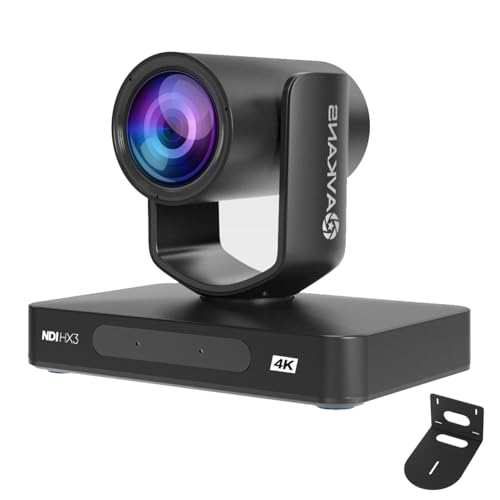
NDI PTZ Broadcast Camera – AVKANS 4K 20X AI Tracking PTZ
If your school auditorium setup needs a network-friendly video camera for school auditorium streaming, this AVKANS PTZ model is aimed squarely at AV production. It supports 4K output at 30fps, AI tracking modes, and 20X optical zoom, while adding HDMI, SDI, USB, and NDI connectivity for more flexible integration. PoE support and the included NDI license also make it attractive for cleaner installs.
Best For: Schools building a more advanced auditorium streaming or broadcast system.
Pros:
- 4K up to 30fps with 20X optical zoom for stage and event capture.
- NDI license included plus HDMI, SDI, USB, and Ethernet options.
- AI tracking offers presenter, zone, and hybrid tracking modes.
- PoE support can simplify installation with one Ethernet cable.
Cons:
- Geared toward AV installations rather than casual users.
- Windows-based setup tools may be a factor for some workflows.
This camera makes the most sense when the auditorium system is part of a larger networked production workflow. It offers more connectivity and control than a basic camcorder, which is useful if your school already uses switchers or IP-based streaming.
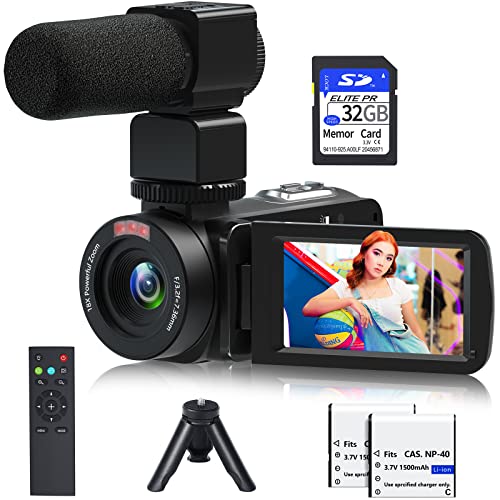
Budget 4K Camcorder – 64MP 4K Camcorder With Accessories
For smaller school projects, this handheld camcorder can work as a simple video camera for school auditorium recordings when you want a bundled, all-in-one kit. It offers 4K video, an external stereo microphone, night vision, a 3.0-inch touch screen, and included accessories like a remote, stabilizer, batteries, and 32GB card. The 18X digital zoom adds flexibility, though it is not an optical zoom camera.
Best For: Budget-minded users who want a ready-to-use handheld camera kit for basic event recording.
Pros:
- Includes a microphone, remote, stabilizer, 32GB card, and 2 batteries.
- 4K video with 64MP capture and a 3.0-inch touch screen.
- IR night vision can help in low-light indoor conditions.
- Webcam function adds extra versatility for calls or streaming.
Cons:
- Uses 18X digital zoom instead of optical zoom.
- Handheld format is less ideal for fixed auditorium coverage.
This camera is best when budget and convenience matter more than pro-level stage optics. It is a usable starter option for school events, but fixed-install PTZ cameras will usually handle auditorium distance better.
All-in-One Auto-Tracking School Auditorium Pick – TONGVEO 1080P PTZ Conference Camera System
If you need a video camera for school auditorium use, this TONGVEO system is built for speaker-focused recording and live streaming. The PTZ camera offers 1080p HD video, 60fps output, and AI auto-tracking, while the included Bluetooth speakerphone helps capture room audio in one setup.
Best For: Schools that want a simple all-in-one camera and audio kit for assemblies, lectures, and events.
Pros:
- AI auto-tracking helps keep lecturers or speakers framed.
- 1080p video at 60fps with USB 3.0 and HDMI output.
- Included Bluetooth speakerphone supports the audio side of the setup.
- Plug-and-play design is useful for quick event setup.
Cons:
- Wired PTZ camera means installation is less flexible than a handheld camcorder.
- Best suited to small-to-medium rooms rather than very large auditoriums.
- Speakerphone range is specified for meeting-room scale use.
For schools that want a practical, no-frills auditorium capture setup, this bundle focuses on tracking the subject and simplifying audio. It makes the most sense when the priority is dependable lecture or performance coverage rather than portable filming.
Budget Portable Recording Option – VETEK 1080P Camcorder Kit
As a video camera for school auditorium use, this camcorder works best when you need a compact, easy-to-move recorder for projects, meetings, or event clips. It records in 1080p, includes a remote, microphone, mini tripod, batteries, and a 32GB card, so it is ready to use with minimal add-ons.
Best For: Teachers, students, or staff who want an affordable portable camera for smaller school recordings and basic event capture.
Pros:
- Comes with useful extras: remote, mic, mini tripod, two batteries, and 32GB SD card.
- 1080p recording and 18X digital zoom cover basic auditorium footage.
- IR night vision can help in low-light environments.
- Can be used as a webcam and supports HDMI output to TV.
Cons:
- Digital zoom is less flexible than an optical zoom PTZ system.
- Fixed-focus design is not ideal for long-distance auditorium work.
- Better suited to compact or casual use than professional stage coverage.
This is the most portable option in the group, but it is not the strongest choice for wide auditorium setups. It fits best when convenience, starter accessories, and budget matter more than advanced camera control.
Professional Multi-Output Auditorium PTZ Choice – SMTAV 20X Zoom PTZ Camera
If you are shopping for a video camera for school auditorium coverage, this SMTAV PTZ model is the most installation-friendly of the three. It delivers 1080p60 video, 20X optical zoom, and simultaneous output through 3G-SDI, HDMI, USB 3.0, and network, which suits larger fixed setups.
Best For: Schools and venues that need a fixed, higher-end camera for assemblies, performances, and streaming.
Pros:
- 20X optical zoom is well suited to stage coverage from a distance.
- Simultaneous 3G-SDI, HDMI, USB 3.0, and network output.
- 1080p60 support gives smooth video for live use.
- Includes wall mount bracket and control protocol support for installed systems.
Cons:
- Stationary PTZ design is less portable than a camcorder.
- Manual focus is less beginner-friendly than fully automatic options.
- Best when paired with a proper installed AV workflow.
For schools that need more reach and more integration options, this camera is the strongest technical fit. It is designed for fixed-room use where zoom range, output flexibility, and control matter more than portability.
Budget-Friendly Compact Pick – kimire 1080P Camcorder with Webcam Mode
If you need a simple video camera for school auditorium use, this kimire camcorder covers the basics without adding much complexity. It records in 1080p, supports a tripod, and can keep recording while charging, which is useful for longer school programs and performances.
Best For: Small schools, parents, or casual event recording where a lightweight, affordable camcorder is enough.
Pros:
- 1080p recording with 16X digital zoom for basic stage capture.
- Supports recording while charging, helpful for longer auditorium events.
- Includes webcam mode, plus USB and TV output options.
- Compact body with tripod support and two included batteries.
Cons:
- Video resolution is listed at 15fps, so motion may not look as smooth as higher-end cameras.
- SD card is not included.
- Best suited to straightforward recording rather than advanced production work.
For schools that mainly want a low-cost way to capture assemblies, recitals, or classroom performances, this is a practical entry-level option. It’s not built for premium results, but the recording flexibility and compact design make it easy to use.
Professional Streaming Option – PTZ 4K Camera with 20X Optical Zoom
For a video camera for school auditorium setups that need live switching, streaming, or controlled framing, this PTZ model is built for more demanding use. Its 4K output, 20X optical zoom, and pan-tilt movement make it a strong fit for larger spaces where the camera needs to cover the stage from a distance.
Best For: Schools, churches, and event teams that want a fixed camera for livestreaming and professional-style auditorium coverage.
Pros:
- 4K UHD output with 20X optical zoom for detailed stage shots.
- 340° pan and 120° tilt help follow speakers or performers.
- Supports USB, HDMI, and Ethernet connections with plug-and-play compatibility.
- Works with common platforms like Zoom, OBS, YouTube, and Facebook livestream.
Cons:
- Stationary PTZ design is less portable than a handheld camcorder.
- Does not include batteries.
- More complex than a basic point-and-shoot option for simple use cases.
This is the strongest pick here for schools that care about live production and flexible remote control. If your auditorium needs a camera that can cover wide stages, zoom in cleanly, and integrate with streaming software, this model is geared for that job.
High-End Event Camcorder – Canon VIXIA HF G70 4K with Dual SD
If you want a more polished video camera for school auditorium recordings, the Canon VIXIA HF G70 brings 4K capture, 20x optical zoom, and dual SD slots for longer or backed-up shoots. It’s a practical choice for school performances, interviews, and events where dependable footage matters.
Best For: Schools or video teams that want a more professional camcorder for performances and event recording.
Pros:
- True 4K UHD capture with Canon DIGIC DV 6 processing.
- 20x optical zoom is useful for school performances and stage events.
- Dual SD slots support redundant recording or longer sessions.
- HDMI output works for monitors or recorders.
Cons:
- Heavier than compact camcorders at 4 pounds.
- No image stabilization is listed.
- Manual shooting mode may be more than casual users need.
This Canon is the most traditional camcorder-style option in the lineup and is better suited to users who want quality and control over maximum simplicity. For auditorium work where you want strong zoom reach and solid 4K output, it stands out as the most refined choice.
How We Picked the Best Video Camera for School Auditorium
We prioritized models that make sense for auditorium environments: enough zoom to capture stages clearly from a distance, stable video for performances and assemblies, and connection options that fit both recording and live streaming. We also favored cameras with straightforward operation, since schools often rely on part-time staff, teachers, or volunteers.
Quick Comparison
For long throw shooting and fixed installations, PTZ models are usually the easiest fit. For handheld coverage, a camcorder may be better if you want portability and simpler framing. If your priority is livestreaming school productions, look for HDMI, USB, SDI, or IP/NDI outputs so the camera can integrate with your existing AV setup.
Key Buying Factors for a Video Camera for School Auditorium
Zoom and Framing
Auditoriums are large, so optical zoom matters more than digital zoom. A 20x optical zoom is often a sweet spot for stage coverage, while PTZ control helps operators reframe without moving the camera.
Low-Light Performance
Stages are rarely evenly lit. Choose a camera that can handle shadows, spotlights, and changing performance lighting without producing muddy detail or excessive noise.
Output and Compatibility
Check whether the camera supports HDMI, USB, SDI, IP, or NDI. The right output depends on whether you’re sending video to a projector, capture device, live switcher, or streaming computer.
Installation and Control
A good Video Camera for School Auditorium use should be easy to position and operate. PTZ cameras are ideal for ceiling mounts or rear-wall setups, while camcorders can work well for mobile recording or simple tripod use.
Audio Workflow
Many school productions use separate audio from the house sound system. Make sure your camera setup can work cleanly alongside a mixer or audio interface, even if the camera itself is not the main audio source.
Who Should Buy Which Video Camera for School Auditorium?
Choose a PTZ camera if you want a fixed, remotely controlled solution for assemblies, concerts, and worship-style events. Choose a camcorder if you need a versatile handheld option for recording rehearsals, classroom productions, or one-person shooting. If livestreaming is a priority, favor models with strong output support and reliable continuous operation. For schools that want the simplest setup, a camera with good optical zoom and easy controls is usually the safest choice.