
Shopping for a working video editor? The best gifts are the ones that save time, improve accuracy, and make long editing sessions easier.
These gift ideas for professional video editors focus on tools they will actually use every day, from fast storage and control surfaces to color-accurate displays and desk upgrades.
17 Gift Ideas for Professional Video Editors to Consider in 2026
Creative Timeline Control
Loupedeck Live Editing Console
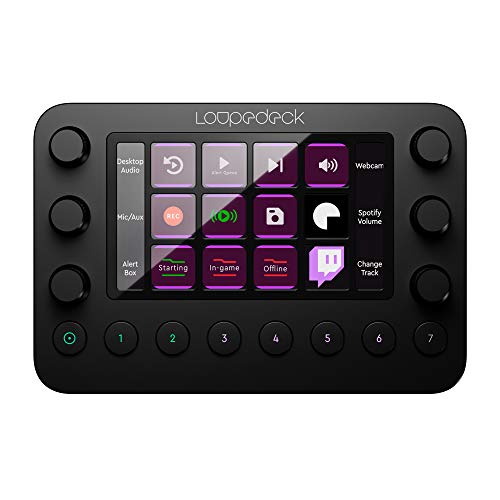
- Customizable buttons, dials, and touchscreen controls
- Built for faster timeline navigation and shortcuts
- Strong fit for professional editors who want workflow speed
Best For: Professional editors who want faster timeline control and customizable shortcuts.
Tactile Color-Grading Control
TourBox Elite Bluetooth Editing Controller

- Bluetooth controller for DaVinci Resolve, Premiere Pro, and Final Cut Pro
- Made for tactile shortcuts and hands-on editing
- Good fit for Mac and PC creator workflows
Best For: Editors who use Premiere Pro, Final Cut Pro, or DaVinci Resolve and like tactile shortcuts.
One-Touch Workflow Macros

- 15 macro keys for quick editing actions
- Great for shortcuts, exporting, and workflow macros
- Strong gift pick for editors who want instant controls
Best For: Video editors who want one-touch actions for editing, exporting, and workflow macros.
Jog Wheel Editing Control
Contour ShuttlePRO v2 Editing Controller

- Jog wheel plus 15 programmable buttons
- Ideal for shuttle-style timeline navigation
- A solid choice for video, audio, and photo editing
Best For: Editors who prefer jog/shuttle-style timeline navigation and shortcut buttons.
Speed Up the Edit

- Built for editors who use DaVinci Resolve’s Cut Page
- Helps make timeline editing faster and more efficient
- A focused gift for professional video editors who want workflow speed
Best For: Editors who use DaVinci Resolve and want faster cut-page editing
Portable Backup Power

- Fast 1TB external storage for large video files
- Ideal for moving projects between computers or backing up on the go
- A practical gift for editors who need reliable portable storage
Best For: Editors who move large video files between computers or backup projects on the go
Rugged 4K Storage
SanDisk Extreme PRO Portable SSD 2TB

- 2TB of fast external storage for heavy video workflows
- Rugged IP65 design suits editing on the move
- Great for editors handling 4K footage and large project files
Best For: Editors handling 4K footage and needing fast, rugged external storage
Laptop Editing Hub

- Adds HDMI, USB, and SD/TF ports to an editing laptop
- Supports 4K@60Hz displays and 100W power delivery
- A useful desk or travel gift for portable edit setups
Best For: Editors using laptops who need more ports for drives, monitors, and SD cards
Single-Cable Dock Upgrade
CalDigit TS4 Thunderbolt 4 Dock

- Thunderbolt 4 dock for a cleaner laptop-based editing desk
- Strong connectivity for video-editing workflows on Mac, Windows, or Chrome
- 98W charging and broad port selection help replace desk clutter
Best For: Editors with a laptop-based workstation who want a cleaner, single-cable setup
Creator Color Monitor

- 27-inch 4K UHD screen gives more room for timelines and previews
- Factory-calibrated color with 95% P3 supports color-conscious editing
- 90W USB-C, USB hub, and ergonomic adjustability suit creator desks
Best For: Editors who care about color accuracy and a bigger timeline workspace
No-Glare Desk Lighting
BenQ ScreenBar Pro Monitor Light

- Monitor light bar designed to reduce glare while lighting the desk
- Adjustable brightness and color temperature for late editing sessions
- Motion sensor and USB-C design make it a polished creator accessory
Best For: Editors working late who want better desk lighting without glare on the screen
Creator Voiceover Pick

- Great for editors who record voiceovers, tutorials, or client notes
- Broad appeal for PC and Mac setups with plug-and-play convenience
- Strong match for gift ideas for professional video editors
Best For: Video editors who also need an easy USB mic for voiceovers and tutorials.
On-Camera Audio Upgrade
Rode VideoMic GO II Shotgun Mic
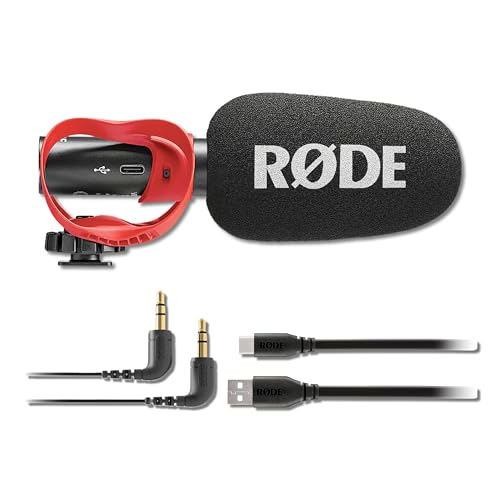
- Useful for better scratch audio, B-roll, or on-camera recording
- Comes as a practical bundle with mount and USB-C cable
- A solid gift choice for editors who sometimes capture their own footage
Best For: Editors who occasionally record scratch audio or on-camera clips.
Monitoring Headphone Staple
Audio-Technica ATH-M50x Headphones

- Reliable studio monitor headphones for sound checks and rough cuts
- Widely used by editors for monitoring, mixing, and tracking
- Strong fit for video editors who want dependable audio review gear
Best For: Editors who need accurate monitoring headphones for editing and sound checks.
Studio Monitoring Pick
Sony MDR-7506 Professional Headphones

- Industry-standard monitoring headphone for video editing and post-production
- 40mm drivers and 10Hz-20kHz range suit detailed audio checks
- A practical gift for editors who need reliable, familiar reference sound
Best For: Editors and post-production pros who want an industry-standard monitoring option.
Color Accuracy Gift
ColorChecker Display Pro Calibrator

- Monitor calibration colorimeter for color-conscious editing workflows
- Helps support accurate screen matching for video and post-production work
- A thoughtful gift for creators who care about reliable color
Best For: Color-conscious editors and creators who want accurate monitor calibration.
Editing Comfort Upgrade
Logitech MX Master 3S Wireless Mouse

- Ergonomic mouse designed for long editing sessions and precise control
- MagSpeed scrolling, quiet clicks, and 8K DPI support faster workflow
- A strong gift for editors who want a comfortable, dependable daily driver
Best For: Editors who spend hours in software and want a comfortable, precise mouse.
How to Choose the Right Gift for a Professional Video Editor
The best gift depends on how the editor works. Some creators spend most of their time cutting in DaVinci Resolve or Premiere Pro, while others split their day between color grading, motion work, streaming, and client revisions. If you are browsing Gift Ideas for Professional Video Editors, start by matching the gift to their workflow instead of picking something generic.
Control surfaces and shortcut decks are ideal for editors who want to speed up repetitive tasks. Storage is a smart choice for anyone juggling large camera files, proxy media, and project backups. Monitors, calibration tools, and lighting help editors who care about color accuracy, while microphones and headphones make sense for creators who also handle voiceover, livestreaming, or podcast work.
Budget Considerations for Editor Gifts
There are strong options at nearly every price point. Smaller accessories like a mouse, monitor light bar, USB hub, or quality headset are affordable but still useful. Midrange gifts often include a portable SSD, a customizable controller, or a good USB microphone. Higher-budget picks such as a Thunderbolt dock, a 4K reference-style monitor, or a professional editing console can feel especially generous for a milestone occasion.
If you are unsure what to buy, consider whether the recipient would benefit more from a workflow upgrade or a quality-of-life upgrade. Workflow tools usually have the biggest impact because they save hours over time. Comfort items can be just as appreciated, especially for editors who spend long stretches at a desk.
Personalization Tips for a More Thoughtful Gift
Personal touches can make even practical gifts feel special. If you know their software, choose accessories that fit it well, such as a controller built for timeline navigation, macro shortcuts, or color grading. If they work on a laptop, portability matters more than raw desk expansion. If they are a colorist, a calibrated display or color checker will feel much more tailored than a general tech accessory.
You can also personalize the presentation. Add a handwritten note that mentions a project they have finished, a tool they use often, or a milestone you want to celebrate. For professional creators, that kind of recognition can mean as much as the gift itself.
Last-Minute Buying Advice
If you are shopping close to the deadline, prioritize fast-shipping accessories and widely compatible gear. A mouse, headset, external SSD, USB-C hub, monitor light bar, or headphones are all practical last-minute buys because they work with most setups and do not require much configuration.
For more technical gifts, double-check compatibility before you buy. Verify whether the editor uses Mac or Windows, whether their laptop supports Thunderbolt, and whether a monitor or dock will match their ports and power needs. For the safest last-minute choice, stick with items that are easy to set up and useful from day one.
Final Thoughts on Buying for Video Editors
The most useful Gift Ideas for Professional Video Editors are the ones that remove friction from the editing process. Think speed, accuracy, comfort, and reliability. Whether you choose a shortcut controller, storage upgrade, monitor accessory, or premium audio gear, the best pick will be something that fits naturally into their daily creative workflow.