
Shopping for a photo editor can feel tricky, but the best gifts are usually the ones that save time, improve accuracy, or make long editing sessions more comfortable.
This roundup of gift ideas for photo editors includes smart picks for every budget, from color-critical tools and editing accessories to desk essentials and backup gear.
24 Gift Ideas for Photo Editors to Consider in 2026
Color Accuracy Tool
Calibrite ColorChecker Classic 24-Patch Chart

- Helps photo editors balance white point and refine color grading.
- Supports consistent edits across devices and workflows.
- A practical gift for anyone who needs accurate photo color matching.
Best For: Photo editors who need reliable color grading and consistent edits across devices.
Monitor Calibration Upgrade
Datacolor Spyder X Elite Monitor Calibrator

- Designed for expert and professional photographers and editors.
- Helps keep multiple displays calibrated for color-critical work.
- A smart gift for improving accuracy in everyday editing.
Best For: Photo editors working with color-critical images and multiple displays.
Sharp Editing Display
LG 27UP650K-W 27-Inch 4K IPS Monitor

- Gives photo editors a 27-inch 4K UHD workspace with sharper detail.
- IPS panel and DisplayHDR 400 suit color-focused retouching.
- Adjustable stand and flicker-safe features support long editing sessions.
Best For: Photo editors who want more screen space and crisp detail while retouching.
Pro Color Display
BenQ SW272Q 27-Inch Photographer Monitor

- Built for accurate color work with 99% Adobe RGB and 98% DCI-P3/Display P3.
- Nano matte panel and anti-reflection certification help create a comfortable setup.
- USB-C, HDR, and 16-bit 3D LUT make it a premium editing gift.
Best For: Photo editors who care about accurate colors and a comfortable editing setup.
Shortcut Console
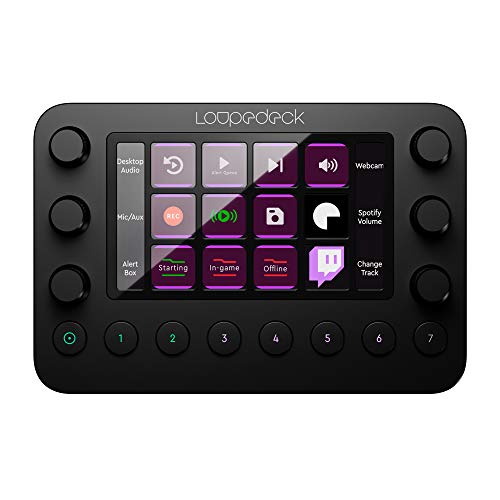
- Custom buttons and dials speed up editing workflows
- Built for photo and video editing with a tactile feel
- Great gift for editors who want faster shortcuts
Best For: Photo editors who want faster shortcuts and a more tactile editing workflow.
Editing Speed Hub
TourBox Elite Bluetooth Editing Controller

- Helps speed up repetitive Lightroom or Photoshop tasks
- Bluetooth controller made for creator workflows
- Solid pick for photo editors who want more efficient control
Best For: Photo editors looking to speed up repetitive tasks in Lightroom or Photoshop.
Precision Retouch Tool
Wacom Intuos Medium Bluetooth Pen Tablet

- Pen tablet style control for detailed editing work
- ExpressKeys add handy shortcut access
- A practical gift for masking and retouching precision
Best For: Photo editors who do detailed retouching and masking with precision.
Affordable Tablet Control
XP-Pen Deco LW Wireless Drawing Tablet
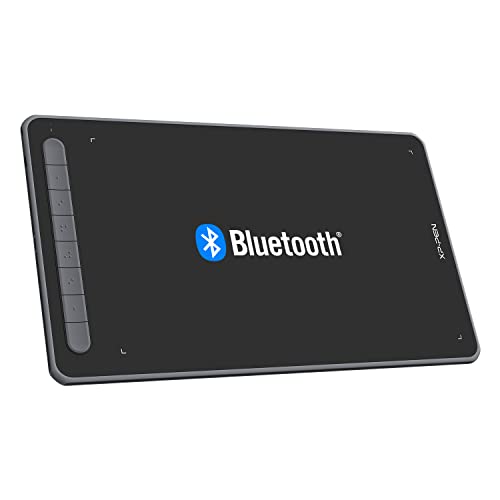
- Wireless Bluetooth tablet for smoother editing control
- Battery-free stylus keeps setup simple
- Good mid-range gift for editors on a budget
Best For: Photo editors who want tablet control without a huge spend.
Precision Mouse Pick
Logitech MX Master 3S Wireless Mouse

- MagSpeed scrolling helps move through edits and timelines quickly.
- 8K DPI control suits precise photo editing adjustments.
- Quiet clicks are a nice touch for long editing sessions.
Best For: Photo editors who want smoother navigation and precise control at the desk.
Shared-Space Screen Privacy
3M 27-Inch Monitor Privacy Filter

- Fits a 27-inch widescreen monitor with a 16:9 aspect ratio.
- Helps keep photo work private in shared offices or studios.
- Reversible gloss or matte side adds flexibility for different setups.
Best For: Photo editors working in shared spaces who want more screen privacy.
Desk Comfort Upgrade
Gimars Keyboard and Mouse Wrist Rest Set

- Cushioned support for both keyboard and mouse use.
- A practical comfort gift for long editing sessions at a desk.
- Designed to help reduce wrist strain during computer work.
Best For: Photo editors who spend long hours editing and want ergonomic desk support.
Color-Aware Desk Lighting
Honeywell Dimmable LED Desk Lamp

- Four color modes and dimming help tailor workstation lighting.
- CRI94 lighting supports more color-aware editing setups.
- USB-A and USB-C ports add extra desk convenience.
Best For: Photo editors who want a brighter, more adjustable workstation lamp.
Workspace Upgrade
UGREEN USB-C Docking Station Dual Monitor

- Supports dual 4K@60Hz monitors for a cleaner editing setup
- Includes 4x 10Gbps USB ports for fast drives and peripherals
- 100W PD helps keep a laptop charged while working
Best For: Photo editors who want an efficient hub for monitors, storage, and accessories.
Fast File Backup
SANDISK 2TB Extreme Portable SSD

- 2TB portable storage for large RAW files and project backups
- USB-C and USB 3.2 Gen 2 for fast transfers up to 1050MB/s
- Compact, rugged drive with IP65 water and dust resistance
Best For: Photo editors who move big files and need quick backup storage.
Archive Storage
Western Digital 8TB My Book External Hard Drive

- 8TB capacity for building a reliable photo archive
- Includes backup software and password protection
- Desktop external drive suited to long-term client work storage
Best For: Photo editors building a dependable archive for finished projects and client files.
Memory Card Import
SABRENT USB-C Dual-Slot UHS-II Card Reader

- Dual-slot reader supports UHS-II SD and microSD cards
- Designed for fast importing from high-speed memory cards
- USB-C connection keeps it simple for modern laptops
Best For: Photo editors who regularly transfer images from SD and microSD cards.
Card Organizer
36-Slot Memory Card Organizer Case

- Holds both SD and microSD cards in one compact case
- Great for photo editors juggling cards from multiple shoots
- Water-resistant, anti-shock design adds gift-worthy practicality
Best For: Photo editors who need a simple way to keep memory cards sorted.
Desk Cable Cleanup
D-Line Cable Management Box, Large Black

- Hides power strips and cord clutter on an editing desk
- Useful for creating a cleaner, less distracting workspace
- A practical gift with broad office and home appeal
Best For: Photo editors who want a tidier, less cluttered workstation.
Screen Comfort
Benicci Blue Light Blocking Computer Glasses

- Designed to ease digital eye strain and headaches
- Helpful for long screen sessions during editing work
- Includes a case for easy gifting and storage
Best For: Photo editors who spend long hours in front of screens.
Ergonomic Upgrade
YEASHEIN Adjustable Under-Desk Foot Rest

- Adjustable footrest with 6 positions for custom comfort
- Supports a more ergonomic setup under an editing desk
- A thoughtful desk-accessory gift for work or home
Best For: Photo editors looking to make their workstation more comfortable.
Desk Upgrade
Adjustable Metal Monitor Stand

- Height-adjustable riser helps improve screen ergonomics.
- Open storage underneath keeps a photo editor's desk tidier.
- A practical, workspace-focused gift for daily editing sessions.
Best For: Photo editors who want better screen height and cleaner desk organization.
Shortcut Cheat Sheet
Colorful Keyboard Shortcut Stickers

- Reference-style shortcut stickers make key commands easier to remember.
- Helpful for photo editors learning faster Photoshop and Lightroom workflows.
- Low-cost gift idea that adds a useful editing reminder right on the keyboard.
Best For: Photo editors who are building shortcut muscle memory or speeding up their workflow.
Shortcut Keyboard Cover
Adobe Photoshop Shortcut Keyboard Cover

- Color-coded shortcut layout keeps Photoshop commands visible at a glance.
- Made for MacBook Pro and Air models, with a clear editing-focused fit.
- A fun, practical gift that helps photo editors work faster.
Best For: MacBook photo editors who want Photoshop shortcuts visible while they work.
Lightroom Guide
How Do I Do That In Lightroom?

- Practical Lightroom book for quicker editing techniques and workflow ideas.
- Great for photo editors who like experimenting with styles and starting points.
- Giftable pick with strong review backing and broad appeal.
Best For: Photo editors who want faster Lightroom know-how and creative editing ideas.
How to Choose the Right Gift for a Photo Editor
The best Gift Ideas for Photo Editors depend on how they work. Some creators spend their time on color correction and retouching, while others move quickly through large batches of images and need speed, comfort, and reliable storage. Before you buy, think about what would genuinely improve their workflow.
If they edit professionally, prioritize tools that improve calibration, file handling, and screen quality. If they are a hobbyist or social media creator, convenience gifts, ergonomic accessories, and shortcut tools may be more useful than a high-end monitor upgrade. It is also worth considering whether they work on a laptop, desktop, or dual-monitor setup, since that affects which accessories will actually fit their routine.
Match the Gift to Their Editing Style
Color-focused editors will appreciate calibration tools, reference charts, and wide-gamut displays. Fast-paced editors may prefer an editing controller, mouse, keyboard shortcut aids, or a tablet that speeds up selection and masking. For anyone who spends hours in Lightroom or Photoshop, comfort gifts like wrist rests, monitor stands, and eye-care lighting can make a noticeable difference.
Budget Considerations
There are great options at almost every price point. Smaller gifts under a modest budget can still be thoughtful and useful, such as cable organizers, shortcut stickers, memory card cases, or a blue light filtering accessory. Mid-range gifts often hit the sweet spot for everyday value, including a better mouse, a drawing tablet, an external SSD, or a desk lamp with accurate color rendering.
If you want to splurge, premium picks like a professional monitor, monitor calibration device, or a high-capacity backup drive can be game-changers. For group gifting, combining a few smaller accessories is a smart way to create a more impressive present without overspending.
Personalization Tips That Make the Gift Feel More Thoughtful
Personalized Gift Ideas for Photo Editors do not need engraving to feel special. Instead, choose something that fits their software, desk setup, or favorite workflow. For example, shortcut reference tools are especially helpful for Photoshop and Lightroom users, while a USB-C dock or card reader makes sense for someone juggling cameras, laptops, and external drives.
You can also build a themed gift set. Pair a storage accessory with a backup drive, or combine an ergonomic wrist rest with a monitor stand and desk lamp. If they are particular about aesthetics, choose sleek black or aluminum finishes that match a modern studio or home office.
Last-Minute Buying Advice
If you are shopping late, focus on gifts that are easy to order, easy to use, and likely to fit most setups. Universal accessories like mice, desk lights, SSDs, cable organizers, and shortcut guides are usually safer than highly specialized gear. Digital items can also work in a pinch, especially if you need something that can be delivered quickly or gifted alongside a physical item.
When in doubt, avoid overly niche tools unless you are sure they use the same software, monitor size, or device ecosystem. The safest last-minute Gift Ideas for Photo Editors are practical upgrades that remove friction from daily editing. That is what makes them feel useful long after the wrapping paper is gone.
Final Tip for Choosing a Standout Gift
Look for the gap in their current setup. If their monitor is great but their desk is cluttered, choose organization tools. If they already have strong gear, focus on comfort and speed. The most appreciated gifts are the ones that quietly improve every editing session.