
Looking for thoughtful gift ideas for Lightroom users? The best picks make editing faster, color more accurate, and file management far less stressful.
From calibration tools to storage and desk essentials, these gift ideas help photographers and creators spend more time editing well and less time fighting their setup.
16 Gift Ideas for Lightroom Users to Consider in 2026
Color Accuracy Upgrade
Calibrite ColorChecker Display Pro

- Helps Lightroom users edit with accurate color-managed workflow
- A strong fit for print matching and consistent photo output
- Core monitor calibrator with solid buyer appeal and 203 reviews
Best For: Lightroom users who edit photos for accurate color and print matching
Pro Editing Monitor
BenQ PD2706U 27" 4K Photo Monitor

- A photo-editing monitor match for serious Lightroom workflows
- Factory-calibrated with 95% P3 and 99% sRGB coverage
- 4K IPS panel with ergonomic features for long editing sessions
Best For: Serious Lightroom users who want a better editing display
Editing Workflow Control
Logitech MX Master 3S Wireless Mouse

- Ideal for long Lightroom sessions with MagSpeed scrolling
- Quiet clicks and 8K DPI tracking support smoother editing
- Broad Mac/Windows compatibility makes it an easy gift
Best For: Anyone who spends hours editing in Lightroom
Masking Precision Tool
Wacom Intuos Pro Drawing Tablet Small
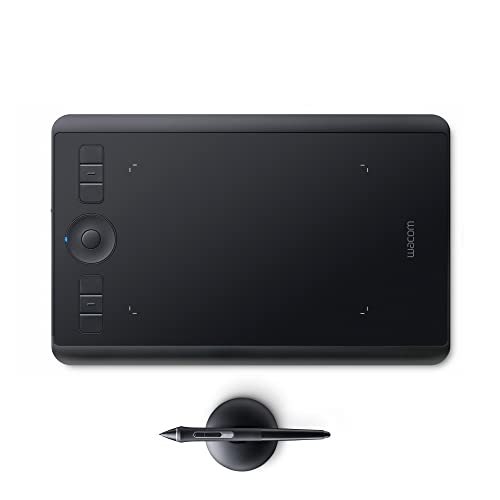
- Great for precise local adjustments and masking in Lightroom
- Wireless tablet with Pro Pen 2 and Touch Ring controls
- Gift-friendly option with strong trust and broad appeal
Best For: Lightroom users who also do precise local adjustments and masking
Hands-On Editing Control
Loupedeck Live S-Style Editing Console
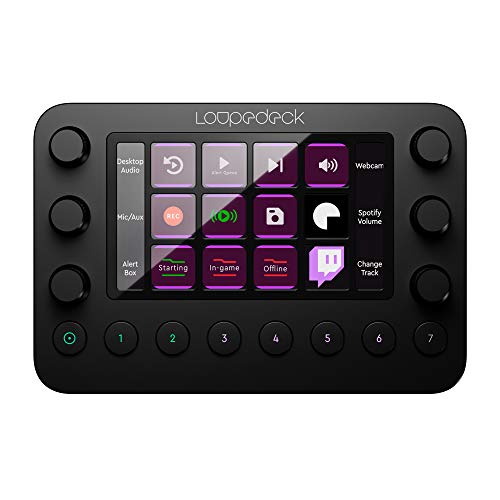
- Customizable buttons, dials, and an LED touchscreen for faster editing.
- Great for Lightroom users who want shortcut-driven, tactile workflows.
- A strong pick for power users who love hands-on control.
Best For: Power users who love shortcuts and hands-on editing.
Tactile Creative Workflow
TourBox Elite Creative Controller

- Designed for advanced Lightroom users who want tactile control.
- A professional-style controller with strong review volume and solid ratings.
- Ideal for creators who prefer physical controls over mouse-only editing.
Best For: Advanced Lightroom users who want tactile control.
Simple Photo Backup
Seagate Portable 2TB External Hard Drive

- Plug-and-play 2TB storage for backup on Windows and macOS.
- Useful for Lightroom catalogs, photos, and everyday storage needs.
- A practical gift for photographers who want straightforward backup.
Best For: Photographers who need simple backup storage for catalogs and photos.
Fast On-The-Go Storage

- Fast 1TB portable SSD for moving large Lightroom catalogs.
- Built for reliable external storage when editing on the go.
- A strong gift for users who need speed and portability.
Best For: Lightroom users who edit on the go or move large catalogs often.
SD Import Hub
UGREEN USB-C Hub with SD Card Reader

- Built-in SD/TF card reader for easy memory card imports
- Useful laptop hub with HDMI, USB-C, USB-A, and PD charging
- Strong review appeal for Lightroom users on the go
Best For: Laptop-based Lightroom users who import from memory cards frequently
Compact Card Reader
USB-C Dual-Slot SD Card Reader

- Compact USB-C reader for SD and microSD cards
- Simple, fast import accessory for Lightroom users
- Broad compatibility for laptops, MacBook, iPad, and more
Best For: Lightroom users who want a compact import accessory
Comfortable Shooting Strap
Peak Design Slide Lite Camera Strap

- Comfort-focused strap for photographers who shoot their own images
- High-quality camera accessory with strong review strength
- A thoughtful gift for Lightroom users who want a better carry setup
Best For: Lightroom users who shoot their own images and value comfort
Camera Carry

- Compact sling for a camera plus everyday essentials
- Padded adjustable strap for crossbody or waist carry
- A practical gift for Lightroom shooters on the go
Best For: Photographers who carry a camera and accessories for shoots.
Creative Lighting
Nanlite PavoTube II 6C LED Tube

- Portable RGB tube light for portrait or product setups
- Wide 2700K-7500K color range for flexible shooting
- A smart gift for creators who edit their photos in Lightroom
Best For: Creators who also do portrait or product photography before editing in Lightroom.
Studio Lighting Kit
Neewer 2-Pack 660 LED Light Kit

- Two bi-color LED panels for home studio shooting
- Includes stands, barn doors, and dimmable 3200-5600K light
- Great for Lightroom users shooting portraits, products, or content
Best For: Lightroom users who shoot portraits, products, or content at home.
Editing Desk Upgrade
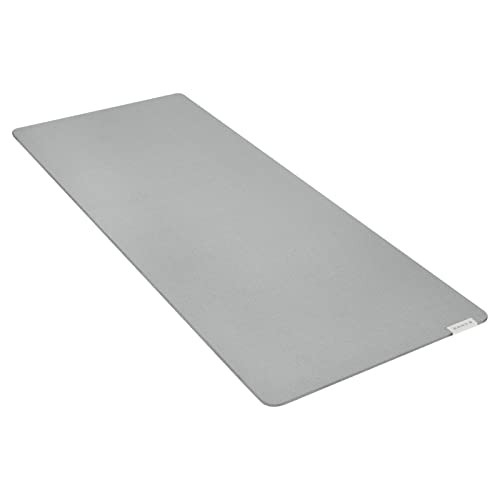
- Large mouse mat for a cleaner editing workspace
- Textured cloth surface with anti-slip rubber base
- A simple gift for a more comfortable Lightroom desk setup
Best For: Anyone building a cleaner, more comfortable editing desk.
How to Choose the Right Gift for a Lightroom User
The best Gift Ideas for Lightroom Users usually solve one of four problems: color accuracy, speed, storage, or comfort. If the person spends a lot of time in Lightroom Classic or Lightroom, look for gifts that improve their workflow instead of adding another novelty item.
Start by thinking about what stage they are in. Beginners often appreciate simple upgrades like a better mouse, a reliable card reader, or a roomy mouse mat. More advanced editors may get the most value from a calibrated monitor, a color checker, or a shortcut controller that saves time on repetitive tasks.
Match the Gift to Their Editing Setup
If they edit on a laptop, a USB-C hub, external storage, and a quality monitor can be especially useful. If they already have a strong workstation, smaller accessories like a camera strap, sling bag, or desktop control surface may be the smarter choice. The best gift is the one that fits how they actually work.
Budget Considerations for Gift Ideas for Lightroom Users
You do not need to spend a lot to give something practical. Affordable gifts can still have a big impact if they improve daily editing comfort. A fast SD card reader, a mouse mat, or a cable-and-port solution may sound basic, but they can remove real friction from a creator’s routine.
Mid-range options often deliver the strongest balance of usefulness and value. External SSDs, a high-quality wireless mouse, and portable lighting are all strong choices for editors who need dependable gear without a full studio overhaul. Higher-budget gifts like a color-accurate monitor or a calibration device make sense when you want to give a true workflow upgrade.
Personalization Tips That Make the Gift Feel Thoughtful
For a more personal touch, choose a gift that reflects the recipient’s editing style. Landscape photographers may value color consistency and storage. Portrait creators may appreciate lighting and smoother editing controls. Travel photographers often need compact, durable gear that fits in a bag and works anywhere.
You can also personalize the gift by pairing it with a small accessory. For example, an SSD becomes more useful with a protective pouch. A tablet feels more complete with a comfortable desk setup. Even practical items can feel special when they are selected with the person’s workflow in mind.
Last-Minute Buying Advice
If you are short on time, choose something versatile and easy to appreciate. Storage, a mouse, a card reader, or a USB-C hub are safe bets because they work with most editing setups. These are especially dependable Gift Ideas for Lightroom Users when you do not know the recipient’s exact camera or computer model.
Check compatibility before buying. Make sure the item works with Mac or Windows as needed, that any USB-C accessory matches the recipient’s ports, and that storage capacity fits their typical photo library size. If you are buying a monitor or calibration tool, confirm the creator can actually use the upgrade with their current desk setup.
When in doubt, prioritize convenience, speed, and long-term use. The most appreciated gifts are the ones that quietly improve every editing session. A thoughtful workflow upgrade can be more valuable than a flashy gadget, especially for someone who spends hours organizing, culling, color correcting, and exporting in Lightroom.