
The best webcams for home studios make video calls, livestreams, lessons, and recordings look sharper without requiring a complicated camera setup. The right model can improve image quality, framing, audio clarity, and your overall on-camera presence.
We compared 10 options across resolution, frame rates, camera flexibility, microphones, mounting, privacy features, and value to help you choose a webcam that fits your space and workflow.
Best 10 Webcams for Home Studios Picks for 2026
Best 4K Detail

- 4K video at 30 fps with autofocus
- RightLight 3 exposure adjustment
- Three field-of-view presets
Best For: Premium home studio video and meetings
Best Wide-Angle Value
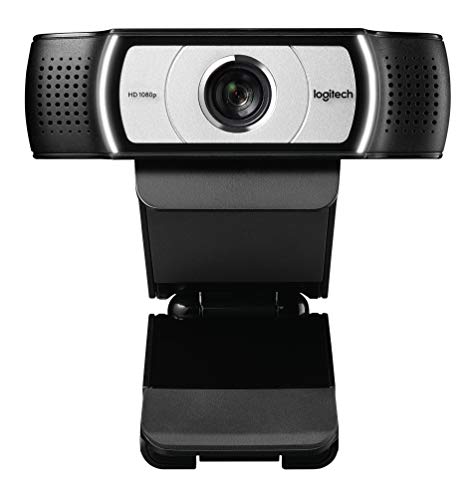
- 1080p video at 30 fps
- 90° extended field of view
- UVC H.264 encoding
Best For: Wide-angle meetings and product demonstrations
Best Dual-View Control
EMEET C60E Dual-Camera 4K Webcam
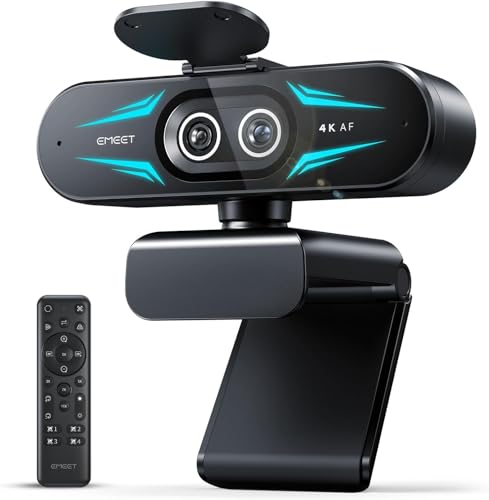
- Wide-angle and telephoto cameras
- Up to 11x hybrid zoom in supported modes
- Remote and software image controls
Best For: Presentations needing wide and close-up views
Reliable Full-HD Value
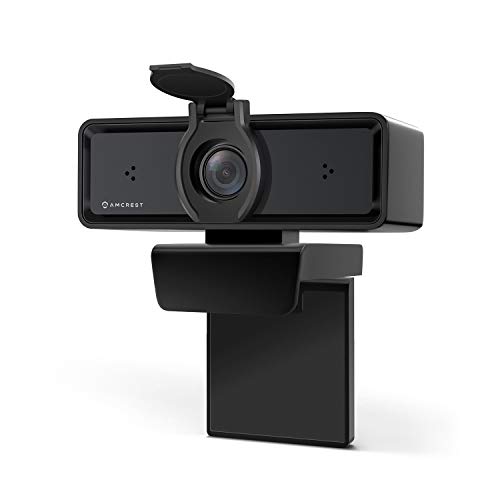
- 1080p video at 30fps
- Dual noise-cancelling microphones
- Privacy cover and tripod thread
Best For: Simple home studios and video calls
Premium Resolution Pick

- 4K video at 30fps
- 1080p video at up to 60fps
- RightLight 3 with HDR
Best For: High-resolution recording and streaming
High-FPS Studio Flexibility

- 2K video at 60fps
- Tripod included for desk positioning
- Autofocus and privacy shutter
Best For: Streaming, recording, and adjustable studio setups
Proven 1080p Classic
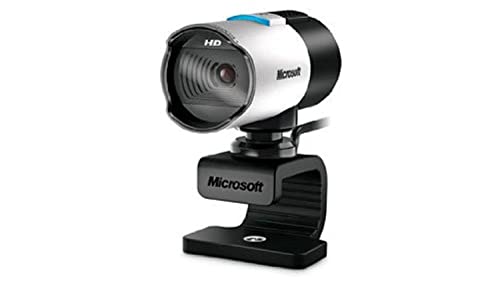
- 1080p 16:9 video at up to 30 fps
- Autofocus glass optics and wide-angle lens
- TrueColor, ClearFrame, and high-fidelity mic
Best For: Fixed home setups needing dependable 1080p USB video
Flexible Studio Starter

- 1080p/30fps video with autofocus
- Tripod and monitor clip included
- Dual noise-cancelling mics and privacy shutter
Best For: Streaming, calls, and portable home-studio setups
Professional Conference Pick

- 1080p video with focused 80-degree framing
- Directional mic and automatic low-light support
- Privacy shutter and Teams/Zoom certification
Best For: Professional home-office calls and focused presentations
Best 4K Detail – Logitech Brio Ultra 4K Webcam
For home studios where image quality matters most, the Logitech Brio delivers sharp 4K video at up to 30 fps. Its autofocus, RightLight 3 exposure adjustment, and selectable field of view make it a flexible choice for streaming, meetings, and recorded content.
Best For: Creators who want premium 4K video, adaptable framing, and built-in Windows Hello support.
Pros:
- Captures up to 4K video at 30 fps with autofocus and 5x digital zoom.
- RightLight 3 helps compensate for glare, backlighting, and difficult lighting.
- Offers 65°, 78°, and 90° diagonal field-of-view presets.
- Dual noise-canceling microphones and an attachable privacy shutter are included.
Cons:
- 4K capture is limited to 30 fps.
- Its USB-A and USB-C connectivity may require attention to the included cable setup.
The Brio is a strong all-around premium webcam for home studios, especially when detailed video and reliable framing are more important than advanced camera movement.
Best AI Tracking – EMEET PIXY Dual-Camera PTZ Webcam
The EMEET PIXY is built for active home studios where the presenter moves around the frame. Its dual-camera design combines 4K imaging with AI-assisted autofocus, exposure control, and PTZ tracking for streaming, teaching, fitness content, and product demonstrations.
Best For: Moving presenters who want automated framing, gesture control, and flexible sound modes.
Pros:
- Combines a 4K main camera with an auxiliary AI camera for tracking and exposure assistance.
- Supports 310° pan and 180° tilt with three-chip intelligent tracking.
- Includes gesture control and preset positions through EMEET STUDIO.
- Triple microphones offer live, noise-canceling, and original sound modes.
Cons:
- A tripod is sold separately.
- Field-of-view adjustment is limited in some 4K and 1080p 60 fps modes.
- Its advanced controls may be more than a stationary presenter needs.
With PTZ movement, AI tracking, and multiple audio modes in one unit, PIXY is particularly useful for dynamic home studio formats that would otherwise require extra camera equipment.
Best Wide-Angle Value – Logitech C930e 1080p Webcam
The Logitech C930e is a practical option for home studios that prioritize dependable conferencing and a broad view over 4K resolution. It records 1080p video at 30 fps and adds a 90-degree field of view, making it useful for whiteboards, product demonstrations, and shared presentations.
Best For: Home office studios needing plug-and-play 1080p video with a wide viewing angle.
Pros:
- Provides 1080p video at 30 fps on PC or Mac.
- 90-degree field of view helps include whiteboards, products, or multiple people.
- UVC H.264 encoding moves video processing to the camera to help free system bandwidth.
- Universal clip and tripod-ready design support flexible placement.
Cons:
- It does not provide 4K resolution.
- The business version ships in a brown box without the retail webcam software.
- USB 2.0 connectivity is less modern than newer USB-C designs.
The C930e remains a sensible studio webcam for calls and presentations, particularly when a wide frame and straightforward compatibility matter more than cinematic image quality.
Best Dual-View Control – EMEET C60E Dual-Camera 4K Webcam
The EMEET C60E gives home studios both a wide-angle view and a telephoto close-up in one webcam. Its dual-camera setup, remote control, and EMEET STUDIO software make it useful for switching between full-scene presentations and detailed views of products, lessons, or demonstrations.
Best For: Streamers, teachers, and presenters who need quick switching between wide and close-up framing.
Pros:
- Dual cameras provide panoramic and telephoto perspectives from one device.
- Supports up to 11x hybrid zoom with PDAF autofocus in supported modes.
- Remote and EMEET STUDIO controls allow zoom, color, brightness, and focus adjustments.
- Includes RGB lighting, two omnidirectional microphones, and 1/4-inch tripod mounting.
Cons:
- Zoom is not supported in 4K, 60 fps, or YUY2 modes.
- It uses USB 2.0 Type-A connectivity.
- The telephoto camera is recommended from about 13.8 inches away.
The C60E is a specialized but versatile choice for home studios where framing flexibility is central to the workflow, especially for close-up product or teaching demonstrations.
Reliable Full-HD Value – Amcrest AWC2198
For shoppers comparing webcams for home studios, the Amcrest AWC2198 is a practical 1080p option with autofocus, a wide 90-degree view, and features suited to calls, webinars, and basic recording. Its plug-and-play USB setup also supports several operating systems and popular video platforms.
Best For: Home-studio users who want dependable Full HD video, built-in microphones, and a privacy cover without a complicated setup.
Pros:
- 1080p video at 30fps with automatic white balance and low-light support.
- Dual noise-cancelling microphones with 3D noise reduction.
- Includes a mounting clip and 1/4-inch tripod thread.
- Compatible with Windows, macOS, Linux, Android, Zoom, OBS Studio, and other platforms.
Cons:
- Video is limited to 1080p at 30fps.
- Uses USB 2.0 connectivity.
The AWC2198 makes sense for straightforward home-studio calls and streaming where ease of use matters more than premium resolution. Its wide view, integrated audio, and privacy cover give it a well-rounded feature set for everyday setups.
Premium Resolution Pick – Logitech Brio 4K
Logitech BRIO Ultra HD Webcam for Video Conferencing Recording and Streaming (Black) (Renewed)
Check Price On AmazonThe renewed Logitech Brio is aimed at home studios that prioritize sharp, flexible video. It records in 4K at 30fps, supports 1080p at up to 60fps, and combines autofocus, multiple fields of view, and RightLight 3 with HDR to handle changing illumination.
Best For: Creators, streamers, and professionals who want high-resolution video and adaptable framing for recording or conferencing.
Pros:
- Supports 4K video at 30fps and 1080p video at 60fps.
- RightLight 3 with HDR is designed for low light and bright conditions.
- Autofocus and multiple field-of-view options up to 90 degrees.
- Offers 5x digital zoom for flexible framing.
Cons:
- This listing is renewed rather than new.
- Includes a 90-day limited warranty.
- Higher-resolution modes may require more computer or network capability.
The Brio is the strongest fit here for image quality and framing flexibility, especially when 4K detail or smooth 1080p footage is useful. Because it is renewed, buyers should weigh the shorter stated warranty against its advanced video features.
High-FPS Studio Flexibility – RUWBY Pro QHD Webcam
For webcams for home studios that need fluid motion and flexible placement, the RUWBY Pro offers 2K video at 60fps, autofocus, and a wide-angle lens. The included adjustable tripod makes it easier to position the camera on a desk rather than leaving it fixed to a monitor.
Best For: Home-studio users who record, stream, or make calls while moving around or adjusting camera height and angle.
Pros:
- 2K resolution at 60fps for smoother video output.
- Autofocus and automatic low-light correction help maintain usable framing.
- Includes a folding aluminum tripod and monitor mounting clip.
- Dual noise-cancelling microphones, privacy shutter, and 360-degree rotation.
Cons:
- Video resolution is below 4K.
- USB connectivity and included features may require checking compatibility with a particular setup.
The RUWBY stands out for combining a high frame rate with a tripod and broad positioning range. It is a practical choice for creators who want a more adjustable desk setup and smoother movement without stepping up to a 4K webcam.
Proven 1080p Classic – Microsoft LifeCam Studio
The Microsoft LifeCam Studio is a straightforward option for webcams for home studios, pairing 1080p video with autofocus, a wide-angle lens, and automatic color adjustment. Its 16:9 image and high-fidelity microphone suit calls, lessons, and basic content recording.
Best For: Home users who want a traditional 1080p USB webcam with autofocus and automatic image enhancement.
Pros:
- 1080p widescreen video captures a sharp 16:9 image at up to 30 frames per second.
- Autofocus and high-precision glass optics help maintain a clear subject.
- TrueColor and ClearFrame technologies are designed to improve color and smoothness across lighting conditions.
- High-fidelity microphone supports more natural, detailed audio.
Cons:
- Uses a USB connection and is listed as compatible with personal computers, so device flexibility is more limited than some newer models.
- Does not include a listed privacy shutter or tripod in the supplied details.
The LifeCam Studio emphasizes dependable core features rather than extras. It is a sensible fit for a fixed home setup where 1080p video, autofocus, and automatic exposure and color handling matter most.
Flexible Studio Starter – RUWBY Pro HD 1080p Webcam
For webcams for home studios that need flexible placement, the RUWBY Pro HD model combines 1080p/30fps video with a monitor clip and included tripod. Autofocus, low-light correction, dual noise-cancelling microphones, and a privacy shutter make it geared toward calls, streaming, and desk-based recording.
Best For: Creators and remote workers who want an affordable, portable webcam with both monitor and tripod mounting.
Pros:
- 1080p video at 30fps provides smooth output for calls and recordings.
- Included aluminum tripod offers adjustable, portable desk placement.
- Dual microphones are designed to capture voice from up to 10 feet while reducing background noise.
- Autofocus, low-light correction, a 90-degree view, and a privacy shutter add practical flexibility.
Cons:
- The supplied details describe USB connectivity but do not specify USB-C support.
- Digital image stabilization is listed rather than optical stabilization.
This model stands out for its included accessories and broad software compatibility, including OBS Studio, YouTube, Zoom, Teams, and Twitch. It is a practical all-in-one starting point for a home studio that may shift between calls, streaming, and travel.
Professional Conference Pick – Poly Studio P5 Webcam
The Poly Studio P5 is a polished choice among webcams for home studios, offering 1080p video, an 80-degree field of view, automatic low-light support, and a directional microphone. Its certified compatibility with Microsoft Teams and Zoom also makes it well suited to a professional home-office setup.
Best For: Professionals who prioritize focused framing, conference-call compatibility, and convenient privacy features.
Pros:
- 1080p HD optics and vivid color rendering support clear, professional-looking video.
- An 80-degree field of view frames the speaker without showing excessive surroundings.
- Automatic low-light technology and a directional microphone help in typical home-office conditions.
- Integrated privacy shutter, tripod readiness, removable camera head, and rear USB port add useful versatility.
Cons:
- The supplied details list an integrated USB-A cable, which may require an adapter for some newer computers.
- Its narrower 80-degree view is less suited to showing a large workspace or multiple people.
- The feature set is optimized for conferencing rather than explicitly listing 30fps video.
The P5 focuses on controlled, professional presentation rather than a wide studio view. With monitor and tripod mounting, app-based customization, and Teams and Zoom certification, it is a strong match for structured video meetings and home-office recording.
How We Picked the Best Webcams for Home Studios
We focused on webcams suited to typical home-studio tasks, including streaming, video conferencing, online teaching, recording, and content creation. Our comparison considers resolution, frame-rate support, field of view, autofocus or tracking features, microphone performance, mounting flexibility, privacy controls, and compatibility with common computers and meeting platforms.
Higher resolution can provide a cleaner image and more room to crop, while reliable exposure and autofocus often matter more than specifications alone in a mixed-light room. We also included practical 1080p models for buyers who prioritize affordability and dependable everyday performance.
Quick Comparison
| Best For | Look For | Recommended Type |
|---|---|---|
| Professional streaming and recording | 4K resolution, autofocus, strong low-light handling | Premium 4K webcam |
| Hands-free presentations | AI tracking, PTZ movement, wide framing | Dual-camera or tracking webcam |
| Video meetings | Clear 1080p video, reliable autofocus, useful field of view | Business-focused webcam |
| Budget home studios | 1080p video, built-in microphones, tripod support | Basic external webcam |
Key Buying Factors for Webcams for Home Studios
Resolution and Frame Rate
1080p is sufficient for most meetings and online classes. Choose 2K or 4K if you record content, stream at high quality, want to crop footage, or sit farther from the camera. A 60fps mode can make movement look smoother, but it may require more light and computer bandwidth.
Framing and Camera Movement
Check the field of view before buying. A narrower view keeps attention on one person, while a wide-angle lens works better for demonstrations or shared spaces. PTZ and AI-tracking models are useful when you move around, but a fixed webcam is simpler and usually less expensive.
Lighting, Focus, and Audio
Autofocus helps when you move toward or away from the camera, while good exposure control is essential in rooms with windows or uneven lighting. Built-in microphones are convenient, but a dedicated USB or XLR microphone will generally deliver better sound for serious recording.
Mounting and Privacy
Look for a stable monitor clip, a standard tripod mount, and a cable length that suits your desk. A physical privacy cover is valuable if the webcam remains connected between calls. Confirm USB requirements and software compatibility before purchase.
Who Should Buy Which Webcams for Home Studios?
- Choose a premium 4K model if image detail, recording quality, and flexible cropping are priorities.
- Choose an AI-tracking or PTZ webcam if you present, teach, demonstrate products, or move frequently in front of the camera.
- Choose a business 1080p webcam for dependable meetings, interviews, and remote work without unnecessary features.
- Choose a budget 1080p webcam if you need a straightforward upgrade over a laptop camera for occasional calls or classes.
- Choose a renewed or older premium model when you want stronger image quality at a lower price and are comfortable checking warranty and condition details.
For most Webcams for Home Studios, prioritize consistent lighting, a stable mount, and clear audio alongside resolution. A well-positioned 1080p webcam can look more professional than a poorly lit 4K camera.