
Choosing among video switchers under $500 can be surprisingly complex: some are built for simple HDMI source selection, while others add multiview monitoring, streaming, recording, or SDI support.
This roundup compares 10 affordable switchers across those use cases so you can match your cameras, workflow, and production goals to the right feature set without overspending.
Best 10 Video Switchers Under 500 Picks for 2026
Best Overall

- Four HDMI inputs with multiview
- Built-in streaming and recording
- Advanced keys, transitions, and audio mixing
Best For: Multicamera livestreams and presentations
Best for Beginners

- Two-camera HDMI switching
- 10-channel digital audio mixer
- Plug-and-play USB-C streaming workflow
Best For: Teachers, gamers, worship, and new streamers
Best for AV Switching
Linkstyle 3-in-1 Component Switch

- Three component inputs to one output
- Supports stereo audio connections
- No external power or drivers required
Best For: Legacy consoles, DVD players, and component displays
Most Versatile

- Four HDMI inputs with multiview
- Recording, playback, and three-platform streaming
- Hardware controls and graphics overlays
Best For: Multicamera events and advanced live productions
Simple AV Organizer

- Eight RCA inputs to one output
- Mechanical push-button switching
- No extra power supply or software
Best For: Retro consoles and legacy composite AV systems
Live Production Powerhouse
Osee GoStream Duet SDI/HDMI Mixer

- Four SDI and four HDMI inputs
- Keying, PIP, DSK, and transitions
- Streams to up to three platforms
Best For: Multi-camera live events and hybrid SDI/HDMI setups
Compact 4K Creator Hub
RGBlink Mini V3 4K HDMI Switcher
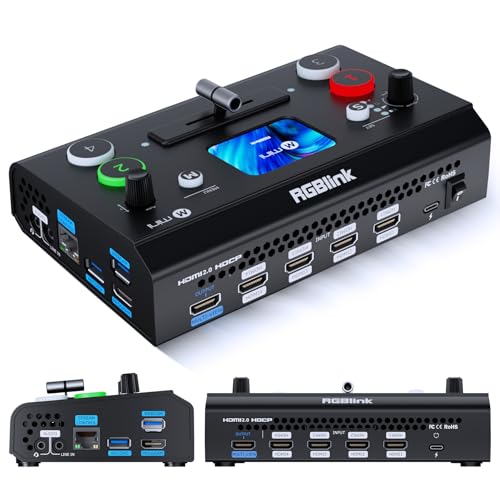
- Four HDMI inputs with dual outputs
- 2.1-inch touch screen and T-bar
- UVC webcam mode and USB recording
Best For: Entry-level HDMI streaming and multi-camera creators
Best All-in-One Production Hub
4-Channel HDMI Switcher with 4.5-Inch LCD

- Built-in multiview display for monitoring
- Four HDMI inputs with portrait mode
- PTZ, keying, overlays, and USB streaming
Best For: Multi-camera livestreams and compact event production
Best for Gaming Streams

- Two 4K60 HDMI inputs
- 1080p60 output with USB 3.0 capture
- PiP and PBP layouts for two sources
Best For: Console streaming and two-source capture
Best Portable Multi-Camera Pick

- Four HDMI inputs in a portable design
- Built-in 4-inch multiview screen
- Flexible AUX output and scene presets
Best For: Mobile events, classes, and multi-camera livestreams
Best Overall – Blackmagic ATEM Mini Pro
For buyers comparing video switchers under 500, the Blackmagic Design ATEM Mini Pro is a feature-rich choice for four-camera HDMI productions. It combines live switching, streaming, recording, multiview monitoring, and audio mixing in a compact unit.
Best For: Multicamera livestreams, education, business presentations, and esports events.
Pros:
- Four HDMI inputs with multiview output for monitoring multiple cameras.
- Built-in streaming, recording, and a six-input, two-channel audio mixer.
- Supports multiple transitions, chroma key, upstream keys, and a downstream keyer.
Cons:
- Designed around HDMI sources rather than a wider range of professional video connections.
- The feature set may be more than needed for simple one- or two-camera streams.
The ATEM Mini Pro stands out when you want substantial production control without moving beyond a compact four-input HDMI workflow.
Best for Beginners – Roland V-02HD MK II
Among video switchers under 500, the Roland V-02HD MK II focuses on straightforward two-camera streaming. Its compact design connects HDMI sources, mixes audio, adds video effects, and sends the production to a streaming setup over USB-C.
Best For: Online teachers, gamers, worship streams, and creators who want a simple two-camera setup.
Pros:
- Simple plug-and-play workflow for switching two HDMI cameras or devices.
- Built-in 10-channel digital audio mixer with dedicated audio inputs and HDMI audio support.
- Supports effects, transitions, remote control apps, and optional footswitch control.
Cons:
- Only two HDMI inputs, limiting expansion for larger multicamera productions.
- Its USB-C streaming approach may be less suitable for users seeking extensive onboard production features.
The V-02HD MK II is a practical fit when ease of setup matters more than a high input count or advanced broadcast-style controls.
Best for AV Switching – Linkstyle 3-in-1 Component Switch
If your search for video switchers under 500 is really about selecting between older component devices, the Linkstyle 3-in-1 switch box offers a simple solution. It connects three analog component sources to one display and switches between them with a physical button.
Best For: Gaming consoles, DVD players, set-top boxes, and displays using component video and stereo audio.
Pros:
- Connects up to three component video sources to one display.
- Supports component video and left/right stereo audio connections.
- Requires no external power or drivers and uses color-coded connectors.
Cons:
- This is an analog AV selector, not a live-production switcher for cameras or livestreams.
- Uses component RCA connections rather than HDMI or USB-C.
The Linkstyle is best viewed as a low-complexity source selector for legacy AV equipment, not as a production mixer with streaming features.
Most Versatile – Osee GoStream Deck HDMI Pro
For shoppers evaluating video switchers under 500 with broader production needs, the Osee GoStream Deck combines four HDMI inputs with recording, playback, audio processing, overlays, and direct streaming. Its control panel is built for managing a live production without relying entirely on a computer.
Best For: Education, conferences, worship, podcasts, weddings, and multicamera live events.
Pros:
- Four HDMI inputs, two HDMI outputs, multiview support, and multiple USB-C connections.
- Can stream to three platforms, record to SD or USB SSD, and play back MP4 files.
- Includes a T-bar, PVW/PGM buses, macros, audio controls, and keying for overlays and green screen.
Cons:
- The extensive feature set may require more setup and learning than a basic switcher.
- Some functions depend on compatible storage, network, or computer connections.
The GoStream Deck is a strong choice for creators who want an all-in-one HDMI production hub with hardware controls and room for more advanced workflows.
Simple AV Organizer – Panlong 8-Way RCA Switcher
For shoppers comparing video switchers under 500, the Panlong 8-Way AV Switch is a straightforward choice for routing older composite-video equipment. Its eight RCA inputs, mechanical push-button controls, and passive design make it easy to connect multiple consoles or AV sources to one display without software or an extra power supply.
Best For: Retro game consoles, DVD players, cable boxes, and other RCA-equipped AV devices.
Pros:
- Connects up to eight RCA AV sources to one output.
- Mechanical push-button switching is simple to operate.
- Metal enclosure is designed for stability and longevity.
- Requires no extra power supply or software driver.
Cons:
- Uses composite RCA connections rather than HDMI or SDI.
- Provides basic source selection without live-production features.
The Panlong is best viewed as a practical cable-management solution, not a streaming mixer. Choose it when your setup is built around legacy RCA equipment and you want uncomplicated switching.
Live Production Powerhouse – Osee GoStream Duet SDI/HDMI Mixer
Osee GoStream Duet Multiple Camera SDI and HDMI Live Stream Video Mixer Switcher
Check Price On AmazonAmong video switchers under 500, the Osee GoStream Duet stands out for multi-camera live production with both SDI and HDMI sources. It supports four SDI inputs, four HDMI inputs, USB-C, NDI HX, playback, multiple control methods, and direct streaming to up to three platforms.
Best For: Live events, multi-camera streaming, and creators combining HDMI, SDI, and network sources.
Pros:
- Offers four SDI and four HDMI inputs plus USB-C and NDI HX support.
- Includes chroma key, luma key, pattern key, PIP, and DSK effects.
- Provides MIX, DIP, WIPE, and T-bar transitions.
- Can stream to up to three platforms through Ethernet or a smartphone hotspot.
Cons:
- Its broad feature set may require more setup than a basic switcher.
- NDI HX requires the latest firmware to unlock the included license.
- It is more specialized than needed for simple single-display source switching.
The GoStream Duet is the strongest fit here for users building a serious live-streaming workflow. Its varied inputs and production effects offer flexibility, while computer software and Bitfocus Companion add control options beyond the built-in GUI.
Compact 4K Creator Hub – RGBlink Mini V3 4K HDMI Switcher
The RGBlink Mini V3 is a compact option for shoppers comparing video switchers under 500 who want HDMI multi-camera production with a built-in touch screen. It combines four HDMI inputs, dual 1080p outputs, UVC webcam mode, a T-bar, and optional recording and creative features activated through TAO Cloud.
Best For: Entry-level creators, multi-camera streaming, and HDMI-based productions needing webcam output.
Pros:
- Provides four HDMI inputs and dual HDMI outputs for program and preview.
- Includes a 2.1-inch touch screen and professional T-bar control.
- Supports UVC webcam mode for recognition by platforms such as YouTube and Facebook.
- Can record to USB drives up to 2TB and offers PIP and 15 transition effects.
Cons:
- Recording and selected advanced features require optional TAO Cloud licensing.
- Stable operation requires a recommended 35W-or-higher USB-C power adapter.
- Cloud activation requires firmware updating, internet access, and account binding.
The Mini V3 balances a small footprint with useful production controls and webcam connectivity. It is appealing for HDMI-focused creators, but buyers should account for the activation process and optional licensing before relying on its advanced functions.
Best All-in-One Production Hub – 4-Channel HDMI Switcher with 4.5-Inch LCD
For shoppers comparing video switchers under 500, the CineTreak Mixer Plus stands out as a self-contained option for multi-camera production. It combines four HDMI inputs, a built-in 4.5-inch multiview display, production effects, and USB 3.0 UVC streaming without requiring a separate capture card.
Best For: Multi-camera livestreams, churches, studios, live events, and creators who need portrait-mode production or PTZ control.
Pros:
- Built-in screen shows inputs, Program, Preview, resolution status, and audio levels.
- Supports four HDMI sources, 30 transition effects, and both landscape and portrait modes.
- Includes VISCA-over-IP PTZ control, chroma key, luma key, PIP, DSK, and logo overlay tools.
- USB 3.0 UVC streaming works with OBS and other compatible software without a separate capture card.
Cons:
- The integrated display is compact at 4.5 inches.
- PTZ control requires compatible cameras and VISCA over IP.
- Video input and output connections are HDMI-based.
This is the most feature-rich choice of the three for users who want switching, monitoring, audio connections, streaming, and advanced production tools in one compact unit.
Best for Gaming Streams – Dual 4K HDMI Capture Switcher
Among video switchers under 500, the VIXLW dual-input model is geared toward gaming and simple two-source streaming. It accepts two 4K60 HDMI sources, provides 1080p60 output, and connects to a computer through USB-C for capture and recording.
Best For: Game streaming, console capture, two-source video setups, and video calls using OBS or similar software.
Pros:
- Two 4K60 HDMI inputs support cameras or gaming consoles.
- USB 3.0 capture and 1080p60 output support streaming and display workflows.
- Offers PiP, PBP, four PBP layouts, and four scalable PiP layouts.
- Plug-and-play compatibility includes Windows, macOS, Linux, OBS, and several streaming platforms.
Cons:
- It has two HDMI inputs rather than a four-source switching setup.
- The capture/output workflow is limited to 1080p60 output according to the supplied specifications.
- Its features are more focused on capture and gaming than advanced broadcast production.
Choose this unit if your priority is capturing or switching between two game or camera sources with PiP/PBP flexibility. It is less suited to larger multi-camera productions requiring PTZ control or extensive overlays.
Best Portable Multi-Camera Pick – Compact 4-HDMI Switcher
For buyers seeking video switchers under 500 for mobile production, this compact Mixer Plus combines four-channel HDMI switching with a built-in 4-inch multiview screen. Its zero-latency switching, scene presets, and flexible AUX output make it practical for online classes, events, YouTube, OBS, and Zoom setups.
Best For: Portable four-camera productions, online classes, events, livestreams, and users who want on-device multiview monitoring.
Pros:
- Four HDMI inputs and a built-in 4-inch screen support portable multi-camera operation.
- Provides zero-latency switching, 30 transition effects, and four user-defined scene presets.
- Includes PTZ control, chroma key, luma key, PIP, DSK, and logo overlay features.
- Customizable AUX HDMI output can route inputs, Program, Preview, Clean Program, patterns, or multiview.
Cons:
- The built-in display is smaller than a separate production monitor.
- PTZ functionality depends on compatible cameras using VISCA over IP.
- The supplied notes do not specify a USB capture output.
This model is a strong fit when portability and four-source control matter more than a dedicated computer-capture connection. Its multiview screen and configurable AUX output add useful flexibility for field and event workflows.
How We Picked the Best Video Switchers Under 500
We focused on switchers that offer practical value for livestreaming, online teaching, gaming, presentations, worship, and small event production. The selection covers compact HDMI mixers, traditional AV selectors, models with built-in screens, and systems that support direct streaming or capture.
We also considered input and output formats, switching controls, monitoring, audio handling, portability, ease of setup, and the kind of production each device is designed to support. Because sub-$500 equipment varies widely, compatibility matters as much as the feature list.
Quick Comparison
| Best For | What to Prioritize | Typical Choice |
|---|---|---|
| Simple source selection | Input count, output resolution, remote or front-panel controls | AV or HDMI switch box |
| Two-camera streaming | HDMI inputs, USB capture, audio mixing, compact controls | Entry-level streaming mixer |
| Multi-camera production | Multiview, transitions, picture-in-picture, recording or streaming | Dedicated video switcher |
| Professional camera systems | SDI support, long cable runs, synchronization, robust I/O | SDI/HDMI hybrid mixer |
Key Buying Factors for Video Switchers Under 500
Inputs, Outputs, and Compatibility
Start by listing every source you plan to connect: cameras, computers, game consoles, media players, and microphones. HDMI models are usually the easiest fit for modern cameras and laptops, while composite AV selectors are intended for older equipment. Check whether the switcher accepts the resolution and frame rate your sources actually produce.
Streaming and Recording Workflow
A switcher with USB output may function as a webcam or capture device, but not every model streams directly without a computer. Confirm whether you need software such as OBS, a hardware encoder, or a separate capture card. Built-in streaming features can simplify setup, while computer-based workflows often provide more control.
Monitoring and Live Control
Multiview output, an integrated display, preview/program buttons, transitions, and physical controls can make live production substantially easier. If you operate alone, prioritize clear monitoring and fast source selection over features you will rarely use.
Audio and Portability
Check for microphone inputs, embedded HDMI audio, headphone monitoring, audio delay, and independent level controls. For mobile work, consider power requirements, chassis size, screen visibility, and whether the controls remain accessible in a compact setup.
Who Should Buy Which Video Switchers Under 500?
Choose a basic AV or HDMI selector if you only need to switch sources for a television, projector, or amplifier. A compact HDMI streaming mixer is a better choice for teachers, gamers, and creators using two or more cameras with a computer. Buyers producing events or multi-camera shows should look for multiview, transition effects, direct streaming, and recording support. If your cameras use SDI or require long cable runs, choose a model with SDI connectivity rather than relying on adapters.
Before buying, verify connector types, supported resolutions, audio requirements, and the number of simultaneous sources. The best option is not necessarily the most feature-heavy model; it is the one that fits your current workflow and leaves enough room for the next upgrade.