
USB duplicators with erase functions can copy multiple flash drives or external disks at once while helping you remove sensitive data before reuse, resale, or disposal.
This roundup compares 10 standalone systems by port count, supported media, transfer speed, erasure controls, and ease of use, so you can choose the right fit for occasional jobs or production workloads.
Best 10 USB Duplicators with Erase Functions Picks for 2026
Best 4-Bay Drive Dock
StarTech Standalone HDD/SSD Duplicator

- 1:3 standalone SATA cloning
- Quick and NIST-aligned secure erase modes
- USB/eSATA dock with IDE adapters
Best For: IT professionals managing SATA drives
Best High-Volume USB Copier
Systor 1:15 USB Duplicator and Sanitizer

- Copies to up to 15 USB drives
- Up to 6GB per minute
- Synchronous and asynchronous modes
Best For: Large standalone USB duplication batches
Best 31-Port Erase Choice

- Duplicates up to 31 USB drives
- Four erase modes, including DoD 3- and 7-pass
- Multiple copy modes with asynchronous operation
Best For: High-volume USB duplication and sanitization
Best Compact Type-A Option

- Duplicates up to seven USB drives
- Four erase modes, including DoD options
- Copy-and-compare verification
Best For: Routine standalone Type-A flash-drive batches
Best High-Capacity Pick

- 1-to-15 standalone USB duplication
- Four erase modes, including DoD options
- Supports USB drives above 2TB
Best For: Large batch duplication and flexible multi-pass erasing
Best for Large Batches

- Duplicates to up to 39 USB targets
- Asynchronous independent copying
- Secure erase plus Smart and Raw modes
Best For: High-volume professional duplication and secure erasing
Best Compact Touchscreen Pick
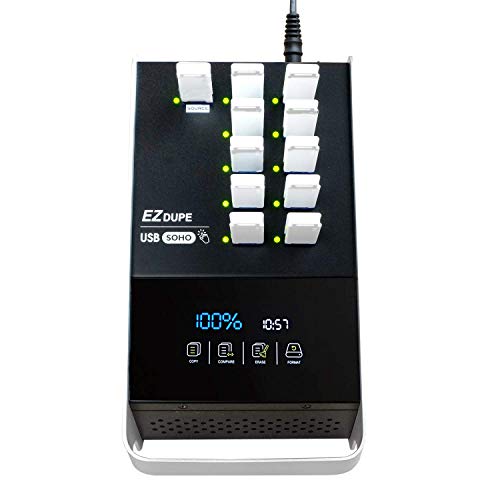
- 1-to-10 USB flash-drive duplication
- Touchscreen copy, format, compare, and erase
- Compact 3-pound design
Best For: Simple small-batch USB flash-drive tasks
Most Versatile SATA/USB Option
1:1 Drive Duplicator and Eraser

- Handles USB flash and SATA HDD/SSD media
- Four copy and five erase modes
- Includes Copy & Compare verification
Best For: Mixed USB and SATA duplication and sanitization
Best for High-Volume USB Copies
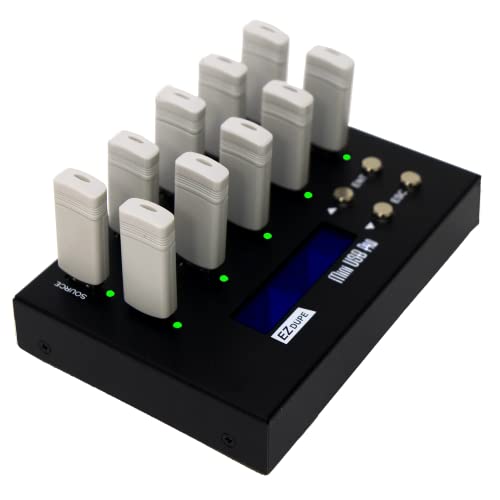
- Copies up to nine USB drives simultaneously
- Supports USB 1.0, 2.0, and 3.0 media
- Includes two erase functions and two copy modes
Best For: Batch USB flash-drive duplication
Best Compact USB Choice
1:2 Standalone USB Duplicator and Eraser

- Duplicates or erases two USB drives at once
- Works without a computer
- Supports asynchronous drive replacement
Best For: Small-batch USB copying and erasure
Best 4-Bay Drive Dock – StarTech Standalone HDD/SSD Duplicator
For buyers seeking USB duplicators with erase functions, the StarTech SATDOCK4U3RE combines standalone 1:3 drive cloning, secure wiping, and everyday disk docking. It supports 2.5- and 3.5-inch SATA drives, with included adapters for select IDE drives.
Best For: IT professionals who need to clone, sanitize, and access multiple SATA HDDs or SSDs from one desktop unit.
Pros:
- Supports standalone duplication plus Quick Erase and Secure Erase aligned with NIST SP 800-88 Rev. 1 Purge.
- Four drive bays and 1:3 sector-by-sector cloning make batch work practical.
- Works as a USB 3.2 Gen 1 or eSATA docking station and includes IDE adapters.
- LCD menu, drive doors, eject buttons, and status LEDs simplify operation.
Cons:
- Target drives must be equal to or larger than the source drive for cloning.
- Designed for SATA and supported IDE drives rather than general-purpose USB flash duplication.
Its combination of cloning, docking, and standards-oriented erasure makes it a versatile choice for drive lifecycle workflows, especially where computer-independent operation matters.
Best High-Volume USB Copier – Systor 1:15 USB Duplicator and Sanitizer
The Systor SYS-USB30100-15 is a high-capacity option among USB duplicators with erase functions. It operates without a computer or software and can copy one USB 3.0/3.1 source to as many as 15 target drives at up to 6GB per minute.
Best For: Organizations that need standalone, batch USB flash-drive duplication with synchronous or asynchronous workflows.
Pros:
- Supports up to 15 target USB drives for larger duplication runs.
- Standalone design requires no computer or software.
- Offers synchronous and asynchronous copy modes for flexible batch handling.
- USB Type-C drives are supported with an adapter.
Cons:
- The supplied notes identify copying features but do not specify particular erase modes or data-erasure standards.
- USB Type-C use requires a separate adapter.
Choose this model primarily for its 1:15 throughput and simple standalone operation. If verified drive sanitization is the main requirement, confirm the available erase functions before purchase.
Best 31-Port Erase Choice – EZ Dupe Xtreme USB Duplicator
For large batches and flexible sanitization, the EZ Dupe Xtreme is one of the more capable USB duplicators with erase functions. Its 1:31 design supports flash drives and self-powered external hard drives, with multiple copy and erase modes built into the standalone system.
Best For: High-volume USB production, media redistribution, and users who need selectable quick, full, DoD 3-pass, or DoD 7-pass erasure.
Pros:
- Copies to as many as 31 USB flash drives at up to 35MB per second.
- Offers Quick, Full, DoD 3-pass, and DoD 7-pass erase modes.
- Supports system-and-files, whole-drive, partitioned-area, and percentage copy modes.
- Asynchronous copying can begin as soon as the source and available targets are inserted.
Cons:
- External hard drives must have their own power source.
- Its listed speed is lower than the Systor’s stated 100MB-per-second rate.
This is a strong fit when port count and configurable erasure matter more than maximum transfer speed. Capacity checking and multiple copy modes also add useful control for mixed USB workflows.
Best Compact Type-A Option – Acumen Disc 1:7 USB Sanitizer
The Acumen Disc AD07-USB offers a smaller-scale entry into USB duplicators with erase functions. This standalone 1:7 unit provides quick and full copying, four erase modes, real-time copy-and-compare verification, and FAT32 or exFAT formatting.
Best For: Users duplicating USB Type-A flash drives in batches of up to seven without connecting a computer.
Pros:
- Supports Quick Erase, Full Erase, DoD 3-pass, and DoD 7-pass modes.
- Copy-and-compare technology helps verify successful duplication.
- Offers synchronous and asynchronous operation plus system/file or whole-media copying.
- LCD status display and four-key controls keep operation straightforward.
Cons:
- Supports standard USB Type-A flash media; USB-C drives require a separate adapter.
- Hardware-encrypted or protected USB memory devices are not supported.
- Its seven-slot capacity is less suited to very large production runs.
This model balances essential duplication and sanitization features with a manageable seven-drive capacity. It is a practical choice for routine Type-A media work, provided the drives are USB-IF compliant and unprotected.
Best High-Capacity Pick – EZ DUPE USB Cyclone
The EZ DUPE USB Cyclone is a strong option for buyers seeking usb duplicators with erase functions for larger batch jobs. Its 1-to-15 layout supports USB flash drives and external USB HDDs or SSDs, while four erase modes and four copy modes provide useful control for different workflows.
Best For: Businesses and users who need standalone duplication, comparison, formatting, and multi-pass erasing across many USB devices.
Pros:
- Supports up to 15 USB devices with independent bandwidth design.
- Offers Quick, Full, DoD 3-pass, and DoD 7-pass erase modes.
- Supports drives above 2TB with no stated capacity limit and requires no computer.
- Includes multiple copy modes, including essential-files, full, partitioned, and percentage copying.
Cons:
- Its listed transfer speed is up to 45MB per second, depending on the connected USB devices.
- At 7 pounds, it is less portable than smaller desktop duplicators.
Choose this model when erase flexibility and broad drive-capacity support matter more than compact size. Its automatic slow-drive alert is also useful for keeping slower hard drives from affecting the overall job.
Best for Large Batches – Vinpower USBDupeBoxES
The Vinpower Digital USBDupeBoxES is built for high-volume work, making it a compelling choice among usb duplicators with erase functions. It handles up to 39 USB targets, supports asynchronous duplication, and includes secure erase for USB flash drives and external USB hard drives or SSDs.
Best For: Organizations that need high-capacity, standalone duplication with independent target operation and secure erasing.
Pros:
- Duplicates to up to 39 USB devices asynchronously.
- Secure Erase is designed to remove content without leaving recoverable traces.
- Supports Smart Copy and bit-by-bit Raw Mode.
- Includes a 600-watt power supply for connected USB drives and power-hungry devices.
Cons:
- Its 26-pound weight makes it a substantial, stationary desktop unit.
- Alternative flash formats such as SD and Micro SD require an add-on interface module.
This is the most suitable pick for demanding production environments where the number of simultaneous targets is a priority. The asynchronous design lets different target devices operate independently without sacrificing stated duplication speed or quality.
Best Compact Touchscreen Pick – EZ Dupe SOHO Touch
The EZ Dupe SOHO Touch is a user-friendly choice for usb duplicators with erase functions when straightforward control is important. Its touchscreen menu provides access to copy, compare, format, and one-touch erase functions, while the 1-to-10 design suits smaller batch jobs.
Best For: Home users, offices, and small operations that want simple USB flash-drive duplication and erasing from a compact standalone unit.
Pros:
- Touchscreen interface simplifies copy, compare, format, and erase tasks.
- Duplicates USB 2.0, 3.0, and 3.1 thumb drives at up to 35MB per second.
- Supports all file formats, file sizes, and drive capacities on USB flash media.
- Lightweight 3-pound construction is easier to place and move than larger units.
Cons:
- Handles up to 10 USB targets, fewer than the larger duplicators in this roundup.
- The supplied notes specify USB flash media support rather than external HDD or SSD support.
Pick the SOHO Touch for accessible day-to-day USB flash-drive work. It trades maximum port count for a simpler touchscreen workflow and a more manageable form factor.
Most Versatile SATA/USB Option – 1:1 Drive Duplicator and Eraser
For buyers comparing USB duplicators with erase functions, the StarTech.com SU2DUPERA11 stands out for its support of both USB flash drives and 2.5- or 3.5-inch SATA HDDs and SSDs. Its standalone design offers four copy modes, five erase modes, and an LCD menu for selecting operations without a computer.
Best For: Users who need one standalone tool for USB and SATA drive duplication, erasure, and verification.
Pros:
- Supports USB flash drives plus 2.5- and 3.5-inch SATA HDDs and SSDs.
- Offers four duplication modes and five erase modes, including cryptographic erase and 3-pass overwrite.
- Copy & Compare can verify a completed clone, while the LCD displays drive information and errors.
Cons:
- Some interfaces, including IDE, mSATA, and M.2 SATA, require separately sold adapters.
- Its broader drive support may be more than needed for USB-only duplication.
This is the most flexible choice in the group for mixed media workflows. It is especially practical when secure sanitization and post-copy verification matter alongside duplication.
Best for High-Volume USB Copies – 1:9 USB Duplicator and Eraser
The EZ Dupe MiniUSB Pro is a practical pick among USB duplicators with erase functions when producing several copies at once is the priority. It can copy to up to nine USB flash drives simultaneously and supports USB 1.0, 2.0, and 3.0 media, along with two erase functions.
Best For: Offices, technicians, and media workflows that need up to nine simultaneous USB copies.
Pros:
- Copies to up to nine USB flash drives at the same time.
- Supports USB 1.0, 2.0, and 3.0 flash media and other USB devices.
- Provides Quick Copy and whole-media, sector-by-sector copying, plus two erase functions.
Cons:
- Its listed copy speed is up to 2GB per minute, slower than some SATA-focused duplicators.
- External USB hard drives up to 2TB must have their own power source.
- It is designed for USB media rather than SATA drives.
Choose this model when throughput across many USB targets matters more than broad drive-interface support. Its standalone operation and nine-target capacity can reduce repetitive copying work.
Best Compact USB Choice – 1:2 Standalone USB Duplicator and Eraser
The StarTech.com USBDUP12 is a compact option for buyers seeking USB duplicators with erase functions without connecting to a computer. It can duplicate or erase two USB drives simultaneously and supports copying from a flash drive to another USB-connected storage device through a dock, enclosure, or card reader.
Best For: Users who need a lightweight, standalone tool for two-drive USB copying and erasure.
Pros:
- Duplicates or erases two USB drives simultaneously without a computer.
- Supports copying to USB-connected HDDs, SSDs, or other flash media through compatible accessories.
- Asynchronous duplication lets one drive continue copying while another is removed and replaced.
Cons:
- It supports only two target drives at a time.
- The supplied notes do not specify the number or type of erase modes.
- It is intended for USB media and does not provide the direct SATA support of the larger StarTech.com model.
This model suits smaller jobs where portability and simple standalone operation are more important than maximum target capacity. Its asynchronous workflow is useful when drives need to be rotated through repeated tasks.
How We Picked the Best USB Duplicators with Erase Functions
We focused on standalone duplicators that can copy USB flash media, external hard drives, SSDs, or a combination of formats and also provide a dedicated erase or sanitization mode. The selection spans compact 1:1 and 1:2 units, midrange systems, and high-output machines with as many as 39 target ports.
We also considered stated transfer rates, USB generation, supported source and target media, drive-size flexibility, operation controls, and whether the unit supports verification or recognized sanitization standards. Port count matters, but it is only useful when the device can sustain the workload and handle the media your organization actually uses.
Quick Comparison
- Small batches: 1:1, 1:2, or 1:7 models are easier to store and suit technicians, classrooms, and occasional deployment.
- Regular production: 1:9, 1:10, or 1:15 systems balance throughput, footprint, and cost.
- High-volume copying: 1:31 and 1:39 machines reduce operator time when many identical drives are needed.
- Hard-drive workflows: Choose a model with SATA or external-drive support rather than a flash-only duplicator.
- Mixed media: Confirm whether the ports support USB 2.0, USB 3.x, Type-A devices, and the capacities you plan to process.
Key Buying Factors for USB Duplicators with Erase Functions
Port Count and Real Throughput
A higher target count increases potential output, but advertised speed is commonly shared across ports. Check the rated per-minute rate, USB version, and whether simultaneous copying slows with larger or slower source media.
Copy Modes and Verification
Look for whole-drive or system-and-file copy options, capacity matching, and post-copy verification. Verification is especially valuable for bootable media, installation drives, and customer deliverables where an undetected error can waste an entire batch.
Erase and Sanitization Controls
Determine whether the unit offers quick erase, full overwrite, or a recognized DoD-style sanitization mode. Erasure requirements vary by organization and data sensitivity, so confirm the available patterns and retain any completion logs or status information your policy requires.
Media Compatibility and Controls
Review support for flash drives, USB hard disks, SATA HDDs, and SSDs. A touchscreen or clear button-based menu can reduce training time, while independent status indicators help identify failed targets without stopping a complete batch.
Who Should Buy Which USB Duplicators with Erase Functions?
Home users and occasional technicians should favor compact 1:1 or 1:2 models that are simple to operate and do not consume unnecessary desk space. Schools, repair shops, and IT departments will usually benefit from 1:7 to 1:15 systems, which provide useful batch capacity without the footprint of industrial units.
Resellers, deployment teams, and media producers should consider high-port models when repetitive copying is a daily task. Organizations retiring drives or handling confidential media should prioritize dedicated sanitization modes, clear completion feedback, and compatibility with their documented data-destruction policy. Before buying, estimate your largest batch, identify the slowest media involved, and choose enough capacity to finish the job without paying for ports you will rarely use.