
If you store RAW files, edited exports, or client archives on portable drives, the right enclosure matters as much as the SSD itself. A good enclosure can improve transfer speed, protect your data, and make backups easier.
Below, we’ve focused on the best options for fast, dependable photo storage across NVMe and SATA setups, with choices for single-drive portability and larger capacity needs.
Best 10 SSD Enclosures for Photo Storage Picks for 2026
Tool-Free Speed Pick
SABRENT USB-C NVMe Enclosure & Reader

- Tool-free flip-open design
- Direct thermal-pad cooling
- Up to 10Gbps NVMe speeds
Best For: Photographers needing a compact, fast NVMe enclosure for portable storage
Simple SATA Transfer Pick
BENFEI 2.5 Inch Tool-Free Enclosure

- Tool-free plug-and-play setup
- UASP SATA III support
- USB-C and USB-A cable included
Best For: Users with 2.5-inch SATA SSDs who want simple photo transfers and backup
Fast NVMe Portable Pick

- 10Gbps NVMe performance
- Supports up to 8TB M.2 NVMe drives
- Includes USB-C and USB-A cables
Best For: Photographers and mobile creators needing compact NVMe speed for portable storage
Tool-Free Everyday Pick
BENFEI 2.5 Inch SATA to USB Tool Free Enclosure

- Tool-free setup with plug-and-play use
- USB Type-C and Type-A connection options
- Supports UASP and up to 5 Gbps
Best For: photographers who want a simple 2.5-inch SATA SSD enclosure
Thin Budget Option
MAIWO 2.5 Inch SATA SSD/HDD Enclosure
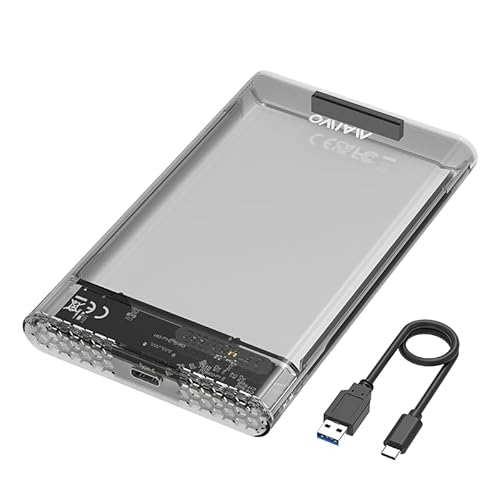
- Fits 7mm and 9.5mm 2.5-inch SATA drives
- Tool-free design with Type-C connectivity
- Adds LED indicator and anti-shock pads
Best For: compact photo-storage setups using a 2.5-inch SATA SSD or HDD
Premium Heat-Dissipating Choice
UGREEN USB C Hard Drive Enclosure

- Aluminum alloy build for better heat dissipation
- Up to 6 Gbps SATA with UASP support
- Includes USB-C to USB-C cable
Best For: frequent photo transfers and portable backups with a 2.5-inch SATA drive
Tool-Free SSD Simplicity
SABRENT 2.5in SATA to USB 3.0 Enclosure

- Tool-free setup for fast drive installs
- USB 3.0 with UASP support
- Optimized for 2.5-inch SATA SSDs
Best For: Photographers who want a simple portable SSD enclosure
Clear and Compact Storage
ORICO 2.5 inch USB-C SSD Enclosure

- Transparent tool-free 2.5-inch enclosure
- USB 3.1 Gen1 with UASP at 5Gbps
- Auto-sleep mode helps reduce idle power use
Best For: People who want a compact, easy-to-check portable enclosure
Powered Drive Bay Option
SABRENT USB 3.0 2.5/3.5in Enclosure

- Fits both 2.5-inch and 3.5-inch SATA drives
- Includes external power for desktop use
- Aluminum shell with shock-absorbing tray
Best For: Users building a larger desktop-style photo archive
Tool-Free Speed Pick – SABRENT USB-C NVMe Enclosure & Reader
If you want ssd enclosures for photo storage that keep transfers fast and the setup simple, this SABRENT NVMe enclosure is built for portable work. It supports M.2 NVMe drives only, uses a flip-open tool-free design, and pairs the SSD directly against the thermal pad for better heat transfer during long file moves.
Best For: Photographers and creators who need a compact, fast NVMe enclosure for frequent offloads and portable storage.
Pros:
- Tool-free flip-open design makes drive swaps quick and easy.
- Aluminum top and direct thermal-pad contact help with cooling during extended transfers.
- USB-C plug-and-play operation with up to 10Gbps performance.
- Supports NVMe drives in 2230, 2242, 2260, and 2280 sizes up to at least 8TB.
Cons:
- Not compatible with M.2 SATA SSDs.
- Single-drive design means it is not a multi-bay backup solution.
For fast photo offloads and a slim carry-along setup, this SABRENT model is a strong fit if your workflow centers on NVMe storage. It is especially appealing when you want speed, cooling, and a no-tools design in one enclosure.
All-in-One Backup Hub – ORICO 4-Bay All-Flash Enclosure
For ssd enclosures for photo storage that do more than hold a single drive, this ORICO 4-bay all-flash enclosure is built around fast access and workflow flexibility. It combines multi-drive storage with RAID modes, USB expansion ports, and SD/TF card slots, making it a practical station for backup and file handling in the field or studio.
Best For: Photographers and video editors who want a compact all-flash storage hub with RAID options and memory-card access.
Pros:
- Supports seven RAID modes, including RAID 0, 1, 3, 5, 10, JBOD, and CLEAR.
- Four bays support 2.5-inch SSDs or HDDs, with up to 40TB total capacity.
- USB 3.2 Gen 2 provides up to 10Gbps when used with a PSSD.
- SD and TF card slots plus USB ports help streamline on-site photo backup.
Cons:
- Designed for 2.5-inch drives only, not 3.5-inch drives.
- More complex than a simple single-drive enclosure.
This ORICO enclosure is best when your storage needs are growing beyond a single SSD and you want flexibility for backup and editing. Its RAID support and card-reader expansion make it especially useful for organized photo workflows.
Simple SATA Transfer Pick – BENFEI 2.5 Inch Tool-Free Enclosure
If you need ssd enclosures for photo storage without extra complexity, this BENFEI 2.5-inch SATA enclosure is a straightforward choice. It is optimized for SSD use, supports tool-free installation, and includes a USB Type-C/Type-A cable for easy connections across common devices.
Best For: Anyone with a 2.5-inch SATA SSD who wants an easy, portable enclosure for photo transfers and everyday backup.
Pros:
- Tool-free, plug-and-play design keeps setup fast.
- Supports UASP SATA III for better performance than traditional USB 3.0.
- Works with 7mm and 9.5mm 2.5-inch SATA SSDs and HDDs up to 6TB.
- Includes both USB-C and USB-A compatibility in the cable package.
Cons:
- Built for 2.5-inch SATA drives only, not NVMe SSDs.
- Single-drive design is less expandable than multi-bay storage options.
This BENFEI enclosure is a practical pick if your photo storage setup uses a standard SATA SSD and you want something portable and easy to use. It focuses on simplicity and broad compatibility rather than maximum speed or multi-drive features.
Fast NVMe Portable Pick – ORICO M.2 NVMe SSD Enclosure
Among ssd enclosures for photo storage, this ORICO M.2 NVMe model is aimed at users who want fast portable access to a PCIe SSD. It supports NVMe M-Key drives only, uses a USB 3.1 Gen 2 Type-C interface, and includes both USB-C and USB-A cables for flexible use with different hosts.
Best For: Photographers and mobile creators who need a compact NVMe enclosure for quick file transfers and portable work.
Pros:
- Up to 10Gbps theoretical speed with UASP support.
- Compatible with M.2 NVMe SSDs in 2230, 2242, 2260, and 2280 sizes up to 8TB.
- Aluminum top helps with portability and heat dissipation.
- Works with Windows, Mac, Linux, and multiple device types.
Cons:
- Does not support M.2 SATA or M.2 PCIe AHCI SSDs.
- Single-drive enclosure only, so it is not designed for large multi-drive backups.
This ORICO enclosure makes sense if your photo workflow depends on NVMe speed in a pocketable format. It is a strong match for creators who want a lightweight drive case that can handle fast transfers without external power.
Tool-Free Everyday Pick – BENFEI 2.5 Inch SATA to USB Tool Free Enclosure
If you need one of the simplest ssd enclosures for photo storage, this BENFEI model is a practical way to move a 2.5-inch SATA SSD between a desktop, laptop, or other compatible device. It supports USB Type-C and Type-A connections, offers up to 5 Gbps transfer speeds with UASP, and uses a tool-free, plug-and-play design that keeps setup quick.
Best For: photographers and everyday users who want an easy, no-fuss enclosure for a 2.5-inch SATA SSD.
Pros:
- Tool-free installation with no driver needed
- USB Type-C/Type-A plug design for flexible connections
- Supports UASP and up to 5 Gbps transfers
- Compatible with 7mm and 9.5mm 2.5-inch SATA drives up to 6TB
Cons:
- Built for 2.5-inch SATA drives only
- Speed tops out at 5 Gbps rather than faster USB standards
For photo backups, transfers, and general portable storage, this enclosure focuses on convenience and broad compatibility rather than extra features. Its lightweight design and included support for common operating systems make it a straightforward choice for daily use.
Thin Budget Option – MAIWO 2.5 Inch SATA SSD/HDD Enclosure
For ssd enclosures for photo storage, the MAIWO external hard drive enclosure is a straightforward option for 2.5-inch SATA SSDs and HDDs in 7mm or 9.5mm sizes. It offers a Type-C connection, up to 5 Gbps transfer speed with UASP support, and a tool-free design that keeps the setup process fast.
Best For: users who want a compact, simple enclosure for storing and moving photo files on a 2.5-inch SATA drive.
Pros:
- Supports 2.5-inch SATA SSDs and HDDs in 7mm and 9.5mm sizes
- Tool-free, plug-and-play setup
- Up to 5 Gbps transfer speed with UASP support
- Includes LED indicator and anti-shock pads
Cons:
- Limited to 2.5-inch SATA drives
- Transfer speed is capped at 5 Gbps
This enclosure keeps the feature set practical: a slim case, easy installation, and support for up to 6TB. It is a sensible pick if you mainly want a portable storage case for photo libraries without extra complexity.
Premium Heat-Dissipating Choice – UGREEN USB C Hard Drive Enclosure
Among ssd enclosures for photo storage, the UGREEN USB C hard drive enclosure stands out if you want a sturdier aluminum build and strong thermal management. It supports 2.5-inch SATA SSDs and HDDs up to 6TB, includes a USB-C to USB-C cable, and uses UASP plus an ASM235CM chipset for up to 6 Gbps SATA performance.
Best For: users who want a durable, well-built enclosure for frequent photo transfers and portable backup.
Pros:
- Aluminum alloy body helps with heat dissipation
- Supports UASP and up to 6 Gbps SATA speeds
- Tool-free installation with no driver needed
- Works with Windows, Mac OS, and Linux, plus game consoles and other USB devices
Cons:
- Only supports 2.5-inch SATA SSDs and HDDs
- Best performance depends on SATA drive speed, not the enclosure alone
This is a strong all-around enclosure for people who move large photo folders often and value a solid enclosure shell. Its combination of aluminum construction, broad compatibility, and included USB-C cable makes it a polished option for everyday backup workflows.
Tool-Free SSD Simplicity – SABRENT 2.5in SATA to USB 3.0 Enclosure
If you want one of the most straightforward ssd enclosures for photo storage, this Sabrent model keeps the focus on fast, no-fuss access to a 2.5-inch SATA SSD or notebook drive. It supports USB 3.0 speeds, UASP SATA III, and tool-free installation, making it a practical pick for quick backups, portable photo libraries, and everyday drive swaps.
Best For: Photographers who want a simple, tool-free 2.5-inch SSD enclosure for fast portable storage.
Pros:
- Tool-free design makes installing or swapping a drive fast and easy.
- USB 3.0 support and UASP are optimized for SSD use.
- Hot-swappable and plug-and-play with no drivers needed.
- Backwards-compatible with USB 2.0 for older systems.
Cons:
- Supports only 2.5-inch SATA drives, not M.2 or other formats.
- Plastic enclosure may feel less rugged than metal options.
This is a strong basic enclosure if your priority is quick setup and solid everyday transfer performance. It fits nicely into a simple photo storage workflow where convenience matters more than extra features.
Clear and Compact Storage – ORICO 2.5 inch USB-C SSD Enclosure
This ORICO enclosure is a clean option for ssd enclosures for photo storage when you want easy visibility, tool-free setup, and support for common 2.5-inch SATA SSDs or HDDs. It uses USB 3.1 Gen1 at up to 5Gbps, supports UASP, and adds auto-sleep to help reduce unnecessary wear during idle time.
Best For: Users who want a transparent, tool-free 2.5-inch enclosure for portable photo backups and everyday file access.
Pros:
- Tool-free installation makes setup quick and simple.
- USB 3.1 Gen1 with UASP supports 5Gbps transfers.
- Transparent design lets you see drive status easily.
- Auto-sleep mode helps reduce idle power use.
Cons:
- Supports only 7-9.5mm 2.5-inch SATA drives.
- Mac users may need a USB-C to USB-C cable, which is not included.
For photo storage, this enclosure works well if you value quick installation and a lightweight, portable build. It is a sensible choice for moving image libraries between computers without adding much complexity.
Powered Drive Bay Option – SABRENT USB 3.0 2.5/3.5in Enclosure
If your photo archive is growing beyond a small portable drive, this is one of the more flexible ssd enclosures for photo storage because it supports both 2.5-inch and 3.5-inch SATA drives. The external power supply and aluminum shell make it a better fit for a semi-permanent desktop storage setup where heat management and drive compatibility matter.
Best For: Users who want a powered enclosure for larger photo archives and mixed 2.5-inch or 3.5-inch SATA drives.
Pros:
- Supports both 2.5-inch and 3.5-inch SATA HDDs and SSDs.
- External 12V/2A power adapter supports stable desktop use.
- Tool-free setup makes drive swaps quick.
- Aluminum shell with shock-absorbing tray aids durability and heat dissipation.
Cons:
- Not compatible with SAS, M.2, NVMe, or IDE/PATA drives.
- Requires wall power, so it is less portable than bus-powered options.
- USB-A connection may require an adapter for USB-C-only computers.
This enclosure is the strongest fit when your photo storage needs lean toward capacity and reliability over travel convenience. It is a practical desktop-style choice for larger libraries and regular backups.
How We Picked These SSD Enclosures for Photo Storage
We prioritized real-world storage needs for photographers and creators: drive type support, transfer speed, thermal design, ease of installation, and connection options. The best SSD Enclosures for Photo Storage should move large image libraries quickly, stay stable during long copy jobs, and match the SSD you already own.
We also favored models with broad OS compatibility, tool-free designs where useful, and solid build quality for frequent travel or studio use.
Quick Comparison
In simple terms, NVMe enclosures are best when speed is the priority, especially for large RAW catalogs and video-heavy workflows. SATA enclosures are usually the better value for everyday photo backups, older SSDs, and general archiving. Multi-bay options suit users who want more capacity in one place or plan to keep several drives organized.
Key Buying Factors for SSD Enclosures for Photo Storage
Drive Interface
Match the enclosure to your SSD: M.2 NVMe enclosures are not interchangeable with 2.5-inch SATA models. This is the most important compatibility check before buying.
Speed and Connection
USB 3.2 Gen 2 and 10Gbps-class NVMe enclosures can better handle large photo sessions and backups. For SATA drives, 5Gbps is usually enough because the drive itself is the bottleneck.
Thermals and Durability
For long transfers, look for aluminum shells, heat pads, or designs that help dissipate heat. Better cooling helps maintain performance and may reduce wear during extended editing or backup sessions.
Capacity and Workflow
If you archive by client, shoot, or year, choose a capacity that leaves headroom for growth. Multi-bay enclosures can be useful for redundant storage or larger project libraries, but they are more than most solo photographers need.
Portability and Convenience
Tool-free assembly, compact size, and USB-C support are especially helpful if you travel with your drives or swap SSDs often.
Who Should Buy Which SSD Enclosures for Photo Storage?
Choose an NVMe enclosure if you want the fastest transfers for high-volume editing, culling, or frequent backups. Choose a SATA enclosure if you want a cost-effective way to repurpose an older SSD for dependable photo storage. Choose a multi-bay enclosure if you manage multiple archives, need more total capacity, or want a more structured storage setup.
For most users, the best option is the enclosure that matches your SSD type, offers enough speed for your workflow, and provides reliable cooling for long-term use.