
Resin printers can bring high-detail 3D printing into classrooms, makerspaces, and STEM labs, but only if the setup is manageable and dependable. The best options for schools balance print quality, ease of supervision, and practical maintenance.
This roundup highlights 10 products that can support educational use, from beginner-friendly printers to wash-and-cure gear, resin, and essential accessories.
Best 10 Resin Printers for Schools Picks for 2026
Classroom-Friendly Beginner Pick
ELEGOO Mars 5 MSLA Resin 3D Printer

- Automatic leveling for easier setup
- Mechanical sensor and self-check features
- Overheat protection for added safety
Best For: Classrooms and beginners
Budget Resin for Shared Labs
SUNLU Standard 3D Printer Resin Plus

- Broad 365-405nm printer compatibility
- Low shrinkage for accurate parts
- Easy cleanup with light odor
Best For: Shared labs on a budget
Advanced Multi-Material Option
ANYCUBIC Photon P1 Resin 3D Printer

- Dual-color and dual-material printing
- AI monitoring with auto-leveling
- Wave Release Technology lowers failures
Best For: Advanced classrooms and creative labs
Compact Easy-Setup Choice
Creality HALOT R6 Resin 3D Printer
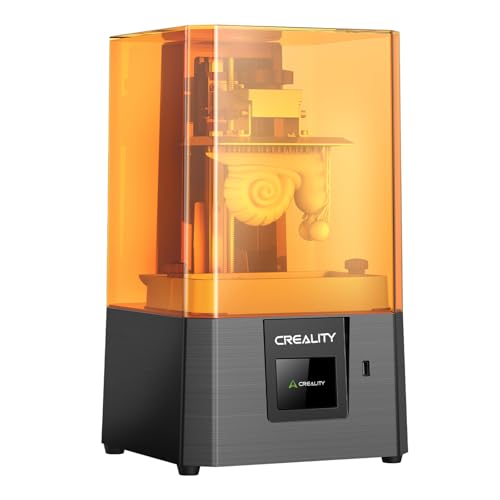
- Built-in guidance for beginners
- Compact body saves classroom space
- Webcam support for monitoring
Best For: Small classrooms and novice users
Wash & Cure Station
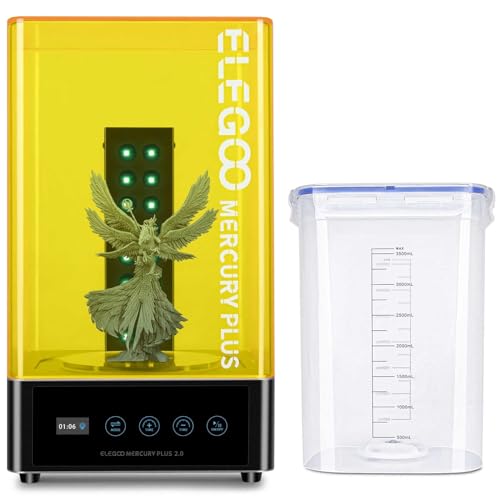
- Sealed washing helps limit alcohol volatilization.
- Anti-UV lid blocks 99.95% of UV rays.
- Front TFT screen shows time clearly.
Best For: School labs needing a simple resin print post-processing station
Beginner Resin Printer

- 5.5-inch 2K LCD for detailed prints.
- Auto-calibrates and levels at startup.
- Compact build size suits small projects.
Best For: Beginners and classrooms with small resin print needs
Resin Printing Accessory Kit
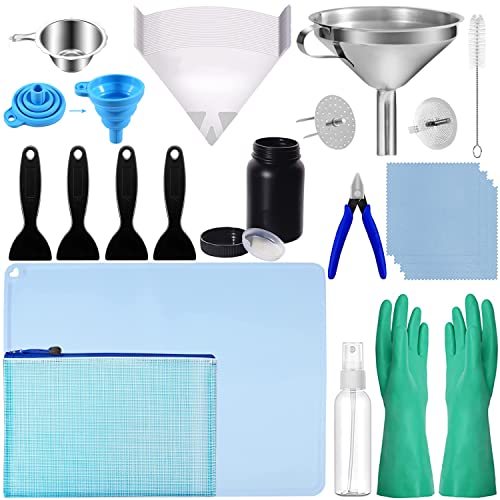
- Includes funnels, filters, gloves, and scrapers.
- HDPE bottle helps protect resin from light and air.
- Silicone mat helps manage leaks and cleanup.
Best For: Schools that already have resin printers and need cleanup tools
High-detail classroom pick
ANYCUBIC Photon Mono 4 10K Resin Printer

- 7-inch 10K mono LCD for sharp detail
- Uniform lighting and stable platform support consistent prints
- Pre-assembled and resume-print capable
Best For: Classroom projects needing fine detail and reliable setup
Post-processing station
Creality UW-01 Wash and Cure Station

- Combines washing and curing in one machine
- 360° tray and UV LEDs support even curing
- Sealed container helps reduce solution volatilization
Best For: Schools that need an organized resin print finishing workflow
Tough classroom resin
Siraya Tech Fast ABS-Like Grey Resin

- Fast curing and easy to clean
- ABS-like toughness helps resist brittleness
- Compatible with most LCD and DLP printers
Best For: School labs printing durable models with simpler cleanup
Classroom-Friendly Beginner Pick – ELEGOO Mars 5 MSLA Resin 3D Printer
For schools looking at resin printers for schools, the ELEGOO Mars 5 focuses on safer, simpler operation for beginners. Its automatic leveling, one-click self-check, and built-in sensor checks help reduce setup mistakes and catch common issues early, which is useful when multiple users may be sharing the machine.
Best For: Classrooms, makerspaces, and first-time users who want simpler setup and built-in safety checks.
Pros:
- Automatic leveling reduces repeated manual setup.
- One-click self-check helps verify printer status before starting.
- Mechanical sensor can detect foreign objects and resin-related problems.
- Overheat protection adds another layer of safety during use.
Cons:
- Built for beginner-friendly use rather than advanced classroom workflows.
- Smaller 6.6-inch screen may limit build volume compared with larger models.
The Mars 5 is a practical entry point if your priority is reducing friction for students or staff new to resin printing. It combines safety checks and easy setup in a compact printer that can support day-to-day educational projects.
Budget Resin for Shared Labs – SUNLU Standard 3D Printer Resin Plus
When evaluating resin printers for schools, the resin you pair with them matters just as much as the machine. SUNLU Standard 3D Printer Resin Plus is positioned as an easy-to-use, low-shrinkage option with broad compatibility, making it a practical choice for classroom printing where consistency and cleanup are important.
Best For: School labs and makerspaces that need an affordable, easy-to-handle general-purpose resin.
Pros:
- Compatible with LCD, DLP, and SLA printers using 365-405nm light.
- Low shrinkage helps printed parts keep accurate size and shape.
- Easy to clean and post-process for student projects.
- Light odor and good cost-effectiveness suit shared spaces.
Cons:
- General-purpose resin may not be ideal for specialized technical applications.
- Still requires standard resin handling and cleanup procedures.
For schools that want a dependable everyday resin rather than a specialty formula, this is a sensible starting point. Its balance of compatibility, ease of use, and low cost makes it well suited to introductory printing workflows.
Advanced Multi-Material Option – ANYCUBIC Photon P1 Resin 3D Printer
For schools exploring more advanced resin printers for schools, the ANYCUBIC Photon P1 stands out with dual-color and dual-material printing. It also includes auto-leveling, AI monitoring, and release technology designed to improve success rates, which can be valuable in a classroom where time and material waste matter.
Best For: Programs that want advanced creative printing and stronger automation features.
Pros:
- Dual-color and dual-material printing supports creative projects.
- Wave Release Technology reduces release force and helps lower failures.
- Factory-calibrated smart leveling with real-time pressure feedback.
- AI monitoring checks build plate installation, resin level, and vat residue.
Cons:
- More advanced than a basic starter classroom printer.
- Best fit depends on whether your school will actually use dual-material features.
If your school wants a resin printer that can do more than basic single-material jobs, this model offers useful automation and creative flexibility. It is a stronger fit for classrooms or clubs ready to experiment with more complex print workflows.
Compact Easy-Setup Choice – Creality HALOT R6 Resin 3D Printer
Among resin printers for schools, the Creality HALOT R6 is designed for users who want a straightforward start with minimal setup. Its built-in guidance, one-click slicing support, and compact body make it a good fit for classrooms, labs, or desk spaces where ease of use matters more than large-format output.
Best For: Students, teachers, and beginners who need a compact resin printer with simple operation.
Pros:
- Built-in guidance supports first-time users from setup onward.
- High light uniformity helps promote even curing.
- Compact, lightweight design saves desk space.
- Webcam support adds remote monitoring and time-lapse options.
Cons:
- 2K, 6.08-inch screen is more compact than larger classroom printers.
- Small footprint may mean less capacity for bigger projects.
The HALOT R6 is a strong choice when space, simplicity, and student-friendly operation are the top priorities. It brings useful software and monitoring features in a body that is easy to place in a classroom or lab.
Wash & Cure Station – ELEGOO Mercury Plus 2.0
For resin printers for schools, a wash-and-cure station can make post-processing cleaner, faster, and easier to manage. The ELEGOO Mercury Plus 2.0 is built to help classrooms handle resin prints more safely with a sealed washing setup, an anti-UV lid, and simple front-panel controls.
Best For: School labs and makerspaces that need a straightforward wash-and-cure workflow for compatible resin prints.
Pros:
- Sealed washing helps reduce alcohol volatilization during cleaning.
- Anti-UV lid blocks 99.95% of ultraviolet rays for added eye protection.
- Front TFT screen shows set time and remaining time clearly.
- Flexible washing options let you clean models separately or on the build plate.
Cons:
- Washing is not quite suitable for water washable resin.
- Compatibility is limited to most LCD/DLP/SLA printers, not every resin printer.
This is a practical post-processing add-on if your school already uses compatible resin printers and wants a more organized finishing station. It focuses on safer handling, simple operation, and even curing rather than on printing itself.
Beginner Resin Printer – MALYAN S100 Mini
If you are comparing resin printers for schools, the MALYAN S100 is aimed at entry-level use with beginner-friendly setup and compact dimensions. It offers a 5.5-inch 2K LCD, automatic calibration and leveling, and a magnetic build plate that can help make repeated classroom print jobs easier to manage.
Best For: Beginners, classrooms, and small school projects that need a compact resin printer with simple startup.
Pros:
- 5.5-inch 2K LCD helps restore detail with 2560×1440 resolution.
- Auto calibrates and levels the platform whenever a print starts.
- Magnetic build plate makes removal and prep easier between jobs.
- Upgraded 57W parallel LED array is designed to reduce layer and grid lines.
Cons:
- Small build size of 115 x 65 x 110 mm limits larger classroom projects.
- Best results depend on matching the right parameters for different resins.
The S100 makes sense when your priority is a compact, approachable resin printer rather than maximum build volume. Its automatic leveling and simple workflow are the most school-friendly features here, especially for first-time users.
Resin Printing Accessory Kit – LCD 3D Printer Resin Tool Kit
For resin printers for schools, a well-stocked accessory kit can make cleanup and handling much more efficient. This LCD 3D printer resin tool kit bundles funnels, filters, gloves, scrapers, a silicone mat, and storage items so a classroom can transfer, filter, and manage resin with fewer loose parts.
Best For: School labs, clubs, and makerspaces that need an organized set of resin handling and cleanup tools.
Pros:
- Includes multiple funnels and filters for resin transfer and recycling.
- Nitrile latex gloves add durability and corrosion resistance.
- HDPE resin bottle is designed to protect resin from light and air.
- Silicone mat helps catch leaks and can serve as a work surface.
Cons:
- Does not include a printer or curing equipment.
- Some items are consumables, such as disposable filters.
This kit is best viewed as a support package for resin workflow, not a standalone printing solution. If your school already has a resin printer, these tools can help keep the post-processing area cleaner and more organized.
High-detail classroom pick – ANYCUBIC Photon Mono 4 10K Resin Printer
For resin printers for schools, the ANYCUBIC Photon Mono 4 is built around detail and efficiency, making it a strong fit for classrooms that need clean, high-precision prints with minimal fuss. Its 10K mono LCD, uniform LightTurbo matrix light source, and stable build platform help produce sharp models consistently, while the pre-assembled, tested setup is helpful when teachers want a quicker start.
Best For: Classroom projects that need high detail, stable printing, and straightforward setup.
Pros:
- 7-inch 10K mono LCD with 9024 x 5120 resolution for fine detail
- LightTurbo matrix light source aims for smoother surfaces and clearer layers
- Large 153.4 x 87 x 165 mm build volume for everyday school projects
- Pre-assembled, calibrated, and supports resume printing after power loss
Cons:
- Resin printing still requires post-processing and cleanup
- Build volume is useful, but not as large as some classroom users may want
Overall, this is a practical option for schools that care most about print detail, reliable operation, and a printer that can be ready to use quickly. It balances quality and ease of use well for student projects and teacher-led demonstrations.
Post-processing station – Creality UW-01 Wash and Cure Station
When evaluating resin printers for schools, a wash and cure station like the Creality UW-01 can make the workflow safer and more organized after printing. This 2-in-1 unit is designed to wash and cure resin models in one setup, with a sealed washing container, 360° rotating curing tray, and touch controls that simplify post-processing for classroom use.
Best For: Schools that want a dedicated wash-and-cure workflow for resin prints.
Pros:
- 2-in-1 washing and curing helps streamline post-processing
- 360° rotating curing tray and double-row UV LEDs support even curing
- Large washing container fits bigger models and helps reduce solution volatilization
- Cover removal pauses curing, which helps reduce light pollution
Cons:
- It is a post-processing machine, not a printer itself
- Best value depends on whether your school already has resin printing operations in place
For classrooms using resin printers, this station can save time by combining two important finishing steps into one device. It is a sensible add-on for schools that want a more controlled and repeatable cleanup process.
Tough classroom resin – Siraya Tech Fast ABS-Like Grey Resin
For resin printers for schools, the resin you choose matters as much as the machine, and Siraya Tech Fast ABS-Like is aimed at faster printing with practical durability. It is described as low odor, easy to clean, and compatible with most LCD and DLP printers, which makes it a flexible option for educational labs that print a range of models.
Best For: School labs that want a fast-curing resin with good toughness and easy cleanup.
Pros:
- Fast printing and curing with good fluidity
- ABS-like toughness helps reduce brittleness in handled models
- Low odor and easy cleaning simplify the post-print process
- Compatible with most LCD and DLP printers, including 8K-capable models
Cons:
- Still requires alcohol cleaning after printing
- Best suited to smaller and half-length models
This is a sensible classroom resin when you want a balance of speed, surface finish, and toughness for student projects. It is especially useful when printed parts will be handled often and you want cleanup to stay manageable.
How We Picked These Resin Printers for Schools
We focused on classroom practicality first: simple setup, consistent output, manageable post-processing, and hardware that can be supervised by teachers or lab staff. For Resin Printers for Schools, reliability matters as much as resolution, because a stalled print or messy cleanup can disrupt a full class period.
We also considered whether the ecosystem is suitable for beginner users, how easy it is to keep the workspace organized, and whether supporting tools like wash-and-cure stations and accessory kits would reduce friction during daily use.
Quick Comparison
In a school setting, compact desktop printers are usually the easiest to deploy in limited spaces, while wash-and-cure stations help standardize cleanup and curing. Standard modeling resin and tougher ABS-like resin serve different teaching needs: one is good for everyday detail work, while the other is better for parts that need more durability.
If your goal is a complete classroom workflow, the best results usually come from pairing a printer with post-processing equipment and basic consumables rather than buying a printer alone.
Key Buying Factors for Resin Printers for Schools
Ease of Use
Look for auto-leveling, clear interfaces, and straightforward resin handling. These features help reduce setup errors and make it easier for multiple users to work with the same machine.
Safety and Cleanup
Resin printing requires gloves, ventilation, and careful handling of uncured resin and IPA or cleaning fluid. School buyers should prioritize enclosed workflows, dedicated wash stations, and tools that keep spills and waste under control.
Build Volume and Classroom Fit
Smaller printers are often easier to supervise and store, while larger build areas are better for group projects and prototypes. Match the machine size to the number of students and the kinds of models you plan to print.
Print Quality and Material Choice
Fine detail is a major reason to choose Resin Printers for Schools, especially for miniatures, dental-style models, engineering samples, or art pieces. Resin selection matters too, since standard resins and impact-resistant formulas behave differently during class demos and handling.
Post-Processing Support
A wash-and-cure station can save time and create a more repeatable process for student projects. Tool kits, filters, and funnels also help keep materials organized and reduce waste.
Who Should Buy Which Resin Printers for Schools?
Choose a beginner-friendly resin printer if you want a low-friction introduction for teachers or advanced students. Pick a compact mini model if your lab space is tight or you only need small parts. Add a wash-and-cure station if you are building a shared classroom workflow, and choose a tougher resin if printed parts will be handled often.
For schools that want a full setup, the smartest purchase is often a balanced mix of printer, post-processing gear, and reliable resin rather than chasing the highest resolution alone.