
Choosing a professional live streaming camera comes down to more than resolution. For dependable streams, you want clean image quality, stable autofocus, flexible outputs, and controls that fit your workflow.
Below, we’ve narrowed the field to the best options for creators, churches, events, and studio teams that need a camera built for consistent live production in 2026.
Best 10 Professional Live Streaming Camera Picks for 2026
Pro-Grade PTZ Power

- 4K/30fps via HDMI and USB
- Official NDI with 1080P IP streaming
- AI auto-tracking plus SDI and PoE
Best For: Churches, schools, and event productions needing PTZ flexibility
Wireless Creator Pick
Logitech Mevo Start Live Streaming Camera

- 1080p HD streaming and recording
- Wi-Fi, Ethernet, and LTE support
- App control with multicam capability
Best For: Creators wanting portable wireless streaming
Broadcast Camcorder Choice
Canon XA60 4K Livestream Bundle

- UHD 4K30 with USB-C UVC streaming
- 20x optical zoom with stabilization
- Dual XLR audio inputs
Best For: Videographers and educators needing camcorder-style streaming
Touchscreen Streaming Hub
Hollyland VenusLiv Wireless Camera
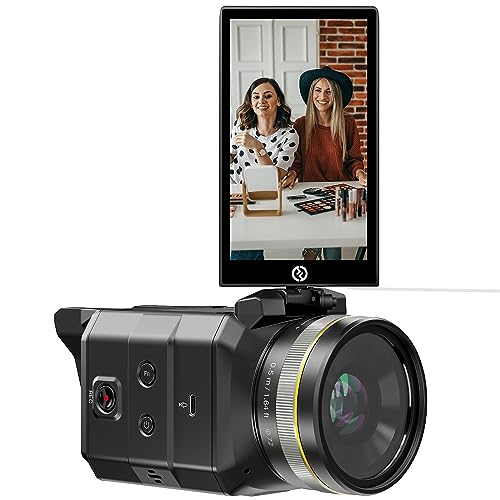
- 1080P 60fps with RTMP streaming
- Built-in UVC, HDMI, and network output
- 5-inch flip touchscreen with autofocus
Best For: Streamers and educators wanting simple direct streaming
Studio Color Pick
Hollyland VenusLiv Air Live Streaming Camera
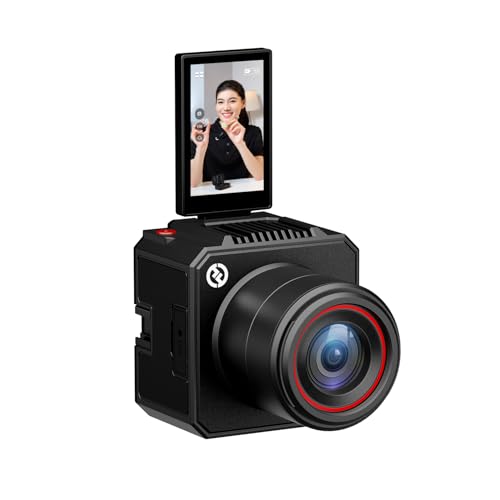
- 1/1.3" CMOS and F1.05 lens for clean low-light video
- AI tuning plus manual presets for quick scene changes
- 4K30 UVC/HDMI output with green screen tools
Best For: Creators who want color control and reliable long-session streaming
Zoom Workflow Pick
NearStream VM20 Pro 4K Streaming Camera

- 10x optical zoom with 4K capture and autofocus
- USB-C, HDMI, RJ45, and wireless AV output options
- MicroSD recording plus 8-mic array with noise reduction
Best For: Churches, classrooms, podcasts, and multi-camera live workflows
Pro Camcorder Zoom
Canon XA65 4K Streaming Camcorder

- 4K UHD camcorder with 20x optical zoom
- USB live streaming with UVC support
- Two XLR inputs and image stabilization
Best For: event coverage and pro audio streaming
PTZ Broadcast Control
Canon CR-N300 4K Pro PTZ Camera

- 4K 30p PTZ camera with Hybrid AF
- 20x optical zoom and wide viewing angle
- IP, USB, HDMI, SDI, RTMP, and NDI|HX2 support
Best For: fixed installations and multi-camera control
Pro-Grade PTZ Power – TONGVEO 4K NDI PTZ Camera
If you need a professional live streaming camera for churches, events, or multi-input productions, this TONGVEO PTZ model packs a lot into one unit. It delivers 4K/30fps over HDMI and USB, supports 1080P network streaming via IP/NDI, and includes AI auto-tracking to keep a speaker framed with less manual control.
Best For: Churches, schools, studios, and event teams that want a feature-rich PTZ camera with NDI, SDI, and AI tracking.
Pros:
- 4K/30fps output via HDMI and USB for high-resolution production
- Official NDI license included, with IP/NDI streaming support up to 1080P
- AI auto-tracking with presenter tracking and auto-framing modes
- Professional connectivity including HDMI, SDI, USB3.0, PoE, and LAN
Cons:
- AI tracking is designed for one person at a time
- Not intended for high-speed motion
- Multi-camera setups may need a separate joystick controller
Overall, this is a strong pick if you want a flexible pro streaming camera that can integrate into serious production workflows without adding extra conversion gear.
Wireless Creator Pick – Logitech Mevo Start Live Streaming Camera
The Mevo Start is a compact professional live streaming camera built for creators who want to stream from almost anywhere. It offers 1080p HD video, wireless app-based control, and support for Wi-Fi, Ethernet, or even smartphone LTE, making it easy to set up for mobile or small-scale broadcast use.
Best For: Creators who want a portable, wireless streaming camera with simple app control and multicam options.
Pros:
- Streams and records in 1080p HD
- Can stream over Wi-Fi, Ethernet, or smartphone LTE
- App control includes Auto-Director from your phone
- Supports up to three cameras for multicam setups
Cons:
- Fixed-focus design limits manual lens control
- Maximum video resolution is 1080p, not 4K
- Built-in battery life is listed at about 6 hours
If your priority is easy deployment and wireless convenience, the Mevo Start is a practical streaming camera that keeps production simple while still supporting advanced protocols like RTMP and NDI|HX.
Broadcast Camcorder Choice – Canon XA60 4K Livestream Bundle
The Canon XA60 is a professional live streaming camera bundle that fits users who want a traditional camcorder workflow with serious video and audio tools. It records UHD 4K30, supports direct UVC livestreaming over USB-C, and adds pro audio inputs plus optical stabilization for dependable handheld shooting.
Best For: Videographers, field reporters, and educators who want a compact camcorder with 4K capture and built-in livestreaming support.
Pros:
- UHD 4K30 recording with Canon DIGIC DV 6 processing
- USB-C UVC support for direct livestreaming to Mac or Windows
- 20x optical zoom with 5-axis optical stabilization
- Dual XLR inputs for professional microphone setups
Cons:
- Heavier than compact webcam-style streaming cameras
- Bundle format may include accessories some buyers do not need
- Designed more as a camcorder than an all-in-one creator device
This is a solid choice if you want camera-body ergonomics, optical zoom, and pro audio support in a single livestream-ready package.
Touchscreen Streaming Hub – Hollyland VenusLiv Wireless Camera
The Hollyland VenusLiv is a professional live streaming camera aimed at creators who want an easy all-in-one streaming workflow. It supports RTMP streaming, UVC output, HDMI, and network connectivity, while the 5-inch touchscreen and quick autofocus make it straightforward to monitor and manage live content.
Best For: Streamers, teachers, and worship setups that want a touchscreen camera with direct RTMP streaming and flexible outputs.
Pros:
- RTMP support lets you stream by entering a URL directly
- Built-in UVC streaming works without an external capture card
- 5-inch flip touchscreen with CalMAN color calibration
- Hybrid autofocus helps keep foreground subjects sharp
Cons:
- Resolution is limited to 1080P 60fps
- Not water resistant
- Heavier than small webcam-style cameras
For buyers who value on-camera control and straightforward live delivery, the VenusLiv offers a practical balance of convenience, connectivity, and monitoring.
AI PTZ Creator Pick – EMEET PIXY Dual-Camera AI-Powered PTZ 4K Webcam
If you want a professional live streaming camera that can keep up with moving subjects, the EMEET PIXY Kit is built for that job. Its dual-camera design combines a 4K main sensor with AI-assisted framing, fast autofocus, and PTZ movement, making it a flexible choice for streamers who switch between talking-head shots, demos, and active scenes.
Best For: Creators who need AI tracking, smooth PTZ control, and a webcam-style setup for streaming, teaching, or fitness content.
Pros:
- Dual-camera system pairs a 4K imaging camera with an auxiliary AI camera for smarter autofocus and exposure.
- 310° pan and 180° tilt with gesture control helps keep moving subjects centered during live streams.
- Included tripod adjusts from 6.7″ to 18.5″ and supports portrait or landscape framing.
- 3-mic array offers multiple sound modes for live, noise-canceling, or ambient recording.
Cons:
- 4K operation is locked to 30 fps, so it is not the best fit if you want higher-frame-rate 4K streaming.
- Some advanced controls rely on EMEET STUDIO software for presets and fine-tuning.
- The remote control is sold separately.
This is a strong option if you want automated tracking and pro-style framing without building a full camera rig. It is especially appealing for creators who value flexibility, built-in audio, and quick setup over deep manual control.
Studio Color Pick – Hollyland VenusLiv Air Live Streaming Camera
The Hollyland VenusLiv Air is a professional live streaming camera aimed at creators who want polished image quality with minimal setup. It combines a large-aperture lens, 1/1.3″ CMOS sensor, and AI tuning features that help keep color, exposure, and low-light performance consistent across different streaming environments.
Best For: Streamers who want an all-in-one camera for color-accurate, long-running broadcasts with app or desktop control.
Pros:
- 1/1.3″ CMOS sensor and F1.05 lens are designed for clean, low-light-friendly video.
- AI tuning automatically adjusts AE and AWB for easier professional-looking results.
- Supports 4K30 UVC and HDMI output for simple USB streaming or multi-camera workflows.
- Built-in green screen, image overlay, skin beauty, and color correction tools add production value.
Cons:
- 4K output is limited to 30 fps.
- Some advanced features depend on the VenusCam mobile app or HollyStudio desktop software.
- It is built for streaming workflows rather than a general-purpose zoom camera.
If you care most about dependable color and easy scene refinement, this model offers a very creator-friendly package. The built-in cooling system and 24/7 streaming focus make it especially practical for long sessions.
Zoom Workflow Pick – NearStream VM20 Pro 4K Streaming Camera
The NearStream VM20 Pro is a professional live streaming camera for setups that need more reach, more connection options, and more flexibility than a typical webcam. With 10x optical zoom, 4K capture, and multiple output paths, it suits churches, classrooms, podcasts, and live production environments where the camera has to adapt to the workflow.
Best For: Multi-purpose streaming setups that need optical zoom, wired or wireless output, and onboard recording.
Pros:
- 10x optical zoom plus 4x digital zoom gives strong close-up flexibility.
- USB-C, HDMI, RJ45 RTSP, and included wireless AV support multiple streaming workflows.
- Built-in MicroSD recording up to 1TB adds backup capture for events and lectures.
- 8-mic array with AI noise reduction and external mic input improves audio versatility.
Cons:
- Wireless AV tops out at 1080p, not 4K.
- HDMI output is also limited to 1080p.
- Its feature set may be more camera than casual streamer needs for a simple desktop setup.
For buyers who need one camera to cover streaming, recording, and remote workflows, this is the most connection-rich option in the group. The optical zoom and standalone recording make it especially useful when the shot needs to change without changing cameras.
Wireless AI Tracking PTZ – EMEET PIXY 4K Dual-Lens Streaming Camera
If you want a professional live streaming camera that feels flexible in real-world use, the EMEET PIXY Wireless is built around 4K clarity, AI tracking, and wireless control. Its dual-lens design is aimed at keeping subjects centered during movement, while the 97° field of view and HDR help it handle active scenes and mixed lighting.
Best For: Solo creators, training sessions, and wireless multi-camera live streaming.
Pros:
- 4K resolution with a dual-camera design for more stable AI recognition during movement
- AI auto tracking plus gesture control for hands-free start/stop control
- Wireless control from phone or PC, with multi-camera switching in EMEET STUDIO
- Built-in 48kHz mic, 3.5mm mic input, HDR, and up to 8 hours of battery life
Cons:
- Uses a compact camera style rather than a full-size studio camcorder
- Built-in audio is convenient, but external mic use may still be preferable for pro setups
Overall, this is a strong pick if you value movement-friendly tracking and simple wireless operation over traditional broadcast hardware. It fits creators who need a portable streaming camera that can cover solo sessions, dynamic content, and multi-platform streaming with less setup friction.
Pro Camcorder Zoom – Canon XA65 4K Streaming Camcorder
The Canon XA65 is a professional live streaming camera for users who want camcorder-style control, built-in zoom, and proper audio inputs. With 4K UHD capture, a 20x optical zoom lens, image stabilization, and USB live streaming support, it’s designed for polished shoots where reliability matters more than novelty.
Best For: Event coverage, interviews, and streamers who need zoom range plus XLR audio.
Pros:
- 4K UHD capture with a 1/2.3" CMOS sensor and DIGIC DV6 processing
- 20x optical zoom plus optical and infrared image stabilization
- USB Type-C live streaming with UVC support for PC or Mac
- Two XLR terminals and 4-channel linear PCM for pro audio control
Cons:
- More expensive and more camera-heavy than simple plug-and-play streaming models
- Best results will usually require a more deliberate setup than a basic webcam-style option
If your priority is a production-ready camcorder with serious zoom and audio flexibility, the XA65 makes a lot of sense. It is especially appealing for creators who want one camera for recording, streaming, and event work without giving up professional inputs.
PTZ Broadcast Control – Canon CR-N300 4K Pro PTZ Camera
The Canon CR-N300 is a professional live streaming camera built for controlled broadcast environments like classrooms, churches, conferences, and esports setups. Its 4K 30p output, 20x optical zoom, hybrid autofocus, and IP/USB/HDMI/SDI connectivity make it a versatile PTZ option for fixed installations and multi-camera workflows.
Best For: Houses of worship, classrooms, conference rooms, and multi-camera productions.
Pros:
- 4K 30p and Full HD 60p output with Hybrid AF for reliable focus
- 20x optical zoom with a wide 65.6° horizontal viewing angle
- Multiple output options including IP, USB, HDMI, and SDI
- Supports RTMP streaming, NDI|HX2, and webcam use over a network
Cons:
- PTZ installation and control are more involved than using a simple standalone camera
- At 4.9 pounds, it is less portable than compact streaming cameras
This is a strong choice when you need repeatable framing, remote operation, and pro-level integration rather than an all-in-one handheld camera. It stands out most in fixed locations where one operator may need to control multiple angles and outputs.
How We Picked the Best Professional Live Streaming Camera
We focused on cameras that make live production easier, not harder. That means strong low-latency output options, good autofocus or auto-tracking, dependable zoom range, and connectivity that fits modern streaming setups such as USB, HDMI, SDI, IP, or NDI workflows.
We also favored models with clear advantages for a Professional Live Streaming Camera, including remote control, multi-camera compatibility, wireless flexibility, and features that help one-person teams stay productive on air.
Quick Comparison
If you want the simplest setup, USB livestreaming cameras are usually the fastest to deploy. If you need longer cable runs, more stable integration, or multi-cam production, look at HDMI, SDI, IP, and NDI-enabled models. For mobile creators and smaller teams, wireless streaming and app-based control can be a major advantage.
Key Buying Factors for a Professional Live Streaming Camera
Resolution and Frame Rate
4K is increasingly common, but 1080p60 can still be the better choice if smooth motion matters more than ultra-high detail. Match the camera to your platform, audience, and editing needs.
Zoom, Lens, and Framing
Optical zoom is more valuable than digital zoom for image quality. PTZ cameras are ideal when you need remote framing, while camcorders can be better for handheld or run-and-gun use.
Connectivity and Workflow
USB is easy, HDMI is versatile, SDI is dependable for longer professional runs, and IP or NDI is useful for network-based productions. Choose the output that best matches your switcher, encoder, or streaming software.
Autofocus, Tracking, and Ease of Use
AI tracking, face detection, and fast autofocus reduce operator workload. These features matter most when one person is managing the stream, audio, and scene changes at the same time.
Who Should Buy Which Professional Live Streaming Camera?
Churches, event venues, and houses of worship should lean toward PTZ and IP-friendly cameras for flexible installation and remote control. Creators and educators often benefit from compact USB or wireless models that are quick to set up. Broadcast-minded teams and larger studios should prioritize cameras with SDI, IP, NDI, and robust optical zoom for cleaner integration and more scalable production.
If your goal is the most reliable Professional Live Streaming Camera for long-term use, think beyond specs alone. The best choice is the one that fits your space, your crew size, and the way you actually produce live video.