
The best photo printers for home studios balance image quality, print size, operating cost, connectivity, and the space available on your desk. This roundup includes compact dye-sublimation printers for quick snapshots, refillable-tank models for frequent printing, and professional wide-format options for exhibition-ready work.
Use the comparisons below to match a printer to your photography workflow, whether you need occasional 4×6 prints, borderless enlargements, or an efficient all-in-one setup for a creative workspace.
Best 10 Photo Printers for Home Studios Picks for 2026
Best Professional Print Quality

- 9-color pigment inks with Chroma Optimizer
- Prints media up to 13 x 19 inches
- LCD, Wi-Fi, Ethernet, and USB connectivity
Best For: Fine-art photographers seeking gallery-quality studio prints
Best Docking Convenience
KODAK Dock Plus 4x6 Photo Printer

- 4PASS dye-sublimation 4 x 6-inch printing
- Integrated smartphone docking station
- Prints in approximately 55 seconds
Best For: Simple smartphone photo printing, albums, and gifts
Best Low-Running-Cost All-in-One

- Refillable six-color ink tank system
- Supports wide-format media up to 13 x 19 inches
- Prints, scans, copies, and duplexes
Best For: Frequent home-studio printing with multifunction needs
Best Compact 4x6 Wi-Fi Printer

- Compact thermal dye-sublimation design
- Built-in Wi-Fi hotspot for direct connections
- Supports up to five devices simultaneously
Best For: Small studios and shared 4 x 6-inch photo printing
Wide-Format Studio Choice
Epson Expression Photo HD XP-15000
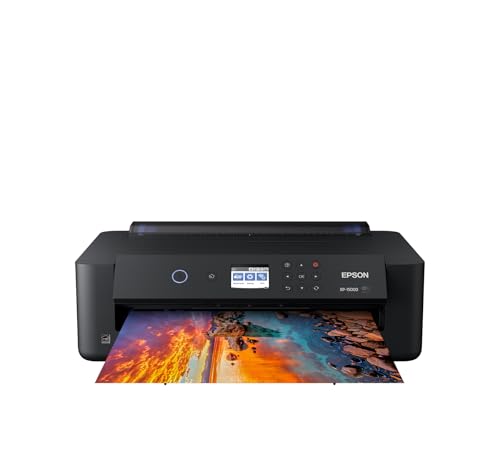
- Borderless output up to 13 x 19 inches
- Six-color ink with red and gray
- Rear specialty-media tray and wireless printing
Best For: Home studios making large photo prints and specialty-media projects
Portable Sticker Specialist
Liene Amber M110 Photo Printer

- Prints 4 x 6-inch photos and 3 x 3-inch stickers
- Dye-sublimation output has a protective laminated surface
- Bluetooth and app-based editing for smartphone printing
Best For: Portable photo and sticker printing from phones
Compact Event Printer

- Borderless 4 x 6 and 5 x 7-inch photo printing
- Wireless printing from phones and tablets
- Compact 6-pound design for events and small spaces
Best For: Portable home, event, and personal photo printing
Best Large-Format Choice

- Eight-color dye ink for vibrant photos
- Borderless printing up to 13 x 19 inches
- Wi-Fi, Ethernet, USB, and LCD controls
Best For: Large, borderless photo prints in a home studio
Best Multifunction Value

- Six-color ink for detailed photo output
- Printing, scanning, copying, and auto duplex
- Refillable tank with wireless connectivity
Best For: Studios needing photo and everyday multifunction printing
Best Compact 4x6 Printer

- Dye-sublimation 4 x 6 photo printing
- Includes 108 sheets and three cartridges
- Compact wireless design for events and travel
Best For: Portable snapshots, gifts, scrapbooking, and journaling
Best Professional Print Quality – Canon imagePROGRAF PRO-310
For photographers building a serious home studio, the Canon imagePROGRAF PRO-310 is designed for gallery-quality output. Its 9-color pigment system, Chroma Optimizer, matte black ink, and support for media up to 13 x 19 inches make it a strong choice for detailed exhibition prints.
Best For: Photographers who prioritize fine-art print quality, rich blacks, and wide-format output.
Pros:
- 9-color LUCIA PRO II pigment inks with Chroma Optimizer support detailed, gallery-quality prints.
- Matte black ink enhances black density and dark-area reproduction.
- Handles sizes up to 13 x 19 inches, plus custom panoramic media up to 13 x 129 inches.
- Color LCD, anti-clogging system, and skew correction simplify operation.
Cons:
- Print speeds are listed at about 2 pages per minute.
- At 31.6 pounds, it requires substantial desk or studio space.
- It is a print-only machine without scanning or copying functions.
The PRO-310 is a specialized investment for photographers who want pigment-based archival-style output rather than an all-purpose office printer. Wi-Fi, Ethernet, and USB connectivity add flexibility for a dedicated studio workflow.
Best Docking Convenience – KODAK Dock Plus 4×6 Photo Printer
The KODAK Dock Plus is a straightforward option for home studios that mainly produce 4 x 6-inch prints. Its integrated smartphone dock, Bluetooth connection, and 4PASS dye-sublimation process make casual photo printing quick and approachable.
Best For: Families, creators, and home users who want simple smartphone printing for albums, gifts, and everyday photos.
Pros:
- Integrated docking station provides a stable connection and can charge a compatible phone while printing.
- 4PASS printing uses three color layers and protective lamination for water-, fingerprint-, and fade-resistant prints.
- Prints 4 x 6-inch photos in approximately 55 seconds.
- The KODAK app supports editing, cropping, and customization on compatible iOS and Android devices.
Cons:
- It is limited to a maximum media size of 4 x 6 inches.
- Its listed output capacity is 50 sheets, with a 20-sheet maximum sheet capacity in the specifications.
- It is intended for print-only use rather than scanning or copying.
The Dock Plus favors convenience over studio versatility. If your home studio needs larger formats or advanced color control, look elsewhere; for quick, durable 4 x 6-inch smartphone prints, its dock-and-app workflow is easy to manage.
Best Low-Running-Cost All-in-One – Epson EcoTank Photo ET-8550
The Epson EcoTank Photo ET-8550 suits home studios that need both photo printing and everyday flexibility. Its refillable six-color ink system, wide-format support, scanner, and copier combine creative production with lower ongoing ink costs.
Best For: Home studios that print frequently, need up to 13 x 19-inch output, and value scanning and copying.
Pros:
- Six-color Claria ET Premium inks are designed for vibrant photos and sharp text.
- Refillable bottles can reduce photo-printing costs; the supplied comparison cites about 4 cents for a 4 x 6-inch photo.
- Supports media up to 13 x 19 inches and includes automatic duplex printing.
- Prints, scans, and copies, with up to two years of ink supplied in the box according to the notes.
Cons:
- Its large 29.8 x 20.6 x 16.9-inch footprint may be challenging for compact workspaces.
- It weighs 24.5 pounds, so it is less convenient to move frequently.
- The supplied specifications list USB connectivity rather than Wi-Fi.
The ET-8550 is a practical workhorse for a home studio with steady print volume. It is less specialized than the Canon for dedicated fine-art printing, but the tank system and multifunction design can make it more economical and useful day to day.
Best Compact 4×6 Wi-Fi Printer – Liene M100 4×6 Photo Printer
The Liene M100 is a compact choice for photo printers for home studios when portability and simple 4 x 6-inch output matter most. Its thermal dye-sublimation process, built-in Wi-Fi hotspot, and app-based editing make it easy to print from phones, laptops, and PCs without relying on a home network.
Best For: Small home studios, shared printing, and users who want durable 4 x 6-inch prints from multiple devices.
Pros:
- Thermal dye-sublimation printing produces vibrant, borderless 4 x 6-inch photos with a protective layer.
- Built-in Wi-Fi hotspot enables direct connections without a separate home network.
- Supports up to five connected devices and works with iOS, Android, Windows, laptops, and PCs.
- The Liene app offers frames, filters, ID-photo options, and printing-status guidance.
Cons:
- It is limited to 4 x 6-inch glossy photo paper.
- The package includes 20 sheets and one cartridge, so additional supplies are needed for larger projects.
- It is a print-only device without scanning or copying functions.
At 2.2 pounds, the M100 is substantially easier to place or move than wide-format studio printers. It is best viewed as a convenient small-format companion rather than a replacement for a professional printer handling large or fine-art media.
Wide-Format Studio Choice – Epson Expression Photo HD XP-15000
For home studios that need large, polished output, the Epson Expression Photo HD XP-15000 is a strong option among photo printers for home studios. Its six-color Claria Photo HD ink system supports borderless prints up to 13 x 19 inches, while wired and wireless connectivity keeps it flexible for desktop workflows.
Best For: Home studios producing wide-format photos, specialty-media projects, and enhanced black-and-white prints.
Pros:
- Prints borderless photos up to 13 x 19 inches.
- Six-color ink system includes red and gray for a wide color gamut and improved black-and-white output.
- Includes a 50-sheet rear tray for specialty media and a 200-sheet front tray.
- Supports automatic two-sided document printing and Ethernet or wireless connectivity.
Cons:
- Designed for use with Epson Genuine Cartridges, which can limit ink choices.
- Print-only design does not include scanning or copying.
- Its wide-format capability requires more desk space than compact photo printers.
The XP-15000 is the most capable choice here for studio-size prints and varied media. Choose it if 13 x 19-inch output and color flexibility matter more than portability.
Portable Sticker Specialist – Liene Amber M110 Photo Printer
The Liene Amber M110 is a compact choice for home studios that prioritize quick, phone-based printing. This thermal dye-sublimation model handles both 4 x 6-inch photos and 3 x 3-inch sticky-backed prints, making it one of the more flexible small photo printers for home studios.
Best For: Smartphone users who want portable 4 x 6-inch photos and square sticker prints.
Pros:
- Dual trays support both 4 x 6-inch and 3 x 3-inch media.
- Dye-sublimation prints have a laminated surface resistant to water, scratches, fingerprints, and fading.
- Bluetooth pairing takes about 13 seconds and supports multiple devices.
- The app adds borders, filters, brightness and contrast adjustments, and ID or visa photo layouts.
Cons:
- Maximum print size is limited to 4 x 6 inches.
- Uses only compatible Liene 4 x 6 and 3 x 3 cartridges.
- Resolution is listed at 300 x 300 dpi, and printing is rated at one color page per minute.
The M110 is better suited to creative snapshots, labels, and small-format sharing than professional enlargement work. Its dual-media design is particularly useful when a home studio also creates stickers or compact keepsakes.
Compact Event Printer – Epson PictureMate PM-400
The Epson PictureMate PM-400 keeps photo printing simple when space and portability matter. It produces borderless 4 x 6 and 5 x 7-inch photos, connects over Wi-Fi or USB, and fits well into a home studio setup focused on personal projects, events, or on-the-go printing.
Best For: Home studios and event setups needing compact wireless prints in common photo sizes.
Pros:
- Prints borderless 4 x 6 and 5 x 7-inch photos.
- Compact, lightweight design weighs 6 pounds.
- Wireless printing works with iPad, iPhone, tablets, and smartphones.
- Prints a 4 x 6-inch borderless photo in as fast as 36 seconds under the stated conditions.
Cons:
- Maximum media size is 5 x 7 inches, so it is not intended for large prints.
- Uses Epson cartridges rather than a broad range of third-party options.
- Its compact photo-focused design is less suitable for varied studio media workflows.
The PM-400 is a practical middle ground for quick, small-format output without the footprint of a wide-format printer. It makes the most sense when portability and straightforward wireless printing outweigh enlargement capability.
Best Large-Format Choice – Canon PIXMA PRO-200S
For home studios focused on vivid, gallery-style output, the Canon PIXMA PRO-200S is a strong option among photo printers for home studios. Its eight-color dye ink system supports detailed color prints, while borderless printing accommodates sizes from 3.5 x 3.5 inches through 13 x 19 inches.
Best For: Photographers and creators who need large, borderless prints and broad paper-size flexibility.
Pros:
- Eight-color dye ink system is designed for vibrant, high-quality color prints.
- Supports borderless printing up to 13 x 19 inches, plus custom panoramas up to 13 x 39 inches.
- Built-in 3-inch color LCD helps monitor ink levels, printer status, and settings.
- Offers Wi-Fi, Ethernet, and USB connectivity.
Cons:
- Print-only design does not include scanning or copying.
- At 32 pounds and nearly 29 inches deep, it requires substantial workspace.
- Its listed color and black-and-white print speeds are 2 pages per minute.
The PRO-200S makes the most sense when print quality, large formats, and borderless presentation matter more than compact size or multifunction features.
Best Multifunction Value – Epson EcoTank Photo ET-8500
The Epson EcoTank Photo ET-8500 combines photo printing with scanning and copying, making it a versatile pick among photo printers for home studios. Its six-color Claria ET Premium ink system, borderless output, and refillable tank design suit creators who print photos and everyday studio materials.
Best For: Home studios that want photo quality, multifunction convenience, and cartridge-free ink refills.
Pros:
- Six-color Claria ET Premium ink is intended to produce vivid detail and vibrant hues.
- Supports borderless printing and media such as cardstock, envelopes, CDs, and DVDs.
- Includes scanning, copying, automatic duplex printing, and a 4.3-inch touchscreen.
- Offers Wi-Fi, Wi-Fi Direct, Ethernet, and USB connectivity.
Cons:
- Its maximum sheet capacity is listed as 10 sheets.
- It is limited to a maximum media size of 13 x 19 inches.
- The printer measures 24.1 inches deep, so it still needs a dedicated workspace.
Choose the ET-8500 if your studio needs one machine for photos, documents, scans, and copies, especially when refillable ink convenience is a priority.
Best Compact 4×6 Printer – Canon SELPHY CP1500 Bundle
For quick snapshots, gifts, and event photos, the Canon SELPHY CP1500 bundle is a compact alternative among photo printers for home studios. Its dye-sublimation process produces water-resistant, fingerprint-resistant 4 x 6-inch prints, and the bundle includes paper, three color cartridges, and a cleaning cloth.
Best For: Small-space studios, events, scrapbooking, journaling, and portable 4 x 6 photo printing.
Pros:
- Dye-sublimation printing produces durable, lab-quality-style 4 x 6 photos.
- Wireless printing works with smartphones, tablets, and computers.
- Bundle includes 108 sheets of paper, three color cartridges, and a cleaning cloth.
- Compact design is suitable for desks, shelves, or travel.
Cons:
- Maximum media size is limited to 4 x 6 inches.
- Print-only design has no scanner or copier.
- Uses simplex printing rather than duplex output.
The SELPHY CP1500 is a practical choice when portability and straightforward 4 x 6 printing matter more than large-format flexibility or advanced studio controls.
How We Picked the Best Photo Printers for Home Studios
We evaluated these models by looking at the factors that matter most in a home studio: print quality, supported media sizes, color technology, connectivity, speed, running costs, and ease of use. The selection spans dye-sublimation, conventional inkjet, pigment-ink, dye-ink, and refillable EcoTank designs so different types of photographers can compare practical alternatives.
We also considered workflow fit. A compact printer may be ideal for client proofs or event snapshots, while a wide-format model is better suited to fine-art prints and portfolio work. Features such as wireless printing, mobile-app support, LCD controls, automatic duplex printing, and scanning can make a meaningful difference in daily use.
Quick Comparison
| Best For | Printer Type | Typical Strength |
|---|---|---|
| Professional large prints | 13-inch inkjet | Advanced color control and fine-art output |
| Frequent home printing | Supertank inkjet | Lower ongoing ink costs |
| Everyday wide-format work | Standard inkjet | Flexible paper sizes and strong detail |
| Instant 4×6 photos | Dye-sublimation | Fast, durable prints with simple operation |
| Portable snapshots | Compact photo printer | Small footprint and phone-friendly printing |
Key Buying Factors for Photo Printers for Home Studios
Print Size and Media Support
Decide whether you mainly need 4×6 snapshots, letter-size images, or prints up to 13 inches wide. Check borderless support, paper thickness limits, roll-paper compatibility, and whether the printer accepts specialty fine-art media.
Ink System and Running Cost
Cartridge printers can deliver excellent color but may cost more to operate when used frequently. Refillable-tank models generally make more sense for high-volume work. Pigment inks typically offer strong longevity, while dye inks can produce vibrant, glossy images.
Color Quality and Workflow
Professional photographers should look for broad color control, multiple ink channels, accurate driver settings, and support for ICC profiles. For casual printing, consistent automatic correction and a reliable mobile app may matter more than advanced calibration features.
Connectivity and Studio Practicality
Wi-Fi is useful when several devices share the printer, while USB can provide a dependable direct connection. Consider the printer’s footprint, noise, display, paper loading, maintenance requirements, and whether it includes scanning or copying.
Who Should Buy Which Photo Printers for Home Studios?
Choose a professional Canon 13-inch model if gallery-quality output, detailed color management, and larger prints are central to your work. Pick an Epson EcoTank Photo model if you print often and want to reduce the cost of replacement ink while retaining wide-format capability or all-in-one convenience.
For occasional enlargements on a more conventional budget, an Epson Expression Photo printer is a practical middle ground. Choose a compact Epson PictureMate, Canon SELPHY, KODAK Dock Plus, or Liene model when quick 4×6 prints, portability, and straightforward phone printing matter most. Before buying, confirm the paper and cartridge bundle, because included supplies and proprietary media can significantly affect the first-year cost.