
Choosing the right photo booth equipment with touchscreen can make setup faster, guest use easier, and your event output more professional.
Below, we’ve rounded up 10 strong options for parties, weddings, rentals, and business use, with a focus on usability, printing, portability, and overall value.
Best 10 Photo Booth Equipment with Touchscreen Picks for 2026
Instant Print Desktop Booth
Desktop Photo Booth with 10.1" Touchscreen

- 10.1-inch IPS touchscreen with 10-point touch
- Includes printer, ribbon, and 60 sheets of paper
- Built-in adjustable 3-color fill light
Best For: Fast event printing in a compact desktop setup
Mirror Booth Traveler
15.6" Touch Screen Mirror Photo Booth

- 15.6-inch touchscreen mirror display
- Built-in 1200W HD camera with USB printing
- Tripod and flight case help with transport
Best For: Portable mirror booth rentals and creator events
Big Screen DSLR Booth
21.5" Mirror Touchscreen Photo Booth

- Large 21.5-inch mirrored capacitive touchscreen
- Windows 11 mini PC with DSLRBooth Basic Edition
- Reinforced flight case with wheels for mobility
Best For: Large-format weddings and corporate activations
Portable Print Booth
10.1" Touch Screen Desktop Photo Booth

- 10.1-inch touchscreen with adjustable height and angle
- Built-in 1200W HD camera and LED surround light
- Includes printer support and 4x6 paper
Best For: Portable events and small rental businesses
White DSLR Mirror Booth

- 15.6-inch touchscreen with DSLR Booth software
- Instant sharing via email, social, and QR code
- Includes flight case and adjustable RGB lighting
Best For: Event hosts and rental businesses needing a portable mirror booth
Best for Everyday Use

- 10.1-inch touchscreen with live view
- Ink-free Zink printing on 3x4 paper
- Lightweight design with QR and cloud sharing
Best For: Event planners wanting a compact instant-print booth
Black Mirror Booth

- 15.6-inch HD touchscreen with Intel i5 mini PC
- Interactive editing and instant sharing options
- Aluminum build with flight case and RGB lighting
Best For: Wedding and event operators wanting a premium mirror booth
Dual-Screen Event Booth
Portable DSLR Photo Booth Machine

- 15.6-inch touchscreen with Win 11 system
- 29-inch LCD display for slideshows and branding
- Dimmable ring light with multiple lighting modes
Best For: Event rentals and weddings needing dual-screen presentation
Customizable Mirror Booth
Square White Mirror Photo Booth
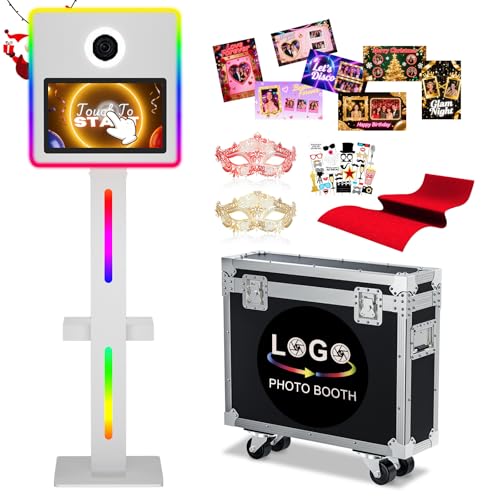
- 15.6-inch interactive touchscreen with sharing tools
- RGB lighting with app and remote control
- Flight case and lockable wheels for transport
Best For: Creative event setups and rental businesses
Large-Screen Booth Pick

- 21.5-inch mirrored capacitive touchscreen
- Built-in mini PC with photo, GIF, and video support
- Portable flight case with wheels and handle
Best For: Mobile events and rentals needing a larger touchscreen
Instant Print Desktop Booth – Desktop Photo Booth with 10.1" Touchscreen
If you want photo booth equipment with touchscreen that can produce physical keepsakes on the spot, this desktop unit is built for fast event use. It combines a 10.1-inch IPS touchscreen, a 13MP camera, and included instant printing support so guests can capture and take home photos without extra setup.
Best For: Weddings, parties, retail activations, and corporate events that need quick on-site printing.
Pros:
- 10.1-inch touchscreen with 10-point touch for simple operation
- Includes a photo printer, ribbon, and 60 sheets of photo paper
- Built-in 3-color fill light with adjustable brightness for indoor setups
- Compact desktop design makes transport and repositioning easier
Cons:
- USB printer connection means it is best suited to a wired event setup
- Desktop format is less flexible than larger booth enclosures
This is a practical all-in-one choice if print speed and straightforward touchscreen control matter most. It is designed to get up and running quickly for events where instant souvenirs are part of the experience.
Mirror Booth Traveler – 15.6" Touch Screen Mirror Photo Booth
This photo booth equipment with touchscreen is aimed at operators who want a portable mirror-style setup with strong software and printing support. It pairs a 15.6-inch touchscreen mirror display with a built-in HD camera, USB printer connection, and Chacktok software features for templates, props, and social sharing.
Best For: Mobile events, creators, and rental setups that need a mirror booth with software effects.
Pros:
- 15.6-inch touchscreen mirror display for interactive use
- Built-in 1200W camera and USB printer support for fast photo output
- Chacktok software adds frames, props, stickers, and music
- Extendable tripod and pull-handle flight case improve portability
Cons:
- Printer is connected via USB, so setup is more cable-dependent
- Mirror-style format may be more than needed for simple basic photo capture
Overall, this model stands out if you want a touch-screen mirror booth with event-friendly portability and plenty of built-in creative options. The included flight case and software package make it more ready for travel than a bare-bones booth.
Big Screen DSLR Booth – 21.5" Mirror Touchscreen Photo Booth
If you are comparing photo booth equipment with touchscreen for higher-end events, this larger mirror booth is built around a 21.5-inch mirrored capacitive display and a Windows 11 mini PC. It supports DSLRBooth Basic Edition, optional DSLR cameras and printers, and instant sharing or printing after each session.
Best For: Wedding and corporate operators who want a large touchscreen mirror booth with DSLR workflow support.
Pros:
- Large 21.5-inch mirrored capacitive touchscreen
- Windows 11 mini PC with pre-installed DSLRBooth Basic Edition
- Supports photos, GIFs, and videos, plus one-click sharing
- Reinforced flight case with wheels helps with transport and setup
Cons:
- Camera and printer are optional, so the full system may require extra purchases
- At 51 kg, it is heavier than smaller desktop-style booths
This is a strong pick when screen size, presentation, and DSLR compatibility matter more than compactness. The RGB lighting options and flight case make it well suited to active event use where both image quality and mobility count.
Portable Print Booth – 10.1" Touch Screen Desktop Photo Booth
This photo booth equipment with touchscreen is geared toward operators who want a lightweight desktop unit with built-in camera, printing, and app-driven effects. The 10.1-inch display, 1200W HD camera, LED surround light, and included printer support give it a practical balance of portability and on-site output.
Best For: Travel-friendly event setups and small rental operations that want quick prints and simple operation.
Pros:
- 10.1-inch touchscreen with adjustable height and angle
- Built-in 1200W HD camera with wide-angle viewing
- Includes printer support and 60 sheets of 4×6 photo paper
- Chacktok software adds lighting control, effects, frames, and social sharing
Cons:
- Software VIP access is limited to 2 months
- Desktop build is compact, but not as expansive as larger mirror booth systems
For buyers who value easy setup and portability, this model covers the essentials without overcomplicating the workflow. It is especially appealing if you want a booth that can be adjusted for different shooting angles and deployed quickly.
White DSLR Mirror Booth – VANYA 15.6" Touch Screen
If you want photo booth equipment with touchscreen control for weddings, parties, or rentals, this VANYA DSLR mirror booth is built around easy guest interaction and instant sharing. The 15.6-inch touchscreen, DSLR Booth software, and social sharing features make it straightforward to run, while the included flight case helps when you need to move between venues.
Best For: Event hosts and rental businesses that want a touchscreen mirror booth with DSLR compatibility, lighting control, and easy transport.
Pros:
- 15.6-inch touchscreen with DSLR Booth software for simple operation
- Instant sharing options include email, social, and QR code
- Includes a flight case for transport and protection
- Adjustable RGB lighting with remote or app control
Cons:
- Printer and camera are not included
- Designed for event use, so setup is more involved than a basic consumer printer
This is a strong fit if you need a booth-style system that combines interaction, portability, and event-ready features. It leans toward business use rather than casual home printing, especially for buyers who already have compatible DSLR gear.
Best for Everyday Use – HP Sprocket 10.1" Touchscreen
For buyers comparing photo booth equipment with touchscreen controls, this HP Sprocket model is focused on fast printing and easy guest use. The 10.1-inch touchscreen, built-in flash, and LED ring light help create a simple event workflow, while Zink printing keeps the setup ink-free and portable.
Best For: Event planners and casual hosts who want a lightweight touchscreen booth that prints and shares photos quickly.
Pros:
- 10.1-inch LCD touchscreen with live view and easy controls
- Prints on HP 3×4 Zink paper without ink or toner
- Lightweight at about 7.3 pounds for easy transport
- Supports custom frames, filters, QR sharing, and cloud storage
Cons:
- Compatible only with HP 3×4 ZINK paper
- Print size is limited to 3×4 inches
This is the most portable option in the group and makes sense if you want a compact booth for quick event setups. It is less of a full DSLR booth system and more of an all-in-one instant print station.
Black Mirror Booth – Magic Mirror 15.6" DSLR
This Magic Mirror model is a solid pick if you want photo booth equipment with touchscreen features and a more premium event feel. Its 15.6-inch HD touchscreen, Intel i5 mini PC, and interactive editing tools are aimed at smooth, guest-friendly operation, while the flight case and aluminum build support frequent transport.
Best For: Wedding, party, and corporate event operators who want a touchscreen mirror booth with strong hardware and lighting effects.
Pros:
- 15.6-inch HD touchscreen with Intel i5 mini PC and Windows 11
- Interactive editing tools for filters, stickers, backgrounds, and signatures
- Instant sharing via email, text, QR code, or social media
- Flight case, aluminum build, and RGB lighting control for event use
Cons:
- Printer and camera are not included in the supplied notes
- More of a dedicated event booth than a simple plug-and-play accessory
Compared with simpler options, this booth is geared toward polished event presentation and more responsive guest interaction. The stronger hardware and longer warranty details may appeal to buyers planning regular use.
Dual-Screen Event Booth – Portable DSLR Photo Booth Machine
If you want photo booth equipment with touchscreen control for events or rentals, this portable DSLR setup is built for smoother operation and stronger guest engagement. It combines a 15.6-inch touchscreen, a 29-inch LCD display for slideshows and branding, and a Windows 11 system to keep the workflow practical during busy use.
Best For: Wedding, party, and rental operators who want a more feature-rich touchscreen booth with display playback and instant sharing.
Pros:
- 15.6-inch touchscreen with Windows 11 for stable, straightforward operation
- 29-inch LCD display supports slideshows, photos, videos, and promotional content
- Dimmable ring light offers natural, cool, warm, and RGB lighting modes
- Supports instant photo taking, quick printing, and one-click sharing
Cons:
- Camera and printer compatibility matters, since those are separate event components
- Best suited to planned event setups rather than casual home use
Overall, this is a strong option if you need a touchscreen photo booth that does more than capture photos. The added LCD display and lighting controls make it a better fit for branded events and commercial rentals.
Customizable Mirror Booth – Square White Mirror Photo Booth
This mirror photo booth with touchscreen is aimed at event hosts who want interactive controls and flexible lighting in one package. The 15.6-inch touchscreen lets guests browse photos, add stickers, customize layouts, and share content, while RGB lighting and app or remote control make it easier to tune the look of the booth.
Best For: Weddings, parties, and rental businesses that want a touchscreen mirror booth with customizable creative features.
Pros:
- 15.6-inch interactive touchscreen supports layouts, styles, backgrounds, stickers, and startup animations
- RGB lighting system offers more than 18 effects with 10 brightness levels
- App or remote control lets you adjust lighting and use music sync features
- Includes flight case, lockable wheels, and reinforced packaging for transport protection
Cons:
- Camera is not listed as included in the supplied details
- Advanced customization may take extra setup time for first-time users
This is a good pick if creative control matters as much as image capture. It stands out for its interactive touchscreen features and packaging protection, which are useful for mobile event work.
Large-Screen Booth Pick – 21.5-Inch Mirror Photo Booth
For buyers comparing photo booth equipment with touchscreen control, this portable mirror booth offers a larger 21.5-inch mirrored capacitive display and built-in PC hardware for a more complete event setup. It is designed for photo, GIF, and video templates, plus instant sharing and printing when paired with a compatible camera and printer.
Best For: Weddings, corporate events, and mobile operators who want a larger touchscreen booth with built-in software support.
Pros:
- 21.5-inch mirrored capacitive touchscreen gives guests a large interactive interface
- Built-in Windows 10 mini PC and DSLRBooth Basic Edition software support photos, GIFs, and videos
- RGB ring fill light and frame lighting offer cold, warm, natural, and RGB color modes
- Flight case, handle, and wheels improve portability for indoor and outdoor transfers
Cons:
- Camera and printer are optional, so the full setup may require extra purchases
- Heavier portable design may be more than some small-scale users need
Compared with smaller touchscreen booths, this one gives you more screen space and integrated software out of the box. That makes it a practical choice for operators who want a ready-to-run event booth with flexible media support.
How We Picked the Best Photo Booth Equipment with Touchscreen
We focused on touchscreen responsiveness, print workflow, camera quality, portability, lighting, and whether the booth suits one-time events or recurring rental work. We also looked for practical extras such as app control, flight cases, and frame customization.
Quick Comparison
In this group, desktop photo booth machines are usually the easiest to transport and quickest to set up, while mirror-style booths generally offer a more premium guest experience and stronger visual impact. Models with larger displays tend to be easier for guests to navigate, and bundles that include a printer, mini PC, or flight case can reduce total setup costs.
Key Buying Factors for Photo Booth Equipment with Touchscreen
Screen Size and Usability
A larger touchscreen can improve the guest experience, especially at weddings and high-traffic events. Smaller 10.1-inch units are more compact and portable, while 15.6-inch and 21.5-inch options often feel more polished and are easier for first-time users.
Printing and Output
If you need instant keepsakes, check printer speed, color quality, and supported print sizes. Some systems are built for fast on-site printing, while others work best when digital sharing is the priority.
Camera and Lighting
DSLR-based booths usually offer stronger image quality than basic camera setups. Built-in ring lights, RGB lighting, and fill lights can help keep photos consistent across different venues and lighting conditions.
Software, App Control, and Customization
Good software matters as much as hardware. Look for customizable frames, templates, remote control, and easy app integration if you want to streamline operations or offer branded event packages.
Portability and Durability
For rental businesses, weight, case protection, and assembly time matter a lot. Flight cases, sturdy stands, and compact footprints make transport safer and recurring use easier.
Who Should Buy Which Photo Booth Equipment with Touchscreen?
If you want a simple, compact setup for small events, a desktop-style unit is often the best fit. If presentation and guest engagement matter more, a mirror booth with a larger touchscreen is worth the upgrade. For pro-level image quality and rental use, choose DSLR-based Photo Booth Equipment with Touchscreen, better lighting, and a protective case.
For most buyers, the best choice comes down to where the booth will be used most often: home parties, weddings, brand activations, or a full rental business.