
Choosing photo booth equipment with dye sublimation printer capability is about more than just image quality. You need a setup that prints fast, travels well, and keeps guests moving without bottlenecks.
This guide focuses on practical buying factors for rentals, weddings, parties, and high-volume events, so you can match the right booth and printer combination to your workflow.
Best 10 Photo Booth Equipment with Dye Sublimation Printer Picks for 2026
All-in-One Event Booth
Photo Booth with Printer and Dual Displays

- Win 11 system with 15.6-inch touchscreen
- 29-inch LCD supports slideshows and promo media
- Dimmable ring light with RGB lighting modes
Best For: Rentals, weddings, and events needing interactive booth printing
High-Speed Dye-Sub Printer
DNP RX1 HS 6-Inch Photo Printer

- 4x6 prints in about 12.4 seconds
- Supports 2x6, 4x6, and 6x8 sizes
- Up to 700 4x6 sheets per roll
Best For: Busy events that need fast, reliable dye-sublimation printing
Dual-Screen Booth Kit
Portable DSLR Photo Booth with Dual Touchscreens

- Dual 15.6-inch touchscreens with independent systems
- Compatible with most printers and major DSLR brands
- Includes RGB lighting and wheeled flight case
Best For: Side businesses and rental setups needing a flexible booth system
Professional Booth Printer
DNP DS620A Dye Sub Photo Printer
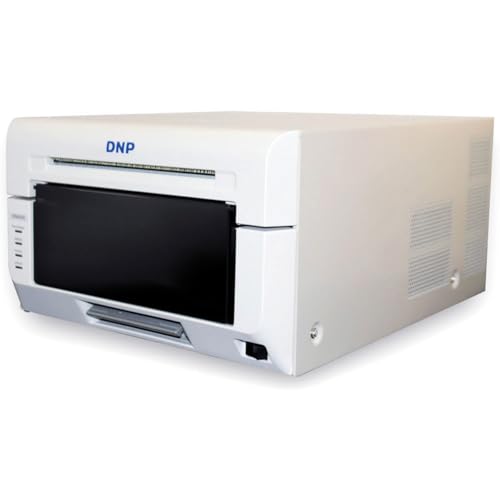
- 4x6 prints in about 8.3 seconds
- Supports strips through 6x8 prints
- Glossy and matte finish options
Best For: Photobooths and studios needing fast multi-size dye-sub output
Portable DSLR Booth Kit
15.6" Touch Screen Booth + Printer

- 15.6-inch touch screen with Windows 11 mini PC
- DSLRBooth Basic Edition for photo, GIF, and video
- Flight case and wheels help with transport
Best For: event rentals and mobile photo booth setups
RGB Event Booth System
15.6" Touch Screen Machine + Printer + Camera
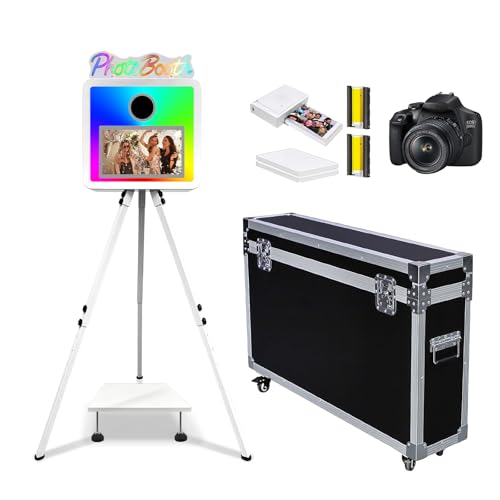
- 15.6-inch touch screen and Windows 11 mini PC
- RGB ambient lighting with app-based control
- Supports DSLR cameras and instant printing
Best For: weddings and events needing a polished booth package
Mirror Booth Rental Package
Touch Screen Booth + Dye Sub Printer

- 15.6-inch touch screen with mini PC and flight case
- dslrBooth trial supports GIFs, video, and instant printing
- RGB lights include app control and music-sync mode
Best For: portable rental setups for weddings and corporate events
Premium Booth Package

- 29-inch LCD HD screen for ads and slideshow playback
- Built-in Intel i5 mini PC with 8GB RAM and 256GB storage
- Lightweight aluminum body with flight case packing
Best For: portable event rentals that need a customizable booth and printer-ready setup
Rental-Ready Booth
15.6" Touch Screen White Package
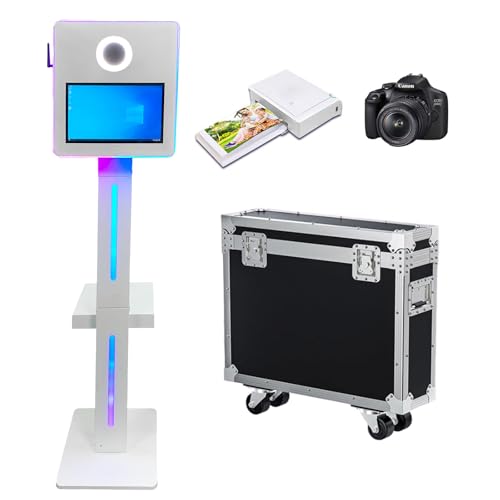
- Windows 11 mini PC with pre-installed DSLRBooth Basic Edition
- Compatible with most cameras and printers
- Reinforced flight case with wheels for transport
Best For: mobile rental setups that value easy setup and broad printer support
Display-Focused Booth

- 29-inch LCD bar screen with split-screen playback
- Supports instant printing and one-click social sharing
- RGB ring light and wheeled flight case
Best For: brand-led events that need custom screen content and easy transport
All-in-One Event Booth – Photo Booth with Printer and Dual Displays
If you want photo booth equipment with dye sublimation printer support for weddings, rentals, and branded events, this portable DSLR booth is built for fast guest interaction. It combines a 15.6-inch touchscreen, a 29-inch LCD for slideshows, and built-in Win 11 software to keep the workflow simple on site.
Best For: Event hosts and rental operators who want an all-in-one booth with display and instant print capabilities.
Pros:
- Built-in Windows 11 system aims for smooth, stable operation.
- 15.6-inch touchscreen plus 29-inch LCD supports interactive guest experiences.
- Dimmable ring light offers natural, cool, warm, and RGB lighting modes.
- Supports instant photo taking, quick printing, and one-click sharing.
Cons:
- Printer compatibility is broad, but specific model compatibility is not fully listed.
- Designed for event use, so setup and transport still require handling a full booth system.
Overall, this is a strong choice if you need a booth that can handle both guest engagement and on-the-spot output. The mix of touch controls, display space, and lighting flexibility makes it practical for busy event environments.
High-Speed Dye-Sub Printer – DNP RX1 HS 6-Inch Photo Printer
For photo booth equipment with dye sublimation printer performance, the DNP RX1 HS is focused on speed and print consistency. It handles 2×6, 4×6, and 6×8 output, making it a practical pick when you need fast color prints for events or busy production days.
Best For: High-volume photo booth or event printing where speed and reliable output matter most.
Pros:
- Fast output: 4×6 prints in about 12.4 seconds.
- Supports 2×6, 4×6, and 6×8 print sizes.
- High-resolution modes reach 300×600 dpi.
- Up to 700 4×6 sheets per roll helps reduce media changes.
Cons:
- USB 2.0 connectivity is straightforward, but not as flexible as wireless options.
- Print-only design means it is not an all-in-one booth solution.
This printer makes sense when your priority is throughput rather than extra features. If your booth setup already includes cameras and software, the RX1 HS gives you a dependable dye-sub print engine for quick guest delivery.
Dual-Screen Booth Kit – Portable DSLR Photo Booth with Dual Touchscreens
This photo booth equipment with dye sublimation printer compatibility is aimed at operators who want more screen space and more flexibility. With dual 15.6-inch touchscreens, built-in mini PCs, and support for most printers on the market, it is set up for event use where speed, sharing, and easy transport matter.
Best For: Operators who want a dual-screen booth for parties, rentals, and side-business use.
Pros:
- Dual 15.6-inch touchscreens run on two independent systems.
- Built-in Intel i5, 8GB RAM, and 256GB storage on both units.
- Compatible with most printers on the market and major DSLR camera brands.
- Includes RGB lighting and a wheeled flight case for transport.
Cons:
- Camera compatibility may need confirmation if your model is less common.
- Setup is more involved than a single-screen booth.
For a booth operator, the main appeal is flexibility: dual displays, software support, and transport-friendly hardware in one package. It is a solid option if you want a more polished rental or promotional setup with easy sharing built in.
Professional Booth Printer – DNP DS620A Dye Sub Photo Printer
If you are building photo booth equipment with dye sublimation printer support, the DNP DS620A is designed for professional print speed and flexible size options. It handles everything from 2×6 strips to 6×8 prints, making it a strong fit for photobooths, events, and studio work.
Best For: Booth operators and studios that need compact, high-speed dye-sub printing across multiple sizes.
Pros:
- Fast print times: 4×6 in about 8.3 seconds.
- Supports 2×6, 4×6, 5×7, and 6×8 print sizes.
- Large roll capacities help minimize downtime.
- Glossy and matte finish options add output flexibility.
Cons:
- Print-only design requires a separate booth or camera setup.
- USB C connectivity keeps it simple, but not especially feature-rich.
The DS620A stands out for operators who need speed without giving up size flexibility. Its compact footprint and high-capacity media support make it especially useful when print volume is steady and turnaround time matters.
Portable DSLR Booth Kit – 15.6" Touch Screen Booth + Printer
If you want photo booth equipment with dye sublimation printer compatibility for fast event output, this DSLR photo booth is built around a 15.6-inch touch screen, a Windows 11 mini PC, and DSLRBooth Basic Edition. It’s a practical option for parties, rentals, and pop-up activations where you need quick setup, simple operation, and the flexibility to connect your own camera and printer.
Best For: Rentals, weddings, corporate events, and mobile operators who want a portable booth with room to add their preferred printer.
Pros:
- 15.6-inch capacitive touch screen with built-in Windows 11 mini PC
- Pre-installed DSLRBooth Basic Edition supports photo, GIF, and video templates
- Compatible with most printers for on-the-spot printing
- Flight case with handle and wheels improves portability for mobile use
Cons:
- Printer is optional rather than guaranteed in the base setup
- Requires external DSLR camera connection for full use
- Designed more for event mobility than compact home storage
This is a strong choice if your priority is a booth platform that’s easy to move, easy to operate, and ready for instant sharing and printing. The included support materials and three-year warranty also add confidence for rental or recurring event use.
RGB Event Booth System – 15.6" Touch Screen Machine + Printer + Camera
For buyers comparing photo booth equipment with dye sublimation printer support, this machine is aimed at high-traffic events that need smooth operation and instant printing. It combines a 15.6-inch touch screen, mini PC, adjustable RGB lighting, and DSLRBooth software, making it a capable all-in-one event centerpiece when you want a polished booth experience.
Best For: Weddings, birthdays, corporate gatherings, and commercial events that need a ready-to-use booth package with lighting effects.
Pros:
- 15.6-inch touch screen with stable Windows 11 mini PC system
- Adjustable RGB ambient lighting with app control
- Supports external DSLR cameras and printers for instant photo printing
- Lightweight aluminum build and included installation support
Cons:
- Standalone device does not include camera and printer
- Specifications are less detailed in places than other listings
- More suited to event use than casual personal photography
This model stands out for presentation as much as functionality, especially if you want lighting that adds atmosphere and draws attention on site. The included software, support, and portability make it a sensible pick for operators who need a flexible booth for different venues.
Mirror Booth Rental Package – Touch Screen Booth + Dye Sub Printer
If you’re shopping for photo booth equipment with dye sublimation printer compatibility, this mirror-style DSLR booth is built for instant event printing and easy transport. It includes a 15.6-inch touch screen, Windows 11 mini PC, pre-installed dslrBooth trial software, and a reinforced flight case, so it fits well into rental workflows and busy event schedules.
Best For: Pop-up rentals, weddings, graduations, and corporate events that need a portable booth with printing features.
Pros:
- 15.6-inch capacitive touch screen with Intel i5 mini PC
- Pre-installed dslrBooth trial supports templates, GIFs, videos, and instant printing
- Built-in RGB light strips with app control and music-sync effects
- Reinforced flight case with handles and wheels for mobility
Cons:
- Camera and printer are optional, not automatically included
- Trial software may require subscription prompts to be skipped if you don’t upgrade
- Heavier than a simple tabletop booth at 41 kg
Overall, this is the most event-rental-friendly option in the group if you want a booth that’s built to move and supports instant printing. Its lighting effects and software features add value, but the real strength is the combination of portability and production-ready booth hardware.
Premium Booth Package – 15.6" DSLR Booth with 29" LCD
If you want photo booth equipment with dye sublimation printer support for weddings, parties, and event rentals, this WideMeet setup leans toward presentation and flexibility. It combines a 15.6-inch capacitive touch screen, a built-in Intel i5 mini PC, and a large 29-inch LCD HD display that can be controlled by app for advertising and slideshow-style playback.
Best For: Event hosts and rental operators who want a portable booth package with a strong display and DIY camera/printer setup.
Pros:
- 29-inch LCD HD screen can be controlled by app for ads and slideshow content.
- Built-in Intel i5 mini PC with 8GB RAM and 256GB storage.
- 15.6-inch capacitive touch screen keeps operation straightforward.
- Lightweight aluminum build and flight case packing support mobility.
Cons:
- Printer and camera are DIY-supported rather than described with a specific bundled model.
- Best fit appears to depend on adding extra accessories like strobe flash and umbrella.
This is a practical pick if your priority is a portable booth with strong guest-facing visuals and room to customize the photo setup. The combination of display options and flight case packing makes it suited to recurring event use.
Rental-Ready Booth – 15.6" Touch Screen White Package
For shoppers comparing photo booth equipment with dye sublimation printer support, this YuuuCooo unit focuses on easy operation, transport, and fast sharing. It includes a 15.6-inch capacitive touch screen, a Windows 11 mini PC, and pre-installed DSLRBooth Basic Edition software for photo, GIF, and video templates.
Best For: Rental businesses and mobile operators who need a portable booth with simple setup and broad printer compatibility.
Pros:
- 15.6-inch capacitive touch screen plus Windows 11 mini PC for user-friendly operation.
- Pre-installed DSLRBooth Basic Edition supports photo, GIF, and video shooting templates.
- Compatible with most cameras and printers for flexible pairing.
- Reinforced flight case with wheels helps with transport and installation.
Cons:
- Printer compatibility is broad, but no specific printer model is listed.
- RGB effects are built in, but the lighting system is described more for ambiance than output control.
This package makes sense if you want a booth that is straightforward to move, quick to deploy, and ready for on-the-spot sharing or printing. The included support materials and three-year warranty also add appeal for operators who expect repeat use.
Display-Focused Booth – 29" LCD DIY Playback Model
If you need photo booth equipment with dye sublimation printer compatibility and a stronger screen-first presentation, this WideMeet model is built around instant shooting, printing, and social sharing. It includes pre-installed photo software, a 29-inch LCD bar screen, and RGB lighting that can be adjusted for natural, cold, warm, or RGB modes.
Best For: Operators who want a booth with customizable screen playback and a portable flight case for event use.
Pros:
- Instant shooting, printing, and one-click social sharing support.
- 29-inch LCD bar screen offers split-screen playback and DIY content options.
- RGB ring light can be adjusted to multiple lighting modes.
- Portable flight case with wheels makes transport easier.
Cons:
- Printer and camera are supported, but no specific printer or camera model is listed.
- Logo customization is offered, which may require extra preparation from the buyer.
This is a strong option when the guest-facing display matters as much as the capture workflow. The custom screen playback, app control, and transport-friendly case make it suitable for branded events and recurring installations.
How We Picked the Best Photo Booth Equipment with Dye Sublimation Printer
We prioritized systems that make event operation easier: compact booth hardware, integrated touch screens, flight-case portability, RGB lighting, and printers known for consistent dye-sub output. The best options balance speed, print quality, media availability, and setup simplicity.
Quick Comparison
For most buyers, the decision comes down to two paths: all-in-one DSLR photo booth machines for a simplified guest experience, or standalone dye-sublimation printers for operators who already have a booth build and want reliable print output. If you need an end-to-end package, look for bundles with a mini PC, screen, and software. If you already have a booth, a printer like the DNP RX1 DS-RX1HS or DS620A can be the smarter upgrade.
Key Buying Factors for Photo Booth Equipment with Dye Sublimation Printer
Print Speed and Throughput
Events can stall quickly if prints lag. Check prints per hour, warm-up behavior, and whether the printer can handle your expected guest volume without slowing down lines.
Print Size and Media Options
Different events call for different formats. Common dye-sub sizes include 2×6 strips and 4×6 prints, while larger 6×8 output can feel more premium for formal events. Make sure the printer supports the formats you actually sell.
Booth Portability
Flight cases, compact footprints, and lighter builds matter if you transport your setup often. For rental operators, portability can be just as important as image quality.
Display and User Experience
A bright touch screen or dual-display layout can reduce confusion and speed up guest interaction. Clear prompts, simple software, and visible countdowns help keep the line moving.
Lighting and Camera Integration
Good lighting is essential for flattering results. Ring lights or RGB lighting can help, but the booth should also work well with DSLR capture so image quality stays consistent across venues.
Who Should Buy Which Photo Booth Equipment with Dye Sublimation Printer?
Buy an integrated photo booth machine if you want an easier setup, a more turnkey rental package, and fewer compatibility issues. Choose a standalone dye-sublimation printer if you already own a booth shell, laptop, or camera system and mainly need dependable print production. If your business serves weddings and corporate events, prioritize speed and reliability. If you focus on private parties or mobile activations, portability and all-in-one convenience may matter more.
In short, the best Photo Booth Equipment with Dye Sublimation Printer support is the one that matches your event volume, transport needs, and print-size requirements—not just the flashiest feature list.