
Choosing the right microscope camera for soldering can make fine-pitch inspection, bridge checking, and rework dramatically easier. The best models balance sharp image quality, a comfortable working distance, and a stable stand that leaves room for your iron and tweezers.
In this roundup, we focus on practical options for electronics repair, from HDMI microscope stations to compact USB cameras and all-in-one LCD units.
Best 10 Microscope Camera for Soldering Picks for 2026
Top Bench-Ready Kit
Andonstar AD249S-M Plus 10.1" HDMI Microscope

- 3-lens system for soldering, repair, and slides
- 2160P HDMI viewing for larger screens
- Includes helping hands, tool holder, and anti-static mat
Best For: Electronics repair users who want a full microscope-and-bench setup
Most Portable USB Pick
Plugable 250x USB Digital Microscope

- USB and USB-C connectivity with wide OS support
- Handheld or flexible-arm stand use
- LED halo light with brightness control
Best For: Portable inspection and hobby soldering checks across many devices
Compact Soldering Station Pick
Andonstar AD246S-M Plus 7" HDMI Microscope

- 3-lens system for soldering and inspection
- 2160P HDMI output with 7-inch monitor
- Includes helping hands, tool holder, and anti-static mat
Best For: Bench users who want a smaller integrated soldering microscope station
Budget 5-inch LCD Starter
5" LCD Digital Soldering Microscope with C-Clamp

- 5-inch IPS screen for bench use
- C-clamp keeps both hands free
- Manual focus with up to 1000X digital magnification
Best For: Compact PCB repair and solder joint checks
Premium 4K Workhorse
4K 10.1" HDMI Microscope with Flex Arm
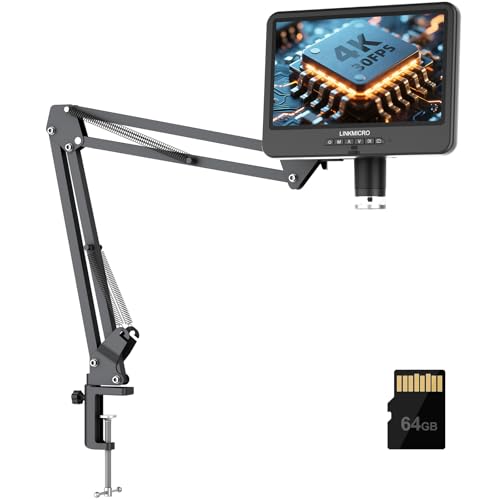
- 4K 30FPS output with HDMI and USB support
- 10.1-inch IPS screen for easier viewing
- Extended flexible arm gives more workspace
Best For: Serious soldering, repair demos, and PC/HDMI viewing
Workspace-Max Rail System
AD409 SA 10.1" HDMI Microscope with Slide Rail

- Wide slide rail arm for large PCB work
- Dual C-clamps and metal rails improve stability
- Also functions as a 3D endoscope
Best For: Large bench setups, PCB repair, and multi-angle inspection
Bench-Ready HDMI Pick
Digital Microscope Camera with 1080P HDMI Output

- 13MP sensor with 1080P HDMI/VGA output
- 150X C-mount lens for repair-focused viewing
- 56-LED ring light and flexible stand
Best For: Bench soldering and electronics repair with an external monitor
Multi-Lens Workshop Choice
Andonstar AD246S-M 3 Lens 2160P Microscope

- Three interchangeable lenses for repair, coins, and slides
- 2160P HDMI output with Windows measurement software
- Metal adjustable boom arm suited to soldering setups
Best For: Users who want a versatile soldering microscope with PC tools
Top Bench-Ready Kit – Andonstar AD249S-M Plus 10.1" HDMI Microscope
If you want a microscope camera for soldering that also replaces part of your bench setup, the Andonstar AD249S-M Plus is built for that kind of workflow. Its 3-lens design, 2160P HDMI output, and included soldering accessories make it a strong fit for electronics repair, close inspection, and larger-screen viewing.
Best For: Electronics hobbyists and repair users who want a microscope plus integrated soldering station accessories.
Pros:
- 3-lens system covers soldering, general inspection, and high-magnification slide viewing.
- 2160P HDMI output is designed for clear viewing on larger screens.
- Includes helping hands, tool holder, anti-static mat, and an extension base with storage boxes.
- Comes with a 32GB card, remote, adjustable LED lights, and measurement software support.
Cons:
- More of a bench station than a compact portable microscope.
- Designed around Windows software for measurement features.
- Some of the high magnification modes are better suited to non-soldering uses like slides.
This is the most feature-packed option here if you want an electronics-focused microscope camera for soldering with a fuller workstation layout. The tradeoff is size and complexity, but the bundled tools make it easier to justify for dedicated repair benches.
Most Portable USB Pick – Plugable 250x USB Digital Microscope
For a simple microscope camera for soldering, the Plugable USB Digital Microscope keeps the setup lightweight and flexible. It connects through USB or USB-C, works across many operating systems, and can be used handheld or on its included flexible arm stand for quick board checks and close-up inspection.
Best For: Users who want a compact, easy-to-connect microscope for occasional soldering inspection and general hobby use.
Pros:
- Broad compatibility with Windows, Mac, ChromeOS, Linux, Android, and iPad.
- Flexible arm stand plus handheld use gives you two practical ways to inspect work.
- Built-in LED halo light with brightness control helps with close-up visibility.
- Small, grab-and-go design is convenient for portable bench or desk use.
Cons:
- 250x maximum magnification is modest compared with station-style microscopes.
- Designed for hobby and inspection use rather than a full soldering workstation.
- Best results may depend on using it with a laptop, tablet, or desktop.
This is a practical choice when you mainly want a straightforward USB microscope camera for soldering inspections without extra bench accessories. It’s the easiest option here to move around and connect to different devices.
Compact Soldering Station Pick – Andonstar AD246S-M Plus 7" HDMI Microscope
The Andonstar AD246S-M Plus is a strong middle-ground microscope camera for soldering if you want a bench-friendly setup without going all the way up to a 10.1-inch screen. It keeps the same 3-lens approach, 2160P HDMI output, and soldering accessories while using a smaller 7-inch monitor format.
Best For: Electronics repair users who want a smaller integrated soldering microscope station.
Pros:
- 3-lens system supports soldering, repair work, and higher-magnification inspection.
- 2160P HDMI output is intended for clear viewing on larger displays.
- Includes helping hands, tool holder, anti-static mat, and extension base storage boxes.
- Comes with a 32GB card, remote control, adjustable LED lighting, and Windows measurement software support.
Cons:
- 7-inch screen is smaller than the larger Andonstar version in this roundup.
- Still more of a stationary bench tool than a portable microscope.
- High-magnification lens modes are not all aimed at soldering specifically.
If you want the station-style benefits of a microscope camera for soldering but prefer a more compact display size, this model is easy to justify. It keeps the key repair-focused extras while trimming the footprint a bit.
Budget USB Microscope Camera – Jiusion 40-1000x Digital Microscope
The Jiusion 40 to 1000x microscope camera for soldering is a low-cost way to get basic close-up inspection on a workbench. It connects over USB, includes a metal stand, and offers built-in LED lighting with adjustable focus and brightness, which is useful for checking small joints and components.
Best For: Budget-minded users who need a simple microscope for soldering and general electronic inspection.
Pros:
- Very portable USB design with a metal stand and OTG adapter included.
- 40x to 1000x magnification gives you a wide inspection range.
- Built-in 8 LED lights and adjustable brightness help with close-up visibility.
- Works with many systems, including Mac, Windows, Linux, Chrome OS, and compatible Android devices.
Cons:
- Not compatible with iPhone or iPad.
- Android use depends on OTG support.
- Less workstation-oriented than the Andonstar soldering stations in this roundup.
This is the simplest entry in the group if you mainly need an affordable microscope camera for soldering rather than a full-featured bench station. It trades extras for low price and broad basic compatibility.
Budget 5-inch LCD Starter – 5" LCD Digital Soldering Microscope with C-Clamp
If you want a microscope camera for soldering that keeps the setup simple, this 5-inch LCD model focuses on hands-free PCB work without needing a computer. The C-clamp mount helps stabilize the unit at the bench, while the IPS screen is designed to reduce neck and eye strain during long repair sessions.
Best For: Hobbyists and repair users who want a compact, screen-based soldering microscope for PCB checks and electronics repair.
Pros:
- 5-inch IPS display is useful for long soldering and inspection sessions
- C-clamp and flexible goose-neck arm help keep both hands free
- Plug-and-play PC viewing works with built-in Windows Camera or Mac Photo Booth
- LED lighting and up to 1000X digital magnification support close inspection
Cons:
- Not auto-focus; you must adjust distance and use the focus wheel manually
- Micro SD card is required for saving photos and 1080P videos and is not included
- Best for micro-details, not full-screen viewing of larger objects
This is a straightforward option if you mainly need a practical soldering view and a screen that works on its own. The tradeoff is manual focusing and a smaller display, but the bench-friendly setup makes it easy to use for everyday electronics repair.
Premium 4K Workhorse – 4K 10.1" HDMI Microscope with Flex Arm
For a microscope camera for soldering with a larger screen and more advanced output options, this 4K HDMI model is built for detailed PCB repair and inspection. Its 10.1-inch IPS display, real-time 4K 30FPS output, and upgraded flexible arm make it a strong fit for users who want a steadier, more spacious bench setup.
Best For: Advanced hobbyists, content creators, and repair work that benefits from a larger display and 4K output.
Pros:
- Real-time 4K 30FPS output on the built-in screen and HDMI monitors
- 10.1-inch IPS display gives a bigger, clearer viewing area
- Flexible arm stand offers extended reach and taller working clearance
- Includes 64GB card, remote control, and USB/HDMI connectivity
Cons:
- Larger footprint than compact bench microscopes
- Designed for serious setups, so it may be more than casual users need
- Best results depend on a well-positioned arm and working distance
This model stands out when you want smoother live viewing and more room to work around soldering tools. The 4K video, audio recording, and broad connectivity make it especially useful for demonstrations or heavier repair workflows.
Workspace-Max Rail System – AD409 SA 10.1" HDMI Microscope with Slide Rail
If your microscope camera for soldering needs to cover larger boards and multiple tools, this AD409 SA focuses on workspace freedom. The slide rail arm gives a wide operating area, while the all-metal construction and dual C-clamps are designed to keep the setup stable during precise PCB repair.
Best For: Users working on larger PCBs or bench setups who want maximum reach, stability, and multi-purpose inspection.
Pros:
- Slide rail arm creates a much larger working area than traditional stands
- All-metal rails and dual C-clamps are built for stable positioning
- 10.1-inch HDMI display supports 2160P recording and multiple output methods
- 2-in-1 microscope and endoscope design adds extra inspection flexibility
Cons:
- Bulkier system that takes up more bench space than simpler microscopes
- Windows PC measurement software requires a download
- Endoscope function is not supported on Windows PC output
This is the most workspace-focused option here, and it makes sense if you regularly move between soldering, inspection, and broader component access. The rail system and metal build are the key selling points, especially when stability matters more than compact size.
Bench-Ready HDMI Pick – Digital Microscope Camera with 1080P HDMI Output
If you want a microscope camera for soldering that focuses on straightforward HDMI/VGA viewing, this NICE-POWER model is built for bench work. Its 13MP sensor, 1080P output, and 150X C-mount lens make it a practical pick for electronics repair, while the LED ring light and flexible stand help keep components visible during close inspection.
Best For: Soldering, electronics repair, and users who want a simple external-display microscope setup.
Pros:
- 13MP sensor with 1080P HDMI and VGA output for clear live viewing.
- 150X zoom C-mount lens with a maximum working distance up to 1000mm.
- 56-LED ring light with adjustable brightness for brighter work areas.
- Flexible, adjustable stand with remote control support in HDMI mode.
Cons:
- Remote control works only in HDMI output mode.
- No built-in screen, so you need an external display.
- Designed more for inspection than all-in-one portability.
Overall, this is a solid microscope camera for soldering if you already use a monitor and want a bright, adjustable inspection setup. It keeps the feature set focused on repair work rather than extra bells and whistles.
Multi-Lens Workshop Choice – Andonstar AD246S-M 3 Lens 2160P Microscope
For buyers who want a microscope camera for soldering with more versatility, the Andonstar AD246S-M combines three interchangeable lenses with a 2160P HDMI microscope body. It is aimed at circuit board repair, has a strong metal boom arm for higher-heat work areas, and can also connect to Windows for measurement software.
Best For: Electronics repair users who want multiple viewing options, HDMI output, and PC measurement support.
Pros:
- Three-lens system tailored for soldering, coins, and slide viewing.
- UHD 2160P video output with HDMI support for larger screens.
- Pro boom arm stand is adjustable and built with metal materials for soldering environments.
- Windows-compatible measurement software plus included remote, SD card, and accessories.
Cons:
- The multi-lens design adds setup complexity compared with simpler scopes.
- Highest usefulness depends on using the right lens for the task.
- Less compact than basic single-lens microscope cameras.
This is a strong choice if you want one microscope that can handle soldering, display output, and software-based measurement. The extra lenses make it more flexible, but also more involved than a basic bench camera.
Big-Screen Soldering Setup – Andonstar AD109 10.1-Inch Screen Microscope
If you prefer a microscope camera for soldering with its own display, the Andonstar AD109 centers the experience around a 10.1-inch IPS screen. It pairs 1080p video and 12MP photos with a long flexible boom arm, making it easier to position over larger PCB layouts and other detailed bench projects.
Best For: Soldering work that benefits from an integrated screen, long reach, and flexible positioning.
Pros:
- 10.1-inch IPS screen with 1080p video and 12MP photo capture.
- 27.56-inch boom arm with 360-degree rotation and 170-degree tilt.
- 8+56 LED lighting system with adjustable brightness for clearer detail.
- USB-C connectivity supports both Mac and Windows for simple plug-and-play use.
Cons:
- Maximum magnification is lower than some higher-zoom inspection scopes.
- Remote batteries are not included.
- Bulkier than a small camera-head-only setup.
This model stands out if you want a self-contained soldering microscope with a big screen and generous reach. It is especially useful when you need to inspect larger boards without constantly repositioning a compact stand.
How We Picked the Best Microscope Camera for Soldering
We prioritized image clarity, usable magnification, stable mounting, and features that help during real soldering work. That includes enough clearance for tools, responsive controls, acceptable latency for live viewing, and a display or output option that fits your bench setup. We also looked for models that suit both beginners and experienced repair techs.
Quick Comparison
For fast decision-making, the main tradeoff is between convenience and flexibility. Integrated LCD microscope stations are usually the easiest all-in-one choice. HDMI setups tend to deliver a cleaner, larger bench display with lower lag. USB microscope cameras can be the most versatile if you want to use a PC, but they depend more on your software and computer setup.
Key Buying Factors for a Microscope Camera for Soldering
Working Distance and Clearance
A Microscope Camera for Soldering should leave enough room for soldering irons, hot air nozzles, and tweezers. If the lens sits too close to the board, it becomes frustrating to work under the camera. Look for a stand and optics designed with bench work in mind.
Image Quality and Frame Rate
Resolution matters, but so does stability of the live image. Higher resolution helps with pad inspection and reading markings, while smoother frame rates can reduce eye fatigue and make hand-eye coordination easier during rework. For soldering, a clean live feed often matters more than extreme zoom numbers.
Stand Type and Stability
Rigid stands, boom arms, and well-supported bases are important because even small vibrations can make fine work harder. If you’ll be adjusting boards often, choose a stand that is easy to position without drifting.
Display and Connectivity
HDMI and built-in LCD models are straightforward and low-fuss. USB cameras can be convenient if you prefer software tools, recording, or a larger monitor setup. Make sure the connection type matches how you actually work at the bench.
Who Should Buy Which Microscope Camera for Soldering?
If you want the simplest setup for regular electronics repair, an integrated LCD microscope station is usually the best fit. If you prefer a larger screen or lower-lag viewing, an HDMI model is a smart pick. If you already work from a PC or need maximum flexibility, a USB microscope camera may be the better choice. For occasional hobby soldering, a compact and affordable model is often enough, while frequent repair work usually justifies a sturdier, more ergonomic system.
In short, the best Microscope Camera for Soldering is the one that gives you a stable view, enough workspace, and a display setup that keeps your hands free and your workflow efficient.