
Choosing the right microscope camera for electronics repair can make fine solder joints, pad damage, and tiny component markings much easier to inspect.
Below, we focus on practical options for PCB work, BGA inspection, and soldering tasks, with an eye toward image quality, working distance, and ease of use.
Best 10 Microscope Camera for Electronics Repair Picks for 2026
Multi-Lens Repair Scope
7" LCD HDMI Digital Microscope

- 3 lenses for soldering, coins, and slides
- 2160P recording with HDMI output
- Metal boom arm and 8-level LED lighting
Best For: Bench users who want a versatile repair and inspection microscope
Bench Camera Head

- 1080P output for PCB and soldering inspection
- USB-C and VGA connectivity
- 56-LED adjustable ring light
Best For: Users who already have a compatible bench microscope setup
Ergonomic Screen Scope

- 12MP camera with 1080P imaging
- Rotatable 7-inch screen for better comfort
- 8 LEDs plus 2 gooseneck lights
Best For: Hobbyists and repair users who want a screen-based microscope
Monitor-First Repair Camera
HDMI/VGA C-Mount Soldering Camera

- HDMI and VGA outputs for external monitors
- 56-LED adjustable ring light
- Industrial build for daily repair use
Best For: Repair benches that need direct display output
Bench-View Pick
5" LCD Digital Soldering Microscope

- 5-inch IPS display for easier bench viewing
- C-clamp and flexible arm keep hands free
- Plug-and-play PC mode with no driver downloads
Best For: Bench-top PCB soldering checks and hands-free inspection
HDMI Shop Monitor Pick
2MP VGA HDMI Industrial Microscope Camera
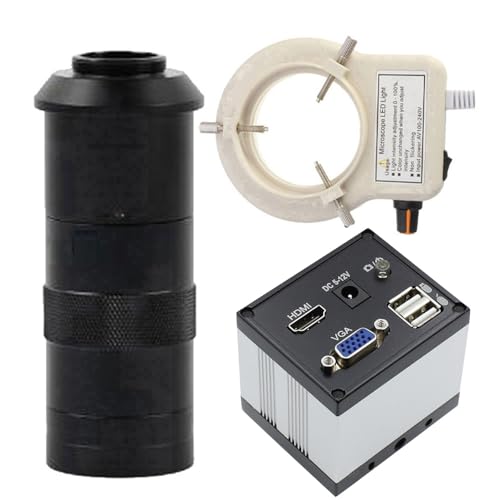
- VGA and HDMI outputs for external monitors
- 56-LED adjustable ring light included
- Built for phone repair and soldering tasks
Best For: Benches that use an external display for inspection
3-Output Utility Pick
2 In 1 AV USB VGA Microscope Camera

- VGA, AV, and USB2.0 outputs
- Cross cursor, freeze, and compare tools
- Auto white balance and noise reduction
Best For: PCBs and repair benches needing flexible connections and tools
HDMI Workbench View
200X C-Mount Lens with 56-LED Ring Light

- HDMI and VGA outputs for monitor use
- 200X C-mount lens for close inspection
- 56-LED adjustable ring light improves visibility
Best For: Technicians who want a monitor-connected repair camera
USB-C Repair Camera
180X C-Mount Lens with 56-LED Ring Light

- USB-C and VGA outputs for flexible setup
- 1080P viewing for detailed inspection
- Plug-and-play convenience for quick use
Best For: Repair techs who want easy USB-C connectivity
Compact PCB View
100X C-Mount Lens with 56-LED Ring Light

- USB-C and VGA outputs for bench use
- 1080P visuals for inspection tasks
- 100X lens offers a simpler viewing range
Best For: Technicians who prefer a simpler magnification setup
Multi-Lens Repair Scope – 7" LCD HDMI Digital Microscope
If you want a microscope camera for electronics repair that can also handle general inspection, the Andonstar AD246S-M offers a flexible 3-lens setup with a strong boom arm. Its L lens is the most relevant for soldering and PCB work, while HDMI output and 2160P recording make it easier to view fine details on a larger screen.
Best For: Repair techs who want a versatile microscope for soldering, inspection, and teaching or demo use.
Pros:
- 3-lens design covers soldering, coin inspection, and biological slides.
- 2160P recording plus HDMI output supports clearer viewing on external displays.
- Upgraded metal boom arm is adjustable and suitable for soldering environments.
- Includes remote control, LED lighting with 8 levels, and measurement software for Windows PCs.
Cons:
- Best functionality depends on swapping between lenses for different tasks.
- Some advanced features, like measurement, require a Windows PC.
This is a strong all-purpose bench microscope if you need more than just repair coverage. It stands out for its flexible optics and accessory package, but it is most compelling for users who will actually take advantage of the multi-lens design.
Bench Camera Head – 1080P USB-C/VGA Repair Camera
This microscope camera for electronics repair is a straightforward industrial option built around 1080P imaging, USB Type-C connectivity, and VGA output. It is aimed at PCB, BGA, CPU, and phone repair work, and the included 56-LED ring light helps keep fine solder joints visible.
Best For: Technicians who want a compact camera head for bench microscopes and repair stations.
Pros:
- 1080P image output is designed for detailed inspection and soldering work.
- USB Type-C and VGA outputs make it easier to connect to compatible setups.
- 56-LED adjustable ring light improves visibility on small components.
- Built for industrial use and positioned for phone, PCB, BGA, and CPU repair.
Cons:
- It is a camera module, so it does not include a complete microscope stand.
- Best suited to users who already have a compatible C-mount setup.
This is a practical choice if you already have a bench rig and just need a capable camera head. The strength here is connectivity and repair-focused lighting rather than an all-in-one package.
Ergonomic Screen Scope – 7" FHD Soldering Microscope
For buyers comparing a microscope camera for electronics repair with a built-in display, the TOMLOV DM9 is a user-friendly option with a 12MP camera and 1080P imaging. Its 7-inch rotatable screen, aluminum alloy frame, and PC viewing support make it a solid fit for soldering, PCB inspection, and general close-up work.
Best For: Hobbyists and repair users who want an easy-to-use microscope with a screen and PC viewing support.
Pros:
- 12MP camera and 1080P output provide detailed viewing for small components.
- Rotatable 7-inch screen improves comfort during longer repair sessions.
- Includes 8 LED fill lights plus 2 gooseneck lights for flexible illumination.
- 16GB Micro SD card is included for saving photos and videos.
Cons:
- Maximum magnification depends on screen size and working distance.
- PC view uses built-in camera apps rather than dedicated software.
The DM9 is a balanced choice when ergonomics matter as much as image quality. It does a good job covering the basics for electronics repair while also staying approachable for casual users and students.
Monitor-First Repair Camera – HDMI/VGA C-Mount Soldering Camera
If you need a microscope camera for electronics repair that can feed a monitor directly, this industrial C-mount model is built around HDMI and VGA connectivity. It is positioned for phone repair and soldering, and the 56-LED adjustable ring light is there to help you see detailed work more clearly.
Best For: Repair benches that need direct monitor output and a rugged camera head.
Pros:
- HDMI and VGA outputs make it easy to use with external displays.
- Designed for phone repair and soldering workflows.
- 56-LED adjustable ring light supports brighter, more even viewing.
- Industrial construction is intended for regular daily use.
Cons:
- The listing describes it as a camera, so a full stand or workstation may be needed.
- Specification details are less complete than some all-in-one microscope kits.
This model makes the most sense as part of a larger bench setup rather than as a standalone starter kit. If your priority is reliable monitor output for repair work, it is aimed squarely at that use case.
Bench-View Pick – 5" LCD Digital Soldering Microscope
If you want a microscope camera for electronics repair that works as a self-contained bench display, this 5-inch LCD model keeps the workflow simple. It’s built for PCB soldering checks, uses a C-clamp and flexible arm to free up both hands, and can also connect to a PC without needing extra driver downloads or third-party software.
Best For: Bench-top soldering checks, PCB inspection, and users who want an all-in-one screen without relying on a computer.
Pros:
- 5-inch IPS display helps reduce neck and eye strain during longer repair sessions.
- C-clamp and flexible goose-neck arm keep both hands available at the bench.
- Plug-and-play PC viewing works through built-in camera apps on Windows and Mac.
- Can record 1080P video and save photos when a Micro SD card is installed.
Cons:
- Not auto-focus; sharpness depends on adjusting distance and the silver focus wheel.
- Micro SD card is required for saving files and is not included.
- Best for micro-details, not for capturing full-screen views of larger objects.
For repair work where you want a built-in screen and straightforward setup, this is a practical bench microscope camera. The tradeoff is manual focus, but the flexible arm, PC viewing option, and hands-free mounting make it a solid fit for routine soldering inspections.
HDMI Shop Monitor Pick – 2MP VGA HDMI Industrial Microscope Camera
This microscope camera for electronics repair is aimed at users who want to feed an external monitor through VGA or HDMI. It’s described as an industrial microscope video camera for phone repair and solder work, with a 100X C-mount lens and an adjustable 56-LED ring light for clearer viewing on the bench.
Best For: Repair setups that use an external VGA or HDMI display for close-up inspection and soldering.
Pros:
- VGA and HDMI outputs make it easy to connect to compatible displays.
- Includes an adjustable 56-LED ring light for bench illumination.
- Designed for phone repair, soldering, and other detailed inspection tasks.
- Industrial-style build is intended for daily use.
Cons:
- Note inconsistency: title says 2MP while notes describe 9MP imaging.
- Less of an all-in-one solution if you want a built-in screen.
- Focuses on external viewing workflow rather than portable standalone use.
If your bench already has a monitor and you prefer a camera-style microscope setup, this model is a straightforward choice. The connectivity and ring light are the main appeal, though the listing’s imaging specs should be reviewed carefully before buying.
3-Output Utility Pick – 2 In 1 AV USB VGA Microscope Camera
For buyers comparing a microscope camera for electronics repair, this 2.0MP model stands out for its three output options: VGA, AV, and USB2.0. It’s designed for PCB soldering repair and includes useful display tools like image compare, cross cursor, freeze, and mirror controls, which can help when checking fine board details.
Best For: Users who want flexible output options and on-screen measurement/compare tools for PCB work.
Pros:
- Three output modes give you flexibility across different bench setups.
- Includes practical viewing tools such as cross cursor, freeze, and picture compare.
- Auto white balance, auto light, and digital noise reduction help streamline operation.
- Working distance range of 55mm to 290mm supports varied inspection distances.
Cons:
- USB2.0 frame rate is listed at 10–15, which may feel limited for some users.
- Resolution is 1600×1200, so it is not the highest-detail option in this group.
- Field of view narrows at closer working distances, which can take adjustment.
This is a practical utility-focused microscope camera if you value compatibility and onscreen inspection aids over premium imaging specs. It’s especially appealing for repair benches that need multiple connection options and built-in comparison tools.
HDMI Workbench View – 200X C-Mount Lens with 56-LED Ring Light
If you want a microscope camera for electronics repair that focuses on visibility at the bench, this HDMI/VGA industrial unit is built for detailed inspection during phone repairs and soldering. Its C-mount lens and adjustable 56-LED ring light are aimed at making small joints and components easier to see on a monitor.
Best For: Technicians who prefer direct HDMI or VGA viewing for repair and soldering work.
Pros:
- HDMI and VGA outputs support flexible monitor connections.
- 200X C-mount lens is geared toward close inspection work.
- 56-LED adjustable ring light helps illuminate small parts.
- Built for industrial use with user-friendly controls.
Cons:
- Focuses on display output rather than USB-based workflows.
- The product notes emphasize repair use more than general lab use.
This is a practical choice if your priority is a straightforward bench camera with strong lighting and monitor-friendly connectivity. It fits repair tasks where clear live viewing matters more than extra software features.
USB-C Repair Camera – 180X C-Mount Lens with 56-LED Ring Light
This microscope camera for electronics repair is a strong fit if you want a simple digital setup with USB-C and VGA output for inspection at the bench. The supplied notes point to sharp 1080P viewing, adjustable magnification, and plug-and-play convenience for PCB, BGA, and CPU work.
Best For: Repair techs who want USB-C convenience alongside VGA compatibility.
Pros:
- USB Type-C and VGA outputs offer flexible connection options.
- 1080P visuals are designed for sharp inspection.
- Adjustable magnification supports detailed repair tasks.
- Plug-and-play setup keeps installation simple.
Cons:
- Notes mention both 2.0MP and 2.9MP, so the listing details are a bit inconsistent.
- Targeted mainly at lab and repair workflows rather than general imaging.
Overall, this model stands out for buyers who want a practical USB-C microscope camera with straightforward setup and repair-focused compatibility. It should suit shops that value quick connectivity and clear live viewing.
Compact PCB View – 100X C-Mount Lens with 56-LED Ring Light
If you need a microscope camera for electronics repair that keeps the setup simple, this USB Type-C and VGA industrial model is built around clear 1080P inspection for phones, PCBs, BGAs, and CPU work. Its 100X C-mount lens makes it a good fit for detailed bench viewing without adding unnecessary complexity.
Best For: Electronics repair work where a simpler magnification range is preferred.
Pros:
- USB Type-C and VGA outputs support common repair bench setups.
- 1080P visuals are intended for sharp inspection.
- 100X C-mount lens suits detailed component viewing.
- 56-LED adjustable ring light helps brighten the work area.
Cons:
- Lower lens magnification than the 180X version in this lineup.
- Best suited to inspection and soldering, not broader imaging needs.
This is the most straightforward option of the group if you want a repair camera with easy connectivity and a less aggressive magnification setup. It makes sense for technicians who prefer a balanced view for everyday PCB and soldering tasks.
How We Picked the Best Microscope Camera for Electronics Repair
We prioritized models that fit real repair workflows: clear enough for inspecting bridges and lifted pads, flexible enough for different bench setups, and simple enough to use without wasting time on calibration. We also favored cameras and microscopes that offer useful output options such as HDMI, USB, VGA, or LCD displays, since repair work often benefits from live viewing on a monitor rather than only through an eyepiece.
Quick Comparison
For fast picking, think in terms of use case. All-in-one LCD microscopes are best if you want a self-contained bench solution. C-mount industrial camera kits are better if you already have a monitor, stand, and lenses. Higher-resolution models are appealing, but for electronics repair, stable focus, working distance, and consistent lighting usually matter more than headline magnification.
Key Buying Factors for a Microscope Camera for Electronics Repair
Image Clarity and Real Working Distance
Look for a setup that keeps enough space between the lens and your board to comfortably move a soldering iron, tweezers, or hot air nozzle. Excessive magnification can reduce usable working room and make it harder to see the whole job.
Display and Connection Type
HDMI and VGA outputs are useful for bench monitors, while USB and Type-C are convenient for computer-based viewing and recording. An integrated LCD can simplify setup, especially if you want a portable station or do not want to rely on a separate screen.
Lighting Control
A bright, adjustable ring light helps reveal silkscreen text, solder joints, and component edges. Even illumination matters more than raw brightness, because harsh glare can hide defects on shiny pads and leads.
Mounting and Stability
A rigid stand or clamp can make a bigger difference than extra resolution. If the image shakes when you touch the board, inspection becomes slower and less accurate. Choose a mount that stays put during rework and close-up inspection.
Field of View and Task Fit
For BGA, IC rework, and detailed trace inspection, narrower views can help. For general soldering checks and part identification, a broader field of view is often more practical.
Who Should Buy Which Microscope Camera for Electronics Repair?
If you want an easy all-in-one bench tool, pick an LCD microscope style model. If you already have a monitor and want a more modular setup, a Microscope Camera for Electronics Repair with HDMI, VGA, or USB output is the better route. If you do frequent board rework, prioritize stability, lighting, and comfortable working distance over extreme magnification. Hobbyists may prefer simplicity, while technicians and small repair shops will usually get more value from a flexible industrial camera kit that can adapt to different boards and tasks.