
Choosing the right live streaming camera with clean HDMI can make your setup faster, more reliable, and easier to scale. Whether you stream from a studio, church, classroom, or event space, the right camera should deliver a clean signal and the outputs you actually need.
Below, we’ve rounded up 10 strong options for 2026, with a focus on image quality, connectivity, control, and long-form streaming stability.
Best 10 Live Streaming Camera with Clean HDMI Picks for 2026
Premium 4K All-in-One
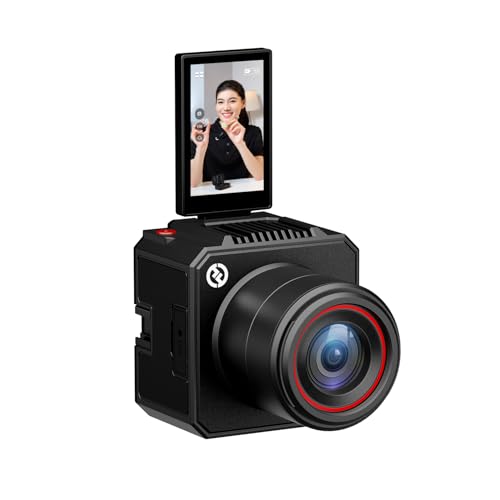
- 4K30 HDMI output for live production
- 1/1.3" CMOS and F1.05 lens for cleaner low-light video
- AI tuning plus green screen and overlay tools
Best For: Creators needing a polished HDMI streaming camera with built-in scene tools
Wireless Multicam Starter

- 1080p streaming with wireless app control
- Wi-Fi, Ethernet, and LTE support
- Up to three-camera multicam setups
Best For: Mobile creators and simple 1080p multicam streams
Wireless Sports Streamer

- 4K video with HDMI, USB, Wi-Fi, and NDI HX3
- Up to 6 hours of battery life
- Built for sports, church, and multicam streaming
Best For: Wireless live production, sports coverage, and flexible multicam setups
Dual-Output Value
4K USB/HDMI Camera with 10X Zoom

- Simultaneous USB and HDMI output
- 4K capture over USB with plug-and-play UVC
- 5-50mm manual focus lens with 10x zoom
Best For: Simple streaming, teaching, and close-up capture
Feature-Rich PTZ
4K NDI PTZ Camera with SDI and AI Tracking

- 4K/30FPS over HDMI and USB
- Official NDI plus SDI, LAN, and PoE
- AI auto-tracking with presenter and framing modes
Best For: Advanced live production and multi-camera workflows
NearStream Pick

- 4K USB-C streaming with 1/2" CMOS sensor
- 1080p HDMI, RJ45 RTSP, and wireless AV support
- 10x optical zoom with 40x hybrid zoom
Best For: Churches, classrooms, podcasts, and cable-light multi-output setups
Premium 4K All-in-One – Hollyland VenusLiv Air
If you want a live streaming camera with clean HDMI and modern creator tools, the Hollyland VenusLiv Air is built to give you a polished, low-noise image without a complicated setup. Its 1/1.3″ CMOS sensor, F1.05 lens, and 4K30 HDMI output make it a strong fit for streamers who want professional-looking video and flexible control.
Best For: Creators who want a feature-rich, always-on streaming camera with clean HDMI, strong low-light performance, and built-in scene tools.
Pros:
- 4K30 HDMI output for direct connection to a switcher or professional multi-camera workflow.
- Large 1/1.3″ CMOS sensor and F1.05 aperture help keep the image crisp and clean in low light.
- AI tuning, color correction, green screen, image overlay, and skin beauty tools support fast setup.
- Built for 24/7 streaming with air-cooling to help maintain stable operation.
Cons:
- Advanced features may be more than casual users need.
- Best results come from learning the app or desktop control options.
Overall, this is the most feature-packed option here for creators who care about image quality and HDMI workflow flexibility. If your priority is a clean, ready-for-production streaming camera, VenusLiv Air stands out.
Wireless Multicam Starter – Logitech Mevo Start
The Logitech Mevo Start is a practical live streaming camera with clean HDMI-style workflow alternatives through Webcam Mode, RTMP, and NDI|HX support, but its real strength is simple wireless operation. If you want a compact camera that streams in 1080p and can move between Wi-Fi, Ethernet, and LTE, it is built for flexible creator setups.
Best For: Creators who want a compact wireless streaming camera for simple, mobile, or multicam 1080p setups.
Pros:
- Streams and records in 1080p HD with crisp detail out of the box.
- Works over Wi-Fi, Ethernet, or smartphone LTE for more location flexibility.
- App control includes Auto-Director and wireless camera management.
- Supports up to three cameras for multicam streaming.
Cons:
- Maxes out at 1080p rather than 4K.
- Not focused on HDMI-first production workflows.
Mevo Start is best when ease of use matters more than raw resolution. For creators who want a compact, wireless camera with strong app control, it remains a smart buy.
Zoom-Focused Production Cam – NearStream VM20
The NearStream VM20 is a live streaming camera with clean HDMI-oriented output options for software-based production, especially if you need 1080p HDMI alongside 4K USB and IP streaming. With 40X hybrid zoom and remote control, it is aimed at larger rooms, teaching spaces, worship, and event setups.
Best For: Teaching, worship, and event teams that need long zoom reach, remote control, and flexible HDMI/USB/Ethernet workflows.
Pros:
- 4K output over USB-C and 1080p output via HDMI and RJ45.
- 40X hybrid zoom helps frame distant subjects in large rooms or stages.
- Remote control supports pan, tilt, zoom, and multi-camera management.
- Built-in 8-MEMS mic array with AI noise canceling and 3.5mm audio input.
Cons:
- HDMI output is limited to 1080p, not 4K.
- Designed for software-based workflows, not direct consumer plug-and-play use.
VM20 is a strong fit when reach and control matter more than simplicity. It makes sense for users who need a flexible streaming camera that integrates into OBS-style production setups.
Wireless Sports Streamer – AVKANS Go 4K
The AVKANS Go is a live streaming camera with clean HDMI-style connectivity options for streamers who want wireless freedom and multi-platform support. It delivers 4K recording, HDMI, USB, Wi-Fi, and NDI HX3 compatibility, making it a versatile pick for sports, church, and live event workflows.
Best For: Wireless streamers and sports creators who need flexible output options, multicam support, and long battery life.
Pros:
- 4K Ultra HD capture with support for 1080p and 4K video modes.
- HDMI, USB, Wi-Fi, NDI HX3, RTMP, RTMPS, and SRT support.
- Up to 6 hours of battery life for longer wireless sessions.
- Works with OBS, vMix, Wirecast, Propresenter, and multicam app workflows.
Cons:
- Firmware and app requirements matter for best Wi-Fi reliability.
- More advanced than a basic plug-in webcam.
AVKANS Go is a flexible production camera for users who need more than one connection path. If you want a wireless-friendly streaming camera that still supports HDMI workflows, it is one of the most adaptable options here.
Pro PTZ Pick – 4K AI Auto-Tracking PTZ Camera with 20X Zoom
If you need a live streaming camera with clean HDMI for larger rooms and multi-platform production, this 4K PTZ model is built for flexible output and hands-off framing. It combines AI auto-tracking, 20x optical zoom, and simultaneous USB 3.0, HDMI, and LAN streaming, making it a practical fit for church services, conferences, classrooms, and events.
Best For: Houses of worship, conference rooms, classrooms, and event streams that need tracking plus multiple output options.
Pros:
- 4K@30fps video with a 1/2.8-inch 8.29MP CMOS sensor and 20x optical zoom
- AI face and body tracking with presenter mode and auto framing
- Simultaneous USB 3.0, HDMI, and LAN output with RTMP, RTSP, and SRT support
- PoE support and up to 255 presets for easier installation and control
Cons:
- Requires a PoE switch if you want single-cable power and data
- Designed around fixed-install production, so it is less compact than a webcam-style camera
Overall, this is a strong choice when clean HDMI matters alongside broadcast-style features and automated subject tracking. It is especially appealing if you want one camera that can feed a live stream, a computer, and a network workflow at the same time.
Dual-Output Value – 4K USB/HDMI Camera with 10X Zoom
This live streaming camera with clean HDMI is geared toward simple dual-display setups where you want a camera feed on both a PC and a monitor or TV. It offers simultaneous USB and HDMI output, a manual variable-focus 5-50mm lens, and 4K capture over USB, which makes it useful for teaching, long-distance viewing, and detail-focused projects.
Best For: Budget-conscious users who want a compact USB/HDMI camera for streaming, teaching, or close-up work.
Pros:
- Simultaneous USB and HDMI output for PC and display use at the same time
- 4K 3840×2160 capture over USB with H.264, MJPEG, and YUY2 support
- 5-50mm manual focus lens with 10x total zoom for detailed framing
- Plug-and-play UVC compatibility for Windows, Linux, Mac, Android, and Raspberry Pi
Cons:
- HDMI output is listed as 1080P, not full 4K
- Manual focus means it is less automated than PTZ-style alternatives
In practical terms, this camera makes the most sense when you need a straightforward dual-output setup rather than advanced tracking. Its smaller size and broad compatibility are useful, but the HDMI output limitation is worth noting if your workflow depends on that connection.
Feature-Rich PTZ – 4K NDI PTZ Camera with SDI and AI Tracking
If you want a live streaming camera with clean HDMI plus more professional routing options, this TONGVEO PTZ model packs in HDMI, SDI, USB 3.0, LAN, PoE, and official NDI support. It is aimed at production environments that need 4K/30FPS over HDMI and USB, while network streaming tops out at 1080P.
Best For: Churches, schools, studios, and live production teams that want HDMI, SDI, NDI, and PoE in one camera.
Pros:
- 4K/30FPS via HDMI and USB with 20x optical zoom
- Official NDI license included, plus SDI, HDMI, USB, and LAN connectivity
- AI auto-tracking with presenter tracking and auto-framing modes
- PoE support and locking SDI output for longer cable runs
Cons:
- IP/NDI network output is limited to 1080P
- AI tracking is for one person at a time and is not intended for high-speed motion
This is the most production-ready option in the group if you need broader integration than a basic webcam-style camera. It stands out for its combination of clean HDMI, SDI, and NDI support, making it easier to fit into both simple and more advanced streaming rigs.
NearStream Pick – VM20 Pro 4K Streaming Camera
If you want a live streaming camera with clean HDMI plus more flexible outputs, the NearStream VM20 Pro is built for multi-purpose creator setups. It combines 4K USB-C streaming, 1080p HDMI output, RJ45 RTSP support, and included wireless AV hardware, making it a practical choice for churches, classrooms, podcasts, and small studios.
Best For: Creators and venues that want a single camera for USB, HDMI, network, and wireless workflows.
Pros:
- 4K output over USB-C with a 1/2″ CMOS sensor, autofocus, HDR, and 3D noise reduction
- 10x optical zoom and 40x hybrid zoom for close-ups in live productions
- 1080p HDMI output plus RJ45 RTSP streaming for flexible integration
- Includes NA20 wireless AV transceiver for a cleaner, cable-light setup
Cons:
- HDMI output is limited to 1080p, not 4K
- Wireless AV depends on the included transceiver, not standard Wi-Fi
- MicroSD recording requires compatible UHS-I U3/V30 or better cards
Overall, this model stands out if you need clean HDMI alongside broader connectivity options and prefer a camera that can also handle standalone recording and wireless transmission.
Conference PTZ Choice – 4K 20X Zoom PTZ Camera
This live streaming camera with clean HDMI is designed for larger rooms that need remote control and strong zoom reach. The PTZ camera offers 4K UHD at 30FPS, 20x optical zoom, and HDMI, USB, and IP/LAN connectivity, so it fits church services, conference rooms, and livestream productions that need flexible routing.
Best For: Larger venues and meeting spaces that need PTZ control, long zoom, and plug-and-play output options.
Pros:
- 4K UHD 30FPS video with a 20x optical zoom lens
- 340° pan and 120° tilt for wide coverage and remote framing
- HDMI and USB plug-and-play support with no extra drivers required
- PoE, RTSP, RTMP, and H.264/H.265 support for streaming workflows
Cons:
- It is a stationary PTZ unit, not a portable camera
- USB/HDMI simplicity is good, but setup may still feel more technical than a basic webcam
- The supplied details do not specify a 4K HDMI output, only HDMI connectivity
For buyers who prioritize coverage, zoom, and pro-style control, this PTZ model is a strong fit for fixed installations and multi-camera environments.
Wireless Streamer’s Pick – AVKANS GO 4K NDI Camera
If you need a live streaming camera with clean HDMI and multiple modern output paths, the AVKANS GO is built for flexible broadcasts. It delivers 4K video, HDMI, USB, RTMP/RTMPS, NDI, and SRT support, plus wireless and wired going-live options for churches, sports, and creator workflows.
Best For: Streamers who want versatile output formats, wireless control, and simultaneous recording.
Pros:
- 4K Ultra HD recording and live streaming with a clean high-resolution ISO recording option to microSD
- HDMI, USB, RTMP, RTMPS, NDI, and SRT support for broad compatibility
- Wireless app control with overlays, lower thirds, scoreboard, and more
- 3x optical zoom and a 90-degree wide-angle lens for flexible framing
Cons:
- Stable live streaming is recommended over Wi-Fi or wired Ethernet, not mobile data alone
- Some advanced app features are still being expanded
- The product notes emphasize HDMI connectivity but do not state a 4K HDMI output
This is a smart pick if you want one camera that can feed different streaming systems while also recording a clean copy for editing later.
How We Picked the Best Live Streaming Camera with Clean HDMI
We focused on cameras built for real streaming use: clean HDMI output, stable video transmission, and features that reduce setup friction. Priority was given to models with useful extras such as USB, HDMI, Ethernet, NDI, PTZ control, or built-in recording, since those options help a Live Streaming Camera with Clean HDMI fit more workflows.
We also looked for practical factors like sensor quality, zoom range, autofocus or auto-tracking, wireless support, and compatibility with streaming rigs used by creators, houses of worship, and conference teams.
Quick Comparison
For solo creators and small studios, compact cameras with simple app control and UVC/USB options are often the easiest to deploy. For churches and larger venues, PTZ models with optical zoom, IP streaming, and PoE tend to offer better reach and installation flexibility. If you need maximum versatility, choose a camera that can output HDMI alongside USB or LAN so you can switch workflows without replacing hardware.
Key Buying Factors for a Live Streaming Camera with Clean HDMI
Clean HDMI Output
Make sure the HDMI feed can be sent without on-screen overlays. That matters when you’re feeding a capture card, switcher, or encoder.
Resolution and Frame Rate
4K can improve cropping and future-proofing, but 1080p is often enough for most live streams. Match the camera’s output to your platform and internet bandwidth.
Zoom and Framing Control
Optical zoom is better than digital zoom for keeping detail intact. PTZ, AI tracking, or remote control can be especially valuable in fixed installations.
Connectivity
Look for the ports you’ll actually use: HDMI, USB-C, Ethernet, SDI, NDI, or PoE. A flexible Live Streaming Camera with Clean HDMI is easier to integrate into both simple and advanced setups.
Low-Light and Lens Quality
For indoor streaming, lens speed and sensor performance can matter as much as resolution. A brighter lens and larger sensor usually help in less-than-ideal lighting.
Who Should Buy Which Live Streaming Camera with Clean HDMI?
If you want the easiest creator setup, choose a compact camera with USB and HDMI output. If you’re covering worship services, panels, or stage events, a PTZ camera with long zoom and network control is often the smarter fit. For teams that need flexible switching and broadcast-style reliability, prioritize models with multiple outputs and wired networking.
In short, the best choice depends on how you stream today and how much you want to expand later. Pick the camera that matches your room size, control needs, and production workflow, not just the highest spec sheet on paper.