
Choosing a live streaming camera for sports events is about more than resolution. You need reliable tracking, smooth motion handling, fast setup, and clean output to reach viewers without missing the action.
Below, we focus on cameras that make sideline, gym, and field streaming easier for solo creators, schools, clubs, and production teams.
Best 10 Live Streaming Camera for Sports Events Picks for 2026
Pro Streamer Pick
AVKANS GO 4K Live Streaming Camera

- 4K camera with NDI HX3, HDMI, USB, and Wi-Fi
- Works with OBS, vMix, Wirecast, and multicam apps
- Streams to GameChanger, SidelineHD, and major platforms
Best For: Teams and creators needing flexible broadcast workflows
All-in-One Tracker
XbotGo Falcon 4K Sports Camera

- Dual-lens AI tracks players and the ball
- 4K recording with instant live streaming
- IPX5 water-resistant all-in-one design
Best For: Sideline users wanting AI tracking and live streaming
Easy Multicam Option
Logitech Mevo Start Live Streaming Camera

- 1080p HD streaming and recording
- App control with Auto-Director features
- Supports up to three-camera multicam setups
Best For: Users who want simple multicam live streaming
AI Auto-Tracking iPhone Gimbal
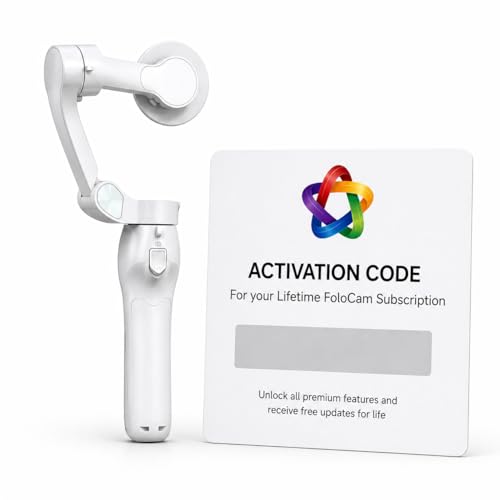
- AI automatically follows the subject in frame
- Smart ball tracking for soccer and basketball
- 4K UHD recording with live streaming support
Best For: iPhone users filming youth sports and casual live streams
Wireless Multi-Cam Streaming
Mevo Start Live Streaming Camera

- Syncs up to three cameras for multi-angle coverage
- Streams over Wi-Fi or LTE with app control
- Records in 1080p HD with up to six-hour battery
Best For: Wireless sports and event streaming with multi-camera coverage
PTZ Pro Sports Streamer
FoMaKo 4K 60FPS NDI PTZ Camera

- 20x optical zoom for distant action
- AI auto-tracking for sports coverage
- NDI, HDMI, USB, LAN, and SDI support
Best For: Larger sports productions and multi-camera streaming rigs
Auto-Tracking PTZ Value Pick
PTZOptics Move SE 30x PTZ Camera

- 30x zoom and auto-tracking for moving subjects
- 1080p60 with HDMI, SDI, USB, and IP outputs
- NDI|HX upgradeable for future workflows
Best For: Sports venues and production teams needing PTZ control on a budget
Pro-Grade Large Event PTZ
Tenveo 4K 60FPS NDI AI Tracking PTZ Camera

- 4K 60fps sensor with 30x optical zoom
- AI auto tracking with customizable tracking modes
- SDI, HDMI, USB 3.0, LAN/NDI, plus PoE support
Best For: Professional sports productions and large live event workflows
AI Sports Tracker – XbotGo Chameleon 4K Auto Tracking Camera
If you want a live streaming camera for sports events that can follow fast action without constant manual control, the XbotGo Chameleon is built around AI tracking and smartphone-based operation. It records in 4K at 60FPS, supports live streaming through the XbotGo app, and is designed to handle a wide range of team and individual sports.
Best For: Coaches, parents, and teams who want automatic tracking plus live streaming with minimal setup.
Pros:
- xbotVision AI 2.0 tracks over 20 sports, including soccer, basketball, gymnastics, and martial arts.
- 4K 60FPS capture with automatic sports tracking and integrated live streaming.
- 360° panoramic tracking and a 120° ultra-wide AI lens for broad field coverage.
- Bluetooth remote and Apple Watch support make angle changes and previews easier.
Cons:
- Relies on a smartphone and the XbotGo app for core functionality.
- Not water resistant, so it needs weather protection at outdoor events.
Overall, the Chameleon is a strong choice if you want AI-assisted filming and streaming in one portable system. It is especially appealing for sideline use where automatic tracking matters more than manual camera operation.
Pro Streamer Pick – AVKANS GO 4K Live Streaming Camera
The AVKANS GO is a practical live streaming camera for sports events when you need flexible output options and broadcast-style workflow. It shoots in 4K, supports NDI HX3, HDMI, USB, and Wi-Fi connections, and is designed to work with streaming software and platforms used for live sports coverage.
Best For: Streamers, schools, and sports teams that need reliable multi-output live production.
Pros:
- 4K video with support for wireless, HDMI, USB, NDI HX3, SRT, and PoE setups.
- Compatible with OBS, vMix, Wirecast, Propresenter, and multicam apps over NDI.
- Can stream to YouTube, Facebook, GameChanger, SidelineHD, Twitch, and more.
- Up to 6 hours of battery life supports longer events and sideline use.
Cons:
- Max video capture listed at 1080p and 4K depending on mode, so setup choice matters.
- Pro-style features may be more than casual users need.
If your priority is stable live production rather than automatic player tracking, the AVKANS GO fits well. It is a versatile option for sports broadcasts that may also need recording, multicam, or streaming-software integration.
All-in-One Tracker – XbotGo Falcon 4K Sports Camera
For buyers looking for a live streaming camera for sports events with automatic tracking built in, the XbotGo Falcon combines AI player-and-ball tracking with 4K recording in a compact all-in-one design. It is aimed at soccer, basketball, and football coverage, making it a straightforward sideline tool for game review, player development, and sharing live action.
Best For: Coaches, parents, and teams that want an all-in-one sports camera with live streaming and AI tracking.
Pros:
- AI auto-tracking uses a dual-lens system and 6 TOPS AI performance for sports action.
- 4K video recording supports game review and recruitment footage.
- Built-in Wi-Fi enables instant live streaming and sharing.
- IPX5 water-resistant design is better suited to outdoor sideline conditions.
Cons:
- MicroSD card is required for recording and sold separately.
- Best suited to supported team sports rather than general-purpose filmmaking.
The Falcon stands out for users who want a simpler, self-contained camera instead of a more complex streaming rig. Its mix of AI tracking, 4K capture, and weather-resistant design makes it a strong sideline option.
Easy Multicam Option – Logitech Mevo Start Live Streaming Camera
The Logitech Mevo Start is a compact live streaming camera for sports events if you want a simpler broadcast setup with app control and multicam flexibility. It records and streams in 1080p HD, supports Wi-Fi or LTE streaming, and can be paired with up to three cameras for multi-angle coverage.
Best For: Creators, coaches, and teams who want easy multicam streaming in a compact package.
Pros:
- Streams and records in 1080p HD with a compact, portable design.
- App-based control includes Auto-Director features from a smartphone.
- Supports Wi-Fi, Ethernet, or LTE streaming for flexible locations.
- Can connect up to three Mevo Start cameras for multicam production.
Cons:
- 1080p is lower resolution than the 4K options in this roundup.
- Fixed-focus design offers less manual imaging flexibility.
The Mevo Start is a good fit when ease of use matters more than higher-end resolution. For sports events where you want simple app control and the option to expand into multicam, it remains a practical pick.
AI Auto-Tracking iPhone Gimbal – FoloCam Kit AI Sports Camera
If you want a live streaming camera for sports events that leans more toward mobile simplicity than a full studio setup, the FoloCam Kit is built around iPhone-based filming with AI tracking. It automatically follows your subject, adds smart ball tracking for soccer and basketball, and records in 4K UHD, which makes it a practical pick for parents, coaches, and solo streamers who need smooth action capture without constant manual control.
Best For: iPhone users filming youth sports, recreational games, and on-the-go live streams.
Pros:
- AI automatic tracking keeps the subject centered without constant camera adjustments.
- Smart ball tracking is tailored for soccer and basketball filming.
- 4K UHD recording and built-in live streaming support are useful for highlights and broadcasts.
- Lifetime subscription is included for premium features tied to the bundled gimbal.
Cons:
- Compatible only with iPhone 13 or newer.
- It is designed around the bundled gimbal, so it is less flexible than standalone cameras.
- Best suited to mobile use rather than multi-camera production.
Overall, this is a focused sports filming tool for iPhone owners who want automated tracking and live streaming in one compact setup. It is strongest when you value convenience, smart subject following, and 4K capture more than advanced camera-system flexibility.
Wireless Multi-Cam Streaming – Mevo Start Live Streaming Camera
The Mevo Start is a solid live streaming camera for sports events when you want wireless operation, app control, and the ability to build a multi-camera setup. It streams and records in 1080p HD, works over Wi-Fi or LTE, and can sync up to three cameras, making it a practical option for capturing games from multiple angles without a lot of cabling.
Best For: Streamers who want a wireless multi-camera setup for sports, events, or remote coverage.
Pros:
- Syncs up to three Mevo Start cameras for multi-angle streaming.
- Streams over Wi-Fi or LTE with no cables required.
- Records and streams in 1080p HD.
- App control includes Auto-Director for easier operation.
Cons:
- Video resolution is limited to 1080p rather than 4K.
- Battery life is up to six hours, so long events may still need power.
- It relies on smartphone/app workflow, which may not suit everyone.
For buyers who prioritize flexibility and wireless setup, Mevo Start is a dependable sports streaming camera. Its biggest advantage is the combination of multi-camera support and simple app-based control, especially if you want to cover an event from more than one viewpoint.
PTZ Pro Sports Streamer – FoMaKo 4K 60FPS NDI PTZ Camera
If you need a live streaming camera for sports events with more reach and production control, the FoMaKo PTZ package is aimed at larger setups. It combines a 20x optical zoom PTZ camera with AI auto-tracking, NDI HX3 support, and compatibility with live production software and switchers, making it suited to sports coverage where the camera needs to follow action across a wider field.
Best For: Larger sports productions, venue streaming, and teams using switchers or OBS/vMix.
Pros:
- 20x optical zoom helps cover action from farther away.
- AI auto-tracking is built in for following sports movement.
- NDI HX3, HDMI, USB, LAN, and SDI support provide flexible connectivity.
- Compatible with vMix, OBS, and multi-camera live streaming workflows.
Cons:
- This is a more complex production setup than a simple point-and-shoot camera.
- Best value comes when paired with other gear like a switcher or PTZ controller.
- The bundle is geared toward live production, so it may be more than casual users need.
This is the most production-focused option in the group, built for controlled sports livestreams and organized event coverage. If you need zoom, tracking, and broad integration with streaming gear, it offers a much more capable workflow than compact camera-only solutions.
Premium Wireless 4K Streaming Choice – AVKANS Go 4K Wireless Live Streaming Camera
If you want a live streaming camera for sports events that can handle sideline coverage, AVKANS GO is built around flexibility and broadcast-style outputs. It streams in 4K, supports HDMI, USB, RTMP/RTMPS, NDI, and SRT, and can record a clean ISO feed to micro SD while broadcasting live. The wide 90-degree lens and 3X optical zoom make it useful when you need both field coverage and tighter detail.
Best For: Sports creators, youth league streams, and sideline broadcasts that need wireless streaming plus multiple output options.
Pros:
- 4K live streaming and simultaneous ISO recording to micro SD
- Supports HDMI, USB, RTMP/RTMPS, NDI, and SRT workflows
- Wide 90-degree view with 3X optical zoom for flexible framing
- AVKANS Live App includes overlays, scoreboard, text, PIP, and countdown tools
Cons:
- Best stability is recommended on Wi-Fi or wired Ethernet
- Not water resistant, so outdoor use needs protection
- Some app features are still being expanded
For teams that want an all-in-one camera with modern streaming connections and sideline-friendly software tools, this model stands out for versatility. It is especially appealing if you want to stream and archive at the same time without extra gear.
Auto-Tracking PTZ Value Pick – PTZOptics Move SE 30x PTZ Camera
For a live streaming camera for sports events where remote framing matters, the PTZOptics Move SE focuses on smooth pan, tilt, zoom control and auto-tracking. It delivers 1080p at 60fps and combines HDMI, SDI, USB, and IP outputs in one camera, with NDI|HX upgradeability if your workflow needs it later. The 30x zoom is the standout feature when you need to cover a larger court, field, or stage from one fixed position.
Best For: Multi-camera sports setups, gyms, and production teams that want reliable PTZ control and auto-tracking.
Pros:
- 30x zoom helps capture action from farther away
- 1080p60 output is well suited to live production
- Includes HDMI, SDI, USB, and IP connections
- Auto-tracking adds convenience for moving subjects
Cons:
- Resolution is 1080p rather than 4K
- Wired-only connectivity may limit placement flexibility
- NDI|HX requires an upgrade if you need that workflow
This is a practical pick if your priority is dependable PTZ control more than ultra-high resolution. It fits sports organizations that want one camera to cover a wide area and follow the action without constant manual adjustment.
Pro-Grade Large Event PTZ – Tenveo 4K 60FPS NDI AI Tracking PTZ Camera
If you need a live streaming camera for sports events at a higher production level, the Tenveo VX30M-Ultra is built for broadcast-style coverage. It pairs a 4K 60fps 1/1.8-inch CMOS sensor with 30x optical zoom, AI auto tracking, and multiple outputs including SDI, HDMI, USB 3.0, and LAN/NDI. PoE support and tally light features make it a strong fit for more complex live productions.
Best For: Large live events, professional sports productions, and multi-camera setups that need 4K output and advanced tracking.
Pros:
- 4K 60fps video with a 1/1.8-inch 8.42MP CMOS sensor
- 30x optical zoom plus AI auto tracking for precise coverage
- Multiple outputs: SDI, HDMI, USB 3.0, and LAN/NDI
- Includes tally light, FreeD support, and PoE compatibility
Cons:
- More advanced than what casual streamers usually need
- Some features are aimed at professional workflows and systems
- Upgradeable Dante AV-H support adds cost if desired
This camera is the most production-ready option in the group, especially if you need advanced networking, tracking, and pro integration. It makes the most sense for teams planning a serious broadcast workflow around sports or other large live events.
How We Picked the Best Live Streaming Camera for Sports Events
We looked for models that fit real sports-streaming needs: dependable auto-tracking, strong low-latency output options, usable zoom, stable wireless or wired connectivity, and controls that won’t slow you down during a game. We also favored cameras that can handle fast movement and changing scenes better than typical creator cameras.
Quick Comparison
For automatic follow-cam coverage, AI sports cameras are the easiest choice. For multi-purpose live production, PTZ cameras offer the most flexibility and zoom reach. For portable, simpler setups, compact wireless cameras are best when you want quick deployment and app-based control.
Key Buying Factors for a Live Streaming Camera for Sports Events
Tracking and Motion Handling
Sports demand accurate subject tracking, especially during quick cuts, runs, passes, and transitions. Look for AI tracking or PTZ auto-framing if you need the camera to stay locked on the play with minimal manual control.
Resolution, Frame Rate, and Zoom
4K is ideal if you want sharper detail for replay clips or post-game edits, while 1080p can still be excellent for live delivery. Higher frame rates help motion look smoother. Optical zoom matters more than digital zoom for distant courts and fields.
Streaming and Output Options
Choose the connections that match your workflow. HDMI, USB, NDI, RTMP, and SDI each serve different production levels. If you stream often, prioritize compatibility with your encoder, switcher, or streaming software before chasing extra features.
Setup Speed and Control
A good Live Streaming Camera for Sports Events should be fast to mount, easy to aim, and simple to manage from a phone, tablet, or controller. That matters when you’re moving between venues or operating with a small crew.
Who Should Buy Which Live Streaming Camera for Sports Events?
Schools, youth leagues, and coaches usually get the most value from AI auto-tracking cameras because they reduce the need for a dedicated camera operator. Churches and community venues that also stream sports should consider flexible wireless or NDI-friendly models. For clubs, broadcasters, and advanced creators, PTZ cameras with strong zoom and pro outputs are the best fit. If you want a portable all-in-one solution, compact wireless action-style systems are the easiest way to start streaming quickly.
In short, the best choice depends on how much control you want, how far you need to shoot, and how hands-off you want the camera to be during live play.