
Choosing a live streaming camera for conferences comes down to more than resolution alone. The right model should deliver stable framing, reliable autofocus or tracking, and flexible connectivity for your room setup.
This roundup focuses on conference-ready cameras that are practical for meetings, webinars, church events, and hybrid presentations, with options for different room sizes and budgets.
Best 10 Live Streaming Camera for Conferences Picks for 2026
Auto-Tracking Streaming Choice
Tenveo 20X AI Tracking PTZ Camera
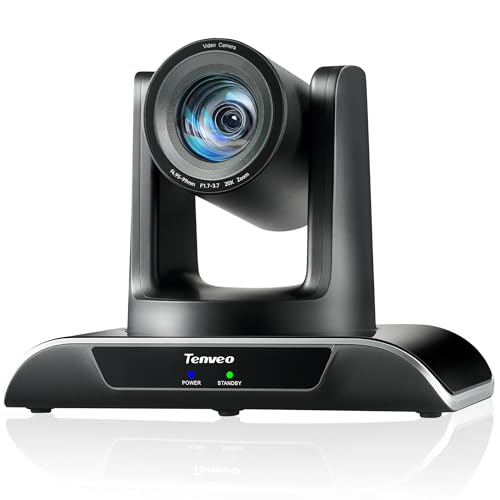
- AI face and body tracking for hands-off framing
- 20x optical zoom with 1080p 60fps output
- USB3.0, HDMI, and LAN/PoE connectivity
Best For: Conference and streaming rooms that need automatic subject tracking
All-in-One Conference Kit
TONGVEO 4K PTZ Camera with Speakerphone

- 4K PTZ camera with AI auto-tracking
- Includes speakerphone with noise reduction
- USB3.0 plug-and-play for meeting apps
Best For: Teams wanting camera and audio in one bundle
High-Zoom Meeting Pick
Tenveo VLoop 11X Optical Zoom PTZ Camera

- 11x optical zoom for tighter speaker shots
- 1080p 60fps via USB3.0 or HDMI
- Wide platform compatibility and preset PTZ control
Best For: Conference rooms and events needing strong zoom and smooth video
AI-Tracking PTZ for Larger Rooms
TONGVEO 20X Optical Zoom 1080P60

- AI auto tracking with multi-person framing
- 20X optical zoom for distant speakers
- HDMI and USB 3.0 plug-and-play setup
Best For: larger conference rooms and church livestreams
4K Entry-Level Streaming PTZ
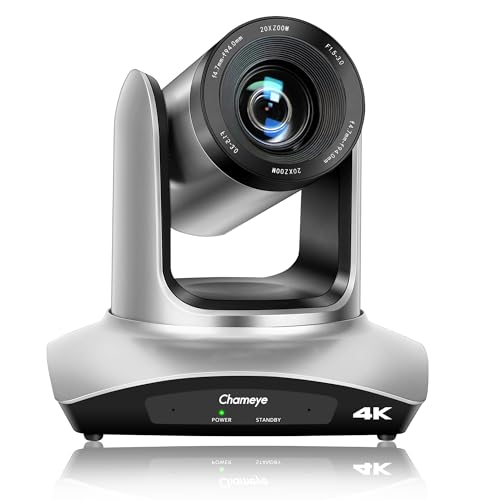
- 4K UHD capture with 8.5MP CMOS sensor
- 20X optical zoom for wide rooms and detail
- HDMI, USB 3.0, IP, and LAN streaming
Best For: budget 4K conference and livestream setups
Conference-Ready 4K PTZ

- 4K UHD with HDR support
- 20x optical zoom and quiet PTZ motion
- USB 3.0, HDMI, and RJ45/PoE outputs
Best For: Conference rooms and worship spaces needing flexible 4K coverage
Budget PTZ Room Pick – NexiGo 10X Optical Zoom Conference Camera
If you need a live streaming camera for conferences that keeps the whole room in frame while still delivering tight speaker close-ups, this NexiGo PTZ system is built for that job. Its 10x optical zoom, wide-angle view, and autofocus/manual focus options make it a practical fit for smaller conference rooms, meetings, church services, and education setups.
Best For: Small to medium conference rooms that need flexible framing and simple USB setup.
Pros:
- 10x optical zoom helps capture both full-room views and speaker close-ups.
- PTZ control supports smooth pan and tilt with up to 10 IR presets.
- 1080p video with 2D/3D noise reduction is designed for cleaner low-light image quality.
- Multiple mounting options make it easier to fit different room layouts.
Cons:
- No built-in microphone, so audio needs a separate solution.
- Mounting hardware is not included.
Overall, this is a straightforward conference camera for teams that want dependable framing, optical zoom, and USB convenience without paying for advanced tracking features.
Auto-Tracking Streaming Choice – Tenveo 20X AI Tracking PTZ Camera
For buyers comparing a live streaming camera for conferences with more automation, this Tenveo model stands out for its AI humanoid and face auto-tracking. The 20x optical zoom, 1080p 60fps output, and triple connection options make it a strong fit for conference rooms, worship spaces, and live event production where you want smoother, more hands-off camera work.
Best For: Conference and live-stream setups that benefit from AI tracking and multiple output options.
Pros:
- AI humanoid and face tracking helps keep speakers centered automatically.
- 20x optical zoom and 1080p 60fps output suit more demanding live video needs.
- USB3.0, HDMI, and LAN/PoE support give you flexible integration paths.
- Silent pan/tilt movement and preset support make it easier to manage in professional rooms.
Cons:
- No built-in microphone.
- PoE requires a compatible PoE switch.
This is a feature-rich option if you want tracking, smooth motion, and broad connectivity in one conference camera, especially for mixed meeting and streaming use.
All-in-One Conference Kit – TONGVEO 4K PTZ Camera with Speakerphone
If you want a live streaming camera for conferences plus audio in one package, this TONGVEO kit is easy to evaluate. It combines a 4K PTZ camera with gesture control, AI auto-tracking, and an included speakerphone, so it is geared toward remote meetings, Zoom/Teams calls, and compact conference spaces.
Best For: Teams that want a bundled camera-and-speakerphone solution for meetings and streaming.
Pros:
- 4K 30fps camera output is paired with AI auto-tracking and gesture control.
- Includes a speakerphone with built-in microphones and noise reduction.
- USB3.0 plug-and-play support simplifies setup for common conference apps.
- Wide 120-degree view and preset control help cover small meeting rooms well.
Cons:
- Remote focus buttons do not apply to this version.
- Requires 4K-capable equipment and software to use the full resolution.
As a bundled system, it is especially appealing if you want to reduce separate hardware purchases and keep the setup compact for everyday conferencing.
High-Zoom Meeting Pick – Tenveo VLoop 11X Optical Zoom PTZ Camera
For a live streaming camera for conferences that needs more reach than a basic webcam, this Tenveo VLoop model offers 11x optical zoom and 1080p 60fps output. It is designed for conference rooms, church events, online classes, and live broadcasts, with HDMI and USB3.0 connectivity for flexible deployment.
Best For: Rooms and events that need strong zoom, smooth video, and broad software compatibility.
Pros:
- 11x optical zoom helps isolate speakers while keeping wider room coverage available.
- 1080p 60fps output through USB3.0 or HDMI supports smooth conference video.
- Remote PTZ control with presets makes recurring meeting setups easier.
- Works with many platforms and operating systems, including Windows, Mac, Linux, and Android.
Cons:
- No built-in microphone.
- Some advanced workflows rely on matching software and device support.
This model is a solid middle ground for buyers who want optical zoom, dependable video output, and broad compatibility without stepping into higher-end tracking systems.
AI-Tracking PTZ for Larger Rooms – TONGVEO 20X Optical Zoom 1080P60
If you need a live streaming camera for conferences that can keep up with larger rooms and changing speakers, this TONGVEO PTZ system is built for that job. It combines AI auto tracking, 1080P 60fps video, and a 20X optical zoom lens to maintain clear framing without constant manual control.
Best For: Conference rooms, churches, and hybrid meetings that need automatic subject tracking plus strong zoom reach.
Pros:
- AI auto tracking supports single-person tracking and multi-person auto framing.
- 20X optical zoom keeps distant subjects sharp without digital zoom softness.
- HDMI and USB 3.0 outputs make it easy to connect to Zoom, OBS, Teams, and YouTube.
- 350° pan, 180° tilt, and 255 presets help with quick angle changes.
Cons:
- It is limited to 1080P resolution rather than 4K.
- The system is geared toward stationary conference setups, not mobile use.
Overall, this is a practical choice if you want dependable automation and strong optical zoom in a conference environment. It is especially appealing when smooth tracking and simple plug-and-play connectivity matter more than ultra-high resolution.
4K Entry-Level Streaming PTZ – Chameye C420 4K 20X Zoom
For buyers comparing a live streaming camera for conferences, this Chameye PTZ model stands out for offering 4K UHD capture, 20X optical zoom, and multiple connection options. It is built for rooms that need flexible output through HDMI, USB 3.0, IP, or LAN, with easy setup and broad software compatibility.
Best For: Budget-conscious conference, worship, or education setups that want 4K output and network streaming options.
Pros:
- 4K UHD video up to 30fps with an 8.5MP CMOS sensor.
- 20X optical zoom and a 60° field of view support wide rooms and distant details.
- HDMI, USB 3.0, IP, and LAN streaming add setup flexibility.
- Plug-and-play compatibility works with Zoom, Teams, OBS, vMix, and YouTube.
Cons:
- IP streaming tops out at 1080P30 rather than full 4K over the network.
- PTZ preset control is more limited with the IR remote than with the dedicated controller.
This is a strong option if you want an affordable path into 4K conferencing without giving up useful networking features. The mix of optical zoom, noise reduction, and multiple outputs makes it a versatile starter PTZ for professional-looking streams.
Compact AI PTZ for Meetings – TONGVEO 3X Zoom 1080P60
If your priority is a live streaming camera for conferences that fits smaller boardrooms and meeting spaces, this TONGVEO model is designed around a wide 93° lens, AI auto-tracking, and clean 1080P 60fps output. It focuses on smooth framing, simple USB connection, and reliable compatibility with common meeting and streaming software.
Best For: Small to mid-sized conference rooms, hybrid meetings, and online learning setups that need a wide room view.
Pros:
- AI auto-tracking keeps one speaker framed automatically.
- 93° wide-angle lens helps capture groups in tighter rooms.
- 3X optical zoom adds a closer view when needed.
- HDMI and USB 3.0 outputs support Zoom, Teams, Skype, OBS, YouTube, and Facebook Live.
Cons:
- Tracking is limited to one person at a time.
- It is not intended for high-speed motion.
- 3X zoom is more modest than larger-room PTZ cameras.
That makes this a practical fit when you want easy conference camera coverage without overbuying for a small room. The wide-angle lens and automatic tracking are the main strengths here, especially for steady meetings and presentations.
Conference-Ready 4K PTZ – 20X Zoom HDMI/USB Camera
If you need a live streaming camera for conferences that can also handle worship, lectures, and remote meetings, this 4K PTZ model is built for flexible room coverage. It combines 20x optical zoom, smooth pan/tilt control, and USB, HDMI, and RJ45 connectivity, so it fits both simple plug-and-play setups and more advanced AV workflows.
Best For: Conference rooms, churches, and training spaces that want detailed 4K video with flexible mounting and control options.
Pros:
- 4K UHD video with a 1/2.8-inch CMOS sensor and HDR support
- 20x optical zoom and silent 355° horizontal / 120° vertical PTZ movement
- USB 3.0, HDMI, and RJ45/PoE connectivity for versatile setup options
- Supports up to 255 presets for faster camera positioning
Cons:
- PoE requires a compatible PoE switch
- Advanced control options may be more than basic users need
This is a strong option if you want a conference camera that balances image quality, zoom reach, and installation flexibility. The included cables, bracket, and remote help simplify deployment in rooms where camera placement matters.
AI Tracking Live Streamer – 4K 20X Auto-Framing PTZ
For a live streaming camera for conferences where presenters move around the room, this 4K PTZ model adds AI face and body tracking to keep speakers framed automatically. It also offers USB 3.0, HDMI, and LAN outputs at the same time, plus RTMP, RTSP, and SRT support for more serious broadcast and streaming setups.
Best For: Conference presenters, churches, and event teams that want automatic tracking and multi-output streaming.
Pros:
- AI face and figure tracking with presenter mode and auto framing
- 4K@30fps output with 20x optical zoom and a 63° wide-angle lens
- USB 3.0, HDMI, and LAN outputs can run simultaneously
- Supports PoE, RTMP, RTSP, and SRT for live production workflows
Cons:
- PoE setup requires a compatible PoE switch
- AI tracking features may be more than needed for fixed-shot conference use
This camera stands out when the speaker is not staying at a podium. Its tracking and framing tools reduce manual camera work, while the networking and encoding options make it a practical fit for streaming teams.
Flexible 4K Conference PTZ – 20X Zoom Live Streaming Camera
This live streaming camera for conferences is aimed at rooms that need clear 4K video, reliable zoom, and simple compatibility with common meeting software. With 20x optical zoom, 340° pan, 120° tilt, and HDMI/USB/IP options, it can cover a meeting room, classroom, or worship space without complicated setup.
Best For: Meeting rooms, classrooms, and event spaces that need smooth PTZ control and easy software compatibility.
Pros:
- 4K UHD at 30fps for sharp, smooth conference video
- 20x optical zoom with 340° pan and 120° tilt
- HDMI, USB 3.0, and IP/LAN streaming with PoE support
- Compatible with Zoom, Teams, WebEx, Skype, and more
Cons:
- PoE and IP workflows may need extra network setup
- Heavier than some basic webcam-style conference cameras
Overall, this model is a practical choice if you want a conference camera that can plug into both simple and network-based streaming systems. The broad software support and long transmission distance make it especially useful in larger venues.
How We Picked the Best Live Streaming Camera for Conferences
We focused on conference cameras that balance image quality, zoom range, ease of control, and streaming compatibility. Priority went to models with clean HDMI, USB, and network output options, since those connections are the most useful for real-world conferencing setups.
We also looked for features that matter in group environments, including PTZ movement, autofocus, AI tracking, speaker-friendly framing, and support for common streaming workflows.
Quick Comparison
For small rooms and simple plug-and-play use, a USB-focused camera is often the easiest choice. For larger boardrooms or multi-purpose spaces, PTZ models with stronger optical zoom and remote control offer better coverage. If your events are streamed to multiple platforms or managed by AV staff, LAN, PoE, and HDMI options can add useful flexibility.
Key Buying Factors for a Live Streaming Camera for Conferences
Resolution and Frame Rate
1080p at 60fps is often enough for clean, fluid conference video, while 4K can help if you need more detail or plan to crop and reframe. Higher resolution is helpful, but only if your lighting, network, and production setup can support it.
Zoom and Field of View
Optical zoom is more valuable than digital zoom for conference rooms because it keeps faces sharper at a distance. Wide-angle coverage works better for small rooms, while stronger zoom helps in larger spaces or when the camera is mounted farther back.
Tracking and Framing
AI auto-tracking can be a major advantage for presenters who move around the room. For panel discussions or fixed-podium events, good presets and smooth PTZ controls may matter more than tracking features.
Connectivity and Compatibility
USB is the simplest choice for laptop-based streaming. HDMI is useful for switchers and encoders, while LAN and PoE make sense for installed systems that need stable power and network control.
Who Should Buy Which Live Streaming Camera for Conferences?
If you want the easiest setup, choose a USB conference camera with autofocus and remote control. If your room is larger or your presenters move often, look for a PTZ model with optical zoom and AI tracking. For churches, auditoriums, and professional AV installs, a 4K camera with HDMI, USB, and LAN support is usually the most versatile option.
In short, the best Live Streaming Camera for Conferences is the one that matches your room size, streaming workflow, and how much control you want over framing during live events.