
Choosing the right headphones for calls can make every meeting clearer, quieter, and far less tiring. Whether you take calls all day or just need a dependable headset for occasional meetings, the best option balances mic clarity, comfort, and connection stability.
In this roundup, we focused on models that suit work, commuting, and multitasking, with options for wired reliability, wireless freedom, and different wearing styles.
Best 10 Headphones for Calls Picks for 2026
Quiet Calls Wireless Headset
Wireless Headset with Mic for Work

- ENC noise cancelling reduces background distractions.
- 40-hour talk time with a 2-hour full charge.
- Bluetooth 5.3 and USB dongle support laptops and PCs.
Best For: Remote and hybrid workers in noisy environments
Compact Clear-Call Earbuds
Soundcore P20i True Wireless Earbuds

- Two built-in mics plus AI for clearer calls.
- Up to 30 hours total battery life with case.
- Compact, lightweight case includes a lanyard.
Best For: Portable everyday calling and music
Simple Plug-In Call Headset
Jabra Evolve 10 Wired USB Headset

- Plug-and-play USB setup is quick and simple.
- Noise-cancelling mic helps in busy environments.
- Lightweight design with left/right adjustable boom arm.
Best For: Users who want a reliable wired headset for work calls
Long-Range Work Headset
Logitech Zone 301 Wireless Bluetooth Headset

- Dual beamforming mics help suppress background noise.
- Up to 30 m wireless range supports movement during calls.
- Up to 16 hours of talk time with quick-charge support.
Best For: Workers who need clear calls and room to move
Office-Friendly Wired Pick

- Noise-canceling rotating mic for clearer calls
- USB-A plug-and-play setup with in-line controls
- Padded design with swivel ear cushions
Best For: Simple everyday calls on PC, laptop, or Chromebook
Long-Battery Wireless Pick
HEIBAS Bluetooth Work Earpiece
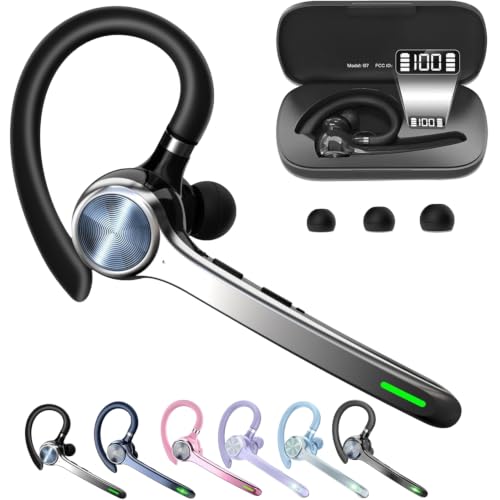
- 18-23 hours of talking time per headset
- Charging case includes a power display
- Bluetooth 5.1 with a dedicated mute button
Best For: Lightweight wireless calling and long work shifts
Comfortable Team-Call Pick
Lenovo USB-A Stereo Headset Gen 2

- AI noise canceling via Lenovo software
- Light 140 g design for long wear
- In-line controls for mute, volume, and calls
Best For: Teams and Zoom users who want lightweight wired comfort
Open-Ear Work Companion
Open Ear Bluetooth Headset for Calls

- Open-ear air conduction design for pressure-free comfort
- Mic system designed for clear calls and meetings
- Dual-device connection plus one-touch mute
Best For: Office work, commuting, and all-day call use
Truck-Ready Call Pick
Trucker Bluetooth Headset with AI Noise Canceling

- Directional mic with AI noise canceling for clearer calls
- Up to 35 hours of talking time
- Dual-device support with mute switch and Siri
Best For: Drivers and call-heavy users in noisy settings
Quiet Calls Wireless Headset – Wireless Headset with Mic for Work
If you need headphones for calls in a noisy home or office, this wireless headset is built to keep conversations clear. Its ENC noise cancelling helps cut down background distractions, and the one-touch mute button makes it easy to pause your mic during meetings on Zoom, Teams, Webex, and similar apps.
Best For: Remote workers and hybrid teams who need a comfortable headset for long meetings in noisy environments.
Pros:
- ENC noise cancelling helps reduce background noise from pets, kids, and other distractions.
- One-touch mute is convenient during live calls and meetings.
- Bluetooth 5.3 plus USB dongle support gives flexible laptop and Windows PC connectivity.
- 40-hour talk time and a 2-hour full charge support heavy daily use.
Cons:
- USB dongle is not compatible with desk phones or landlines.
- MFB voice-assistant button works with smartphones only, not computer apps.
Overall, this is a practical call-first headset with strong noise handling, long battery life, and easy switching between devices. It makes the most sense if your top priority is staying clear and comfortable through long work calls.
Compact Clear-Call Earbuds – Soundcore P20i True Wireless Earbuds
For buyers who want headphones for calls in a small, easy-to-carry design, the Soundcore P20i focuses on voice pickup and everyday portability. It uses two built-in mics with an AI algorithm to help make phone conversations clearer, while the compact case with a lanyard is easy to keep in a pocket or clipped to a bag.
Best For: People who want pocketable earbuds for clear everyday phone calls and music.
Pros:
- Two built-in mics and AI help pick up your voice for clearer calls.
- 10-hour battery life per charge, with up to 30 hours using the case.
- Fast charging gives 2 hours of playtime from a 10-minute charge.
- Compact case with lanyard is easy to carry on the go.
Cons:
- Best call-focused feature set is centered on voice pickup rather than advanced business headset controls.
- In-ear earbud design may not suit users who prefer an over-ear or boom-mic headset.
This is a straightforward option if you want something small, simple, and capable for daily calls. It stands out more for portability and battery life than for office-style headset features.
Simple Plug-In Call Headset – Jabra Evolve 10 Wired USB Headset
If you want headphones for calls without dealing with pairing or charging, this wired USB headset keeps things simple. Just plug it into a PC or laptop and use the noise-cancelling microphone to help make conversations clearer in busy work environments.
Best For: Office and home users who want a no-fuss wired headset for daily calls and meetings.
Pros:
- Plug-and-play USB setup makes it quick to start using.
- Noise-cancelling microphone helps in loud or busy environments.
- Lightweight design is meant for all-day comfort.
- Adjustable boom arm can be worn on the left or right side.
Cons:
- Wired design limits movement compared with Bluetooth headsets.
- USB connection is for compatible computers, not broader device flexibility.
For users who value reliability over wireless convenience, this is a clean and practical call headset. It’s a good fit when you want an easy setup and a lightweight build for regular work calls.
Long-Range Work Headset – Logitech Zone 301 Wireless Bluetooth Headset
For people comparing headphones for calls in a home office or shared workspace, the Logitech Zone 301 is built around clarity and movement. Its dual beamforming microphones and noise-canceling algorithms are designed to reduce background noise, while the long wireless range lets you move around during calls without being tied to your desk.
Best For: Workers who want a lightweight wireless headset with long range and clear call pickup.
Pros:
- Dual beamforming mics and noise-canceling algorithms help suppress background noise.
- Up to 30 m wireless range supports movement around the office or home.
- Up to 16 hours of talk time, with a 5-minute quick charge adding 1 hour.
- Lightweight build with enlarged earpads and a padded headband supports long wear.
Cons:
- Noise control is listed as passive noise cancellation rather than active noise cancellation.
- Best software features require downloading LogiTune.
This headset is a strong fit if you care about staying mobile while keeping calls intelligible. It balances comfort, battery life, and microphone tuning in a way that suits everyday work use.
Office-Friendly Wired Pick – Logitech H390 USB-A Headset
If you want headphones for calls that keep setup simple, the Logitech H390 is a practical wired option for everyday PC and laptop use. It focuses on clear voice pickup, easy USB-A plug-and-play connectivity, and comfort for long meetings.
Best For: People who want a straightforward wired headset for work calls, meetings, and Chromebook use.
Pros:
- Rotating noise-canceling mic helps reduce background noise during conversations.
- USB-A plug-and-play connection means no software is needed.
- In-line controls let you adjust volume or mute without interrupting a call.
- Padded headband and swivel-mounted leatherette ear cushions are built for comfort.
Cons:
- Wired design limits movement compared with wireless options.
- USB-A connection may not suit devices without a USB-A port.
Overall, the H390 is a no-fuss call headset that prioritizes clarity and convenience over extra features. It is a solid fit if you value dependable performance and simple controls.
Long-Battery Wireless Pick – HEIBAS Bluetooth Work Earpiece
For headphones for calls with wireless convenience, the HEIBAS Bluetooth headset is built around long talking time and a lightweight earbud-style fit. It is aimed at work calls where quick pairing, mute control, and all-day use matter more than stereo sound.
Best For: Users who want a lightweight wireless earpiece for phone calls and busy workdays.
Pros:
- Up to 18-23 hours of talking time from the earpiece, with a charging case for longer use.
- Digital display on the case shows remaining power for easier charging checks.
- Dedicated mute button makes muting during phone calls simpler.
- Bluetooth 5.1 and wide compatibility support phones, PCs, and other Bluetooth devices.
Cons:
- Mute function is limited to calls on a phone.
- Single-ear design is less immersive than stereo headphones.
This is a strong pick if you need a compact wireless headset that stays comfortable and lasts through long call-heavy days. It leans heavily toward practical voice communication rather than entertainment listening.
Comfortable Team-Call Pick – Lenovo USB-A Stereo Headset Gen 2
If you need headphones for calls in a busy work environment, the Lenovo USB-A Wired Stereo Headset Gen 2 is designed to keep conversations clear and controls simple. Its lightweight build, AI noise-canceling support via app, and compatibility with common meeting tools make it a work-focused choice.
Best For: Professionals who want a lightweight wired headset for Teams, Zoom, and other office calls.
Pros:
- AI noise canceling via Lenovo Accessories and Device Manager software helps improve call clarity.
- At 140 g, it is built to feel lightweight during long sessions.
- In-line control box provides easy access to call functions, volume, and mute.
- USB-A plug-and-play support works with Teams, Zoom, Google Meet, and more.
Cons:
- Noise canceling relies on software support through LADM.
- USB-A wired setup may not fit users who want a cordless headset.
Overall, this Lenovo headset is a polished option for meeting-heavy days where comfort and call control matter. It is especially appealing if you want a light headset that fits common collaboration apps.
Open-Ear Work Companion – Open Ear Bluetooth Headset for Calls
If you want headphones for calls that stay comfortable through long workdays, this open-ear Bluetooth headset is built for all-day wear without pressure inside the ears. The air conduction design also keeps you aware of your surroundings, which is useful for commuting, driving, and moving between tasks.
Best For: Office work, remote meetings, commuting, and users who want open-ear comfort with clear voice pickup.
Pros:
- Open-ear air conduction design reduces ear pressure for extended wear.
- Advanced microphone system is designed for clear voice pickup during calls and meetings.
- Dual-device connection makes it easier to switch between phone, laptop, and tablet.
- One-touch mute control adds quick microphone management for meetings and online classes.
Cons:
- Open-ear design won’t block outside noise the way sealed headphones do.
- 10-hour talk/playback battery is solid, but not the longest in this group.
This model focuses on comfort, awareness, and call-ready convenience rather than isolation. For users who spend a lot of time on calls and still need to hear what’s happening around them, it’s a practical fit.
Truck-Ready Call Pick – Trucker Bluetooth Headset with AI Noise Canceling
For headphones for calls in noisy environments, this trucker-style Bluetooth headset is built around a directional microphone and AI noise canceling to help keep conversations clear. The on-ear design, mute switch, and dual-device support make it a straightforward pick for drivers, office users, and call-heavy routines.
Best For: Drivers, call center use, and anyone who needs a comfortable headset for long, hands-free calls.
Pros:
- Directional microphone and AI noise canceling are designed for clearer phone conversations.
- Supports two device connections for easier switching between calls and other devices.
- Long battery life offers up to 35 hours of talking time or 60 hours of music playback.
- Includes mute switch, Siri support, and simple call controls.
Cons:
- On-ear fit may not suit users who prefer open-ear or over-ear styles.
- At 9.6 ounces, it is not the lightest option listed here.
This headset is a strong match if call clarity matters more than compact size. Its long runtime and hands-free controls make it especially useful for work shifts and road time.
Long-Haul Office Headset – Noise Cancelling Bluetooth Headset for Calls
If you’re comparing headphones for calls in busy home or office settings, this TECKNET headset puts emphasis on microphone noise suppression and battery life. It’s made for users who want a practical wireless headset with clear voice transmission, dual-device connectivity, and simple mute control.
Best For: Remote work, online meetings, webinars, and call-focused users who need long battery life.
Pros:
- Noise-canceling microphone is designed to suppress up to 96% of environmental noise.
- 50 hours of music playback and 720 hours of standby time support long use between charges.
- Dual connection lets you pair to two devices within seconds.
- 270° rotatable microphone, adjustable headband, and soft ear cushions improve all-day comfort.
Cons:
- On-ear design may not be ideal for users who want open-ear awareness.
- Focus is on calling and office use, so it’s less versatile for those prioritizing workout-friendly design.
Overall, this is a work-first headset with the kind of battery life and microphone control that suit long call sessions. It’s a sensible choice if you want dependable performance without a lot of setup complexity.
How We Picked the Best Headphones for Calls
We prioritized Headphones for Calls that offer strong voice pickup, practical noise reduction, comfortable long-wear designs, and dependable compatibility with common devices and meeting apps. We also considered battery life, portability, and whether the headset is better suited to office desks, remote work, or on-the-go use.
Quick Comparison
Wired USB headsets are usually the simplest choice for plug-and-play reliability and consistent call quality. Wireless Bluetooth models add mobility and convenience, while lightweight earpieces and open-ear designs are better for users who want to stay aware of their surroundings. If you switch between devices often, look for dual-device pairing and easy mute controls.
Key Buying Factors for Headphones for Calls
Microphone Quality
A clear microphone matters more than extra bass for call-focused use. Look for noise-canceling or beamforming mic technology that reduces background speech, keyboard noise, and room echo.
Comfort and Fit
If you spend hours on calls, weight, clamp force, earcup material, and adjustability all matter. Over-ear and on-ear designs usually provide better isolation, while lightweight earpieces and open-ear styles can feel less fatiguing.
Connection Type
USB wired headsets are typically the easiest for laptops and desktop PCs. Bluetooth is best if you need freedom of movement or use multiple devices. Check whether the headset supports your phone, computer, or adapter setup before buying.
Battery Life and Controls
For wireless Headphones for Calls, battery life should match your workday. Helpful controls include mute, volume adjustment, call answer buttons, and clear pairing indicators.
Noise Environment
Think about where you take calls. A quiet home office may not require the strongest noise suppression, but shared spaces, travel, and open offices benefit from better mic filtering and a more isolating design.
Who Should Buy Which Headphones for Calls?
If you want the most dependable setup for desk work, a wired USB headset is often the best value. If you move around during calls, a Bluetooth headset or wireless earpiece is more convenient. For users who need to stay aware of nearby sounds, open-ear models are a smart fit. And if your priority is all-day comfort with straightforward meeting audio, choose a lightweight headset with a well-reviewed microphone and simple controls.
The best choice depends on your workflow, but the right Headphones for Calls should make every conversation easier, clearer, and more comfortable.