
Finding the right HDMI extender under $100 depends on more than advertised distance. Resolution, refresh rate, installation method, and control features all affect whether a setup works reliably.
This roundup compares wireless kits, Ethernet-based extenders, HDMI couplers, and short extension cables so you can match the hardware to your TV, projector, console, or home theater.
Best 10 Hdmi Extenders Under 100 Picks for 2026
Best Wireless Pick

- 1080p/60Hz output with 4K decoding
- Up to 165ft indoors or 328ft outdoors
- No Wi-Fi, app, or Bluetooth required
Best For: Wireless presentations, classrooms, and home theaters
Best Budget Coupler
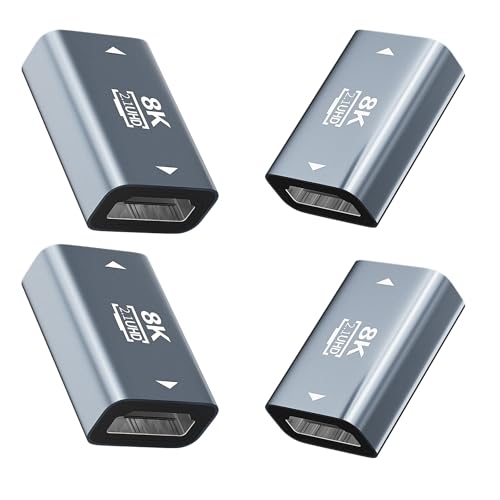
- Supports 8K/60Hz and 4K/120Hz
- Shielded aluminum housing with gold-plated contacts
- Four passive adapters for multiple setups
Best For: Joining HDMI cables for TVs, PCs, monitors, and consoles
Best Long-Range Wired Pick

- Reaches 130ft at 4K or 230ft at 1080p
- Includes IR control and HDMI loop-out
- POC powers the receiver through Ethernet cable
Best For: Home theaters, meeting rooms, and wired multi-display installations
Best Cable Extension
Highwings 8K HDMI 2.1 Extension Cable
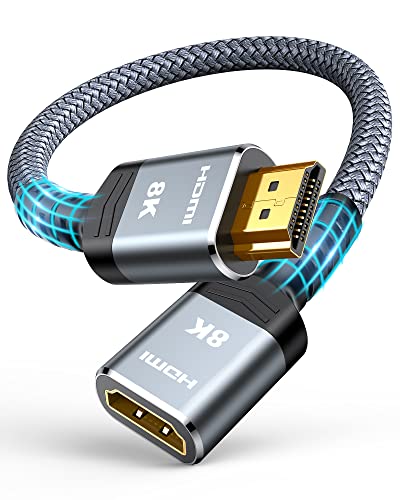
- Supports up to 8K/60Hz and 48Gbps
- One-foot male-to-female port-saving design
- Nylon build with gold-plated connectors
Best For: Short extensions for gaming, streaming, and home theater gear
Best for Easy Setup

- Wireless range up to 328 feet in open conditions
- No Wi-Fi, app, or Bluetooth required
- Supports 1080p/60Hz with 4K decoding
Best For: Cable-free home theaters, presentations, and classrooms
Best Wired Performance
OREI 4K HDMI Extender Over CAT6

- Extends 4K@60Hz up to 165 feet over CAT6
- Supports HDR, HDR10+, HDCP 2.2, and 18Gbps
- Includes HDMI loop-out for a local display
Best For: Reliable multi-display home and professional AV systems
Best Short-Run Option

- Supports 8K@60Hz and 4K@120Hz
- Provides up to 48Gbps bandwidth with HDR and ARC
- Durable shielded design with gold-plated connectors
Best For: Short extensions for TVs, consoles, PCs, and streaming devices
Best Long-Range Pick
196ft HDMI Over Ethernet Extender

- 1080p at 60Hz up to 196 feet
- EDID copy supports signal matching
- Direct Cat6 connection; no routers or switches
Best For: Long HDMI runs for home theaters, conferences, and displays
Best for Tight Spaces

- 4K at 60Hz with 18Gbps bandwidth
- Supports HDR, 3D, ARC, and Dolby Atmos
- 5.5-inch male-to-female design protects hard-to-reach ports
Best For: Wall-mounted TVs, gaming consoles, and crowded media cabinets
Best Compact Budget Kit

- Extends HDMI up to 98 feet over Cat5e or Cat6
- Supports 3D and common HD resolutions
- Compact paired TX/RX design; does not support HDCP
Best For: Shorter direct-cable runs between consoles, computers, TVs, and projectors
Best Wireless Pick – 328ft Wireless HDMI Extender
For shoppers comparing hdmi extenders under 100, this wireless transmitter-and-receiver kit is a convenient choice when running a physical cable is impractical. It supports 1080p output, requires no Wi-Fi, app, or Bluetooth, and is designed for plug-and-play setup.
Best For: Presentations, classrooms, home theaters, churches, outdoor movie setups, and other installations where a wireless connection is preferred.
Pros:
- Wireless range is rated up to 165 feet indoors and 328 feet outdoors.
- Supports 4K decoding with 1080p/60Hz output and duplicate or extended display modes.
- Works with laptops, cameras, projectors, monitors, Blu-ray players, and other HDMI sources.
- Compact design includes Micro HDMI and Mini HDMI adapters.
Cons:
- Both the transmitter and receiver need to be connected to power.
- Walls and obstacles can reduce transmission distance and speed.
- It outputs at 1080p even though it supports 4K decoding.
This is a strong fit for flexible room-to-room video transmission, especially when cable clutter matters more than native 4K output.
Best Budget Coupler – 8K HDMI 2.1 Coupler 4-Pack
If you need a simple way to join HDMI cables, this female-to-female adapter pack is a practical option among hdmi extenders under 100. It uses a passive plug-and-play design with no power or drivers required and supports modern HDMI 2.1 features.
Best For: Extending existing HDMI cables for TVs, monitors, PCs, game consoles, projectors, and installations in tight spaces.
Pros:
- Supports up to 8K/60Hz and 4K/120Hz, along with HDR, ARC, VRR, 3D, and Dolby sound.
- Shielded aluminum housing and gold-plated contacts are designed for durability and stable transmission.
- Four-pack format makes it useful for multiple rooms or backup connections.
- Requires no power, drivers, or complicated installation.
Cons:
- It is only a coupler, so HDMI cables must be purchased separately.
- It does not provide wireless transmission or signal conversion.
- Longer cable runs may still depend on the quality and capabilities of the connected cables.
Choose this coupler when your goal is simply to connect two HDMI cables while retaining support for high-resolution HDMI 2.1 signals.
Best Long-Range Wired Pick – 4K HDMI Extender Over Cat6
This PWAY kit is a capable wired choice for shoppers seeking hdmi extenders under 100 with longer reach and installation features. It sends HDMI through a Cat5, Cat6, or Cat7 cable, supports 4K at 30Hz, and adds IR control, loop-out, and receiver power over the network cable.
Best For: Home theaters, meeting rooms, live streaming, and multi-display installations that need remote control and extended cable runs.
Pros:
- Extends up to 130 feet at 4K/30Hz or 230 feet at 1080p over a single Cat6 cable.
- Supports mirror and extended display modes.
- HDMI loop-out allows local monitoring while sending video to a remote display.
- IR control and POC simplify remote operation and wiring.
Cons:
- 4K transmission is limited to 30Hz.
- A suitable Cat5, Cat6, or Cat7 cable is required and is not indicated as included.
- The system is less portable than a simple HDMI cable or wireless kit.
Its combination of long-distance transmission, loop-out, and IR makes it the most installation-oriented option in this group, particularly for structured cable setups.
Best Cable Extension – Highwings 8K HDMI 2.1 Extension Cable
For a short, direct connection upgrade, this male-to-female cable is one of the simplest hdmi extenders under 100. The one-foot HDMI 2.1 extension supports high-bandwidth video and can act as a port saver when a device needs a little more reach.
Best For: Gaming consoles, streaming sticks, laptops, Blu-ray players, and home theater equipment that need a short HDMI extension.
Pros:
- Supports 8K/60Hz, 4K/120Hz, 4K/240Hz, and bandwidth up to 48Gbps.
- Includes HDR, ARC, HDMI Ethernet Channel, and 3D support.
- Nylon construction, gold-plated connectors, and a stated 25,000-flex durability rating support regular use.
- Plug-and-play male-to-female design helps with tight or awkward ports.
Cons:
- At one foot, it is intended for short extensions rather than long-distance runs.
- Only one cable is included.
- It is designed for indoor use.
This is the best fit when you need a compact HDMI 2.1 extension for a console, streaming device, or crowded entertainment center rather than a room-to-room extender.
Best for Easy Setup – 328FT Wireless HDMI Extender
For shoppers comparing HDMI extenders under 100, this wireless transmitter-and-receiver kit is a convenient option when running a long cable is impractical. It supports up to 328 feet in open conditions, requires no Wi-Fi, app, or Bluetooth, and can connect a range of source devices to a TV, monitor, or projector.
Best For: Home theaters, classrooms, presentations, and setups where you want to avoid a long HDMI cable.
Pros:
- Wireless transmission reaches up to 328 feet or 100 meters in open conditions.
- Plug-and-play setup can establish a connection in under 10 seconds.
- Supports 1080p/60Hz video and audio, with 4K decoding and backward compatibility.
- Works with laptops, cameras, cable boxes, projectors, monitors, and HDTVs, subject to device output compatibility.
Cons:
- Walls and other obstacles can reduce transmission distance and speed.
- Both the transmitter and receiver require power through the included USB-to-USB-C cables.
- Mobile-device compatibility is limited to specified models and devices that support HDMI signal output.
This is a flexible choice among HDMI extenders under 100 when convenience and a cable-free installation matter most. Just plan for USB power at both ends and expect performance to vary with obstacles.
Best Wired Performance – OREI 4K HDMI Extender Over CAT6
Among HDMI extenders under 100, the OREI UHD-IPC165-K is suited to installations that prioritize consistent wired performance. It sends 4K video over a single CAT6 cable for up to 165 feet and adds features such as HDR support, HDMI loop-out, and two-way IR.
Best For: Home theaters, gaming setups, conference rooms, digital signage, and other permanent or semi-permanent AV installations.
Pros:
- Extends 4K@60Hz 4:4:4 video up to 165 feet over CAT6 cable.
- Supports HDMI 2.0a, HDCP 2.2, HDR, HDR10+, and 18Gbps bandwidth.
- HDMI loop-out allows a local display and a remote display to operate simultaneously.
- Supports DTS-HD, Dolby TrueHD, and 7.1-channel digital audio.
Cons:
- Requires a CAT6 cable for the extended connection.
- It is a wired solution rather than a cable-free wireless extender.
- The listed audio support is centered on HDMI formats, including LPCM 2.0 and multichannel formats.
Choose this OREI model if reliable 4K distribution is more important than the simplest possible setup. Its loop-out and broad HDR support make it especially practical for multi-display systems.
Best Short-Run Option – 8K HDMI 2.1 Extension Cable
For buyers seeking HDMI extenders under 100 for a nearby connection, this 3.3-foot male-to-female extension cable is a straightforward solution. Its HDMI 2.1 design supports high-bandwidth 8K and 4K formats while adding flexibility for wall-mounted TVs, consoles, streaming devices, and other HDMI equipment.
Best For: Short HDMI extensions for TVs, game consoles, streaming players, PCs, and wall-mounted displays.
Pros:
- Supports 8K@60Hz, 4K@120Hz, and up to 48Gbps bandwidth.
- Supports HDR, ARC, HDMI Ethernet Channel, and full 3D playback.
- Compatible with a broad range of TVs, consoles, streaming devices, Blu-ray players, PCs, and AV equipment.
- Shielding, gold-plated connectors, an aluminum-alloy housing, and a 20,000-plus bend test support durability.
Cons:
- The 3.3-foot length is intended for short extensions, not room-to-room signal distribution.
- It is a passive cable adapter rather than a wireless or CAT6-based extender.
- Actual resolution and refresh rate depend on the connected devices and HDMI setup.
This cable is the simplest pick when you only need a little extra reach and want HDMI 2.1 capabilities. It is not a substitute for a long-distance extender, but it can neatly solve tight or wall-mounted installations.
Best Long-Range Pick – 196ft HDMI Over Ethernet Extender
For shoppers comparing HDMI extenders under 100, this transmitter-and-receiver kit is designed for longer cable runs. It sends 1080p video and audio up to 196 feet over a separately supplied Cat6 cable and includes EDID copy support for improved source-and-display matching.
Best For: Home theaters, video conferences, project installations, and indoor or outdoor LED displays that need a long 1080p connection.
Pros:
- Supports 1080p at 60Hz over distances up to 196 feet.
- EDID copy function helps the source and display establish a compatible picture and sound signal.
- Supports multiple audio formats, including DTS-HD, Dolby TrueHD, DTS, Dolby AC-3, and DSD.
- Includes automatic adjustment, ESD protection, and a one-year warranty.
Cons:
- Requires a suitable oxygen-free copper Cat6 cable for the recommended performance.
- Network switches and routers are not supported.
- Resolution is limited to 1080p.
This is the strongest choice here when distance matters more than 4K support. Its EDID feature and broad audio compatibility add practical flexibility, but installation requires a direct Ethernet-cable run rather than standard network equipment.
Best for Tight Spaces – VCE 4K HDMI Extension Cable
Among HDMI extenders under 100, this compact male-to-female cable is a simple way to reach recessed or inconvenient ports. It adds 5.5 inches of flexible connection length while supporting 4K at 60Hz, HDR, 3D, ARC, and Dolby Atmos.
Best For: Wall-mounted TVs, tight media cabinets, gaming setups, streaming devices, and other indoor AV installations where an HDMI port needs extra clearance.
Pros:
- Supports 4K at 60Hz with 18Gbps bandwidth.
- Compatible with HDR, 3D, Dolby Atmos, and ARC.
- Gold-plated connectors and braided plus foil shielding help resist corrosion and interference.
- Includes a dust cap and an 18-month product-care period.
Cons:
- This is a short 5.5-inch extension cable, not a long-distance HDMI-over-Ethernet system.
- It adds one connection point, which may not suit setups needing a single uninterrupted cable.
Choose this VCE model when the problem is port access rather than signal distance. Its HDMI 2.0 features make it suitable for modern 4K entertainment devices, while the short length helps reduce strain behind a TV or in a crowded cabinet.
Best Compact Budget Kit – 98ft HDMI to RJ45 Extender
This two-piece HDMI-over-Ethernet kit is a practical option for shoppers seeking HDMI extenders under 100 for shorter runs. Its transmitter and receiver send HDMI audio and video through Cat5e or Cat6 cable for distances up to 98 feet, with support for common HD resolutions.
Best For: Connecting computers, game consoles, set-top boxes, projectors, monitors, or TVs across a room using a direct Ethernet cable.
Pros:
- Extends HDMI signals up to 98 feet over Cat5e or Cat6 cable.
- Supports 3D and resolutions including 480i through 1080p, with listed support up to 1920×1200.
- Transmits audio and video together and automatically adjusts resolution to the display.
- Compact ABS housings and gold-plated sockets support portable, durable installation.
Cons:
- The transmitter and receiver must be used as a pair.
- It does not support HDCP.
- 4K transmission depends on the output connection also supporting 4K, according to the supplied notes.
This kit suits straightforward room-to-room HDMI extension when 98 feet is enough and HDCP compatibility is not required. Confirm your source, display, and cable requirements before buying, especially if 4K content is part of the setup.
How We Picked the Best Hdmi Extenders Under 100
We organized these options by the connection problem they solve: extending HDMI through a room, sending video over Cat5e or better Ethernet cable, adding a short amount of reach with a coupler, or avoiding a long physical HDMI run with wireless hardware. We also considered stated resolution support, transmission distance, installation requirements, control features, and value.
Specifications should be treated as practical limits rather than guarantees. Cable quality, interference, wall construction, source devices, and display compatibility can reduce real-world performance.
Quick Comparison
| Type | Best for | Typical strength | Main compromise |
|---|---|---|---|
| Wireless extender | Rooms where running cable is difficult | Flexible placement | Potential latency or interference |
| Ethernet extender | Long in-wall or room-to-room runs | Uses affordable network cable | Requires transmitter, receiver, and power |
| HDMI extension cable | Small distance increases | Simple plug-and-play setup | Limited reach |
| HDMI coupler | Joining existing HDMI cables | Compact and inexpensive | Does not actively boost the signal |
Key Buying Factors for HDMI Extenders Under $100
Resolution and Refresh Rate
Choose an extender that matches the highest signal you actually use. A product advertised for 1080p may be unsuitable for a 4K console or streaming setup. For gaming, check refresh-rate support as well as resolution; 4K at 120Hz requires substantially more bandwidth than 4K at 30Hz.
Distance and Cable Type
Ethernet models commonly use Cat5e, Cat6, or Cat7 cable, but the stated maximum distance may depend on resolution and cable quality. Measure the complete route, including vertical runs and turns, and leave some margin instead of buying to the exact limit.
Power, Latency, and Reliability
Some extenders use power over cable, while others require adapters at both ends. Confirm that outlets are available near the source and display. Wireless models are convenient, but wired options are generally preferable for competitive gaming, business presentations, and interference-prone spaces.
IR, HDCP, and Audio Support
Two-way IR is useful when the source device is located away from the display. HDCP compatibility matters for protected streaming content, while audio support should match your soundbar, receiver, or television. Also check whether a model offers loop-out, EDID management, or pass-through features you need.
Who Should Buy Which Hdmi Extenders Under 100?
Choose a wireless kit when installing cable is impractical and moderate latency is acceptable. Pick an Ethernet extender for a permanent room-to-room connection, especially when you already have a suitable network cable route. A short HDMI extension cable or coupler is the better choice when you only need a few extra inches or feet. For modern gaming and high-refresh 4K sources, prioritize verified HDMI 2.1 bandwidth and compatible cables rather than relying only on broad 8K or 10K labeling.