
The best HDMI converters make it easier to connect older game consoles, AV equipment, laptops, and desktops to modern HDMI displays. This roundup covers RCA-to-HDMI, DisplayPort-to-HDMI, and USB-C-to-HDMI options for different setups.
Before choosing one, confirm the source and display ports, required resolution, refresh rate, audio support, and whether you need charging or extra connectivity.
Best 10 Hdmi Converters Picks for 2026
Legacy AV Upgrade
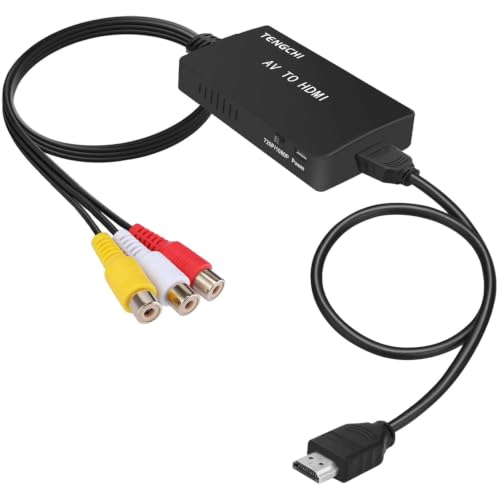
- Converts composite RCA to HDMI 1080p
- Supports PAL, NTSC, and SECAM formats
- Includes HDMI and USB cables
Best For: Older consoles, VCRs, and DVD players
Desktop Display Link
BENFEI DisplayPort to HDMI Adapter

- Supports 4K at 30Hz and 1080p at 60Hz
- Compact for travel and presentations
- Latching, gold-plated DisplayPort connector
Best For: Computers connecting to HDMI displays
Retro Console Ready

- Outputs 720p or 1080p at 60Hz
- Includes RCA, HDMI, and USB cables
- Supports multiple legacy TV formats
Best For: Retro consoles, VHS, VCRs, and DVD players
Modern USB-C Display

- Supports up to 4K at 60Hz
- Plug-and-play USB-C video output
- Aluminum housing with braided cable
Best For: Compatible laptops and HDMI TVs or monitors
Best Analog Upgrade

- Converts yellow/white/red RCA to 720p or 1080p HDMI
- Supports consoles, VCRs, DVD players, and other composite sources
- Requires USB power; adapter is not included
Best For: Connecting legacy composite AV devices to HDMI displays
Best USB-C Multiport Pick

- Outputs up to 4K at 30Hz over HDMI
- Adds USB-A 3.0 data and up to 100W host charging
- Requires USB-C DisplayPort Alternate Mode
Best For: Compatible laptops and tablets needing display, data, and charging
Best Two-Pack for PCs
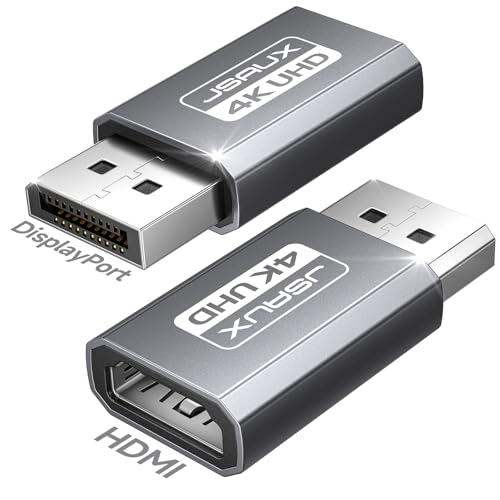
- Connects full-size DisplayPort sources to HDMI displays
- Supports up to 4K@30Hz and 1080p@120Hz
- Two-pack; HDMI cable is not included
Best For: PCs and GPUs with DisplayPort outputs
Best RCA-to-HDMI Converter
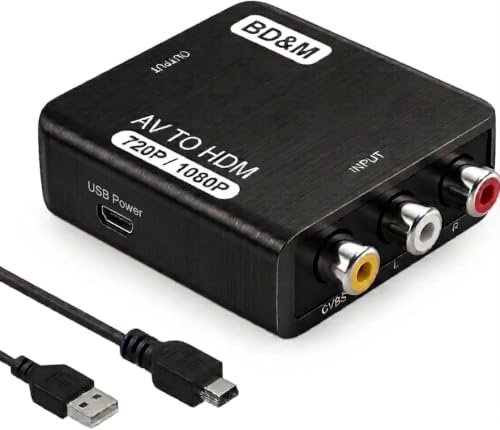
- Converts composite RCA to HDMI
- Supports 720p/1080p output
- Works with consoles and older video players
Best For: Connecting legacy AV devices to modern HDMI displays
Best USB-C HDMI Hub
Mindorlen USB-C to HDMI Multiport Adapter

- Supports HDMI output up to 4K
- Adds USB 3.0 and USB 2.0 ports
- Provides up to 27W USB-C charging
Best For: Expanding compatible USB-C laptops and tablets
Best Budget AV Converter

- Converts composite AV to 720p/1080p HDMI
- Supports multiple PAL and NTSC formats
- Works with consoles, VHS, VCRs, and DVD players
Best For: Connecting composite AV equipment to HDMI TVs and projectors
Legacy AV Upgrade – RCA to HDMI Converter
This RCA-to-HDMI converter is a practical choice for connecting older composite-AV devices to a modern HDTV or monitor. It converts yellow, white, and red RCA input to HDMI 1080p output, though it does not support 3D or 4K.
Best For: PS2, PS3, Xbox, N64, VHS, VCR, DVD players, and other devices with standard composite AV output.
Pros:
- Converts analog RCA input to HDMI 1080p output.
- Supports several PAL, NTSC, and SECAM input formats.
- Includes an HDMI cable, USB power cable, and one-year warranty.
Cons:
- Does not support 3D or 4K.
- Requires connection to an external 5V/1A USB power source, which is not included.
- Works from RCA to HDMI only, not HDMI to AV.
Choose this model when straightforward compatibility with older composite equipment matters more than 4K support. Its included cables and simple installation make it a useful basic option for legacy setups.
Desktop Display Link – BENFEI DisplayPort to HDMI Adapter
This compact DisplayPort-to-HDMI adapter is designed for computers and laptops that need to connect to an HDMI monitor, projector, or TV. It supports up to 4K at 30Hz or 1080p at 60Hz and is a useful pick among hdmi converters for office and home displays.
Best For: Connecting a DisplayPort computer or laptop to an HDMI monitor, projector, or television.
Pros:
- Supports up to 3840×2160 at 30Hz and 1080p at 60Hz.
- Compact design is convenient for travel and presentations.
- Gold-plated connector and latching DisplayPort plug support a secure connection.
- Includes an 18-month warranty.
Cons:
- Uni-directional: it cannot connect an HDMI source to a DisplayPort monitor.
- Requires a DisplayPort output on the source device.
This adapter is best suited to a clearly defined DisplayPort-to-HDMI connection. Confirm the direction of your setup before buying, since it is not a reversible converter.
Retro Console Ready – GINGIN RCA to HDMI Converter
The GINGIN RCA-to-HDMI converter turns composite video and audio from older consoles, VCRs, and DVD players into HDMI output at 720p or 1080p at 60Hz. It includes the key cables needed for setup and supports multiple standard TV formats.
Best For: Connecting PS1, PS2, PS3, Wii, N64, Xbox, VHS, VCR, and DVD players to an HDTV, smart TV, projector, or monitor.
Pros:
- Converts yellow, white, and red RCA input to 720p or 1080p HDMI output.
- Includes RCA, HDMI, and USB power cables.
- Supports PAL, NTSC, and SECAM input formats.
- Backed by 18 months of after-sales service and a 30-day money-back policy.
Cons:
- Requires a separate 5V/1A power adapter for USB power.
- RCA inputs work for HDMI output only; it does not convert HDMI to AV.
With its included cables and broad compatibility, this is a convenient option for bringing several legacy devices to a newer HDMI display. It remains a 720p/1080p converter rather than a 4K solution.
Modern USB-C Display – Anker USB-C to HDMI Adapter
Anker’s USB-C-to-HDMI adapter provides a simple way to connect a compatible laptop to an HDMI TV or display at up to 4K resolution. It uses plug-and-play operation and supports USB-C DP Alt Mode, USB4, and Thunderbolt connections.
Best For: Laptop users who need a portable USB-C connection to an HDMI television or monitor.
Pros:
- Supports video output up to 4K at 60Hz.
- Plug-and-play operation requires no installation.
- Aluminum housing and braided-nylon cable are designed for daily use.
- Includes an 18-month warranty.
Cons:
- Requires a USB-C port with DP Alt Mode, USB4, or Thunderbolt support.
- Does not support charging or Power Delivery.
- Listed for laptop use, so compatibility should be checked before purchase.
This is the strongest fit for modern laptops and high-resolution HDMI displays. Check that the laptop’s USB-C port supports video output, and plan on using a separate charger because the adapter does not provide charging.
Best Analog Upgrade – RCA to HDMI Converter
This RCA-to-HDMI converter is a practical choice for connecting older composite-video equipment to a modern HDTV or monitor. It converts yellow, white, and red RCA input to 720p or 1080p HDMI output, making it useful among hdmi converters for retro consoles, VCRs, DVD players, and similar devices.
Best For: Users connecting composite AV devices such as PS2, PS3, Xbox, N64, Wii, VHS players, VCRs, or DVD players to an HDMI display.
Pros:
- Supports RCA composite input with 720p/1080p HDMI output.
- Works with multiple TV formats, including PAL, NTSC, and SECAM.
- Plug-and-play design requires no additional drivers.
- Compact package includes a Micro USB power cable.
Cons:
- Only converts RCA to HDMI, not HDMI to RCA.
- Requires USB power, and the power adapter is not included.
- Does not upscale HDMI sources or accept other input types.
If you need to modernize a legacy composite setup, this is a straightforward option. Confirm that your source device uses standard RCA output and plan for a separate 5V USB power adapter.
Best USB-C Multiport Pick – Acer USB-C to HDMI Hub
The Acer USB-C hub combines HDMI video output with charging and USB-A connectivity, making it more versatile than a basic display adapter. It supports up to 4K at 30Hz and is a useful choice among hdmi converters for compatible laptops, tablets, and smartphones with full-featured USB-C ports.
Best For: Users who want HDMI display output plus up to 100W host charging and USB-A 3.0 data transfer from a compatible USB-C device.
Pros:
- Provides 4K@30Hz HDMI output for TVs, monitors, and projectors.
- Adds a USB-A 3.0 port with transfer speeds up to 5Gbps.
- Supports up to 100W Power Delivery charging for the host device.
- Compact, lightweight, plug-and-play aluminum design.
Cons:
- USB-C source must support DisplayPort Alternate Mode.
- Not compatible with Lightning-port iPhones or iPads, portable monitors, and several listed device families.
- USB-C charging and HDMI output have specific device and cable requirements.
This hub is a strong fit when you need more than video output, but compatibility should be checked before purchase. It is not a simple HDMI female adapter, and the source device must provide the required USB-C display functionality.
Best Two-Pack for PCs – JSAUX DP to HDMI Adapter
This JSAUX adapter connects a full-size DisplayPort output on a desktop PC or GPU to an HDMI display. It supports up to 4K at 30Hz and comes as a two-pack, making it a practical option among hdmi converters for office, home, and spare-use setups.
Best For: Desktop computers, laptops, and AMD or NVIDIA GPUs with full-size DisplayPort outputs connecting to HDMI TVs, monitors, or projectors.
Pros:
- Supports up to 4K@30Hz, 2K@60Hz, and 1080p@120Hz.
- Two-pack provides a spare or separate adapters for home and office.
- Aluminum housing and gold-plated connectors are suited to frequent plugging.
- Works for presentations, extended displays, streaming, and basic gaming.
Cons:
- One-way operation: DisplayPort source to HDMI display only.
- Not compatible with USB-C or Thunderbolt ports.
- HDMI cable is not included, and chained adapters or hubs are not recommended.
Choose this adapter when your source has a genuine full-size DisplayPort connection and your screen accepts HDMI. It is not suitable for converting HDMI output to DisplayPort, so checking the source port first is essential.
Best RCA-to-HDMI Converter – BD&M RCA to HDMI Converter
If you need hdmi converters for connecting older AV equipment to a modern display, the BD&M model is a straightforward option. It converts yellow, white, and red RCA/composite output to HDMI and supports 720p and 1080p output for compatible TVs, monitors, and projectors.
Best For: Retro gaming consoles, VHS and VCR players, DVD players, and other devices with standard RCA output.
Pros:
- Supports a broad range of older devices, including PS1, PS2, PS3, Xbox, Wii, N64, VHS, and DVD players.
- Provides 720p/1080p HDMI output with PAL/NTSC support.
- Plug-and-play setup requires no drivers or software.
- Compact design and a one-year warranty suit home or travel setups.
Cons:
- Requires the included USB power cable and a separate 5V power source.
- Designed for RCA-to-HDMI conversion only, not the reverse direction.
The BD&M is a practical choice when the main goal is adding HDMI connectivity to legacy AV equipment. Its broad compatibility and simple setup make it especially useful for retro consoles and older video players.
Best USB-C HDMI Hub – Mindorlen USB-C to HDMI Multiport Adapter
For shoppers comparing hdmi converters for laptops, tablets, or phones, this USB-C multiport adapter combines display output with useful expansion ports. It supports HDMI output up to 4K and adds USB-A connectivity plus USB-C Power Delivery charging in a compact aluminum enclosure.
Best For: USB-C laptops, tablets, and smartphones that need HDMI display connectivity, accessory ports, and charging from one adapter.
Pros:
- Supports HDMI output up to 4K and is backward compatible with 2K, 1080p, and 720p.
- Includes USB 3.0 and USB 2.0 ports for peripherals, storage, and card readers.
- USB-C charging port supports up to 27W PD charging.
- Compact aluminum design and compatibility with Thunderbolt 3 and 4 devices.
Cons:
- Charging is limited to a maximum of 27W.
- Requires a compatible USB-C port that supports display output; the notes do not indicate universal USB-C compatibility.
This adapter is more than a basic HDMI converter: it is a small workstation hub for compatible USB-C devices. It is a strong fit when you want to connect a monitor while keeping room for accessories and pass-through charging.
Best Budget AV Converter – GINGIN AV to HDMI Converter
The GINGIN adapter is a simple choice among hdmi converters for turning composite AV output into an HDMI signal. It accepts yellow, white, and red AV connections and outputs 720p or 1080p at 60Hz to a smart TV, projector, or HD display.
Best For: Users who want to connect older PlayStation, Xbox, Wii, N64, VHS, VCR, or DVD equipment to an HDMI display.
Pros:
- Supports many legacy consoles and video devices with standard composite AV output.
- Handles PAL, NTSC, SECAM, and related source formats.
- Plug-and-play operation requires no additional drivers.
- Offers selectable 720p/1080p output at 60Hz.
Cons:
- Requires a 5V power source; the package includes a USB cable but not a power adapter.
- Converts AV to HDMI only and cannot convert HDMI to AV.
- Does not improve the original video quality.
The GINGIN is best viewed as a compatibility solution rather than an image-enhancement device. Its broad format support and simple installation make it useful for bringing older AV hardware back to an HDMI-equipped display.
How We Picked These Hdmi Converters
We selected these Hdmi Converters based on source compatibility, output resolution, connection type, practical features, and suitability for common home and office setups. The list includes simple composite AV adapters for older consoles and VHS equipment, DisplayPort adapters for desktop computers, and USB-C models for laptops and modern mobile devices.
We also considered details that can affect real-world use, including directional limits, included cables, power delivery, USB expansion, PAL/NTSC support, and stated 4K capabilities. A converter cannot improve the original quality of a low-resolution source, so compatibility and reliable signal conversion matter more than headline specifications alone.
Quick Comparison
| Converter Type | Best For | Typical Output | Important Note |
|---|---|---|---|
| RCA/AV to HDMI | Retro consoles, VCRs, DVD players | 720p or 1080p | Requires composite video and left/right audio connections |
| DisplayPort to HDMI | Desktop PCs and graphics cards | Up to 4K on compatible models | Usually uni-directional; verify DP-to-HDMI direction |
| USB-C to HDMI | Laptops, tablets, and phones | Up to 4K on compatible devices | Source USB-C port must support video output |
| USB-C Multiport Hub | Displays plus charging or peripherals | Varies by model | Check bandwidth, power delivery, and port limitations |
Key Buying Factors for Hdmi Converters
Match the Input and Output Direction
Identify the source device first. RCA-to-HDMI models convert analog AV signals to HDMI, while DisplayPort-to-HDMI and USB-C-to-HDMI adapters generally send video from a computer or mobile device to an HDMI display. A standard adapter may not work in reverse.
Check Resolution and Refresh Rate
For older consoles and videotape equipment, 720p or 1080p conversion is usually sufficient. For computers, confirm both the maximum resolution and refresh rate. A product labeled 4K may support 4K at 30Hz rather than 60Hz, which affects cursor movement and gaming smoothness.
Confirm Device Compatibility and Power Needs
USB-C video output depends on DisplayPort Alt Mode or another supported display standard in the source device. Some hubs also need USB-C power input to charge a laptop. Composite converters may require USB power even when the RCA cables carry the signal.
Consider Audio and Regional Formats
RCA converters should support the correct red, white, and yellow connections and, when relevant, PAL and NTSC formats. For a trouble-free setup, check whether the converter includes the needed cables and whether your display accepts the selected HDMI signal.
Who Should Buy Which Hdmi Converters?
Choose an RCA-to-HDMI converter for retro consoles, VCRs, DVD players, and other legacy AV sources. Pick a DisplayPort-to-HDMI adapter for a desktop PC with a DisplayPort output and an HDMI monitor or television. A USB-C-to-HDMI adapter is the simplest choice for a compatible laptop or tablet, while a USB-C multiport hub is better if you also need charging, USB data, or multiple connections.
For gaming, prioritize stable compatibility and the refresh rate your display can use. For occasional legacy-device connections, a compact 1080p AV converter may be enough. Always verify the exact ports and supported standards before ordering.