
Finding the right HDMI converter is less about spending more and more about matching the adapter to your source and display. A composite AV converter for a VCR or older console works very differently from a USB-C, DisplayPort, or Mini HDMI adapter.
We selected 10 practical options for common home-entertainment and computer setups, including 4K-capable adapters, charging-enabled USB-C hubs, legacy RCA converters, and compact HDMI couplers. Use the guide below to narrow the choices by compatibility, resolution, direction, and installation needs.
Best 10 Hdmi Converters Under 100 Picks for 2026
Best Analog-to-HDMI Pick
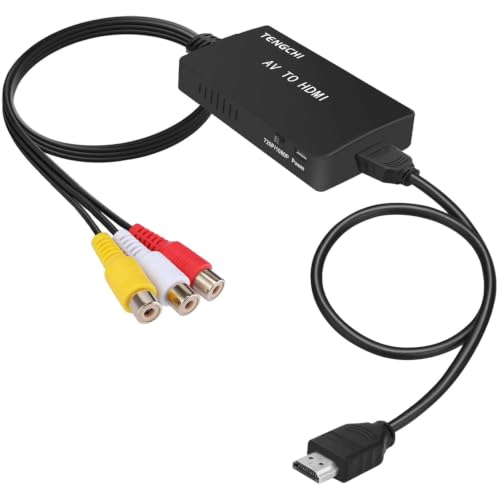
- Converts composite RCA to HDMI 1080p
- Supports PAL, NTSC, and SECAM formats
- Includes HDMI and USB cables
Best For: Older consoles, VCRs, and DVD players
Best Compact RCA Converter
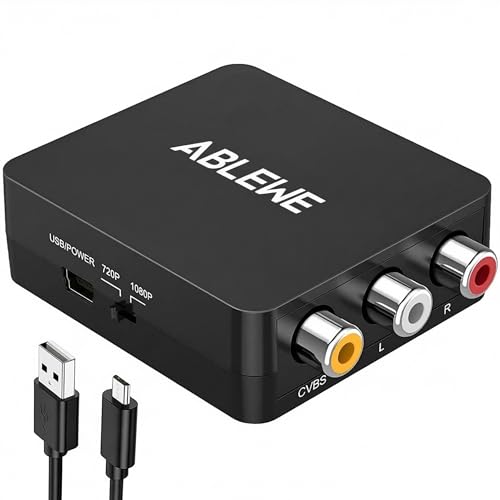
- Outputs 720p or 1080p HDMI video
- Supports several PAL and NTSC formats
- Compact plug-and-play design
Best For: Retro consoles and composite AV equipment
Best Retro-Console Pick
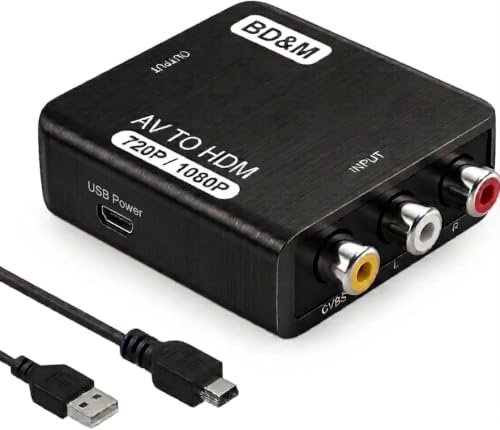
- Converts composite RCA input to HDMI output
- Supports retro consoles, VCRs, DVDs, and camcorders
- Plug-and-play design with up to 1080p output
Best For: Updating older AV devices for modern HDMI displays
Best USB-C Display Adapter

- Outputs video and audio from USB-C to HDMI
- Supports up to 4K at 30Hz
- Offers mirrored or extended display modes
Best For: Connecting compatible USB-C laptops, tablets, and phones to HDMI screens
Best Space-Saving HDMI Add-On
Swivel HDMI Extension Adapters

- Creates clearance for streaming sticks behind TVs
- Supports 4K at 60Hz and 18Gbps transmission
- Includes two short male-to-female swivel adapters
Best For: Roku, Chromecast, and other HDMI sticks in tight TV spaces
Best USB-C Pick
4K USB-C to HDMI Adapter with 100W PD

- 4K at 60Hz output
- 100W pass-through charging
- Plug-and-play design
Best For: USB-C phones, tablets, and laptops that support DisplayPort Alt Mode
Best Multi-Pack
DisplayPort to HDMI Adapter 3-Pack

- Up to 4K at 30Hz
- Secure locking DP connector
- Three adapters included
Best For: Office, presentation, and multi-monitor setups using DisplayPort output
Best High-Bandwidth Option
Mini HDMI to HDMI 8K Adapter 2-Pack

- 8K at 60Hz and 4K at 144Hz
- 48Gbps HDMI 2.1 bandwidth
- Bidirectional Mini HDMI connection
Best For: Mini HDMI cameras, laptops, tablets, and high-refresh displays
Best Analog-to-HDMI Pick – RCA to HDMI Converter
If you need one of the straightforward hdmi converters under 100 for connecting older AV equipment to a modern display, this RCA-to-HDMI adapter is a practical option. It converts yellow, white, and red composite input to HDMI output at up to 1080p and requires USB power during use.
Best For: Connecting PS2, PS3, Xbox, N64, VHS, VCR, DVD players, and other composite-AV devices to an HDTV or monitor.
Pros:
- Converts analog RCA input to HDMI 1080p output.
- Supports multiple PAL, NTSC, and SECAM input formats.
- Includes an HDMI cable, USB power cable, and one-year warranty.
Cons:
- Does not support 3D or 4K.
- Requires a separate 5V/1A power source; the power supply is not included.
- Designed for AV-to-HDMI conversion only, not HDMI-to-AV.
This is a sensible choice for retro consoles and legacy video equipment when 1080p is sufficient. Verify that your source device uses composite RCA output and plan for an available USB power source.
Best DisplayPort Value – 4K DisplayPort to HDMI Adapter
For a modern computer-to-display connection, this adapter is a compact option among hdmi converters under 100. It converts DisplayPort to HDMI and supports up to 4K at 60Hz without drivers or external power.
Best For: Connecting a desktop, laptop, graphics card, monitor, TV, or projector with DisplayPort output to an HDMI display.
Pros:
- Supports 4K resolution at 60Hz, along with 1440p and 1080p.
- Plug-and-play operation needs no drivers or external power.
- Gold-plated connectors and triple shielding support signal stability.
Cons:
- Unidirectional: it converts DisplayPort to HDMI, not HDMI to DisplayPort.
- An HDMI cable is required and sold separately.
- Compatibility depends on having a DisplayPort source.
Choose this adapter when your computer or graphics card has DisplayPort output and your target display has HDMI input. Its 4K/60Hz support makes it more suitable for high-resolution monitors than basic 1080p adapters.
Best Compact RCA Converter – ABLEWE RCA to HDMI Adapter
This compact ABLEWE model is a useful pick among hdmi converters under 100 for bringing composite video equipment back to life. It converts RCA input to 720p or 1080p HDMI output and uses a supplied USB cable for power.
Best For: Retro gaming consoles, VHS and VCR equipment, DVD players, and set-top boxes with yellow, white, and red composite outputs.
Pros:
- Supports 720p and 1080p HDMI output at 60Hz.
- Works with PAL, NTSC, and other listed standard TV formats.
- Small design and plug-and-play setup require no extra drivers.
Cons:
- USB power adapter is not included.
- Converts RCA to HDMI only; it does not perform reverse conversion.
- Limited to composite source devices rather than newer digital outputs.
The ABLEWE is a practical, space-saving solution for users who want simple setup and broad legacy-device compatibility. Make sure the converter is connected to a 5V power source before use.
Best USB-C Multiport Option – USB-C to HDMI Hub Adapter
If your laptop or tablet supports video over USB-C, this multiport hub is a versatile choice among hdmi converters under 100. Along with HDMI output up to 4K at 30Hz, it adds USB-A data connectivity and USB-C PD charging in a portable aluminum body.
Best For: USB-C laptops, tablets, and compatible smartphones that need HDMI display output plus charging and USB-A expansion.
Pros:
- Provides HDMI output up to 4K at 30Hz.
- Includes a USB-A 3.0 port with transfer speeds up to 5Gbps.
- Offers up to 100W PD charging and a lightweight aluminum enclosure.
Cons:
- The host USB-C port must support video transmission, such as USB 4.0 or Thunderbolt 3.
- HDMI output is limited to 4K at 30Hz.
- Compatibility varies by device and operating system.
This hub is more than a basic video adapter, making it a good fit for travel, presentations, and desk setups. Confirm that your device has a full-featured video-capable USB-C port before buying.
Best Retro-Console Pick – RCA to HDMI Converter
If you need HDMI converters under 100 for connecting older RCA-equipped equipment to a modern display, the BD&M RCA to HDMI Converter is a practical option. It accepts composite AV input from devices such as VCRs, DVD players, and retro consoles, then outputs through HDMI at up to 720p or 1080p.
Best For: Retro gaming consoles, VCRs, DVD players, camcorders, and other older devices with standard RCA output.
Pros:
- Converts analog RCA/composite AV to HDMI output.
- Supports PS1, PS2, PS3, Xbox, N64, Wii, VHS, VCR, and DVD devices.
- Plug-and-play setup requires no drivers or software.
- Compact design and included USB power cable suit home or travel use.
Cons:
- Requires a separate HDMI cable and USB power connection.
- Designed for RCA-to-HDMI conversion, not HDMI-to-RCA use.
This converter makes an older AV setup easier to use with current HDTVs, monitors, and projectors. Its broad compatibility and simple installation are especially useful for retro gaming and older media playback.
Best USB-C Display Adapter – USB-C to HDMI Adapter
Among HDMI converters under 100, this USB-C to HDMI adapter is aimed at sending video and audio from compatible laptops, tablets, and smartphones to a TV, monitor, or projector. It supports mirrored or extended displays and resolutions up to 4K at 30Hz.
Best For: MacBook, iPad, Chromebook, Surface, and other compatible USB-C devices that need HDMI display output.
Pros:
- Supports up to 4K resolution at 30Hz, plus 2K and 1080p modes.
- Transmits synchronized audio and video over one connection.
- Supports mirrored and extended display modes.
- Plug-and-play operation requires no drivers or software.
Cons:
- Works from USB-C to HDMI only, not HDMI to USB-C.
- Compatibility depends on a device’s USB-C video-output support.
The compact metallic adapter is useful for presentations, streaming, and adding a larger screen to a compatible USB-C device. Check your device’s port capabilities before buying, since not every USB-C port carries video.
Best Space-Saving HDMI Add-On – Swivel HDMI Extension Adapters
For shoppers comparing HDMI converters under 100, the VCE 2-pack is a convenient HDMI extension solution rather than a signal-format converter. Its short male-to-female swivel adapters help connect streaming sticks in tight TV spaces while reducing awkward bends and clearance issues.
Best For: Google Chromecast, Roku Streaming Stick, TV sticks, and other HDMI devices installed near a crowded or wall-mounted television.
Pros:
- Swivel design helps accommodate limited space behind a TV.
- Supports 2K and 4K at 60Hz, ARC, HEC, and 3D playback.
- 18Gbps transmission supports HDMI 2.0 and HDCP-compliant equipment.
- Two adapters are included, with gold-plated connectors and an 18-month care period.
Cons:
- Does not convert between different video connector formats.
- Its short extension design may not suit installations needing significant cable length.
This two-pack is best viewed as a flexible HDMI clearance and extension accessory. It can make a streaming-stick installation neater while helping avoid tight bends or direct-plugging problems behind the television.
Best USB-C Pick – 4K USB-C to HDMI Adapter with 100W PD
If you need HDMI converters under 100 for a USB-C phone, tablet, or laptop, this adapter combines 4K output with pass-through charging. It supports up to 4K at 60Hz, requires no drivers or external power, and is designed for compatible USB-C devices with DisplayPort Alt Mode.
Best For: iPhone 15/16/17 users, MacBook owners, and anyone who wants to mirror a compatible USB-C device while charging.
Pros:
- Supports up to 4K at 60Hz for compatible displays.
- Includes 100W PD pass-through charging.
- Plug-and-play setup with no app, Wi-Fi, or driver required.
- Compact construction with a reinforced cable and one-year warranty.
Cons:
- Requires a USB-C device that supports DisplayPort Alt Mode.
- Does not support protected streaming apps such as Netflix, Prime Video, HBO, or Hulu.
This is a practical choice when you want both display output and charging in one small adapter. Check your device’s USB-C video compatibility and streaming requirements before buying.
Best Multi-Pack – DisplayPort to HDMI Adapter 3-Pack
For a desktop or laptop with DisplayPort output, this three-pack is a useful option among HDMI converters under 100. The adapters convert DisplayPort to HDMI in one direction and support resolutions up to 4K at 30Hz, making them suitable for monitors, TVs, projectors, office setups, and presentations.
Best For: Home offices, classrooms, and multi-monitor users who need several spare DP-to-HDMI adapters.
Pros:
- Three adapters provide convenient spares or coverage for multiple setups.
- Supports 4K at 30Hz, 1440p at 60Hz, and 1080p at 120Hz.
- Locking DisplayPort connector helps maintain a secure connection.
- Compact, portable design with gold-plated connectors.
Cons:
- Unidirectional: works from DisplayPort source to HDMI display only.
- Does not convert HDMI output to DisplayPort input.
- 4K output is limited to 30Hz.
The main buying consideration is directionality: confirm that your computer has a DisplayPort output and your display has HDMI input. If that matches your setup, the multipack offers practical flexibility for a modest price.
Best High-Bandwidth Option – Mini HDMI to HDMI 8K Adapter 2-Pack
This two-pack stands out among HDMI converters under 100 for devices with a Mini HDMI port. Its HDMI 2.1 design supports up to 8K at 60Hz, 4K at 144Hz, and 48Gbps bandwidth, while the bidirectional connection works with compatible cameras, tablets, laptops, projectors, and displays.
Best For: DSLR and camcorder owners, portable gaming setups, and users who need high refresh rates from a Mini HDMI device.
Pros:
- Supports up to 8K at 60Hz, 4K at 144Hz, and 2K at 240Hz.
- Bidirectional design supports flexible Mini HDMI-to-HDMI connections.
- Compact aluminum-alloy housing with gold-plated connectors.
- Two-pack includes a lifetime warranty for non-human damage and 24/7 support.
Cons:
- Designed for Mini HDMI, not Micro HDMI.
- Actual resolution and refresh rate depend on the connected devices.
- Its compact adapter format may be less convenient than a cable for some setups.
This is the strongest fit for high-resolution or high-refresh applications, provided your source uses Mini HDMI. Verify the port type carefully before ordering, since Mini HDMI and Micro HDMI are not interchangeable.
How We Picked the Best Hdmi Converters Under 100
We focused on compatibility, signal direction, supported resolution, connection type, and everyday practicality. The selection covers the main adapter categories shoppers encounter: RCA/composite AV to HDMI for older equipment, DisplayPort to HDMI for computers, USB-C to HDMI for modern laptops and phones, and compact HDMI-to-HDMI adapters for tight spaces or cable extensions.
We also considered useful specifications such as 4K refresh-rate support, PAL/NTSC compatibility, USB-C Power Delivery, USB expansion, HDMI 2.1 bandwidth, connector design, and package quantity. Because adapters are not interchangeable, the source and display ports were treated as the most important selection criteria.
Quick Comparison
| Adapter Type | Best For | Important Check |
|---|---|---|
| RCA/AV to HDMI | VCRs, DVD players, PS2, PS3, Xbox, and retro equipment | PAL/NTSC and composite video support |
| DisplayPort to HDMI | Desktop PCs, laptops, and DisplayPort graphics outputs | Uni-directional operation and target resolution |
| USB-C to HDMI | MacBooks, tablets, phones, and USB-C laptops | Video-capable USB-C port and charging requirements |
| Mini HDMI to HDMI | Cameras, compact computers, and small devices | Mini HDMI connector size and HDMI version |
| HDMI coupler or swivel adapter | Streaming sticks and difficult cable layouts | Available clearance and connector orientation |
Key Buying Factors for Hdmi Converters Under 100
Match the Source and Destination
Identify the port on the device sending the signal and the HDMI port on the display receiving it. RCA-to-HDMI and DisplayPort-to-HDMI adapters generally work in one direction; reversing them will not produce a signal. For USB-C, confirm that the port supports DisplayPort Alt Mode or another video-output standard rather than data and charging only.
Check Resolution and Refresh Rate
Choose an adapter that supports the resolution you actually need. Older composite converters commonly upscale to 720p or 1080p, while newer USB-C, DisplayPort, and HDMI 2.1 models may support 4K or higher refresh rates. The source, adapter, cable, and display must all support the desired specification.
Consider Power and Extra Ports
Some USB-C adapters draw power from the source, while models with Power Delivery let you charge the connected device at the same time. A USB port can be useful for peripherals, but it does not automatically add video capability to a USB-C connection.
Account for Compatibility Limits
Protected content, unusual resolutions, HDCP requirements, and older television standards can affect performance. For retro equipment, PAL/NTSC support matters. For streaming sticks, a short HDMI extension or swivel adapter may improve clearance without converting the signal.
Who Should Buy Which Hdmi Converters Under 100?
- Owners of VCRs, DVD players, or older consoles: choose an RCA/AV-to-HDMI converter with the correct PAL/NTSC support and a suitable output resolution.
- Desktop PC and laptop users: choose a DisplayPort-to-HDMI adapter, checking whether the computer output is DisplayPort and whether 4K at the desired refresh rate is supported.
- MacBook, tablet, or USB-C phone users: choose a USB-C-to-HDMI adapter, preferably with Power Delivery if the device must charge during use.
- Camera and compact-device owners: select a Mini HDMI-to-HDMI adapter and verify the device uses Mini HDMI rather than Micro HDMI.
- Streaming-stick users: a compact HDMI swivel or extension adapter is the simplest choice when space behind the television is limited.