
If you need to clone, back up, or swap drives without turning a simple job into a PC teardown, a dedicated duplicator can save time and reduce mistakes.
This roundup of hard drive duplicators for Windows focuses on practical features like offline cloning, drive-bay support, speed, and compatibility with common HDD and SSD setups.
Best 10 Hard Drive Duplicators for Windows Picks for 2026
Easy 2-Bay Cloning Dock
SABRENT USB 3.0 Dual Bay Hard Drive Docking Station & Cloner

- Supports 2.5-inch/3.5-inch SATA HDDs and SSDs
- Offline cloning works without a PC
- USB 3.0 plug-and-play design needs no drivers
Best For: Windows users who want a simple dual-bay dock with offline cloning
Standalone Secure Duplicator
Systor 1:1 HDD/SSD Hard Drive Duplicator/Eraser

- Standalone operation requires no computer or software
- Copies and erases 2.5-inch and 3.5-inch drives
- Supports DoD 5220.22-M sanitization
Best For: IT teams and service shops that need standalone cloning and secure erase
USB-C Offline Cloner
SABRENT Dual-Bay USB-C Hard Drive Docking Station & Cloner

- One-touch offline cloning without a PC
- USB-C dock mounts two drives separately on Windows
- Supports 2.5-inch and 3.5-inch SATA HDDs/SSDs
Best For: Windows and Mac users who want USB-C docking with offline cloning
Pro-Grade 2-Bay Duplicator
StarTech Dual-Bay 2.5/3.5in SATA Duplicator Dock

- Standalone sector-by-sector cloning with no computer required
- Supports 2.5-inch/3.5-inch SATA HDDs and SSDs of any capacity
- Also works as a USB to SATA adapter
Best For: IT professionals who need a professional SATA duplicator dock
4-Bay Offline Cloning Dock

- Holds up to four SATA HDDs/SSDs
- Offline cloning with LED progress
- USB 3.0 plug-and-play design
Best For: Windows users who need a 4-bay cloning dock
High-Capacity 4-Bay Duplicator
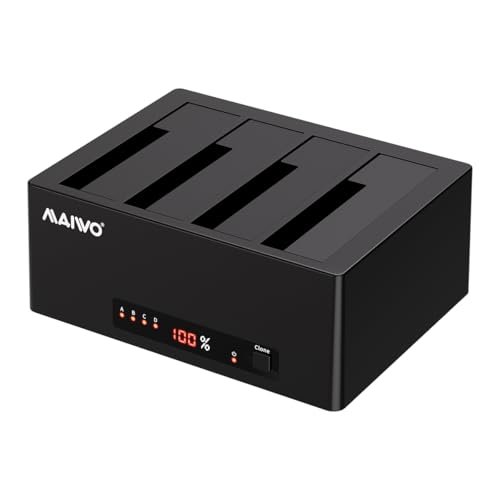
- Offline 1-to-3 cloning without a PC
- Up to 96TB total capacity support
- Works with Windows, macOS, Linux, ChromeOS
Best For: Users who want cloning plus big multi-drive storage
Dual-Bay Windows Cloner

- Offline cloning for two SATA drives
- Up to 2x20TB support
- USB 3.0 with UASP for faster transfers
Best For: Windows users who want a compact two-drive cloner
Triple-Bay NVMe Flex

- Supports NVMe and SATA drive cloning
- Tool-free triple-bay design
- USB 3.2 Gen 2 up to 10 Gbps
Best For: Windows users who need broad drive compatibility and offline cloning
SATA Clone Value Pick

- Offline cloning without a PC
- Supports 44TB total across two bays
- USB 3.0 with UASP and Trim
Best For: Windows users focused on SATA drive cloning and simple backups
USB-C SATA Cloner

- USB-C and USB-A 2-in-1 cable
- Offline clone mode with one-button use
- Up to 5 Gbps with UASP and Trim
Best For: Windows users who want a USB-C SATA duplicator for simple offline cloning
Easy 2-Bay Cloning Dock – SABRENT USB 3.0 Dual Bay Hard Drive Docking Station & Cloner
If you want hard drive duplicators for windows that also double as a handy dock, this Sabrent unit keeps things simple. It works with standard 2.5-inch and 3.5-inch SATA hard drives or SSDs, supports offline cloning, and plugs in without drivers, which makes it practical for everyday PC use.
Best For: Windows users who want a plug-and-play dual-bay dock with basic offline cloning.
Pros:
- Supports 2.5-inch and 3.5-inch SATA drives and SSDs
- Offline cloning works without a computer attached
- Plug and play, with no drivers needed
- USB 3.0 connectivity supports up to 5Gbps for drive access
Cons:
- Offline cloning is limited to up to 60Mbps
- Maximum drive support tops out at 10TB
For straightforward cloning and occasional drive access, this is a flexible dock that balances ease of use with broad SATA compatibility. It is a good fit if you want one device to handle both duplication and everyday Windows storage tasks.
Standalone Secure Duplicator – Systor 1:1 HDD/SSD Hard Drive Duplicator/Eraser
This Systor model is aimed at users who need hard drive duplicators for windows workflows but do not want to rely on a PC at all. It performs standalone copy and erase jobs, supports both 2.5-inch and 3.5-inch drives, and offers data sanitization that meets DoD 5220.22-M requirements.
Best For: Standalone duplication and drive erasure in IT or service environments.
Pros:
- No computer or software required
- Copies multiple HDDs or SSDs simultaneously
- Supports both file-only and full-drive duplication
- Includes sanitization and erase functions compliant with DoD 5220.22-M
Cons:
- Transfer rate is capped at up to 90MB per second
- Less suited to users who only need a simple USB dock
If your priority is dependable standalone cloning and wiping, this Systor unit is built for that job. The copy speed stays consistent even as the load increases, which is useful when duplication time matters more than having a general-purpose dock.
USB-C Offline Cloner – SABRENT Dual-Bay USB-C Hard Drive Docking Station & Cloner
For hard drive duplicators for windows with USB-C support, this Sabrent dock is a practical choice. It can clone one SATA drive to another offline at the press of a button, and when connected to a PC it mounts both bays as separate drives for normal file access.
Best For: Windows and Mac users who want USB-C docking plus one-touch offline cloning.
Pros:
- Offline cloning works without a connected computer
- USB-C dock support with plug-and-play operation on Windows and Mac
- Two bays mount as separate drives for file transfers and drive access
- Fits both 2.5-inch and 3.5-inch SATA HDDs and SSDs
Cons:
- Target drive must be the same size as the source or larger
- Does not support IDE, M.2, or NVMe drives
- Offline cloning runs at up to 60MBps by design
This model fits users who want a modern USB-C docking experience but still need a simple offline clone button. It is especially useful if you move between storage access on a computer and drive-to-drive duplication at the dock.
Pro-Grade 2-Bay Duplicator – StarTech Dual-Bay 2.5/3.5in SATA Duplicator Dock
If you are comparing hard drive duplicators for windows and want a more professional dock, this StarTech model stands out for standalone cloning and USB access. It supports 2.5-inch and 3.5-inch SATA HDDs and SSDs, works without a computer for duplication, and can also function as a USB to SATA adapter.
Best For: IT professionals who need a fast, sector-by-sector SATA duplicator with dock functionality.
Pros:
- Standalone sector-by-sector copying with no computer required
- Supports 2.5-inch and 3.5-inch SATA drives and SSDs of any capacity
- Can be used as a USB to SATA adapter for drive access
- Includes USB-C/A cables and a universal power adapter
Cons:
- Target disk must be equal to or larger than the source disk
- IDE support requires a separate adapter
With broad SATA compatibility and a dock-first design, this StarTech unit is a strong fit for repeat cloning jobs. Its sector-by-sector approach copies the entire drive, including empty sectors, which is useful when you want an exact duplicate rather than just selected files.
4-Bay Offline Cloning Dock – SABRENT 4-Bay USB 3.0 Dock
If you’re comparing hard drive duplicators for windows and want a simple way to manage multiple SATA drives, this SABRENT 4-bay dock is built for that job. It supports up to four 2.5″ or 3.5″ SATA HDDs/SSDs, connects over USB 3.0, and includes an offline clone mode so you can copy drives without opening software.
Best For: Users who want a 4-bay dock for cloning and accessing several SATA drives from one Windows PC.
Pros:
- Supports up to four 2.5″ or 3.5″ SATA HDDs/SSDs in one dock
- Offline clone function works without a computer and includes LED progress indicators
- USB 3.0 connection offers up to 5Gbps transfers and is backward compatible
- Trayless, tool-free drive insertion keeps setup simple
Cons:
- Clone function is offline only, so it is focused on direct drive-to-drive copying
- Needs the external power adapter for stable multi-drive operation
This is a practical pick if you want a dock that does both storage access and basic duplicator duties in one unit. Its four-bay layout adds flexibility for drive management, while the plug-and-play design keeps it easy to use with Windows systems.
High-Capacity 4-Bay Duplicator – MAIWO USB 3.0 4-Bay Dock
For buyers looking at hard drive duplicators for windows with more storage headroom, this MAIWO 4-bay dock combines offline cloning with a high-capacity USB 3.0 enclosure. It supports 2.5″ and 3.5″ SATA HDDs/SSDs, works with Windows versions from 98 through 10, and can clone data without a connected computer.
Best For: People who need a large-capacity 4-bay dock for cloning, backups, and multi-drive storage expansion.
Pros:
- Supports 2.5″ and 3.5″ SATA HDDs/SSDs across four bays
- Offline 1-to-3 cloning works without a computer and uses LED progress indicators
- USB 3.0 with UASP supports faster transfers up to 6Gbps
- Listed capacity reaches up to 96TB with 24TB per bay
Cons:
- 1-to-3 cloning is more specialized than a standard one-to-one duplicator
- Its feature set is broad, so users who only need basic cloning may not use everything it offers
This model stands out if you want duplicator hardware that also functions as a serious storage expansion dock. The combination of offline cloning, broad OS support, and four-drive access makes it a versatile option for Windows-based workflows.
Dual-Bay Windows Cloner – WAVLINK USB 3.0 Dual-Bay Dock
If you only need a compact option among hard drive duplicators for windows, this WAVLINK dual-bay dock keeps things straightforward. It supports two 2.5″ or 3.5″ SATA HDDs/SSDs, offers offline cloning between two drives, and uses USB 3.0 with UASP for faster file transfers.
Best For: Windows users who want a simple two-drive dock for cloning and backup tasks.
Pros:
- Supports two SATA HDDs/SSDs up to 2x20TB
- Offline clone mode copies drives without using a computer
- USB 3.0 with UASP supports up to 6Gbps transfer rates
- Tool-free, hot-swappable, and plug-and-play for easy setup
Cons:
- Only supports two drives, so it is less expandable than 4-bay models
- Clone mode requires the target disk capacity to be equal to or larger than the source
This is a good fit if you want a no-frills duplicator with a smaller footprint and simple operation. Its bezel design adds a bit of drive protection, while Windows compatibility and UASP support make it practical for everyday backups and transfers.
Triple-Bay NVMe Flex – ICY BOX 3-Bay USB-C Dock
If you need hard drive duplicators for windows that can also handle mixed drive setups, this ICY BOX triple-bay station is built for flexible cloning and everyday docking. It supports M.2 PCIe NVMe SSDs plus 2.5-inch and 3.5-inch SATA SSDs/HDDs, and it offers one-touch offline cloning so you can start a copy without installing software or setting up a PC.
Best For: Windows users who want a versatile dock for NVMe and SATA drives with simple offline cloning.
Pros:
- Supports cloning between NVMe and SATA drive types, including NVMe to NVMe and SATA to NVMe
- Triple-bay, tool-free design makes it easy to connect and swap multiple drives
- USB 3.2 Gen 2 connection delivers up to 10 Gbps transfer speeds
- Compatible with both Windows and macOS systems
Cons:
- Requires the right drive mix for cloning, depending on your source and target setup
- Offline cloning means no software workflow, which may not suit users wanting PC-based clone controls
Overall, this is the most flexible option here if your Windows workflow includes both NVMe and SATA drives. It stands out for its triple-bay layout and broad drive compatibility, making it a practical choice for users who regularly move data across different storage formats.
SATA Clone Value Pick – ORICO DD28U3-C Dual-Bay Dock
For buyers comparing hard drive duplicators for windows, this ORICO dual-bay dock is a straightforward SATA-focused option for cloning and drive access. It supports 2.5-inch and 3.5-inch SATA HDDs and SSDs, offers offline clone support, and uses USB 3.0 with UASP and Trim for up to 5 Gbps transfers when connected to a computer.
Best For: Windows users who want a simple dual-bay SATA dock with offline cloning and broad device support.
Pros:
- Offline clone function works without connecting to a computer
- Supports up to 44TB total capacity across two 22TB drives
- USB 3.0 with UASP and Trim supports up to 5 Gbps transfer speeds
- Works with Windows, Mac, Linux, iPad OS, and Android, plus devices like PCs, TVs, routers, and consoles
Cons:
- Target disk must be larger than the source disk for cloning
- Limited to SATA drives rather than NVMe storage
This model is a solid pick if you primarily clone SATA drives and want a simple desktop dock for Windows use. Its offline clone feature and wide device compatibility make it useful for backup, imaging, and routine drive transfers.
USB-C SATA Cloner – ORICO 2-Bay Type-C Dock
If you want hard drive duplicators for windows with a modern USB-C connection, this ORICO dual-bay dock is built around straightforward SATA cloning. It supports 2.5-inch and 3.5-inch SATA SSDs/HDDs, includes offline clone mode, and uses a 2-in-1 USB-C/USB-A cable for easier connection to different Windows setups.
Best For: Windows users who prefer a USB-C SATA dock for easy offline cloning and everyday drive management.
Pros:
- USB-C and USB-A 2-in-1 cable adds connection flexibility
- Supports offline clone mode with simple button-based operation
- UASP and Trim support with up to 5 Gbps transfer rate
- Compatible with Windows, Mac, Linux, iPad OS, Android, and several devices including PS4/PS5 and Switch
Cons:
- Cloning requires the target disk capacity to be larger than the source disk
- Only supports SATA drives, not NVMe
This is a practical choice if your Windows workflow centers on SATA drives and you want a cleaner USB-C connection. Its offline clone feature, broad compatibility, and compact design make it easy to use in mixed-device environments.
How We Picked the Best Hard Drive Duplicators for Windows
We looked for Hard Drive Duplicators for Windows that balance speed, reliability, and ease of use. Priority went to models with straightforward offline cloning, support for common 2.5-inch and 3.5-inch SATA drives, and solid Windows-friendly connectivity through USB 3.0, USB-C, or SATA-based docking.
We also favored designs that make everyday tasks easier, such as tool-free loading, clear status indicators, multi-bay flexibility, and broad HDD/SSD support. For buyers comparing duplicators, the most important question is whether you need a true one-touch clone dock or a more versatile docking station that can also read and transfer data.
Quick Comparison
Dual-bay models are the best fit for most home users and small offices because they are compact, simple, and usually support direct offline duplication. Four-bay options are better when you manage multiple drives, need frequent swapping, or want a single dock for backups and storage access. High-speed models are useful if cloning time matters most, while USB-C and higher-bandwidth docks are a better match for newer Windows laptops and desktops.
Key Buying Factors for Hard Drive Duplicators for Windows
Drive Type and Size
Confirm support for the drives you actually use. Many duplicators handle both 2.5-inch and 3.5-inch SATA HDDs and SSDs, but not every unit supports M.2 NVMe drives or mixed interfaces. If your workflow includes newer NVMe storage, choose a model built for it rather than assuming SATA-only hardware will cover everything.
Offline Cloning Speed
For true duplicators, offline clone speed matters more than USB transfer rate. Faster copy engines can significantly reduce downtime when moving large drives or imaging data repeatedly. If you clone often, prioritize published duplication throughput and a design that supports stable, unattended copying.
Connectivity and Windows Compatibility
Most Windows users want a dock that also works as an external drive reader. USB 3.0 is still perfectly usable, while USB-C and 10Gbps options offer more headroom for fast SSD transfers. Make sure the dock includes dependable Windows support for storage access, hot-swapping, and basic cloning workflows.
Capacity, Bays, and Workflow
Choose 2-bay models for simple source-to-target jobs and 4-bay models if you need more expansion and flexibility. Bigger capacity ratings matter if you work with high-volume HDDs, but bay count and usage style are usually more important than maximum advertised terabytes.
Who Should Buy Which Hard Drive Duplicators for Windows?
Choose a dual-bay unit if you want a simple cloning tool for a desktop or laptop setup. Pick a 4-bay dock if you manage multiple drives, run frequent backups, or need a shared storage station. Go with a faster premium duplicator if cloning time is critical, and consider a USB-C model if you want the best fit for newer Windows systems.
In short, the best Hard Drive Duplicators for Windows are the ones that match your drive types, cloning frequency, and workspace—not just the highest speed number on the box.