
Need a simple way to clone, back up, or manage Mac storage? The right drive dock can save time, reduce downtime, and make drive swaps far less stressful.
This roundup of the best hard drive duplicators for Mac in 2026 focuses on speed, compatibility, and everyday usability so you can choose with confidence.
Best 10 Hard Drive Duplicators for Mac Picks for 2026
Dual-Bay Cloner Dock
SABRENT USB 3.0 Docking Station & Cloner

- Supports 2.5-inch and 3.5-inch SATA drives
- Offline cloning works without a computer
- Plug and play with USB 3.0 speeds up to 5Gbps
Best For: Mac users who want a simple dual-bay SATA cloner and dock
Mac-Ready Portable Drive
WD My Passport Ultra for Mac 5TB

- Formatted for Mac and portable
- USB-C and USB 3.1 compatible
- Password protection with 256-bit AES encryption
Best For: Mac users needing portable backup storage for copied data
IT Pro Duplicator Dock
StarTech Dual-Bay SATA Duplicator

- Standalone cloning with no computer required
- Supports 2.5-inch and 3.5-inch SATA HDDs and SSDs
- Copies entire drives at up to 28 GB/min
Best For: Mac-focused users who want a standalone, IT-style duplicator dock
Mac Portable Backup Drive

- Designed and formatted for Mac
- USB-C compatible portable drive
- Backup software with ransomware defense
Best For: Mac users who want portable backup storage rather than a duplicator
Standalone SATA Duplicator

- Copies up to five SATA drives at once
- No computer or software required
- Supports drive duplication and sanitization
Best For: Multi-drive cloning and secure erasing without a host computer
Best for Everyday Use
- Designed for Mac with USB-C compatibility
- Includes backup software and password protection
- Slim portable design for files on the go
Best For: Portable Mac backup and file storage
Offline Clone Dock
SABRENT Lay Flat NVMe & SATA Dock

- Works with NVMe and SATA drives
- Offline clone with no PC needed
- Includes USB-C and USB-A cables
Best For: Cross-platform users who need a dock plus offline cloning
4-Bay Offline Cloning Dock
SABRENT 4-Bay USB 3.0 Docking Station, Clone

- Supports four SATA HDDs or SSDs
- Offline cloning without a computer
- Trayless, tool-free design
Best For: Mac users who need a four-bay dock with offline cloning
Single-Bay USB 3.0 Dock
SSK USB 3.0 to SATA Hard Drive Docking Station Adapter
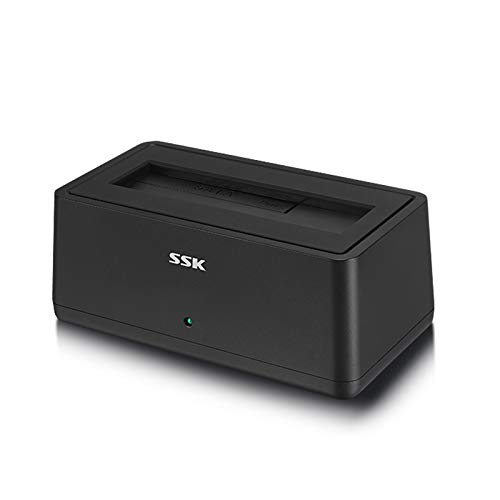
- Supports 2.5-inch and 3.5-inch SATA drives
- USB 3.0 with UASP up to 5Gbps
- Mac compatible, plug-and-play
Best For: Mac users who need simple single-drive SATA access
USB-C Two-Bay Cloner
SABRENT Dual-Bay USB-C Docking Station & Cloner

- Offline cloning without a computer
- Dual-bay access over USB for two drives
- Mac plug-and-play with no drivers
Best For: Mac users who want offline cloning plus dual-drive access
Dual-Bay Cloner Dock – SABRENT USB 3.0 Docking Station & Cloner
If you want hard drive duplicators for mac workflows without relying on a full software setup, this SABRENT dock keeps things simple. It supports standard 2.5-inch and 3.5-inch SATA drives and SSDs, offers offline cloning, and doubles as a USB dock for everyday drive access.
Best For: Mac users who want a straightforward dual-bay SATA dock with offline cloning and plug-and-play use.
Pros:
- Supports 2.5-inch and 3.5-inch SATA hard drives and SSDs
- Offline cloning works without a computer connection
- Plug and play design needs no drivers
- USB 3.0 transfer speeds up to 5Gbps
Cons:
- Offline cloning speed is limited to up to 60Mbps
- Target drive must be large enough for the source drive
Overall, this is a practical dock-and-clone option if you want a simple way to duplicate SATA drives and also use them over USB when needed.
Mac-Ready Portable Drive – WD My Passport Ultra for Mac 5TB
This is not a duplicator dock, but it can still fit a Mac backup setup if your goal is portable storage for cloned data and extra copies. The WD My Passport Ultra for Mac is formatted for Mac, uses USB-C and USB 3.1 compatibility, and adds password protection with 256-bit AES hardware encryption.
Best For: Mac users who need a portable, Mac-formatted backup drive for storing copied data.
Pros:
- Formatted for Mac out of the box
- USB-C and USB 3.1 compatible
- Password protection with 256-bit AES hardware encryption
- Includes backup software with ransomware defense
Cons:
- Not a drive duplicator or cloning dock
- Portable external drive rather than a multi-bay workstation tool
If you need a Mac-friendly destination drive instead of a hardware duplicator, this model is a solid companion for backups and portable file storage.
IT Pro Duplicator Dock – StarTech Dual-Bay SATA Duplicator
For buyers comparing hard drive duplicators for mac systems, this StarTech dual-bay dock is built around standalone cloning and broad drive support. It duplicates 2.5-inch and 3.5-inch SATA HDDs and SSDs with no computer required, while also working as a USB-to-SATA dock for quick access.
Best For: Mac environments that need a standalone, sector-by-sector drive duplicator with IT-focused features.
Pros:
- Standalone cloning requires no computer
- Supports 2.5-inch and 3.5-inch SATA HDDs and SSDs
- Copies entire drives sector by sector at up to 28 GB/min
- Includes USB-C and USB-A cables plus a universal power adapter
Cons:
- Target disk must be equal to or larger than the source disk
- IDE adapter is sold separately
This is the most purpose-built cloning option here for users who want standalone duplication speed and broad SATA compatibility in a desktop dock.
Mac Portable Backup Drive – WD My Passport for Mac 5TB
This WD My Passport for Mac is a portable external drive, so it is not a hardware duplicator, but it is useful in a Mac backup workflow. It is designed for Mac, supports USB-C compatibility, and includes backup software with defense against ransomware.
Best For: Mac users who need a slim portable backup drive for storing copies and carrying files.
Pros:
- Designed for Mac and formatted for Mac use
- USB-C compatible for easier connectivity
- Includes backup software with ransomware defense
- Password protection adds extra security
Cons:
- Not a duplicator dock or standalone cloning device
- Single-drive portable design instead of a dual-bay setup
If your priority is portable Mac storage rather than direct drive cloning, this drive offers a straightforward backup option with useful security features.
Standalone SATA Duplicator – Systor 1:5 HDD/SSD Duplicator
If you need hard drive duplicators for mac workflows that handle cloning and wiping without tying up a computer, this Systor standalone unit is built for that kind of job. It copies up to five SATA drives at once and can duplicate data only or an entire drive, while also offering sanitization for reused storage.
Best For: IT teams or power users who need a computer-free duplicator and eraser for multiple SATA HDDs and SSDs.
Pros:
- Standalone design requires no computer or software.
- Copies multiple 2.5-inch and 3.5-inch SATA drives simultaneously.
- Supports both drive cloning and data sanitization.
- Includes DoD 5220.22-M compliant erasure support.
Cons:
- Built for SATA drives, so it is not a universal Mac storage dock.
- Bulkier and heavier than a portable enclosure.
- Focused on duplication tasks rather than everyday backup use.
For structured cloning, erasing, and drive refresh jobs, this Systor model is a straightforward hardware-first choice. It is especially useful when you want repeatable results across several drives at once and do not want to depend on a host system.
Best for Everyday Use – WD My Passport for Mac 4TB
While not a duplicator, this My Passport for Mac is a practical portable storage option for Mac users who want an easy way to carry backups and working files. It is designed for Mac, supports USB-C connectivity, and includes backup software plus password protection for added file security.
Best For: Mac users who want portable backup storage with simple connectivity and built-in protection features.
Pros:
- Designed specifically for Mac use.
- Mac-ready and USB-C compatible.
- Includes backup software for device management.
- Offers password protection and ransomware defense.
Cons:
- Not a hard drive duplicator.
- Portable drive, so it is not meant for multi-drive cloning.
- Focused on storage and backup rather than offline copy workflows.
If your priority is dependable Mac backup storage rather than drive-to-drive duplication, this WD portable drive is an easy fit. It pairs a slim travel-friendly build with software and security features that make it useful for everyday file protection.
Offline Clone Dock – SABRENT Lay Flat NVMe & SATA Dock
This SABRENT dock is a strong pick for hard drive duplicators for mac users who want both fast external access and offline cloning in one unit. It works with NVMe SSDs and 2.5-inch or 3.5-inch SATA drives, includes USB-C and USB-A cables, and supports cloning without a PC using the built-in direction switch and clone button.
Best For: Mac, Windows, or Linux users who want a tool-free dock that can also do offline drive-to-drive cloning.
Pros:
- Supports both M.2 PCIe NVMe and SATA 2.5-inch/3.5-inch drives.
- Offline clone function works without a computer.
- Includes USB-C to USB-C and USB-A to USB-C cables.
- Tool-free design works across Windows, macOS, and Linux.
Cons:
- Clone target must be equal to or larger than the source drive.
- Only one drive is used in the dock at a time for cloning workflows.
- Real-world speed depends on the drive installed.
For users who want a flexible dock that doubles as a copier, this SABRENT model is the most versatile option here. It is especially appealing if you work across different systems and need both fast drive access and simple offline clone capability.
4-Bay Offline Cloning Dock – SABRENT 4-Bay USB 3.0 Docking Station, Clone
If you want hard drive duplicators for Mac that can also serve as a multi-drive dock, this 4-bay Sabrent model is a practical pick. It supports up to four SATA HDDs or SSDs, connects over USB 3.0, and includes an offline clone function so you can duplicate drives without using a computer.
Best For: Mac users who need a trayless four-drive dock with offline cloning and easy drive swapping.
Pros:
- Supports up to four 2.5-inch or 3.5-inch SATA HDDs and SSDs
- Offline clone function works without a computer
- Trayless, tool-free drive insertion simplifies setup
- USB 3.0 connection offers up to 5Gbps transfer speeds
Cons:
- Cloning requires the dock to be powered off from the computer
- Designed for SATA drives only
- External power adapter is required
This is a versatile option if you need both cloning and regular drive access in one unit. Its four-bay layout makes it more flexible than a simple duplicator, especially for users managing multiple SATA drives on a Mac.
Single-Bay USB 3.0 Dock – SSK USB 3.0 to SATA Hard Drive Docking Station Adapter
This SSK dock is a straightforward choice for hard drive duplicators for Mac if you mainly need quick access to one SATA drive at a time. It supports 2.5-inch and 3.5-inch SATA HDDs and SSDs, uses USB 3.0 for up to 5Gbps transfers, and is built for simple plug-and-play operation.
Best For: Mac users who want a simple single-drive dock for accessing or transferring SATA drives.
Pros:
- Supports 2.5-inch and 3.5-inch SATA HDDs and SSDs
- USB 3.0 with UASP support for up to 5Gbps transfers
- Plug-and-play with no driver installation needed
- Compatible with Mac OS 10.4 to 10.11, plus Windows and Linux
Cons:
- Only supports one drive at a time
- No offline cloning function
- Designed for SATA drives only
While it is not a duplicator, it is useful when your workflow is more about reading, moving, or backing up a single drive. For Mac users who need basic SATA access without extra complexity, this dock keeps things simple.
USB-C Two-Bay Cloner – SABRENT Dual-Bay USB-C Docking Station & Cloner
For Mac users looking specifically at hard drive duplicators for Mac, this dual-bay Sabrent dock is the most direct fit. It can clone one SATA drive to another without a computer, or mount both bays separately over USB 3.0 when you need to move files or work with two drives at once.
Best For: Mac users who want a USB-C dock with offline cloning and dual-drive access.
Pros:
- Offline cloner works without a computer
- Reads and writes two drives at once when connected by USB
- Supports 2.5-inch and 3.5-inch SATA HDDs and SSDs
- Plug and play on Windows and Mac with no drivers
Cons:
- Only supports SATA drives, not IDE, M.2, or NVMe
- Target drive must be the same size as the source or larger for cloning
- USB-C cable is included, so older Macs may need an adapter or separate cable
This is the strongest match if cloning is your priority, since it combines offline duplication with regular dock functionality. It is a good fit for a Mac-based workflow where you need both copy operations and everyday drive access.
How We Picked the Best Hard Drive Duplicators for Mac
We looked for Hard Drive Duplicators for Mac that balance cloning speed, Mac-friendly connectivity, drive support, and practical features like offline duplication, tool-free access, and stable dock designs. We also favored options that fit different needs, from single-bay adapters to multi-bay duplicators and portable backup drives for Mac users who want a simpler storage workflow.
Quick Comparison
If you want the fastest offline cloning setup, a dedicated dual-bay or multi-bay duplicator is the best fit. If your main goal is backup and transport rather than drive-to-drive copying, a portable external drive for Mac may be more useful. USB-C models are a strong choice for newer Macs, while USB 3.0 options can still be a good value for older systems.
Key Buying Factors for Hard Drive Duplicators for Mac
Drive Type Support
Make sure the unit supports the drives you actually use: 2.5-inch SSDs, 3.5-inch hard drives, or both. Some docks handle SATA only, while others add NVMe support for modern SSD workflows.
Clone Speed and Capacity
For frequent backups or multiple-drive workflows, faster duplication rates matter. Multi-bay units are helpful for batch tasks, but a single fast dock may be enough if you only clone one drive at a time.
Mac Connectivity
Look for USB-C or USB 3.0 compatibility depending on your Mac ports. If you use a newer MacBook or desktop, USB-C can simplify connections and improve convenience.
Use Case: Cloning Vs. Backup
Not every product is a true duplicator. Some listings are portable drives that are better for backup, security, and travel. Choose a cloner if you need direct disk-to-disk copying; choose a portable drive if you mainly want reliable storage for Time Machine-style backups or file backup workflows.
Who Should Buy Which Hard Drive Duplicators for Mac?
Choose a dual-bay cloner if you regularly migrate drives, replace storage, or maintain multiple Macs. Go with a 4-bay or 1-to-5 duplicator if you need higher-volume workflows and want to duplicate or erase several drives in one session. Pick a portable Mac-compatible external drive if your priority is safe backup rather than cloning. If you want a flexible desktop setup, a USB-C dock that supports both SATA and NVMe is usually the most future-ready choice.