
Video editors need fast, flexible storage that can keep up with large project files, proxies, and backup drives. The right dock can simplify ingest, offload, cloning, and drive rotation without adding friction to your workflow.
This roundup highlights the best hard drive docking stations for video editing in 2026, with options for single-drive tasks, multi-bay backups, and higher-speed Thunderbolt or USB-C setups.
Best 10 Hard Drive Docking Stations for Video Editing Picks for 2026
Budget Dual-Bay Dock
SABRENT USB 3.0 Dual Bay Docking Station

- Supports 2.5" and 3.5" SATA drives
- Offline cloning without a computer
- Plug and play with USB 3.0
Best For: Editors who need a simple dual-bay dock for backups and cloning
High-Speed RAID Enclosure
OWC ThunderBay 4 4-Bay Thunderbolt Enclosure

- Dual Thunderbolt 3 ports
- Up to 1527MB/s sustained performance
- RAID 0/1/4/5/1+0 support
Best For: Serious editors needing fast RAID storage for post-production
Fast Mixed-Drive Dock
WAVLINK 10Gbps NVMe and SATA Dual-Bay Dock

- USB 3.2 Gen 2 up to 10Gbps
- Supports NVMe and SATA drives
- Offline one-to-one cloning
Best For: Editors using both NVMe and SATA drives who want faster transfers
Large RAID Storage Station
ORICO 5 Bay RAID External Hard Drive Enclosure

- Supports up to five SATA drives
- Hardware RAID with multiple modes
- Built-in power supply and cooling fan
Best For: Editors who need a high-capacity RAID workstation for media storage
3-Bay Cloner with Cooling
M.2 NVMe & SATA Docking Station
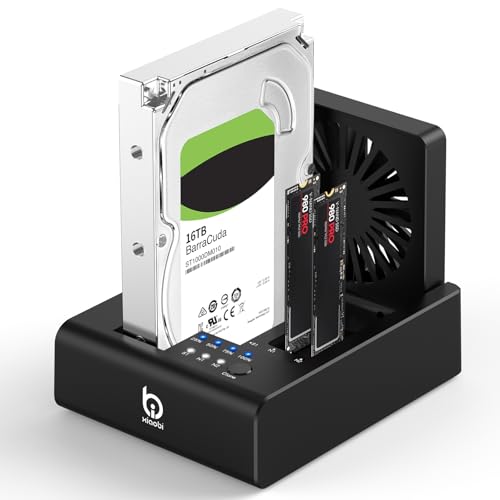
- Supports 2x M.2 NVMe plus 2.5"/3.5" SATA drives
- One-touch offline cloning with no software required
- USB-C 3.2 Gen 2 and built-in cooling fan
Best For: Editors who want a versatile dock for mixing SATA and NVMe drives
5-Bay Backup Station
ORICO USB C 5 Bay Hard Drive Docking Station

- Supports up to five 2.5"/3.5" SATA drives
- 1:4 offline duplication without a computer
- Aluminum vertical design helps with heat dissipation
Best For: Editors and creators who need large-capacity SATA storage and fast offline duplication
Simple Single-Drive Pick

- Bare SATA 2.5-inch and 3.5-inch support
- Tool-free, hot-swappable dock
- Includes 12V power adapter for 3.5-inch drives
Best For: Editors who want a simple dock for one bare SATA drive
Quad-Bay Workhorse
StarTech 4-Bay USB 3.0 SATA Dock

- Four SATA bays for HDDs and SSDs
- Independent controllers and dual fans
- Tool-less hot-swap design
Best For: Editors who need to manage multiple SATA drives at once
Dual-Bay Cloner

- Offline SATA drive cloning without a PC
- Dual bays mount separately over USB
- Includes USB-C cable and power adapter
Best For: Editors who want a dock with standalone cloning
Budget Dual-Bay Dock – SABRENT USB 3.0 Dual Bay Docking Station
If you want a simple entry point into hard drive docking stations for video editing, this dual-bay Sabrent model gives you quick access to SATA SSDs and HDDs without driver setup. It supports standard 2.5″ and 3.5″ drives, includes offline cloning, and offers USB 3.0 connectivity for convenient transfers during everyday media workflows.
Best For: Editors who need a straightforward dual-bay dock for drive access, backups, and basic cloning.
Pros:
- Supports 2.5″ and 3.5″ SATA hard drives and SSDs
- Offline cloning works without a computer
- Plug and play with no drivers needed
- USB 3.0 transfer speeds up to 5Gbps
Cons:
- Transfer speed is lower than Thunderbolt or 10Gbps options
- Offline cloning is limited to up to 60Mbps
- Only a dual-bay design, so expansion is limited
For editors who mainly need quick disk swaps, backups, and simple duplication, this dock keeps the workflow practical and uncomplicated. It is a good fit when reliability and ease of use matter more than high-end throughput.
High-Speed RAID Enclosure – OWC ThunderBay 4 4-Bay Thunderbolt Enclosure
For hard drive docking stations for video editing where speed matters, the OWC ThunderBay 4 is built around Thunderbolt 3 connectivity and four-drive storage. It supports 2.5″ or 3.5″ drives, user-configurable RAID modes, and sustained performance up to 1527MB/s, making it a strong match for larger media projects.
Best For: Editors who want a fast Thunderbolt storage enclosure with RAID flexibility for serious post-production work.
Pros:
- Dual Thunderbolt 3 ports for fast connectivity
- Up to 1527MB/s sustained performance
- Supports 3.5″ and 2.5″ drives without adapters
- RAID 0/1/4/5/1+0 (10) configuration support
Cons:
- Uses a larger four-bay enclosure design
- Best value depends on pairing it with fast drives
- More focused on workstation storage than simple docking
This enclosure is better suited to editors who need a more permanent desktop storage setup than a basic docking station. If your workflow benefits from RAID options and higher sustained throughput, it is one of the most capable choices here.
Fast Mixed-Drive Dock – WAVLINK 10Gbps NVMe and SATA Dual-Bay Dock
This WAVLINK dock is aimed at hard drive docking stations for video editing when you need flexible drive support and faster transfers. It combines dual-bay storage with USB 3.2 Gen 2 speeds up to 10Gbps, plus offline cloning between M.2 NVMe and 2.5″/3.5″ SATA drives for practical project management.
Best For: Editors who work with both NVMe and SATA drives and want a faster dual-bay dock with cloning.
Pros:
- Up to 10Gbps transfer speed for large file movement
- Supports M.2 NVMe and 2.5″/3.5″ SATA drives
- Offline clone function works without a computer
- Aluminum alloy shell helps with heat dissipation
Cons:
- Dual-bay design limits total simultaneous drive count
- Clone feature is one-to-one only
- Performance depends on the connected drive type and system
For editors juggling source media, backups, and drive migrations, this dock offers more flexibility than a basic SATA-only unit. Its mix of 10Gbps connectivity and cross-format support makes it a practical pick for mixed-storage workflows.
Large RAID Storage Station – ORICO 5 Bay RAID External Hard Drive Enclosure
When your hard drive docking stations for video editing need to scale beyond a simple two-bay setup, this ORICO five-bay enclosure adds serious storage capacity and RAID control. It supports 2.5″ and 3.5″ SATA HDDs and SSDs, includes hardware RAID modes, and uses a built-in fan plus aluminum chassis to help keep multi-drive workloads stable.
Best For: Editors building a large desktop storage station for media libraries, backups, and RAID-based workflows.
Pros:
- Hardware RAID modes include 0, 1, 3, 5, 10, JBOD, Clone, and Clear
- Supports up to five 2.5″ or 3.5″ SATA drives
- Built-in 150W power supply for multi-drive stability
- 80mm silent cooling fan and airflow vents for heat management
Cons:
- USB 3.0 interface is slower than Thunderbolt options
- Larger footprint than a basic dock
- Designed more as a desktop DAS than a portable solution
This enclosure makes sense for editors who need more than casual dock functionality and want a dependable multi-drive workstation. If capacity, RAID control, and cooling are priorities, it is built for heavier content storage needs.
3-Bay Cloner with Cooling – M.2 NVMe & SATA Docking Station
If you need hard drive docking stations for video editing, this 3-bay unit stands out for its mix of SATA and NVMe support, offline cloning, and active cooling. It can handle 2.5″/3.5″ SATA HDDs plus two M.2 NVMe SSDs, making it useful when you want fast working storage and simple drive duplication in one desk-friendly dock.
Best For: Editors who want a versatile dock for mixing SATA and NVMe drives, plus offline cloning.
Pros:
- Supports both 2.5″/3.5″ SATA drives and 2x M.2 NVMe SSDs.
- Includes one-touch offline cloning with no software required.
- USB-C 3.2 Gen 2 connection supports up to 10Gbps transfer speeds.
- Built-in 80mm foldable cooling fan helps manage heat during long transfers.
Cons:
- Does not support reverse cloning of M.2 NVMe SSD to SATA HDD.
- Not compatible with SATA (NGFF) or mSATA SSDs.
- Cloning requires a target drive at least as large as the source drive.
For editors managing large footage libraries, this dock offers a practical balance of speed, drive variety, and backup convenience. The fan and offline clone switches make it especially handy on a crowded workstation where quick duplication matters.
Desk-Friendly SATA Dock – ORICO 2.5/3.5 Inch HDD SSD Dock
Among hard drive docking stations for video editing, this ORICO model is a straightforward choice for fast access to SATA storage. It focuses on 2.5″ and 3.5″ SATA HDDs and SSDs, supports UASP and TRIM, and keeps setup simple with a tool-less, hot-swappable design.
Best For: Editors who mainly work with SATA drives and want a simple, reliable dock for backups and file transfers.
Pros:
- Supports 2.5″/3.5″ SATA I/II/III HDDs and SSDs.
- USB 3.0 with UASP and TRIM support for up to 5Gbps transfers.
- Tool-less design makes hot-swapping fast and easy.
- Includes a 36W power supply and LED status indicators.
Cons:
- Does not support IDE or SAS drives.
- Only works with SATA drives, so it is not an NVMe dock.
- Brand new or unallocated drives may need initialization in Disk Management.
This is a practical dock for editors who need dependable SATA access without extra complexity. The broad device compatibility and stable power make it a sensible desk accessory for routine media backup and drive imaging.
5-Bay Backup Station – ORICO USB C 5 Bay Hard Drive Docking Station
If your video projects generate a lot of storage, this ORICO unit is built for high-capacity SATA workflows. As one of the more expandable hard drive docking stations for video editing, it supports up to five 2.5″/3.5″ SATA drives and offers offline duplication, so you can manage large footage archives without tying up your computer.
Best For: Editors and creators who need large-capacity SATA storage and fast offline drive duplication.
Pros:
- Holds up to five 2.5″/3.5″ SATA SSDs or HDDs.
- Supports 1:4 offline duplication without connecting to a computer.
- Aluminum-alloy vertical design helps with heat dissipation.
- USB 3.2 Gen 1 with USB-C to C/C-A cable support.
Cons:
- Designed for SATA drives only, not NVMe.
- Cloning overwrites the target disk, so backup first.
- Larger footprint than a single-bay dock.
For editors handling lots of footage or making repeated backup copies, this dock is more storage hub than basic accessory. Its five-bay layout and duplicate-copy support make it a strong fit for larger media libraries and archival workflows.
Simple Single-Drive Pick – SABRENT USB 3.0 to SATA Dock
If you need one of the simplest hard drive docking stations for video editing, this Sabrent dock is a straightforward way to plug in bare 2.5-inch or 3.5-inch SATA drives for backups, transfers, and quick project access. It’s tool-free, hot-swappable, and built around USB 3.0 with UASP support for solid real-world transfer speeds.
Best For: Editors who want an easy, no-frills single-bay dock for SATA HDDs and SSDs.
Pros:
- Supports bare SATA I/II/III 2.5-inch and 3.5-inch drives
- Tool-free, plug-and-play design with hot-swap support
- Includes a 12V power adapter for stable 3.5-inch drive use
- USB 3.0 with UASP support for practical transfer performance
Cons:
- Does not support IDE/PATA, M.2, NVMe, SAS, or cased drives
- Uses a USB Type-A host cable, so USB-C-only systems need an adapter
- S.M.A.R.T. diagnostics are not passed through the USB bridge
This is a good fit if you mainly need dependable access to one bare SATA drive at a time. It keeps the workflow simple, but it’s less suited to more advanced workflows that need drive diagnostics or modern USB-C-native connectivity.
Quad-Bay Workhorse – StarTech 4-Bay USB 3.0 SATA Dock
For hard drive docking stations for video editing where you need multiple source or backup drives connected at once, this StarTech 4-bay dock is built for fast file transfer, imaging, and day-to-day storage management. It supports up to four 2.5-inch or 3.5-inch SATA drives and uses independently powered controllers so activity in one bay does not interrupt the others.
Best For: Editors and IT users who regularly juggle several SATA drives at the same time.
Pros:
- Four hot-swappable bays for 2.5-inch and 3.5-inch SATA HDDs and SSDs
- Independently powered controllers support uninterrupted multi-drive use
- Dual 40mm fans help maintain drive temperature
- Includes USB-A cable and universal power adapter
Cons:
- Only supports SATA drives, with IDE requiring a separate adapter
- Uses USB-A rather than USB-C on the host connection
- Bulkier than a single-bay dock due to the four-bay design and fans
This dock makes sense if your editing workflow involves rotating several drives for backups, restores, or project shuttling. It’s more of a desktop utility than a portable accessory, but the extra bays and cooling are the tradeoff for heavier workloads.
Dual-Bay Cloner – SABRENT USB-C Dock and Cloner
If your workflow calls for duplicating drives as well as accessing them, this dual-bay option stands out among hard drive docking stations for video editing. It can clone one SATA drive to another without a computer, or mount both bays separately over USB-C for file transfers and working with two drives at once.
Best For: Editors who want a dock that doubles as a standalone SATA drive cloner.
Pros:
- Offline cloning works without a computer connected
- Dual bays can be used as separate mounted drives over USB
- Supports bare 2.5-inch and 3.5-inch SATA HDDs and SSDs
- Includes a USB Type-C cable and power adapter
Cons:
- Cloning speed is limited to up to 60MBps by design
- Only supports SATA drives, not IDE, M.2, NVMe, or Molex-powered drives
- USB-C cable is included, but USB-A users need their own cable or adapter
This is a smart pick if you frequently duplicate source or backup drives before or after editing sessions. The cloning feature adds real utility, but the design is still centered on bare SATA drives and a fairly simple workflow.
How We Picked These Hard Drive Docking Stations for Video Editing
We focused on real editing workflows: fast transfers, dependable drive detection, support for common 2.5-inch and 3.5-inch SATA drives, and useful extras like offline cloning, multi-bay expansion, and better cooling. For editors working with large media libraries, stability matters as much as headline speed.
We also considered connection type, because the interface directly affects how quickly you can move footage and offload cards. USB 3.0 models are often fine for basic ingest and archive work, while USB-C and Thunderbolt options are better suited to faster turnaround and larger project volumes.
Quick Comparison
Single-bay docks are the simplest choice for shuttling drives, cloning media, or managing backups. Dual-bay models add convenience for copying between disks or keeping a working drive and backup drive connected at once. Four- and five-bay enclosures are better when you need to consolidate multiple drives, build a larger media workspace, or keep a structured archive nearby.
If your timeline is constantly growing, higher-speed connections and multi-drive capacity can reduce bottlenecks. If you mostly move finished projects on and off drives, a simpler dock may be the smarter buy.
Key Buying Factors for Hard Drive Docking Stations for Video Editing
Connection Speed
Choose the fastest port your editing computer supports. Thunderbolt is best for demanding workflows, while USB-C and USB 3.0 can still be practical for many editors handling SATA drives.
Drive Support
Make sure the dock supports the drive sizes and formats you actually use, including 2.5-inch SSDs, 3.5-inch HDDs, and, if needed, NVMe M.2 storage. Compatibility matters if you rotate between client media, scratch storage, and archive drives.
Capacity and Bay Count
More bays help if you manage multiple projects, back up footage frequently, or want a dedicated source, cache, and archive setup. Fewer bays are usually enough if you only need one drive at a time.
Cloning, Cooling, and Reliability
Offline cloning can save time when duplicating drives without opening software. Cooling fans and sturdy enclosures are helpful for long copy sessions and large video file transfers, where sustained performance matters.
Who Should Buy Which Hard Drive Docking Stations for Video Editing?
Solo editors and mobile creators often do well with a simple single-bay or dual-bay dock. Small studios and content teams may prefer a four- or five-bay unit for broader storage management and easier backup routines.
If speed is your top priority, lean toward Thunderbolt or USB-C. If your priority is value and flexibility, a well-built USB 3.0 dock can still be a strong choice for Hard Drive Docking Stations for Video Editing.