
An HDMI input can make FPV goggles more versatile, whether you want to view a compatible receiver’s output or use them with another video source. But the connector alone does not guarantee the setup you have in mind will work.
These five options span different FPV ecosystems and buying priorities. Here’s how to narrow them down without overlooking video format, cabling, or fit.
Best 5 Fpv Goggles with Hdmi Input Picks for 2026
Best for Walksnail Pilots

- HDMI input and output
- Dual 1080p OLED displays
- Avatar HD VTX only
Best For: Walksnail Avatar HD pilots wanting HDMI connectivity
Best for Adjustable Optics

- Adjustable focus and IPD
- OLED viewing panel
- HDMI input not confirmed
Best For: Pilots prioritizing optical adjustments
HDMI Specs to Verify
WUFGXBPSY HDZero-Compatible Goggles
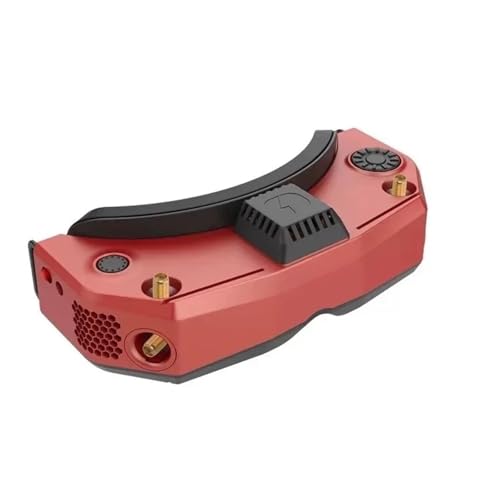
- HDMI connector listed
- OLED, 46° FOV, 90 Hz listed
- Input direction unconfirmed
Best For: Buyers prepared to confirm connections and compatibility
OLED Analog Pick
Skyzone Sky 04O PRO FPV Goggles

- Dual OLED screens
- 4:3/16:9 switching and onboard DVR
- HDMI input not confirmed
Best For: OLED viewing with 5.8 GHz reception and flight recording
HDMI-Listed Option
EasQjK Goggle 2 Digital Transmition (Red)

- Listing mentions HDMI video
- Analog video also mentioned
- Input and display specifications unclear
Best For: Buyers prepared to confirm video compatibility with the seller
Best for Walksnail Pilots – CADDXFPV Goggles X
Among fpv goggles with hdmi input, the CADDXFPV Goggles X are a strong fit if you already fly Walksnail Avatar HD. HDMI input accepts compatible external video sources, while dual 1920×1080 OLED displays and a 50° field of view provide a wide, detailed view.
Best For: Pilots using Walksnail Avatar HD who also want HDMI input and output.
Pros:
- Supports up to 1080p at 100 fps, with stated average latency as low as 22 ms.
- HDMI output can send the FPV feed to a compatible monitor.
- Built-in DVR, adjustable IPD and diopters, and removable antennas add flexibility.
Cons:
- Avatar HD VTX compatibility does not extend to Walksnail Ascent or third-party digital systems.
- Requires a separately purchased compatible 2S–6S battery; microSD storage is also sold separately.
- Analog expansion requires an optional extension board.
Choose these for their documented HDMI connections and Avatar HD features, but budget for the power and storage accessories your setup needs.
Best for Adjustable Optics – Fat Shark Dominator HDO+
The Fat Shark Dominator HDO+ focuses on viewing adjustments, with a higher-resolution OLED panel, a larger field of view, and an updated optical engine. If you are shopping for fpv goggles with hdmi input, however, the supplied product details do not confirm an HDMI input on this model.
Best For: FPV pilots prioritizing adjustable focus and interpupillary distance who can verify their required video connection separately.
Pros:
- Updated optical engine allows focus and IPD adjustments.
- OLED panel and larger field of view are intended to improve viewing clarity and immersion.
Cons:
- HDMI input is not specified in the supplied product details.
- No display resolution or field-of-view measurement is provided for direct comparison.
This is worth considering for its optical adjustability, but confirm its inputs with the seller before buying it for an HDMI-based setup.
HDMI Specs to Verify – WUFGXBPSY HDZero-Compatible Goggles
This WUFGXBPSY listing names HDMI connectivity and an HDMI connector, alongside a 46° field of view, OLED display, and listed 1920 × 1080 maximum resolution. For shoppers seeking fpv goggles with hdmi input, those specifications are a starting point, but the notes do not explicitly identify the connector as an input.
Best For: Buyers willing to verify HDMI input direction and FPV system compatibility before ordering.
Pros:
- HDMI connectivity and connector are listed.
- Specifications list an OLED display, 46° field of view, and 90 Hz refresh rate.
- Listing describes an adjustable fit.
Cons:
- HDMI input functionality is not explicitly confirmed.
- The product title references HDZero, but the supplied details do not establish specific FPV system compatibility.
- Several description bullets discuss VR content rather than concrete FPV features.
Treat this as a verify-before-buy option: check the actual HDMI port function and supported video systems rather than relying on the title alone.
OLED Analog Pick – Skyzone Sky 04O PRO FPV Goggles
If you are comparing fpv goggles with hdmi input, check the connection details carefully: the supplied notes for the Skyzone Sky 04O PRO describe 5.8 GHz, 48-channel wireless reception but do not confirm an HDMI input. Its dual OLED screens and switchable 4:3/16:9 aspect ratios are the clearer reasons to consider it.
Best For: Pilots who want OLED viewing, 5.8 GHz reception, and onboard flight recording.
Pros:
- Dual OLED screens provide high contrast and rich image detail.
- Switches between 4:3 and 16:9 aspect ratios.
- One-click DVR supports recording while flying.
Cons:
- HDMI input is not confirmed in the supplied specifications.
- Display resolution is listed inconsistently as 1280×960 and 1280×720.
This is a stronger fit for the stated OLED and recording features than for a confirmed HDMI setup. Verify the input ports and display resolution before buying.
HDMI-Listed Option – EasQjK Goggle 2 Digital Transmition (Red)
For shoppers seeking fpv goggles with hdmi input, this red EasQjK Goggle 2 listing explicitly mentions HDMI video alongside analog video. The supplied details are sparse, though, so treat it as an option to investigate rather than a fully specified recommendation.
Best For: Buyers willing to verify HDMI and analog video compatibility before ordering.
Pros:
- The listing explicitly mentions HDMI video.
- Analog video is also named in the product description.
Cons:
- No HDMI connector type or supported video formats are specified.
- Display specifications are not provided.
- The listed dimensions of 0.39 inches on each side warrant verification.
Its mention of HDMI makes it relevant to this search, but the listing does not provide enough detail to establish how the input works. Confirm the connector, signal compatibility, and actual product dimensions with the seller.
How We Picked These Fpv Goggles with Hdmi Input
We focused on the five selected models as a mix of ecosystem-focused and potentially more flexible goggles. The comparison centers on what buyers can check before ordering: HDMI input support, display specifications, FPV system compatibility, comfort, and listing clarity. Product names are not proof of a particular port, cable, or supported video format, so confirm those details on the exact version being sold.
Quick Comparison
Start with the video system you already use. The Walksnail Avatar Goggles X are the natural first stop for a Walksnail-centered setup; the listed 1080p OLED displays, 100 FPS, and 50° field of view may also appeal to buyers prioritizing a large, sharp image. The Fat Shark Dominator HDO+ and Skyzone SKY04O PRO deserve a closer look if you want to compare established goggle designs, but verify the specific listing’s inputs and any required modules.
The two red “Goggle 2” listings use similar, broad compatibility language. Treat each as a separate listing: check the manufacturer, model number, included accessories, HDMI direction, and return terms rather than assuming their names describe identical hardware.
Key Buying Factors for Fpv Goggles with Hdmi Input
Confirm the Port and Signal
Look for an explicit HDMI input, not just “HDMI” in a title. Check the connector size, supported input resolutions and refresh rates, and whether your source outputs a compatible signal. Budget for the right cable or adapter; an adapter cannot necessarily fix an unsupported signal format.
Separate HDMI Viewing from FPV Reception
HDMI input displays video from an external source. It does not, by itself, receive analog FPV or a digital FPV transmission. Confirm whether your chosen video system works natively, needs an external receiver, or requires an additional module. If you intend to fly through an HDMI-connected receiver, investigate end-to-end latency—not just the display’s advertised frame rate.
Check Fit and Field Use
Display resolution matters, but so do screen clarity across the field of view, eye adjustment, face-foam fit, weight, and light leakage. Check how the goggles are powered and whether a battery, power lead, antennas, receiver, and carrying case are included. These extras can materially change the total price.
Who Should Buy Which Fpv Goggles with Hdmi Input?
Choose the Walksnail model first if Walksnail is your main system and its documented connections meet your HDMI plans. Compare the Fat Shark and Skyzone options if fit, familiarity, and your existing receiver setup matter more than the largest listed display specs. Consider either red Goggle 2 listing only after verifying the exact hardware and seller documentation. For any model, buy for a confirmed signal path and comfortable fit—not for an HDMI claim in the product title alone.