
Choosing the right external SSD for video editing can save time on transfers, scrubbing, and project backups. The best drive for you depends on your footage, timeline demands, and connection type.
Below, we’ve focused on fast, durable options that make sense for creators working with large media files, from lightweight portable drives to high-performance Thunderbolt models.
Best 10 External SSD for Video Editing Picks for 2026
Pro-Grade Speed
Sandisk 2TB Extreme PRO Portable SSD
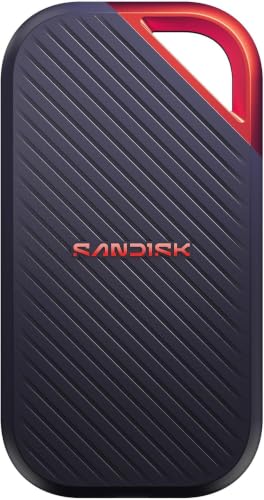
- Up to 4000MB/s transfer speed
- 3100MB/s sustained write performance
- IP65 protection and 3m drop resistance
Best For: High-volume video editors needing rugged, fast portable storage
Compact Thunderbolt Choice
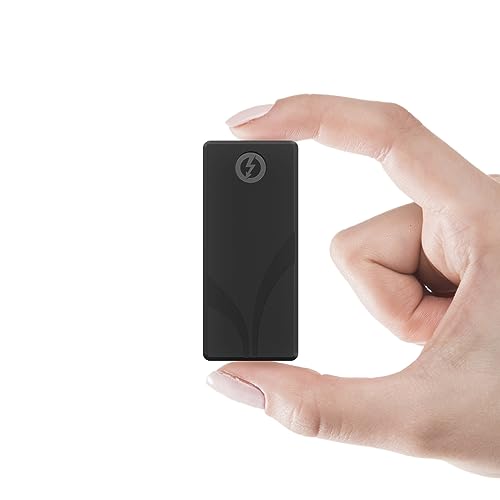
- Up to 2700MB/s via Thunderbolt 3
- Falls back to 900MB/s USB 3.2 Gen 2
- Includes Thunderbolt and USB-C to USB-A cables
Best For: Portable 4K/6K editors who want compact Thunderbolt storage
Budget-Friendly Mobile Pick

- Up to 1050MB/s read and 1000MB/s write
- Supports iPhone 4K60Hz ProRes HDR capture
- Lightweight 36.6g aluminum design
Best For: Mobile creators needing a compact USB-C SSD for everyday editing
Rugged Premium Performer
SANDISK Professional PRO-G40 SSD

- Up to 3000MB/s read via Thunderbolt 3
- Dual-mode Thunderbolt 3 and USB-C support
- IP68 resistance with 3m drop protection
Best For: Professional video editors needing rugged high-speed portable storage
Creator-Grade Speed

- Up to 2,000MB/s transfer speeds
- Works with PCs, Macs, Android, and more
- Drop-resistant up to 3 metres
Best For: Editors and creators who need fast, durable storage
Rugged Pocket Drive

- Up to 1,600MB/s speeds
- IP67 dust and water resistance
- 4-foot drop protection
Best For: Traveling creators who need a rugged compact SSD
Balanced High-Speed Pick

- Up to 2,100MB/s read speeds
- 2TB capacity for large projects
- IP65 and 3m drop resistance
Best For: Users who want speed, capacity, and wide compatibility
Creator Speed Pick
Samsung T9 Portable SSD 1TB, 2,000 MB/s

- Up to 2,000MB/s read/write speeds
- Thermal control for longer heavy-use sessions
- AES 256-bit encryption and Magician Software
Best For: Editors who want the fastest transfer speed for large video files
Rugged Storage Choice
Sandisk Extreme Portable SSD 2TB

- 2TB capacity for larger video libraries
- Up to 1050MB/s read and 1000MB/s write
- IP65 resistance and 3-meter drop protection
Best For: Editors who need more capacity and tougher everyday protection
Rugged All-Rounder
Samsung T7 Shield Portable SSD 2TB
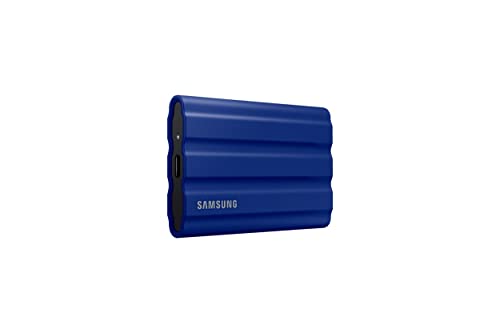
- Up to 1,050/1,000 MB/s speeds
- IP65-rated water, dust, and drop resistance
- Works with PC, Mac, Android, consoles, and iPhone 15 Pro
Best For: Editors who need a durable drive for travel and field shoots
Pro-Grade Speed – Sandisk 2TB Extreme PRO Portable SSD
If you want an external ssd for video editing that can keep up with large timelines and heavy media moves, this SanDisk Extreme PRO model is built for demanding work. It emphasizes sustained performance, fast transfer speeds, and rugged protection for editors who need reliable storage on set or in the studio.
Best For: Editors moving high-volume 4K/12K projects who want fast, durable portable storage.
Pros:
- Up to 4000MB/s transfer speeds for very fast project moves.
- 3100MB/s average sustained write speeds help long transfers stay reliable.
- IP65 rating and up to 3m drop protection add travel-ready durability.
- 256-bit AES encryption helps protect private files.
Cons:
- Top sustained performance is listed for the 2TB-4TB models.
- Best results depend on a compatible high-speed connection.
This is a strong fit for editors who prioritize speed under load rather than just peak benchmark numbers. The added durability and file security make it especially practical for mobile production workflows.
Compact Thunderbolt Choice – SABRENT Rocket Nano XTRM 4TB
This external ssd for video editing is aimed at users who want Thunderbolt performance in a very small package. The Sabrent Rocket Nano XTRM offers fast project transfers for 4K and 6K work, plus fallback USB support for more flexible day-to-day use.
Best For: Mac, PC, and Linux editors who want a pocketable Thunderbolt 3 drive with high capacity.
Pros:
- Up to 2700MB/s over Thunderbolt 3 for fast editing and transfers.
- Falls back to USB 3.2 Gen 2 at up to 900MB/s.
- Very compact 4TB aluminum design for portable workflows.
- Both Thunderbolt and USB-C to USB-A cables are included.
Cons:
- Peak speeds require a Thunderbolt 3 connection.
- USB fallback speed is much lower than Thunderbolt mode.
If your workflow moves between studios, laptops, and client sites, this drive is built for convenience as much as speed. Its small size and included cables make it easy to deploy without extra accessories.
Budget-Friendly Mobile Pick – SSK 1TB USB-C Portable SSD
For creators looking for an external ssd for video editing without going straight to a premium Thunderbolt model, this SSK drive offers solid USB-C performance. It is positioned as a fast, lightweight option for everyday transfers, mobile work, and even iPhone 4K ProRes capture.
Best For: Mobile editors and creators who want a lightweight USB-C SSD for fast everyday workflows.
Pros:
- Up to 1050MB/s read and 1000MB/s write over USB 3.2 Gen2.
- Supports 4K60Hz ProRes HDR video capture for iPhone.
- Very lightweight at 36.6g with a compact aluminum alloy case.
- Includes USB-C and USB-A cables for wider device compatibility.
Cons:
- 1TB capacity may be limiting for larger editing libraries.
- SLC cache performance applies only within the cache capacity.
This is a practical pick when portability and compatibility matter more than top-tier workstation speeds. It should suit lighter editing tasks, backups, and on-the-go capture workflows well.
Rugged Premium Performer – SANDISK Professional PRO-G40 SSD
If you need an external ssd for video editing that combines fast Thunderbolt performance with serious ruggedness, the SanDisk Professional PRO-G40 is a strong contender. It is designed for high-speed transfers, dual-mode connectivity, and difficult production environments where dust, water, and drops are real concerns.
Best For: Professional editors who need fast Thunderbolt storage with rugged all-weather protection.
Pros:
- Up to 3000MB/s read speed over Thunderbolt 3.
- Dual-mode support works with Thunderbolt 3 and USB-C 10Gbps devices.
- IP68 dust/water resistance and up to 3m drop protection.
- Cool aluminum core helps maintain fast transfer speeds.
Cons:
- Peak performance depends on Thunderbolt 3.
- USB-C mode is slower than Thunderbolt mode.
This drive makes sense for editors who want a premium balance of speed, compatibility, and durability. The exFAT formatting also makes it ready for cross-platform use out of the box.
Creator-Grade Speed – Samsung T9 Portable SSD 2TB
If you need an external ssd for video editing, the Samsung T9 is built around fast workflow transfers with up to 2,000MB/s sequential read and write speeds. It pairs that speed with broad compatibility across PCs, Macs, Android devices, game consoles, and even 12K cameras, making it a flexible choice for moving large video files.
Best For: Editors, YouTubers, and other creative professionals who want a fast, compact drive for large media projects.
Pros:
- Up to 2,000MB/s read/write speeds for fast transfers.
- Includes USB-C to C and USB-C to A cables for flexible setup.
- Drop-resistant up to 3 metres with a non-slip surface.
- Dynamic Thermal Guard helps protect against overheating.
Cons:
- Uses USB 3.2 Gen 2×2, so peak performance depends on compatible hardware.
- Premium feature set may be more than casual users need.
Overall, the T9 is the strongest all-round option here for fast editing workflows, especially if you regularly move large project folders or footage between devices. Its mix of speed, durability, and broad compatibility makes it easy to recommend as a primary portable editing drive.
Rugged Pocket Drive – DATO ARES Amber Shield 1TB
The DATO ARES Amber Shield is a compact external ssd for video editing if your workflow needs speed and toughness in a small package. It reaches up to 1,600MB/s and adds IP67 dust and water resistance, plus a 4-foot drop rating, so it is geared toward everyday travel and rougher conditions.
Best For: Creators who want a rugged, pocket-sized drive for fast transfers and field use.
Pros:
- Up to 1,600MB/s performance for quick file transfers.
- IP67 dust and water resistance for added protection.
- Survives a 4-foot free drop for better portability confidence.
- Includes USB-C to C and USB-C to A cables.
Cons:
- 1TB capacity may feel limited for larger video libraries.
- Performance is below the fastest drives in this roundup.
This is a strong pick if you value durability as much as speed and want a drive that can handle travel, outdoor shoots, or daily carry. It is less about maximum capacity and more about dependable performance in a small, rugged enclosure.
Balanced High-Speed Pick – Crucial X10 2TB Portable SSD
The Crucial X10 is a practical external ssd for video editing when you want a mix of speed, capacity, and broad device support. It offers up to 2,100MB/s read speeds, 2TB of storage, and compatibility with Windows, Mac, iPad Pro, Chromebooks, Android, Linux, PS4, PS5, and Xbox, so it fits a wide range of editing and transfer setups.
Best For: Editors who want a fast 2TB portable SSD with broad cross-device compatibility.
Pros:
- Up to 2,100MB/s read speeds for fast access to media files.
- 2TB capacity gives plenty of room for videos, backups, and photos.
- IP65 dust and water resistance with drop resistance up to 3 metres.
- Works across Windows, Mac, Android, iPad Pro, Linux, and consoles.
Cons:
- Only read speed is listed at 2,100MB/s, so write performance is not specified here.
- Durability is good, but not as extreme as some fully rugged drives.
The X10 stands out as a versatile middle ground: fast enough for editing workflows, large enough for serious projects, and flexible enough to move between many devices. If you want one drive that can handle work, backups, and general use, this is an easy option to consider.
Creator Speed Pick – Samsung T9 Portable SSD 1TB, 2,000 MB/s
If you want an external ssd for video editing that prioritizes speed, the Samsung T9 is built for heavy project loads. It advertises sustained read and write speeds up to 2,000MB/s, plus thermal control designed to stay cool during longer transfers and edits.
Best For: Creators who want top-tier transfer speed for editing, loading, and moving large video files.
Pros:
- Up to 2,000MB/s read and write speeds for fast project handling
- Dynamic Thermal Guard helps control heat during heavy use
- Broad compatibility with desktop, camera, gaming console, Mac, PC, tablet, and iPhone 15 Pro
- Includes AES 256-bit hardware encryption and Magician Software support
Cons:
- Only 1TB capacity in this listing, which may be tight for larger video libraries
- Best speeds depend on a compatible setup
Overall, the T9 is the fastest option in this group and the strongest fit when smooth offload and quick editing workflow matter most. It leans more toward performance than ruggedness, but it still adds durable construction and good drive-management features.
Rugged Storage Choice – Sandisk Extreme Portable SSD 2TB
This external ssd for video editing is a solid pick if you need dependable storage with more room for footage. The SanDisk Extreme Portable SSD offers up to 1050MB/s read speeds, 2TB of capacity, and protection features aimed at travel and field work.
Best For: Editors who need portable 2TB storage with a tougher build for on-the-go use.
Pros:
- 2TB capacity gives you more room for video projects and source media
- Up to 1050MB/s read and 1000MB/s write speeds
- IP65 water and dust resistance plus up to 3-meter drop protection
- Includes password protection with 256-bit AES hardware encryption
Cons:
- Slower than the Samsung T9 for speed-focused workflows
- Listed as an old model
The appeal here is balance: decent NVMe performance, large capacity, and a rugged design that suits location shoots or travel. If your priority is durability and space over absolute speed, this one makes sense.
Rugged All-Rounder – Samsung T7 Shield Portable SSD 2TB
The Samsung T7 Shield is a practical external ssd for video editing when you want fast transfers and extra durability. It delivers up to 1,050/1,000 MB/s speeds, 2TB of storage, and an IP65-rated design that can handle water, dust, and drops.
Best For: Editors who want a rugged 2TB drive with fast enough performance for field work and everyday editing.
Pros:
- Up to 1,050MB/s read and 1,000MB/s write speeds
- IP65 water and dust resistance for tougher environments
- Drop resistant up to 9.8 feet
- Compatible with PC, Mac, Android devices, gaming consoles, and iPhone 15 Pro
Cons:
- Not as fast as the Samsung T9 for maximum-speed transfers
- Speed depends on USB 3.2 Gen 2 support and host device compatibility
For creators who move between studio and location, the T7 Shield is the most balanced rugged pick here. It combines strong protection, broad compatibility, and enough speed for most editing workflows.
How We Picked the Best External SSD for Video Editing
We focused on real-world editing needs: sustained transfer speed, connection compatibility, durability, capacity options, and value. For an External SSD for Video Editing, advertised peak speeds matter less than how consistently a drive performs when moving large clips, caches, and project files.
We also considered whether the drive fits common creator setups, including USB-C laptops, desktop workstations, and Thunderbolt-equipped systems.
Quick Comparison
In general, Thunderbolt models are the best fit for heavy 4K or multi-cam workflows, while fast USB 3.2 drives cover most solo editors, travel rigs, and backup duties. Ruggedized drives are a smart choice for field work, and higher-capacity models are better for long-form projects, proxy storage, and active media libraries.
Key Buying Factors for External SSD for Video Editing
Speed and Interface
Match the drive to your port. A USB 3.2 Gen 2 drive is usually plenty for straightforward 1080p and many 4K projects. If you regularly move huge files or want the highest possible scratch-disk performance, Thunderbolt 3 or 4 is worth paying for.
Capacity
1TB is a practical minimum for many editors, but 2TB or 4TB is often better if you keep active projects, camera originals, and exports on the same drive. Bigger drives also tend to maintain workflow flexibility over time.
Durability
If you edit on location, look for drop resistance, IP-rated protection, and a metal or rugged shell. A durable drive matters when your footage travels with you.
Thermal Performance
Long transfers can slow down compact drives if they run hot. Drives with better cooling and stronger enclosures are usually more consistent during sustained workloads.
Compatibility
Make sure the drive works with your camera cards, laptop ports, and operating system. Some ultra-fast drives need a matching host port to reach their rated speeds.
Who Should Buy Which External SSD for Video Editing?
Choose Thunderbolt SSDs if you edit high-bitrate footage, work with large timelines, or want a premium scratch disk. Pick fast USB-C models if you need a balanced mix of speed, portability, and price. Go with rugged drives if you work in the field, travel often, or need dependable backup storage between shoots.
If your editing is lighter, a midrange portable SSD can still make a huge difference versus a hard drive. The right choice is the one that matches your footage size, connection standard, and mobility needs.