
The best document cameras for live streaming make it easier to show books, artwork, handwritten notes, products, and close-up demonstrations without crowding the frame.
We selected 10 options across wireless, USB, 4K, and budget categories so you can match image quality, coverage, connectivity, and setup convenience to your workflow.
Best 10 Document Cameras for Live Streaming Picks for 2026
Best Wireless Pick
IPEVO VZ-X Wireless Document Camera
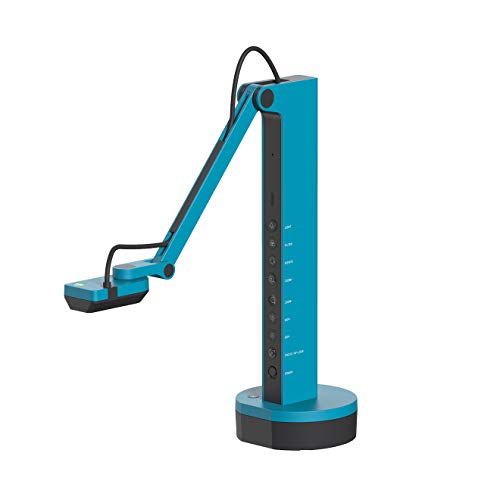
- Wi-Fi, HDMI, and USB connectivity
- Up to 9–12 hours of battery life
- Near-4K USB capture and Full HD video
Best For: Mobile classroom and presentation setups
Best Webcam Hybrid

- 4K video at up to 30 fps
- Automatic low-light compensation
- Adjustable 65°, 78°, and 90° framing
Best For: Streaming and meetings with occasional document views
Best Feature-Rich Option

- 12MP camera with Full HD at 60 fps
- Document camera, webcam, and scanner modes
- Visualizer supports annotation and three-camera PiP
Best For: Interactive teaching and multi-camera demonstrations
Best USB Value
IPEVO V4K Ultra HD Document Camera

- 8MP capture up to 3264 x 2448
- Full HD streaming at up to 30 fps
- Works with Mac, Windows, and Chromebook
Best For: Plug-in classroom demonstrations and live lessons
Flexible Focus Pick
Manual-Focus USB Document Camera

- Manual focus for controlled clarity
- 20.4-inch height and 360-degree rotation
- Foldable design with built-in microphone
Best For: Computer-based teaching, tutoring, and live demonstrations
Large-Format 4K Pick

- 8MP capture up to 2448P at 30 fps
- Covers A3-size materials
- Brightness controls and dual microphones
Best For: Large-page teaching and detailed live demonstrations
Software-Rich Choice
INSWAN INS-1 USB Document Camera

- 8MP capture at up to 3264 × 2448
- Autofocus, macro mode, and built-in LED
- Documate annotation and recording tools
Best For: Software-assisted lessons, demos, and video conferencing
Flexible Streaming Pick
5MP Auto-Focus Document Camera

- A3 coverage with a 360-degree flexible gooseneck
- Three-level LED and five ISO exposure settings
- Works with OBS, Zoom, Mac, Windows, and Chromebooks
Best For: Teachers and streamers needing flexible positioning and close-up demos
Compact Classroom Option
8MP Foldable USB Document Camera

- 8MP imaging with A3 and A4 document coverage
- Foldable arm with multi-angle positioning
- Three LED levels and 10 exposure settings
Best For: Teachers needing a portable camera for large documents and objects
High-Resolution Live Demo Pick

- 8MP capture with listed 4K video and 30 fps transmission
- A3 coverage, autofocus, and 3.94-inch macro focus
- Dual microphones and three-level LED lighting
Best For: Educators and demonstrators prioritizing resolution and integrated audio
Best Wireless Pick – IPEVO VZ-X Wireless Document Camera
For document cameras for live streaming, the IPEVO VZ-X stands out when wireless flexibility matters. It offers Wi-Fi, HDMI, and USB connectivity, with Full HD video in Wi-Fi and HDMI modes and near-4K capture through USB.
Best For: Teachers and presenters who need to move around a room while showing documents, objects, or demonstrations.
Pros:
- Three connection options support computers, mobile devices, displays, projectors, and TVs.
- Wireless range reaches up to 33 feet, with 9–12 hours of battery life.
- Swiveling head, multi-jointed stand, and built-in LED support flexible setup.
- Sony 8MP sensor and Ambarella processing help with focus, noise reduction, and color.
Cons:
- Wireless and HDMI modes are limited to 1920 x 1080 capture.
- At 2.6 pounds, it is heavier than a basic USB document camera.
- Manual focus may require occasional adjustment.
The VZ-X is a versatile choice for presenters who value cable-free operation and broad device compatibility. Choose USB when maximum image detail is more important than wireless convenience.
Best Webcam Hybrid – Logitech Brio Ultra 4K Webcam
The Logitech Brio is a webcam-first option for document cameras for live streaming, particularly if your setup also includes meetings and on-camera presentation. It records up to 4K at 30 fps and includes autofocus, digital zoom, adjustable framing, and automatic low-light adjustment.
Best For: Streamers and presenters who want one compact camera for webcam video, calls, and occasional close-up demonstrations.
Pros:
- Supports Ultra HD 4K video at up to 30 fps.
- RightLight 3 adjusts exposure and contrast in glare or backlighting.
- Three diagonal field-of-view settings help frame a person or more of the room.
- Dual omnidirectional microphones include noise-canceling technology.
Cons:
- It is designed as a compact webcam rather than a dedicated overhead document camera.
- Its 5x zoom is digital rather than optical.
- The listed operating-system compatibility is centered on Windows, Mac, and ChromeOS computers.
The Brio makes sense when live streaming documents is only part of your workflow. For frequent overhead shots of papers or objects, a dedicated document-camera stand may be more practical.
Best Feature-Rich Option – CZUR Fancy S Pro 12MP
The CZUR Fancy S Pro combines a document camera, webcam, and scanner in one USB device, making it a flexible choice among document cameras for live streaming. It can stream Full HD at up to 60 fps, capture up to 4K at 15 fps, and work with CZUR Visualizer for annotation, recording, rotation, and picture-in-picture features.
Best For: Teachers and creators who want live demonstrations, close-range capture, annotation tools, and multi-camera layouts.
Pros:
- 12MP camera captures 2D and 3D subjects, with a maximum A3 capture area.
- Full HD streaming reaches up to 60 fps for smooth motion.
- Multi-jointed design focuses as close as 3.9 inches for detailed near-range views.
- Visualizer supports annotation, recording, scanning functions, and up to three-camera PiP layouts.
Cons:
- CZUR Visualizer must be installed for the listed visualization features.
- A separate scanning mat is required for document-scanning use.
- 4K capture is limited to up to 15 fps.
The Fancy S Pro is a strong fit for interactive teaching and production-oriented setups. Its software features add value, but users should plan for the required software and optional scanning mat.
Best USB Value – IPEVO V4K Ultra HD Document Camera
The IPEVO V4K is a straightforward USB model for document cameras for live streaming. Its 8MP Sony CMOS sensor captures up to 3264 x 2448 images, while Full HD streaming reaches up to 30 fps for responsive demonstrations on Mac, Windows, and Chromebook systems.
Best For: Educators and presenters who want a dedicated, plug-in document camera for computer-based streaming.
Pros:
- USB connection works with Mac, PC, and Chromebook software and applications.
- Full HD streaming at up to 30 fps helps reduce lag during live demonstrations.
- Fast autofocus supports switching between different materials.
- Multi-jointed stand and 13.46 x 10.04-inch maximum shooting area suit common documents.
Cons:
- It does not offer Wi-Fi or HDMI connectivity.
- There is no zoom function.
- Higher-resolution 3264 x 2448 capture is limited to up to 15 fps.
The V4K is a practical wired choice when reliable computer connectivity matters more than portability. Its autofocus and 30-fps Full HD streaming make it well suited to everyday lessons and live demos.
Flexible Focus Pick – Manual-Focus USB Document Camera
If you need document cameras for live streaming that can handle demonstrations, video calls, and online lessons, this 2MP USB model offers a flexible setup. Its manual-focus lens lets you fine-tune clarity, while the tall, rotating arm helps frame objects at different heights and angles.
Best For: Teachers, tutors, and presenters who want manual focus and a foldable, adjustable camera for computer-based streaming.
Pros:
- Manual focus helps maintain a precise, realistic image during demonstrations.
- Flexible arm reaches up to 20.4 inches and rotates 360 degrees.
- Foldable design is easier to store and carry.
- Built-in noise-reducing microphone and compatibility with Windows, Mac, and Chromebook computers.
Cons:
- Requires a computer for normal operation and is not compatible with iPads or mobile phones.
- Its 2MP resolution is lower than the 8MP models in this roundup.
- Manual focus requires more hands-on adjustment than autofocus.
This is a practical choice when framing flexibility and focus control matter more than maximum resolution. Verify your computer and software setup before buying, especially on Mac systems.
Large-Format 4K Pick – Kitchbai 8MP Visualiser
For document cameras for live streaming that need to show large pages or objects, this Kitchbai visualiser combines 8MP imaging with an A3-size coverage area. Brightness controls, one-touch focus, image reversal, and dual microphones make it well suited to live lessons and demonstrations.
Best For: Teachers and presenters showing A3 documents, 2D materials, or 3D objects in well-controlled computer-based broadcasts.
Pros:
- 8MP sensor outputs up to 2448P video at 30 fps.
- Large maximum coverage area supports A3-size materials.
- Three brightness levels help compensate for challenging lighting.
- Foldable multi-joint design, dual microphones, and compatibility with Windows, macOS, and Chrome OS.
Cons:
- It must connect by USB to a compatible computer for streaming.
- The listed resolution is 2448P rather than a confirmed 3840 × 2160 4K output.
- Its larger, extended form may need more setup space when in use.
This model stands out for its broad capture area and higher-resolution sensor. It is a strong fit for educators who need to keep full-size pages or larger demonstrations visible while streaming.
Software-Rich Choice – INSWAN INS-1 USB Document Camera
Among document cameras for live streaming, the INSWAN INS-1 is a versatile option for users who want strong image detail plus software tools. Its 8MP camera supports 30-fps streaming, while autofocus, LED lighting, image controls, and bundled Documate software simplify live presentation workflows.
Best For: Educators and presenters who want autofocus, built-in lighting, and annotation or recording tools for PC and Mac streaming.
Pros:
- 8MP imaging supports up to 3264 × 2448 pixels and 30-fps video.
- Autofocus and macro capability capture subjects as close as 3.9 inches.
- Seven-segment brightness control, LED light, image flip, and anti-glare sheet help with varied setups.
- Documate software includes annotation, digital zoom, rotation, snapshots, and video recording.
Cons:
- It uses a USB-A cable, so newer USB-C-only computers may need an adapter.
- Its stated operating-system support varies by platform and version, so compatibility should be checked before purchase.
- The viewing area is smaller than the A3 coverage offered by the Kitchbai model.
The INS-1 is a well-rounded choice when autofocus and presentation software are priorities. Its lighting and image-adjustment controls make it particularly useful for classrooms, demonstrations, and conference calls with changing exposure conditions.
Flexible Streaming Pick – 5MP Auto-Focus Document Camera
For creators and educators comparing document cameras for live streaming, this THUSTAND model combines a 5MP sensor, Full HD video up to 30 fps, and a flexible gooseneck design. It covers A3-sized materials and works with popular platforms including Zoom, Meet, Teams, TikTok, and OBS.
Best For: Teachers, tutors, and streamers who need flexible positioning, close-up demonstrations, and manual exposure control.
Pros:
- 5MP sensor with up to 2592×1944 still resolution and 1080p video.
- 360-degree gooseneck adjustment and A3 coverage support varied demonstrations.
- Three-level LED lighting, five ISO settings, autofocus, and macro capture to 3.94 inches.
- USB-C connectivity and broad Mac, Windows, and Chromebook compatibility.
Cons:
- Video resolution is listed as 1080p rather than 4K.
- Requires selecting “USB Camera” in system settings during first use.
This is a practical choice when positioning flexibility and lighting adjustments matter more than maximum video resolution. Its image-flip controls and OBS compatibility also suit overhead lessons and live product demonstrations.
Compact Classroom Option – 8MP Foldable USB Document Camera
This PAKOTOO model is a space-conscious option for document cameras for live streaming, with 8MP imaging, A3 coverage, and a foldable multi-joint design. Its physical controls provide image reversal, LED brightness adjustment, exposure adjustment, and one-button autofocus.
Best For: Classrooms and home teaching setups that value foldability, adjustable lighting, and large-format document coverage.
Pros:
- 8MP sensor with up to 2448P resolution and A3-size coverage.
- Foldable design and multi-joint arm make storage and repositioning easier.
- Three LED brightness levels and 10 exposure levels help manage uneven lighting.
- Autofocus and macro capture support detailed object demonstrations.
Cons:
- Does not support zoom or HDMI features.
- Not compatible with iPad.
- Requires selecting “USB Camera” in the computer’s system settings rather than being fully plug and play.
Choose this model if you want high-resolution classroom capture in a foldable body. Its limitations are most relevant to buyers who need HDMI output, optical zoom, or direct tablet connectivity.
High-Resolution Live Demo Pick – 8MP 4K USB Visualiser
For buyers seeking document cameras for live streaming with high-resolution capture, this THUSTAR visualiser offers an 8MP sensor, listed 4K video capture, and transmission up to 2448P at 30 fps. It also includes A3 coverage, a foldable body, built-in dual microphones, and compatibility with OBS, Zoom, Teams, TikTok, and other supported software.
Best For: Live demonstrators and educators who want high-resolution overhead video, built-in microphones, and flexible image controls.
Pros:
- 8MP imaging with listed 4K video capture and up to 30 fps transmission.
- A3 coverage, autofocus, and macro focus down to 3.94 inches support varied subjects.
- Fourteen LED beads with three brightness levels help with difficult lighting.
- Dual built-in microphones and broad Windows, macOS, and Chrome OS compatibility.
Cons:
- Uses USB 2.0 connectivity.
- Image reversal and brightness adjustments are manual rather than fully automatic.
- The supplied notes do not indicate HDMI output.
This is the strongest fit of the three for high-resolution live demonstrations, particularly when integrated audio is useful. The foldable construction and manual controls add flexibility for teaching, product showcases, and overhead presentations.
How We Picked the Best Document Cameras for Live Streaming
We focused on the features that have the greatest impact during real-time teaching, demonstrations, and presentations: resolution, autofocus or manual focus behavior, capture area, connection options, microphone availability, lighting, and physical flexibility. We also considered compatibility with common computers and web-conferencing software, since a camera that is difficult to recognize or position can undermine otherwise strong image quality.
The selection includes dedicated overhead document cameras as well as webcam-style models that can handle documents, objects, and face-to-camera streaming. Product claims such as 4K support or A3 coverage should be checked against the included software, lighting conditions, and computer requirements.
Quick Comparison
| Priority | Look for | Best suited to |
|---|---|---|
| Wireless flexibility | Wi-Fi plus HDMI and USB | Mobile classrooms and uncluttered setups |
| Sharpest image | 4K capture and strong optics | Fine print, artwork, and product details |
| Large materials | A3 coverage and adjustable arms | Textbooks, worksheets, and demonstrations |
| Simple setup | Plug-and-play USB | Remote lessons and everyday streaming |
| Low-light work | Built-in LED lighting | Desks, classrooms, and evening sessions |
Key Buying Factors for Document Cameras for Live Streaming
Resolution and Image Control
Higher resolution can preserve small text and fine detail, but lighting and lens quality matter just as much. Autofocus is convenient for changing subjects, while manual focus can be preferable when you want a stable image during handwriting or close-up work. Look for image rotation, mirroring, or inversion controls if your software does not provide them.
Connection and Compatibility
USB is usually the simplest option for Windows, macOS, Chromebooks, and streaming applications. HDMI can connect directly to a display or switcher, while Wi-Fi reduces cable clutter but may introduce network setup and latency considerations. Confirm that your computer has the necessary USB port and that your chosen application can select the camera as a video source.
Coverage, Stand, and Lighting
A3 support gives you more room for books, worksheets, and demonstrations than A4-only designs. Check the arm’s height, rotation range, folding ability, and base stability. Built-in LEDs help with shadows, but adjustable room lighting and a matte work surface can still improve readability.
Audio and Streaming Workflow
Some models include microphones, but a dedicated headset or USB microphone may deliver clearer speech, especially in noisy rooms. If you switch frequently between your face and documents, prioritize software or hardware that makes camera selection and scene changes quick.
Who Should Buy Which Document Cameras for Live Streaming?
Choose a wireless, multi-connection model if you move between rooms or need HDMI output. Pick a 4K camera when viewers must inspect small print, artwork, electronics, or product details. A foldable A3 USB model is a practical choice for teachers who want broad coverage without a complicated installation. For occasional worksheets, notes, or demonstrations, an affordable plug-and-play USB camera may provide the best value. If audio quality is central to your classes, treat the built-in microphone as a convenience and budget separately for a better external mic.