
Scanning bound books is easier with the right document camera. These systems capture open pages from above, helping preserve books while reducing the need to press spines flat on a conventional scanner.
Our 2026 shortlist covers compact USB models, professional book scanners, and large-format cameras with features such as auto-flattening, OCR, glare control, and page-turn assistance.
Best 10 Document Cameras for Book Scanning Picks for 2026
Best Professional Book Scanner

- 24MP camera with 320 DPI capture
- Flattening technology for curved pages
- A3 support, HDMI, and 180+ language OCR
Best For: High-quality book digitization and large-format scanning
Best 4K Presentation Camera

- 4K capture with a 13MP Sony sensor
- Flexible A3-capable arm and autofocus
- OCR, annotation, and recording software
Best For: Live demonstrations, artwork, and large book spreads
Best Portable Book Scanner

- About one-second scanning per page
- A3/A4 support with smart page processing
- Foldable 4-pound design with foot pedal
Best For: Portable scanning of thinner books and flat documents
Best Budget Document Camera

- 8MP Sony CMOS sensor
- Up to 30 fps Full HD streaming
- Mac, Windows, and Chromebook support
Best For: Live demonstrations and remote teaching
Best Overall
CZUR Aura Pro Book & Document Scanner

- About two seconds per page with JPG, Word, PDF, and searchable PDF output
- Laser-assisted flattening helps capture curved book pages
- 180+ OCR languages plus glare-free, adjustable lighting
Best For: Fast book digitization with OCR and curved-page correction
Best for Teaching
NetumScan 13MP Book Document Camera

- Automatic skew correction and mass scanning simplify page capture
- Live projection and video recording support lessons and presentations
- Foldable design, adjustable bracket, and stepless dimming
Best For: Teachers needing scanning plus live display and recording
Best Portable Option
CZUR Shine Ultra Pro Document Scanner

- 24MP sensor with 5696×4272 listed resolution
- Flattens curved book surfaces through pixel transformation
- 90-degree foldable, height-adjustable design weighs about two pounds
Best For: Portable, high-resolution book scanning and document conversion
Best Large-Format Choice

- A2 capture area for oversized books and maps
- 26MP camera with enhanced detail
- Automatic flattening, finger removal, and OCR
Best For: Large-format books, newspapers, maps, and manuscripts
Best for High-Resolution Bulk Scanning

- 38MP sensor with 410 DPI output
- Flattens curved pages without unbinding books
- Fast page capture and broad OCR support
Best For: High-volume A3 book scanning and searchable archives
Best Simple Pick
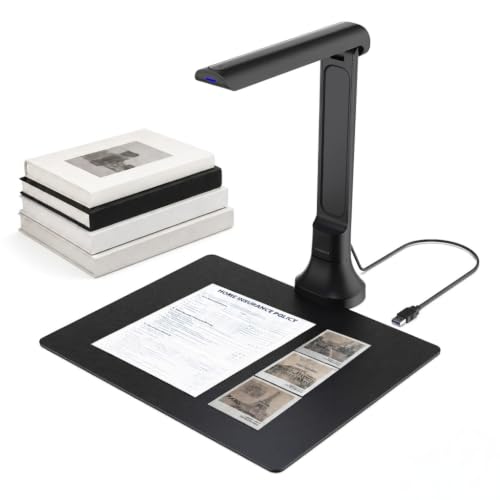
- Foldable 350 g design for mobile setups
- 16MP autofocus camera for books and objects
- OCR, text-to-speech, and Gemini features
Best For: Portable scanning, teaching, remote learning, and accessibility
Best Professional Book Scanner – CZUR ET24 Pro
The CZUR ET24 Pro is a strong choice among document cameras for book scanning when you need high-resolution captures, page-flattening assistance, and support for large A3 materials. Its 24MP camera, three-angle lighting, HDMI connectivity, and ABBYY OCR make it suited to demanding digitization workflows.
Best For: High-volume book scanning, A3 materials, and users who want advanced flattening and OCR features.
Pros:
- 24MP camera captures up to 5696 × 4272 resolution at 320 DPI.
- Flattening technology helps correct curved book pages, including thicker books.
- Supports A3-size documents and OCR in more than 180 languages.
- Includes HDMI, three-angle lighting, and a real-time preview display.
Cons:
- Very glossy or glare-prone paper is not recommended.
- Thai and Hebrew OCR are unsupported; Arabic support depends on the operating system.
- The unit weighs 4.5 kg and is less portable than compact models.
Choose the ET24 Pro if image quality, curved-page handling, and broad document support matter more than portability. Its software and system compatibility are extensive, but check the supported operating system and OCR-language requirements before buying.
Best 4K Presentation Camera – INSWAN INS-2 UHD 4K
The INSWAN INS-2 is a versatile option among document cameras for book scanning, especially when you also need clear live presentations. Its 4K video, A3 capture area, flexible arm, autofocus modes, and Documate software support both scanning and classroom or exhibition use.
Best For: Educators, art instructors, and users scanning large documents or two-page spreads while presenting them live.
Pros:
- 13MP Sony sensor provides 4K Ultra HD capture at 30 fps.
- Flexible multi-joint arm handles documents and artwork up to A3 size.
- Includes autofocus, macro capability, brightness control, built-in LED, and an anti-glare sheet.
- Documate software adds OCR, annotation, recording, and whiteboard tools.
Cons:
- Its 13MP resolution is lower than the CZUR ET24 Pro’s 24MP camera for still scanning.
- Compatibility requires newer platforms for some devices, including macOS 13.5+ and iPadOS 17+.
- It uses a USB connection and does not list HDMI output.
The INS-2 is most compelling when book scanning is part of a broader presentation setup. It offers useful capture controls and software features, though dedicated archival scanning may favor a higher-resolution book-scanner design.
Best Portable Book Scanner – CZUR Shine Ultra
The CZUR Shine Ultra is a practical portable choice among document cameras for book scanning. It scans pages in about one second, supports A3 and A4 materials, and combines document-camera functionality with automatic cropping, page processing, and OCR.
Best For: Portable scanning of thinner books, flat documents, and mixed-size materials in home, office, or remote-learning settings.
Pros:
- Scans at roughly one second per page for efficient workflows.
- 13MP camera supports A3 and A4 materials with automatic cropping and smart paging.
- Patented technology helps flatten curved pages from thinner books.
- Foldable, height-adjustable design weighs about 4 pounds and includes a foot pedal.
Cons:
- Flattening technology is intended for thinner books; CZUR recommends the ET series for thicker books.
- Not compatible with Android or iOS.
- Thai, Hebrew, and Arabic are not supported for OCR.
The Shine Ultra balances speed, portability, and useful page-processing tools. It is a good fit for everyday book and document projects, but users digitizing thick volumes or needing mobile-device compatibility should consider alternatives.
Best Budget Document Camera – IPEVO V4K Ultra HD
The IPEVO V4K is a straightforward option among document cameras for book scanning when live viewing, demonstrations, and web conferencing are priorities. Its 8MP Sony CMOS sensor, fast autofocus, high frame rate, and multi-jointed stand make it useful for capturing book pages and other materials in real time.
Best For: Live book-page demonstrations, remote teaching, web conferencing, and users who want a compact USB camera.
Pros:
- 8MP camera captures still images up to 3264 × 2448 pixels.
- Streams up to 30 fps in Full HD for smooth live demonstrations.
- Fast autofocus helps when switching between pages and other materials.
- Works with Mac, Windows, and Chromebook systems and includes a multi-jointed stand.
Cons:
- It does not provide dedicated book-flattening or OCR features in the supplied specifications.
- Maximum shooting area is about 13.46 × 10.04 inches, smaller than A3-capable models.
- No optical or digital zoom is listed.
The V4K is better suited to live capture than automated book digitization. Choose it for responsive demonstrations and flexible software compatibility, but look to a dedicated book scanner if you need page flattening, batch workflows, or built-in OCR.
Best Overall – CZUR Aura Pro Book & Document Scanner
For shoppers comparing document cameras for book scanning, the CZUR Aura Pro combines fast page capture with curved-page flattening and built-in lighting. It scans a page in about two seconds and exports to JPG, Word, PDF, or searchable PDF.
Best For: Users digitizing books and documents who want fast scanning, broad OCR support, and a reading-light function.
Pros:
- Three laser lines help flatten curved book pages for clearer captures.
- Scans in approximately two seconds per page.
- OCR supports more than 180 languages and exports searchable files.
- Includes glare-free lighting with four color-temperature settings.
Cons:
- Thai, Hebrew, and Arabic are not supported by the OCR.
- Requires a USB connection rather than Wi-Fi or Bluetooth.
- Mac users need macOS 12 or later on Intel systems, or macOS 13 or later on Apple Silicon.
The Aura Pro is a strong all-around choice when book flattening, OCR, and speed matter more than wireless operation. Its compatibility covers modern Windows and Mac systems, along with older Windows versions listed by the manufacturer.
Best for Teaching – NetumScan 13MP Book Document Camera
The NetumScan is a flexible option among document cameras for book scanning, especially if you also need live projection or video recording. Its 13MP CMOS sensor captures up to A4 size, while automatic correction and batch scanning reduce manual work.
Best For: Teachers and presenters who need book scanning alongside real-time display, video recording, and adjustable illumination.
Pros:
- Automatic correction can fix skewed images, and mass scanning requires only page turning.
- Supports Word, PDF, and text formats with AI-based multilingual OCR recognition.
- Provides live projection and video recording, including 4K video capture.
- Foldable aluminum-alloy body and retractable bracket improve portability and setup flexibility.
Cons:
- Capture size is limited to A4.
- Requires a USB connection and software installation on Windows, Mac OS, or Linux.
- It is not water resistant.
The NetumScan stands out as a multipurpose camera rather than a scanner-only device. Stepless dimming, autofocus, and adjustable positioning make it practical for teaching, meetings, music scores, and everyday document capture.
Best Portable Option – CZUR Shine Ultra Pro Document Scanner
For portable document cameras for book scanning, the CZUR Shine Ultra Pro offers a foldable USB design with a 24MP sensor. It can digitally flatten curved pages and save scans as JPG, PDF, searchable PDF, Word, or Excel files.
Best For: Users who want high-resolution book scanning and a compact scanner that is easy to transport.
Pros:
- 24MP CMOS sensor provides a listed resolution of 5696×4272.
- Pixel transformation helps flatten 3D curved book surfaces.
- Exports to JPG, PDF, searchable PDF, Word, and Excel.
- Folds to 90 degrees, offers height adjustment, and weighs about two pounds.
Cons:
- Requires a USB connection and compatible computer software.
- Mac compatibility starts at macOS 12 for Intel systems and macOS 13 for Apple Silicon.
- The supplied notes do not specify a scanning speed or OCR language count.
The Shine Ultra Pro is a sensible pick when portability and high-resolution output are priorities. Its curved-page processing and broad file-format support make it suitable for digitizing books while traveling or working in limited spaces.
Best Large-Format Choice – VIISAN S21 A2 Book Scanner
For shoppers comparing document cameras for book scanning, the VIISAN S21 stands out when you need a large capture area and book-focused image processing. Its adjustable A2/A3 design accommodates oversized books, newspapers, maps, and manuscripts, while the bundled software can flatten curved pages and split facing pages.
Best For: Large-format books, maps, newspapers, manuscripts, and users who need OCR plus automated book cleanup.
Pros:
- A2 capture area supports documents up to 594 × 420 mm.
- 26MP resolution and software-enhanced output up to 600 DPI capture fine detail.
- Software can flatten curved pages, remove fingers, repair edges, and split double-page scans.
- OCR exports scans to PDF, Word, Excel, EPUB, and text formats.
Cons:
- Bundled OfficeCam software is not compatible with ARM-based devices such as Surface Pro X.
- Glossy or highly reflective paper is not recommended, and built-in LEDs are not intended for bright conditions.
- Uses a USB 2.0 connection.
The S21 is a strong fit for archival and oversized scanning projects, especially if automated page correction matters. Confirm your computer uses a supported Windows or macOS architecture before buying.
Best for High-Resolution Bulk Scanning – CZUR ET MAX Book Scanner
The CZUR ET MAX is a compelling option among document cameras for book scanning when detail, speed, and compatibility are priorities. Its 38MP sensor, A3 scanning area, curve-flattening technology, and fast page capture are suited to digitizing bound books and larger documents without unbinding them.
Best For: High-volume book scanning, searchable archives, A3 documents, and users who want Windows, macOS, or Ubuntu support.
Pros:
- 38MP CMOS sensor produces 7168 × 5376 images at 410 DPI.
- Curve-flattening technology corrects distortion in bound books.
- Can scan a page in about 1.5 seconds with practiced operation.
- OCR supports more than 180 languages and creates editable or searchable files.
Cons:
- Not recommended for glossy or highly reflective materials.
- Arabic OCR has operating-system limitations, while Thai and Hebrew are not supported.
- Linux support is limited to Ubuntu 20.04 through 24.04.
Choose the ET MAX if you expect long scanning sessions and want a high-resolution A3 camera with rapid workflow potential. Its language and operating-system limits are worth checking before purchase.
Best Simple Pick – VIISAN DB8401 Document Camera
If portability and everyday versatility matter most, the VIISAN DB8401 is a practical pick among document cameras for book scanning. Its 16MP autofocus camera handles books, papers, receipts, photos, and 3D objects, while the foldable body and plug-and-play Windows/macOS setup suit mobile workspaces.
Best For: Home offices, classrooms, remote learning, accessible reading, and occasional book or document digitization.
Pros:
- Compact 350 g foldable design is easy to transport and store.
- Autofocus 16MP camera supports books, documents, and 3D objects.
- OCR can create editable Word, Excel, PDF, and searchable text files.
- Text-to-speech and Gemini integration support reading aloud, translation, and summaries through the web interface.
Cons:
- Its 16MP resolution is lower than the other listed scanners.
- Gemini features require the VisualCam Lite Web UI in Chrome and access to Gemini.
- Designed for Windows and macOS rather than the wider Linux compatibility offered by the CZUR model.
The DB8401 makes the most sense when a scanner also needs to function as a portable presentation camera and accessibility tool. It offers convenient OCR and AI-assisted features, but heavy archival work may favor a higher-resolution model.
How We Picked the Best Document Cameras for Book Scanning
We focused on the features that matter when digitizing bound books rather than ordinary single-page documents. The selection includes cameras from 8MP to 38MP, models for A3 and A2 pages, and scanners designed for classrooms, offices, archives, and home libraries.
We also considered software compatibility, capture speed, lighting, autofocus, OCR support, portability, and page-curvature correction. A high megapixel count helps, but it is only useful when paired with even illumination, reliable focus, and software that can process curved pages.
Quick Comparison
| Priority | Look For | Best Fit |
|---|---|---|
| Maximum detail | 24MP or higher, stable stand, strong software | Archival work and large pages |
| Portability | Foldable design, USB power, compact footprint | Students, teachers, and mobile users |
| Easy book capture | Auto-flattening, finger removal, page-turn tools | Frequent bound-book scanning |
| Teaching and demonstrations | Fast live preview, microphone, broad OS support | Classrooms and video meetings |
| Text conversion | OCR with export to searchable formats | Researchers and office users |
Key Buying Factors for Document Cameras for Book Scanning
Resolution and Capture Area
Choose resolution based on the smallest text, illustrations, and page size you need to preserve. A3 coverage is suitable for most books and magazines, while A2 support benefits oversized art books, maps, and newspapers. More resolution also gives you flexibility to crop without losing legibility.
Page Flattening and Book-Friendly Design
Curved pages can distort text near the binding. Look for software or hardware that corrects page curvature, removes fingers from the image, and splits facing pages into separate files. A stable overhead arm and adjustable book cradle can improve consistency.
Lighting, Focus, and Glare Control
Integrated LEDs help maintain even exposure, but glossy pages may still reflect light. Autofocus is convenient for mixed materials, while manual focus can be preferable for repeatable archival work. Check whether the camera supports exposure and white-balance adjustments.
Software, OCR, and Compatibility
Confirm support for your operating system before buying. Windows and macOS support is common, while Chromebook and Linux compatibility varies. OCR can turn scans into searchable or editable documents, but results depend on print quality, language support, page curvature, and contrast.
Speed and Workflow
For occasional scans, simple USB capture may be enough. Heavy users should prioritize batch processing, automatic page detection, timed capture, duplex or facing-page workflows, and exports to PDF, JPEG, TIFF, or searchable PDF.
Who Should Buy Which Document Cameras for Book Scanning?
Choose a compact portable model if you need a scanner for classes, travel, demonstrations, or occasional home use. These models save space and are usually simple to connect.
Choose a higher-resolution professional scanner for research collections, rare books, detailed illustrations, or frequent batch scanning. The larger footprint can be worthwhile when image quality and productivity matter most.
Choose a model with strong flattening and OCR tools if your goal is searchable digital books rather than basic snapshots. Choose broad OS support and live video features for teaching, remote collaboration, or document demonstrations.
Before ordering, measure your largest book, verify the included software for your computer, and check whether the stand, lighting, and capture area fit your workspace.