
If you need a sharper way to show worksheets, lab setups, books, or product details, a document camera with optical zoom can make a big difference. It gives you more real zoom than digital-only models, helping preserve clarity when you move in closer.
Below, we’ve rounded up 10 strong options for classrooms, presentations, hybrid teaching, and live demos, with a focus on image quality, ease of use, and practical zoom performance.
Best 10 Document Camera with Optical Zoom Picks for 2026
Professional Classroom Pick
INEBIZ IB280 10x Optical Zoom Document Camera

- 10x optical zoom with 30x digital zoom
- HDMI and USB connectivity for flexible setup
- LED light plus autofocus for clearer presentations
Best For: Teachers who need a practical classroom document camera with optical zoom
High-Resolution Large-Format Pick
INS-2 UHD 4K 13MP Document Camera

- 4K output with a 13MP sensor
- A3 capture for documents and artwork
- Dual autofocus and built-in LED lighting
Best For: Educators and artists who need detailed large-format capture
Premium Connected Classroom Pick
ELMO TT-12W STEM-CAM Visual Presenter

- 12x optical zoom with 192x total zoom
- HDMI, USB, Ethernet, and Wi-Fi connectivity
- Android platform supports educational apps
Best For: Advanced classrooms and STEM programs needing broad connectivity
Compact Teaching Pick
INSWAN INS-1 Classic USB Document Camera

- 8MP capture with 30 fps streaming
- Autofocus and LED light for classroom use
- USB plug-and-play with broad compatibility
Best For: Remote teaching and everyday desktop demonstrations
Premium Classroom Visualizer
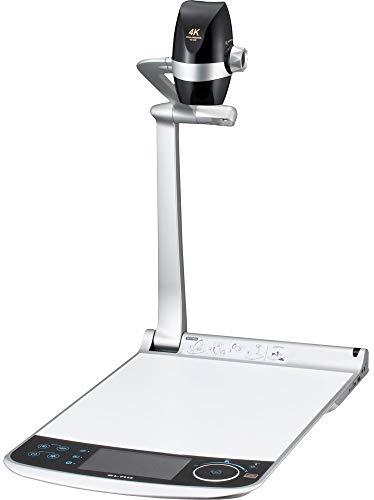
- 12x optical zoom with 12x digital and 2x sensor zoom
- 4K capture and 60fps Full HD recording support
- 5-inch LCD monitor with touch-screen navigation
Best For: teachers and presenters needing a full-featured visualizer
Flexible Teaching Pick
JOYUSING V508 100x Digital Zoom

- 8MP sensor with autofocus and 100x digital zoom
- 3-level dimmable LED lights for tougher lighting
- HDMI and USB support for PC-free or computer use
Best For: teachers needing a flexible classroom visualizer
High-Zoom 4K Pick
JOYUSING V1X-4K 12x Optical Zoom

- 12x optical zoom and 10x digital zoom
- 4K Ultra HD at 30fps with 13MP imaging
- HDMI/VGA support for PC-free projection
Best For: educators wanting strong zoom and 4K clarity
Classroom Zoom Pick
12MP 9X Zoom USB Document Camera

- 9x lossless zoom with remote control
- Moves enlarged images in all directions
- Includes LED light, mic, speaker, and USB hub
Best For: Teachers who need flexible zoom and remote image control
Reliable Everyday Choice
IPEVO V4K 8MP USB Document Camera

- 8MP Ultra HD capture up to 3264 x 2448
- Fast focusing with smooth 30 fps streaming
- Works with Mac, Windows, and Chromebook
Best For: Simple, reliable live demos and remote teaching
Premium Zoom Leader
Elmo TT-12G 4K Interactive Document Camera
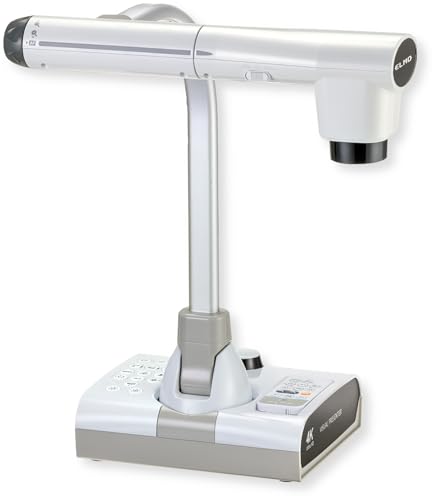
- 12x optical zoom with 192x total zoom
- 4K imaging with 12MP sensor
- HDMI, USB, and VGA outputs
Best For: Classrooms and presenters needing maximum zoom and flexibility
Professional Classroom Pick – INEBIZ IB280 10x Optical Zoom Document Camera
If you want a document camera with optical zoom for teaching, the INEBIZ IB280 is built around flexible classroom use. Its 10x optical zoom, 30x digital zoom, autofocus, and LED light make it easier to show documents, small objects, and demos clearly through HDMI, USB, or webcam use.
Best For: Teachers and presenters who need a compact, wired document camera with strong zoom and simple classroom connectivity.
Pros:
- 10x optical zoom plus 30x digital zoom for close-up viewing.
- Autofocus and manual focus help keep text and objects clear.
- HDMI and USB support make it easy to connect to displays or computers.
- LED light, freeze, split-screen, and remote controls add teaching flexibility.
Cons:
- Not a wireless model, so setup depends on cables.
- 2MP sensor is more modest than higher-resolution classroom options.
- Best suited to practical presentation use rather than premium imaging.
Overall, the IB280 focuses on the features that matter most in a teaching environment: optical zoom, quick adjustments, and broad display compatibility. It is a straightforward choice if you need reliable real-time projection without extra complexity.
High-Resolution Large-Format Pick – INS-2 UHD 4K 13MP Document Camera
This document camera with optical zoom search often leads to models built for image clarity first, and the INS-2 stands out for large-format capture. It uses a 13MP sensor with 4K output, dual auto-focus, built-in LED lighting, and A3 support for documents, artwork, and classroom displays.
Best For: Educators and art instructors who need detailed capture of large documents, artwork, or two-page spreads.
Pros:
- 4K Ultra HD capture with a 13MP SONY sensor.
- A3-size coverage works well for large documents and artwork.
- Dual-mode autofocus, brightness control, and anti-glare sheet improve presentation quality.
- Compatible with Windows, Mac, Chromebook, iPad, and major meeting apps.
Cons:
- Uses digital zoom rather than optical zoom.
- Designed more for image quality and workflow than portability.
- Some advanced software features require using Documate.
If your priority is sharp, flexible capture across bigger surfaces, the INS-2 is a strong fit. It is especially useful when readability, framing, and classroom compatibility matter more than compact size.
Premium Connected Classroom Pick – ELMO TT-12W STEM-CAM Visual Presenter
If you need a document camera with optical zoom for a more advanced classroom or lab setup, the ELMO TT-12W brings a lot of connectivity and control. Its 12x optical zoom, 16x digital zoom, multiple autofocus options, and HDMI, USB, Ethernet, and Wi-Fi support make it suitable for richer presentation environments.
Best For: Schools, trainers, and STEM programs that want a feature-rich visual presenter with extensive input and wireless options.
Pros:
- 12x optical zoom with 192x total zoom for flexible framing.
- Wide connectivity includes HDMI, USB, Ethernet, and Wi-Fi.
- Built-in remote dock helps keep the remote organized.
- Android-based platform supports educational apps.
Cons:
- Heavier and larger than simpler classroom document cameras.
- Likely more camera than basic users need.
- Premium feature set may be unnecessary for simple plug-and-play setups.
The TT-12W is best viewed as a higher-end visual presenter for users who want zoom, network options, and app support in one unit. It is a strong match when the presentation workflow is more demanding than a standard classroom demo.
Compact Teaching Pick – INSWAN INS-1 Classic USB Document Camera
For buyers comparing a document camera with optical zoom, the INSWAN INS-1 is a simple USB option focused on everyday teaching and live demos. It offers 8MP image capture, autofocus, built-in LED lighting, and plug-and-play compatibility with common classroom and meeting software.
Best For: Teachers and remote presenters who want a compact USB document camera for distance learning and online teaching.
Pros:
- 8MP capture with smooth 30 fps video streaming.
- Autofocus, macro capability, and anti-glare sheet help with close-up presentation.
- USB plug-and-play setup keeps installation simple.
- Works with Windows, Mac, iPad, and Chromebook.
Cons:
- Uses digital zoom rather than optical zoom.
- Best for desktop use rather than larger presentation spaces.
- Compact design may limit flexibility compared with higher-end models.
The INS-1 is a practical entry-level choice if you want a lightweight, easy-to-use document camera for everyday instruction. It keeps the setup simple while still covering the core features most teachers need.
Premium Classroom Visualizer – ELMO PX-30E 12x Optical Zoom
If you want a document camera with optical zoom that feels more like a presentation tool than a basic visualizer, the ELMO PX-30E brings serious capability to classrooms and training spaces. Its 12x optical zoom, 12x digital zoom, and 2x sensor zoom give you flexible close-up framing, while the 5-inch LCD preview monitor makes setup and adjustments easier on the fly.
Best For: Teachers, trainers, and presenters who need high-resolution capture, zoom flexibility, and onboard preview control.
Pros:
- 12x optical zoom plus 12x digital zoom and 2x sensor zoom for detailed close-ups
- 4K capture and recording support, including 4K at 30fps and Full HD at 60fps
- 5-inch high-resolution LCD monitor with touch-screen navigation
- HDMI, VGA, USB, and HDBaseT-compatible output options
Cons:
- Not a compact or lightweight option for simple portable use
- Designed more for full-featured presentation setups than quick plug-and-play portability
The PX-30E is a strong fit when image quality and zoom range matter more than keeping things minimal. It stands out if you want a premium classroom document camera with optical zoom and a built-in preview screen for smoother live use.
Flexible Teaching Pick – JOYUSING V508 100x Digital Zoom
The JOYUSING V508 is a practical document camera for teachers who need easy setup, live projection, and strong close-up flexibility. While it uses digital zoom rather than optical zoom, its 100x digital zoom, autofocus, and 8MP sensor make it a capable choice for sharing worksheets, books, and small objects in a classroom or remote lesson.
Best For: Teachers and remote instructors who want a versatile, easy-to-connect document camera for projection and recording.
Pros:
- 8MP CMOS sensor captures up to 3264 x 2448 images
- Autofocus and 100x digital zoom help with close-up viewing
- 3-level dimmable LED lights improve visibility in darker settings
- Works with Windows, Mac, and Chromebook, with HDMI and USB connectivity
Cons:
- No optical zoom, so all magnification is digital
- 4-inch screen is smaller than some higher-end classroom models
For buyers comparing document cameras for teaching, the V508 is a solid all-around option if you value convenience and lighting control. It is especially appealing when you need a straightforward visualizer that can work with or without a computer.
High-Zoom 4K Pick – JOYUSING V1X-4K 12x Optical Zoom
If you specifically want a document camera with optical zoom for detailed classroom or presentation work, the JOYUSING V1X-4K is built around that need. Its 12x optical zoom, 10x digital zoom, and 13MP 4K Ultra HD imaging give you a large amount of room to frame documents and objects clearly, whether you are connected to a computer or running in direct display mode.
Best For: Educators and presenters who want 4K imaging, strong optical zoom, and PC-free projection options.
Pros:
- 12x optical zoom paired with 10x digital zoom for flexible framing
- 4K Ultra HD output at 30fps, plus 1080p at 60fps
- 13.0MP camera and large capture area for classroom materials
- Works with Windows and macOS, with HDMI/VGA projection support
Cons:
- Heavier than simpler classroom models at 4.3 kg
- Software download is a separate step before use on a computer
The V1X-4K is the most zoom-focused pick here and makes sense if detail retention is a priority. It combines optical zoom with 4K output, so it fits well in rooms where you need both flexibility and sharp image quality.
Classroom Zoom Pick – 12MP 9X Zoom USB Document Camera
If you want a document camera with optical zoom for classroom demos, this 12MP model gives you plenty of flexibility. It supports 9x lossless zoom, autofocus with one-button focus lock, and remote-controlled image movement, so you can enlarge details and still keep the view centered during lessons or live demos.
Best For: Teachers, remote presenters, and anyone who needs remote-controlled zoom and image adjustment.
Pros:
- 9x lossless zoom with remote-controlled zoom in/out
- Can move enlarged images up, down, left, and right
- 12MP capture with 4K HD output up to 3840 x 3120
- Includes LED light, mic, speaker, and 2-port USB hub
Cons:
- Zoom movement only works after the image is enlarged
- Zoom-in/zoom-out is limited at resolutions above 1944P
- Best suited to USB-connected classroom and conferencing setups
Overall, this is a feature-heavy teaching camera that emphasizes control and flexibility over simplicity. If you need zoom, image repositioning, and broad software compatibility in one classroom-ready unit, it covers the essentials well.
Reliable Everyday Choice – IPEVO V4K 8MP USB Document Camera
For buyers comparing a document camera with optical zoom against a simpler classroom option, the IPEVO V4K focuses on steady image quality and ease of use. It does not include zoom, but it does deliver 8MP Ultra HD capture, fast focusing, and a high frame rate for smooth live demos and distance learning.
Best For: Users who want a dependable, straightforward USB document camera for live teaching and conferencing.
Pros:
- 8MP sensor captures up to 3264 x 2448 Ultra HD images
- Streams up to 30 fps at Full HD for lag-free use
- Fast focusing helps when switching materials often
- Compatible with Mac, Windows, and Chromebook
Cons:
- No zoom function
- Does not offer optical zoom for close detail work
- Capture area is smaller than some larger classroom models
The V4K is a strong pick if you value image clarity and compatibility more than magnification features. It is better for smooth everyday presentations than for users who specifically need zoom capability.
Premium Zoom Leader – Elmo TT-12G 4K Interactive Document Camera
If you need a document camera with optical zoom and serious presentation flexibility, the Elmo TT-12G is built for that job. It combines 12x optical zoom with 16x digital zoom for 192x total zoom, plus 4K imaging, a flexible multi-angle arm, and multiple output options for classroom and hybrid teaching.
Best For: Power users, classrooms, and presentation setups that need maximum zoom and connection flexibility.
Pros:
- 12x optical zoom plus 16x digital zoom for 192x total zoom
- 4K Ultra HD imaging with 12MP sensor
- Flexible multi-angle arm and large 18.5 x 10.2-inch capture area
- HDMI, USB, and VGA outputs for modern and legacy devices
Cons:
- Heavier and larger than basic USB document cameras
- More feature-rich than many casual users will need
- Likely best suited to fixed classroom or office setups
This is the most capable zoom-focused option in the group, especially if optical zoom is a priority. It is a smart choice when you want high detail, broad connectivity, and room to handle larger teaching materials.
How We Picked the Best Document Camera with Optical Zoom
We focused on models that combine dependable optical zoom with useful everyday features such as autofocus, built-in lighting, HDMI or USB connectivity, and easy compatibility with common operating systems and teaching setups. Since a Document Camera with Optical Zoom is often used in fast-paced environments, we gave extra weight to controls that are simple, stable, and quick to adjust.
We also favored cameras that balance zoom range with image quality. Higher zoom numbers only matter if the picture stays readable, so sensor quality, focus behavior, and output options all played a role in our selection.
Quick Comparison
Think of these options in three broad groups: classroom-friendly USB models for everyday teaching, presentation-focused cameras with stronger optical zoom and more output flexibility, and premium visual presenters with advanced imaging or built-in displays. If you mainly share documents over Zoom, Teams, or a classroom display, ease of connection may matter more than maximum zoom. If you present small objects, textbook details, or science demos, stronger optical zoom and better close-up clarity will matter more.
Key Buying Factors for a Document Camera with Optical Zoom
Optical Zoom Vs. Digital Zoom
Optical zoom is the feature that actually preserves detail as you enlarge the image. Digital zoom can be useful as a secondary tool, but it often reduces sharpness. If clarity matters most, prioritize optical zoom first and treat digital zoom as a bonus.
Resolution and Sensor Quality
For text, diagrams, and tiny objects, higher resolution helps the camera hold detail at different zoom levels. A strong sensor can also improve color accuracy and low-light performance, which is especially useful in classrooms with mixed lighting.
Focus, Lighting, and Stability
Autofocus saves time when switching between papers, books, and 3D objects. Built-in LED lighting helps reduce shadows, and a stable arm or base keeps the image steady during live demonstrations.
Connections and Compatibility
Choose HDMI if you want a direct display connection, USB if you plan to use a computer, and multi-platform support if you work across Windows, Mac, or Chromebook environments. The best Document Camera with Optical Zoom is the one that fits your workflow without extra setup.
Who Should Buy Which Document Camera with Optical Zoom?
Teachers and trainers who need a simple daily-use camera should look for plug-and-play USB models with autofocus and LED lighting. Presenters who value stronger image control and display flexibility should consider higher-end options with HDMI and broader zoom ranges. If you need live demo versatility, science demonstration support, or clearer close-ups of small details, prioritize optical zoom, output options, and robust autofocus over extra software features.
For most buyers, the right choice comes down to where the camera will be used most often: classroom, office, conference room, or hybrid setup. Match the zoom and connection options to that setting, and you’ll get much better results than by chasing specs alone.