
Compact SDI converters make it easier to connect cameras, monitors, switchers, and consumer HDMI equipment without adding bulky rack hardware. The right model depends on your signal direction, resolution, audio needs, and whether you need conversion, distribution, or format scaling.
This roundup compares 10 compact SDI converters, including HDMI-to-SDI and SDI-to-HDMI models, bidirectional units, distribution hardware, and options supporting HD through 12G-SDI.
Best 10 Compact Sdi Converters Picks for 2026
Portable Signal Bridge
Micro Converter HDMI to SDI 3G

- Automatic SD, HD, and 3G-SDI detection
- HDMI input with dual SDI outputs
- Compact design with signal reclocking
Best For: Portable HDMI-to-SDI conversion
Format Flexibility

- Up/down/cross-converts SD and HD SDI
- Automatic SD, HD, and 3G-SDI detection
- Two SDI outputs with reclocking
Best For: SDI standards conversion
Audio-Ready Monitoring
- Supports 3G, HD, and SD-SDI
- HDMI output plus SDI loopout
- Eight-channel digital audio support
Best For: SDI camera monitoring on HDMI displays
Multi-Output Distribution
Mini Converter SDI Distribution

- One SDI input feeds eight outputs
- Automatic SD, HD, and 3G-SDI switching
- Reclocking with embedded-audio support
Best For: Distributing one SDI source to multiple devices
Budget 1080p Pick
SHUITING SDI to HDMI Converter

- Converts SD, HD, and 3G-SDI to HDMI
- Supports up to 1080p with synchronized audio and video
- Adds SDI loop out in a metal plug-and-play housing
Best For: Affordable SDI camera monitoring on an HDMI display
Simple Compact Converter
Blackmagic Micro Converter SDI to HDMI 3G

- Offers HDMI Type A output for SDI sources
- Supports SD and HD video
- Combines a miniaturized design with metal construction
Best For: Compact SDI-to-HDMI monitoring setups
Most Flexible Pick
Blackmagic Micro Converter BiDirectional SDI/HDMI

- Handles SD, HD, and 3G-SDI video
- Includes HDMI input and output plus SDI connectivity
- Comes with a 5V universal supply and international adapters
Best For: Portable workflows requiring bidirectional SDI and HDMI conversion
Color-Calibrated Compact Converter
Micro Converter SDI to HDMI 12G
- 33-point 3D LUT support
- 3D LUT output through SDI loop
- Compact, robust metal body
Best For: SDI-to-HDMI monitoring with color calibration
Two-Way Workflow Pick
Micro Converter BiDirectional SDI/HDMI 12G

- Bidirectional SDI/HDMI conversion
- HDMI 2.0 input and output
- International power adapters included
Best For: Flexible camera, computer, and display connections
Dual-Output Signal Converter
Micro Converter HDMI to SDI 12G

- Two SDI video outputs
- 270Mb to 12G rate support
- Automatic detection and reclocking
Best For: Distributing HDMI to two SDI destinations
Portable Signal Bridge – Micro Converter HDMI to SDI 3G
For creators and production teams needing compact SDI converters, the Blackmagic Design Micro Converter HDMI to SDI 3G offers a small HDMI-to-SDI bridge with automatic format detection and dual SDI outputs. Its reclocking helps maintain signal quality across longer cable runs.
Best For: Portable HDMI-to-SDI conversion in professional video workflows.
Pros:
- Supports SD, HD, and 3G-SDI formats with automatic detection.
- Provides dual SDI outputs from an HDMI Type A input.
- Compact, lightweight design measures about 3.01 x 1.80 x 0.98 inches.
- Reclocking helps preserve signal integrity over long cable runs.
Cons:
- Converts HDMI to SDI rather than operating as a bidirectional converter.
- Its compact form is designed for conversion, not broad standards-conversion features.
This is a practical pick when portability, dual outputs, and straightforward HDMI-to-SDI conversion matter more than advanced format processing.
Format Flexibility – Mini Converter UpDownCross HD
Among compact SDI converters, the Blackmagic Design Mini Converter UpDownCross HD stands out for standards conversion. It can convert and up/down/cross-convert SD and HD SDI formats, with automatic SD/HD/3G-SDI detection and two SDI outputs.
Best For: Production setups that need SDI format conversion between SD and HD standards.
Pros:
- Converts and up/down/cross-converts SD and HD SDI formats.
- Automatically detects SD, HD, and 3G-SDI signals.
- Includes two SDI outputs and omnidirectional SD reclocking.
- Includes a stated two-year warranty.
Cons:
- It is a standards converter rather than a general-purpose HDMI-to-SDI bridge.
- The supplied notes do not specify dimensions or weight as compact as the micro-converter models.
Choose this model when format compatibility is the priority and your workflow needs SDI up-conversion, down-conversion, or cross-conversion in one unit.
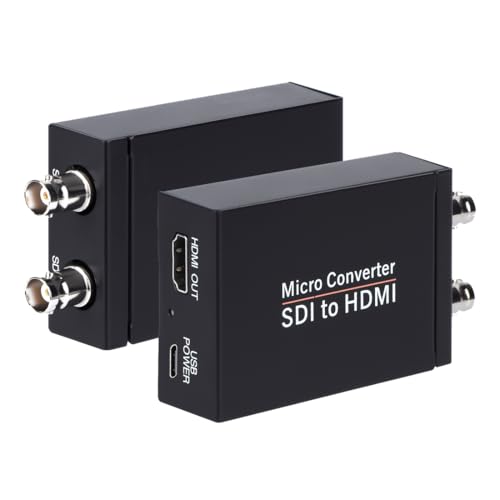
Audio-Ready Monitoring – SDI to HDMI Converter
The Anber-Tech SDI to HDMI Converter is a focused choice among compact SDI converters for sending SDI video to an HDMI display. It supports 3G-SDI, HD-SDI, and SD-SDI, while also offering stereo audio de-embedding, an HDMI output, and an SDI loopout.
Best For: Connecting SDI cameras or sources to HDMI monitors, televisions, or projectors.
Pros:
- Supports 3G-SDI, HD-SDI, and SD-SDI with automatic format detection.
- Provides one HDMI output and one SDI loop output.
- Supports eight channels of 48 kHz digital audio.
- Supports cable runs up to 300 feet for 3G-SDI, 500 feet for HD-SDI, and 1,000 feet for SD-SDI.
Cons:
- It is not bidirectional and cannot convert HDMI to SDI.
- The supplied notes identify a one-year warranty.
This converter makes sense for monitoring or routing SDI sources to HDMI equipment, especially when audio de-embedding and an SDI loopout are useful.
Multi-Output Distribution – Mini Converter SDI Distribution
For installations that need to feed several devices, the Blackmagic Design Mini Converter SDI Distribution is a strong distribution-focused option among compact SDI converters. It accepts SD, HD, and 3G-SDI signals and provides eight reclocked outputs, with support for embedded audio and ancillary data.
Best For: Splitting one SDI source across multiple monitors, recorders, or other SDI equipment.
Pros:
- Provides eight reclocked SDI outputs from one input.
- Automatically switches among SD, HD, and 3G-SDI formats.
- Supports ASI, ancillary data, and embedded audio.
- Includes a redundant SDI input for mission-critical workflows.
Cons:
- It is a distribution amplifier, not a video-direction or format-conversion tool.
- Its eight-output design may be more than needed for a simple point-to-point setup.
This is the most suitable choice here when reliable SDI signal distribution is more important than converting between HDMI and SDI or changing video standards.
Budget 1080p Pick – SHUITING SDI to HDMI Converter
For a straightforward setup using compact SDI converters, this SHUITING model converts SD-SDI, HD-SDI, or 3G-SDI input to HDMI for a television, monitor, or projector. It supports up to 1080p and includes an SDI loop output, making it practical for basic video monitoring without 4K requirements.
Best For: SDI camera users who need an affordable 1080p HDMI display connection with loop-through capability.
Pros:
- Converts SD, HD, and 3G-SDI signals to HDMI output.
- Supports up to 1920x1080p with synchronized audio and video.
- Includes SDI loop out and a durable metal housing.
- Plug-and-play design with heat dissipation.
Cons:
- Does not support 4K resolution.
- Converts SDI to HDMI only; it does not convert HDMI to SDI.
- Requires a BNC male coaxial cable and does not support RF, CVBS, AHD, TVI, or CVI signals.
This is a sensible choice when you need basic SDI-to-HDMI conversion in a compact, easy-to-install package. Confirm your source outputs SDI and that 1080p is sufficient before buying.
Simple Compact Converter – Blackmagic Micro Converter SDI to HDMI 3G
The Blackmagic Design Micro Converter SDI to HDMI 3G is a compact option for converting SDI video to HDMI. Its miniaturized format, metal housing, and rugged connectors suit tabletop installations involving monitors, projectors, or televisions.
Best For: Users who want a small, purpose-built SDI-to-HDMI converter for SD and HD video equipment.
Pros:
- Provides an HDMI Type A output.
- Supports SD and HD video conversion.
- Uses a robust metal housing and rugged connectors.
- Includes a power supply.
Cons:
- This model provides SDI-to-HDMI conversion rather than bidirectional conversion.
- The supplied notes do not indicate 4K support.
- Designed around a single HDMI output channel.
Choose this model when small size and a durable enclosure matter more than extra conversion directions or advanced routing. It is a focused converter for connecting SDI sources to an HDMI display.
Most Flexible Pick – Blackmagic Micro Converter BiDirectional SDI/HDMI
Among compact SDI converters, the Blackmagic Design Micro Converter BiDirectional stands out for two-way SDI and HDMI connectivity. It accepts SD, HD, or 3G-SDI as well as HDMI, and includes an SDI output that automatically matches the incoming SDI, HD, or 3G-SDI video input.
Best For: Portable setups that may need both SDI-to-HDMI and HDMI-to-SDI connections.
Pros:
- Supports SD, HD, and 3G-SDI video input.
- Includes HDMI Type A input and output.
- Provides bidirectional SDI/HDMI conversion flexibility.
- Includes a 5V universal power supply with international socket adapters.
Cons:
- The supplied specifications do not indicate 4K support.
- Its extra conversion flexibility may be unnecessary for one-way SDI-to-HDMI use.
- Power requirements are specified at 5V DC.
This is the strongest fit when your workflow changes between SDI and HDMI equipment. Its portable metal design and universal power supply make it particularly useful for mobile or varied production setups.
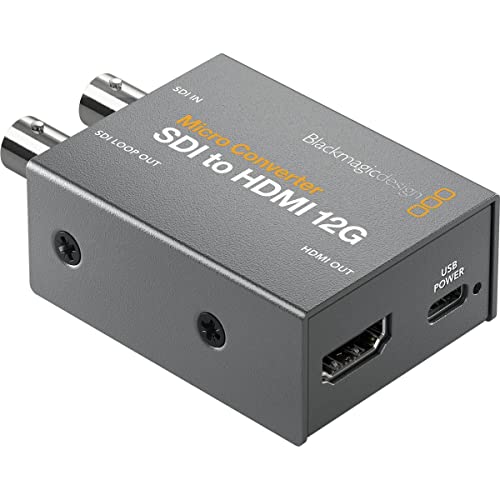
Color-Calibrated Compact Converter – Micro Converter SDI to HDMI 12G
For compact SDI converters that prioritize display output and color control, the Blackmagic Design Micro Converter SDI to HDMI 12G provides SDI-to-HDMI conversion in a small, durable metal enclosure. Its 33-point 3D LUT support adds useful calibration flexibility for compatible monitors, projectors, and televisions.
Best For: SDI sources that need HDMI monitoring with detailed 3D LUT color calibration.
Pros:
- Supports a 33-point 3D LUT for display color calibration.
- Can output the 3D LUT from the SDI loop output.
- Uses broadcasting technology in a compact, robust metal body.
Cons:
- Provides SDI-to-HDMI conversion rather than bidirectional conversion.
- The supplied notes list the main unit as the included component, so additional cabling may be needed.
This is a focused choice for monitoring workflows where compact construction and LUT functionality matter more than two-way signal conversion.
Two-Way Workflow Pick – Micro Converter BiDirectional SDI/HDMI 12G
Blackmagic Design Micro Converter BiDirectional SDI/HDMI 12G with Power Supply CONVBDC/SDI/HDMI12G/P
Check Price On AmazonAmong compact SDI converters, the Blackmagic Design Micro Converter BiDirectional SDI/HDMI 12G stands out for flexible signal routing. It includes SDI and HDMI 2.0 inputs, automatically matches the HDMI video input on its SDI output, and comes with a 5V universal power supply with international socket adapters.
Best For: Camera, computer, monitor, projector, and display setups that need bidirectional SDI/HDMI connectivity.
Pros:
- Supports bidirectional SDI and HDMI conversion.
- Provides one SDI input, one HDMI 2.0 input, and one HDMI 2.0 output.
- Includes a 5V universal power supply with international adapters.
Cons:
- At 3.54 x 2.32 x 0.98 inches and 386 g, it is less lightweight than the smallest converter designs.
- The supplied notes do not specify included signal cables.
This model is the most versatile option in the group when your setup may alternate between SDI-to-HDMI and HDMI-to-SDI tasks.
Dual-Output Signal Converter – Micro Converter HDMI to SDI 12G
For compact SDI converters designed to distribute an HDMI source, the Blackmagic Design Micro Converter HDMI to SDI 12G offers two SDI outputs and automatic matching to the HDMI input. It supports rates from 270Mb through 12G and automatically detects SD, HD, 2K, Ultra HD, and 4K formats.
Best For: Sending one HDMI source to two SDI destinations across a range of supported video formats.
Pros:
- Provides two SDI video outputs.
- Supports 270Mb, 1.5G, 3G, 6G, and 12G rates.
- Offers automatic format detection and SDI reclocking.
Cons:
- Converts HDMI to SDI only; bidirectional operation is not listed.
- The supplied notes list compatible computers and desktops but do not specify included power accessories.
This is a practical pick when you need dual SDI outputs, broad multi-rate support, and automatic handling of common SD through 4K formats.
How We Picked These Compact Sdi Converters
We selected models based on practical production requirements: supported SDI and HDMI standards, conversion direction, maximum resolution, loop-through or distribution capability, audio handling, power options, and portability. The list includes both single-purpose converters and flexible bidirectional designs so you can match the hardware to your signal path rather than pay for features you will not use.
We also considered common use cases such as connecting HDMI cameras to SDI infrastructure, sending SDI feeds to HDMI displays, extracting embedded audio, distributing one source to multiple outputs, and integrating 12G-SDI equipment into higher-bandwidth workflows.
Quick Comparison
| Need | Best fit | What to look for |
|---|---|---|
| HDMI source to SDI system | HDMI-to-SDI converter | 3G-SDI or 12G-SDI support and reliable reclocking |
| SDI camera to HDMI display | SDI-to-HDMI converter | Automatic format detection, embedded audio, and loop-out if needed |
| Flexible signal routing | Bidirectional converter | Selectable direction, compatible frame rates, and suitable bandwidth |
| One SDI feed to several destinations | SDI distribution converter | Multiple reclocked outputs and matching SDI level support |
| 4K or UHD production | 12G-SDI converter | 12G-SDI compatibility, appropriate HDMI version, and adequate power |
Key Buying Factors for Compact Sdi Converters
Signal Direction and Connectors
Start by identifying the source and destination. HDMI-to-SDI and SDI-to-HDMI converters are not interchangeable unless the product specifically supports both directions. A bidirectional model can simplify a mixed workflow, but dedicated converters may be quicker to deploy and easier to troubleshoot.
Resolution, Frame Rate, and SDI Bandwidth
For HD production, 3G-SDI is often sufficient. 12G-SDI is the better choice for 4K/UHD signals carried over a single SDI link. Confirm the exact resolution and frame-rate combinations supported by both the converter and your camera, switcher, recorder, or display; connector compatibility alone does not guarantee signal compatibility.
Audio and Monitoring Features
If audio is embedded in the video signal, check whether the converter passes it through, de-embeds it, or provides a separate output. Audio de-embedding can be valuable when feeding powered speakers, mixers, or monitoring equipment. A loop-out is useful when the same SDI source must continue to another device.
Power, Heat, and Portability
Compact units are convenient for mobile production, but they still need dependable power and ventilation. Check whether a power supply is included, whether the device accepts USB power, and whether its operating environment suits long shoots or fixed installations.
Who Should Buy Which Compact Sdi Converters?
Choose an HDMI-to-SDI model if your camera, laptop, or consumer video source must feed an SDI switcher, recorder, or long cable run. Choose an SDI-to-HDMI model for preview monitors, televisions, projectors, or HDMI capture devices.
Choose a bidirectional converter if your setup changes regularly or you want one compact tool for troubleshooting and occasional production work. Choose an SDI distribution model when one source must reach multiple SDI destinations without relying on improvised splitters.
Choose a 12G-SDI model when your workflow requires 4K/UHD over a single SDI connection. For standard HD installations, a 3G-SDI converter is usually the more economical and practical choice. Before ordering, verify the required cables, power supply, audio routing, and supported video formats across every device in the chain.