
Choosing among today’s 4K computer monitors is easier when you know what matters most: panel type, refresh rate, color accuracy, and ergonomics.
This roundup focuses on the best 10 options for different needs, from productivity and creator work to gaming and smart-TV-style flexibility.
Best 10 4K Computer Monitors Picks for 2026
Editor’s Pick
Dell 27 4K USB-C 120Hz Monitor

- 27-inch 4K IPS panel with 99% sRGB
- Up to 120Hz with AMD FreeSync Premium
- USB-C with up to 65W power delivery
Best For: A fast, color-accurate 4K monitor with simple single-cable connectivity
Large-Screen Choice
Samsung 32" ViewFinity S7 4K Monitor

- 32-inch 4K UHD IPS panel for extra workspace
- HDR10 with over 1 billion accurate colors
- Eye Saver Mode and flicker reduction for comfort
Best For: Professionals who want a roomy 4K display for work and creative tasks
Style Pick
Dell 27 S2725QS 4K Minimalist Monitor

- 27-inch 4K IPS with 99% sRGB color
- Up to 120Hz with AMD FreeSync Premium
- Ultra-thin bezels and ash white finish
Best For: Buyers who want a sleek 4K monitor with smooth motion and clean styling
Budget Productivity Pick
Samsung 27" ViewFinity S7 4K Monitor

- 27-inch 4K UHD display with high pixel density
- HDR10 and 178° wide viewing angle
- Eye Saver Mode helps reduce eye strain
Best For: Business and everyday users who want a simple 4K productivity monitor
Creator-Friendly 4K Pick
LG 27US500-W UltraFine 27-Inch 4K Monitor

- 27-inch IPS 4K display with wide viewing angles
- HDR10 and up to 90% DCI-P3 color support
- Onscreen Control and tilt-adjustable stand
Best For: Productivity users and creative work on a compact 4K screen
Budget Gaming 4K Monitor
Acer Nitro KG272K 27-Inch 4K IPS
- 27-inch IPS 4K panel with detailed image quality
- AMD FreeSync and up to 0.5ms GTG response time
- HDR10 and DCI-P3 95% support
Best For: Gamers who want responsive 4K performance on a 27-inch display
Premium 4K Comfort Pick

- 32-inch 4K UHD VA panel
- 120Hz with FreeSync Premium
- ComfortView Plus and built-in speakers
Best For: Comfort-focused work and mixed-use setups
Budget Big-Screen Option

- 32-inch Full HD display
- 75Hz with AMD FreeSync
- Borderless design and eye-care modes
Best For: Large-screen everyday use on a tighter budget
Value 4K Productivity Pick

- 4K IPS panel with 8-bit color
- HDMI 2.0 plus two DisplayPort 1.4 inputs
- FreeSync compatible with slim bezels
Best For: Productivity users who want flexible connectivity and 4K clarity
Editor’s Pick – Dell 27 4K USB-C 120Hz Monitor
If you want a versatile 4k computer monitor for both work and play, the Dell S2725QC is built around a sharp 27-inch 4K IPS panel with 120Hz smoothness. It also keeps the desk cleaner with USB-C connectivity and adds comfort features that make long sessions easier on the eyes.
Best For: Buyers who want a fast, color-accurate 4K monitor with USB-C and everyday comfort features.
Pros:
- 4K UHD IPS panel with 99% sRGB for vivid color and detailed visuals
- Up to 120Hz refresh rate plus AMD FreeSync Premium for smoother motion
- ComfortView Plus reduces harmful blue light emissions by up to 35%
- USB-C connection supports up to 65W power delivery for simpler cable management
Cons:
- 27-inch size may feel compact if you want more screen space
- Built-in speakers are improved, but audio-focused buyers may still prefer external speakers
This is a strong all-rounder if you want a modern 4K display that balances image quality, refresh rate, and desk-friendly connectivity. It fits especially well in mixed-use setups where one monitor needs to handle productivity, streaming, and light gaming.
Large-Screen Choice – Samsung 32" ViewFinity S7 4K Monitor
The Samsung 32-inch ViewFinity S7 is a practical 4k computer monitor for users who want more workspace without moving into a complex setup. Its 4K UHD resolution, HDR10 support, and 32-inch panel make it well suited to detailed office work, photo/video editing, and content that benefits from extra screen real estate.
Best For: Professionals who want a roomy 32-inch 4K display for productivity and creative work.
Pros:
- 32-inch 4K UHD IPS display gives you more room for complex layouts and multitasking
- HDR10 supports over 1 billion accurate colors with darker blacks and brighter highlights
- Eye Saver Mode reduces blue light and screen flicker for more comfortable viewing
- HDMI and DisplayPort connectivity keeps setup straightforward
Cons:
- 60Hz refresh rate is more basic than faster productivity/gaming monitors
- Response time and feature set are geared more toward work than fast-paced gaming
This monitor makes sense if your priority is clarity, size, and dependable everyday productivity. It delivers the kind of spacious 4K canvas that can improve workflow for design, editing, and business tasks.
Style Pick – Dell 27 S2725QS 4K Minimalist Monitor
The Dell S2725QS is a clean, modern 4k computer monitor that pairs strong everyday performance with a minimalist look. It uses a 27-inch 4K IPS panel, adds 120Hz refresh support, and keeps eye comfort in mind with improved ComfortView Plus.
Best For: Shoppers who want a sleek 4K monitor with smooth motion and a refined design.
Pros:
- 4K UHD IPS panel with 99% sRGB for detailed, vibrant images
- Up to 120Hz refresh rate with AMD FreeSync Premium for smoother motion
- ComfortView Plus reduces harmful blue light emissions by up to 35%
- Ultra-thin bezels and ash white finish create a minimalist desk setup
Cons:
- 27-inch screen may not be ideal if you want a larger workspace
- No USB-C power delivery is listed in the supplied notes
If you want a 4K monitor that looks polished while still handling everyday use and light gaming well, this Dell model is easy to recommend. It emphasizes the essentials: sharp visuals, smooth refresh, and a cleaner design.
Budget Productivity Pick – Samsung 27" ViewFinity S7 4K Monitor
The Samsung 27-inch ViewFinity S7 is a straightforward 4k computer monitor aimed at productivity-first buyers who want sharp detail without extra complexity. It brings 4K UHD resolution, HDR10, and a wide viewing angle, which makes it a sensible fit for office use and general multitasking.
Best For: Users who want a practical 27-inch 4K monitor for business and everyday productivity.
Pros:
- 4K UHD resolution with high pixel density for detailed visuals
- HDR10 adds contrast with darker blacks and brighter highlights
- 178° wide viewing angle helps maintain consistent brightness across the screen
- Eye Saver Mode and flicker reduction support more comfortable viewing
Cons:
- 60Hz refresh rate is basic compared with faster 4K options
- No USB-C or advanced gaming features are listed in the notes
This model is best viewed as a simple, dependable 4K work monitor rather than a feature-packed all-rounder. If you mainly need clarity, comfort, and easy connectivity through HDMI or DisplayPort, it covers the essentials well.
Smart Streaming Hub – Samsung 43" M7 (M70F) 4K UHD Smart Monitor
If you want a 4k computer monitor that doubles as a streaming and smart-home hub, the Samsung 43-inch M7 is built for that all-in-one setup. Its 4K UHD resolution, AI Picture Optimizer, and integrated entertainment features make it a practical pick for mixed work and leisure use.
Best For: Users who want a large 4K monitor for work, streaming, and connected home control.
Pros:
- 43-inch 4K UHD panel delivers sharp detail for documents, videos, and multitasking.
- Smart features include direct streaming access, Samsung TV Plus, and Click to Search.
- USB-C, HDMI, USB-A, Bluetooth, and Wi-Fi support flexible connectivity.
- AI Picture Optimizer and Active Voice Amplifier add convenience for varied environments.
Cons:
- 60Hz refresh rate is better suited to general use than fast competitive gaming.
- Large 43-inch size may take up more desk space than a typical monitor.
This model stands out if you want a big-screen monitor that goes beyond display duties. It is less about raw gaming speed and more about versatility, making it a strong choice for entertainment-focused desks and multi-use setups.
Creator-Friendly 4K Pick – LG 27US500-W UltraFine 27-Inch 4K Monitor
The LG 27US500-W is a straightforward 4k computer monitor for users who want sharp UHD clarity without extra complexity. Its IPS panel, HDR10 support, and up to 90% DCI-P3 color coverage make it a sensible option for everyday work and color-conscious creative tasks.
Best For: Buyers who want a compact 4K monitor for productivity and detailed visual work.
Pros:
- 27-inch 4K UHD IPS display offers crisp detail and wide viewing angles.
- HDR10 and up to 90% DCI-P3 help deliver richer color.
- Onscreen Control makes it easy to split the workspace and adjust settings.
- Ergonomic stand provides tilt adjustment for better positioning.
Cons:
- Not aimed at high-refresh gaming or fast-motion use.
- Connectivity is basic compared with more feature-packed smart monitors.
This LG model is a practical pick if your priority is clean 4K clarity in a compact size. It focuses on color, productivity, and ease of setup rather than flashy extras.
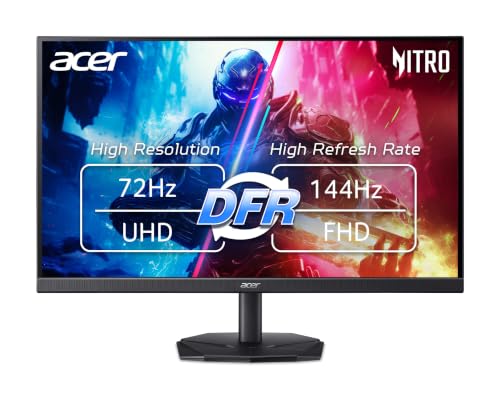
Budget Gaming 4K Monitor – Acer Nitro KG272K 27-Inch 4K IPS
The Acer Nitro KG272K is a 4k computer monitor aimed at gamers and desktop users who want sharp UHD visuals with gaming-oriented features. Its IPS panel, AMD FreeSync, and fast response time make it a more performance-focused option than a typical office display.
Best For: Gamers and mixed-use buyers who want 4K resolution with responsive play features.
Pros:
- 27-inch 4K IPS panel delivers detailed image quality.
- AMD FreeSync and up to 0.5ms GTG response time support smoother gameplay.
- DFR mode lets you choose between higher resolution or higher refresh rate.
- DCI-P3 95% and HDR10 support help with color accuracy and contrast.
Cons:
- 4K refresh rate tops out at 72Hz, so it is not a high-refresh 4K gaming display.
- 2-watt speakers are included, but audio output is limited.
This Acer makes sense if you want a 4K monitor that can handle both games and general use without moving into premium territory. It balances resolution, speed, and color features well for the price segment.
Premium 4K Comfort Pick – Dell 32 Plus 4K Monitor
If you want one of the more polished 4k computer monitors for mixed work and entertainment, the Dell S3225QS stands out for its 32-inch 4K UHD VA panel, 120Hz refresh rate, and strong color coverage. It aims to balance sharp detail, smooth motion, and eye comfort, making it a practical choice for long days at the desk.
Best For: Users who want a comfortable 32-inch 4K monitor for office work, photo/video tasks, and occasional gaming.
Pros:
- 4K UHD VA panel with 99% sRGB and 95% DCI-P3 for vivid, accurate color.
- 120Hz refresh rate with AMD FreeSync Premium and ultra-low 0.03ms response time.
- Improved ComfortView Plus reduces harmful blue light emissions by up to 35%.
- Built-in speakers, height adjustment, tilt adjustment, and ultra-thin bezels.
Cons:
- VA panel performance may not suit buyers who specifically want IPS-style viewing characteristics.
- Only two HDMI ports are listed, so input flexibility is decent but not extensive.
Overall, this Dell is the strongest all-rounder in the group if you care about comfort, color, and smoother-than-basic motion. It fits well in a modern desktop setup where a clean design and practical features matter.
Budget Big-Screen Option – Samsung 32 Flat Monitor
This Samsung is not a 4K panel, but it can still be worth considering if you want a large, simple display among 4k computer monitors search results and care more about screen size than ultra-high resolution. Its 32-inch FHD panel, borderless design, and eye-comfort features make it a straightforward monitor for everyday business and multimedia use.
Best For: Buyers who want a large 32-inch monitor for office tasks, general media, and light gaming without needing 4K.
Pros:
- Three-sided borderless design creates a cleaner look in multi-monitor setups.
- AMD FreeSync and 75Hz refresh rate help smooth out casual gaming and video.
- Eye Saver Mode, Flicker Free technology, and advanced eye comfort features reduce strain.
- Wall-mountable design adds flexibility for desk or mounted setups.
Cons:
- Native resolution is 1920×1080, so it is not a true 4K monitor.
- 8ms response time and 250 cd/m² brightness are modest by modern performance standards.
If resolution is your top priority, this is not the right pick. But if you want a roomy 32-inch display with basic gaming support and eye-care features, it remains a practical value-oriented option.
Value 4K Productivity Pick – 32 Inch 4K UHD Monitor
For shoppers comparing 4k computer monitors on productivity and value, this 32-inch 4K UHD model focuses on sharp detail, broad connectivity, and a clean desk-friendly design. It combines an IPS panel with MPRT dynamic response, AMD FreeSync compatibility, and multiple video inputs, which makes it a flexible fit for work and casual entertainment.
Best For: Users who want a feature-packed 32-inch 4K monitor for productivity, multitasking, and mixed device setups.
Pros:
- 32-inch 3840×2160 4K resolution with 8-bit color depth and smooth transitions.
- IPS panel with MPRT dynamic response for clearer motion in fast scenes.
- AMD FreeSync compatibility helps reduce tearing and stuttering.
- One HDMI 2.0 and two DisplayPort 1.4 inputs support multiple devices.
Cons:
- No built-in speakers are included.
- Brightness is not listed in the supplied notes, so display output is harder to compare directly.
This is a strong practical choice if you want a 4K screen built around connectivity and everyday versatility. The slim, three-sided bezel design and VESA support also make it easy to fit into compact office layouts.
How We Picked These 4K Computer Monitors
We focused on practical features that affect everyday use, including image sharpness, panel quality, refresh rate, color coverage, connectivity, and stand adjustability. We also looked for models that offer strong value at their size and use case, rather than just headline specs.
For 4K Computer Monitors, the best choice is the one that matches how you actually work or play. A fast panel helps gaming feel smoother, while accurate color and comfortable viewing matter more for office and creative tasks.
Quick Comparison
In general, 27-inch models deliver the densest text and crispest desktop experience at 4K, while 32-inch screens feel more spacious and easier to read without scaling as aggressively. If you want a hybrid display for streaming and casual use, smart-monitor options can make sense. For competitive play, prioritize refresh rate and response behavior; for design or editing, prioritize color consistency and wide viewing angles.
Key Buying Factors for 4K Computer Monitors
Panel Type
IPS panels are usually the safest pick for balanced color and viewing angles, making them ideal for most productivity and creator setups. VA panels often provide stronger contrast, which can improve movie watching and general media use.
Refresh Rate and Motion
Standard 60Hz is fine for office work, but 120Hz models feel noticeably smoother when scrolling, switching windows, or gaming. If you plan to use your monitor for both work and play, a higher refresh rate adds flexibility.
Size and Scaling
With 4K Computer Monitors, size affects readability and how much you can fit on screen. A 27-inch display looks extremely sharp, while 32-inch models are easier on the eyes for longer sessions and can reduce the need for UI scaling.
Color, HDR, and Connectivity
Look for strong sRGB coverage if you want accurate everyday color and better-looking web content. HDR support varies widely, so treat it as a bonus unless the monitor has meaningful brightness and contrast to back it up. Also check for HDMI, DisplayPort, USB-C, and adaptive sync support based on your devices.
Who Should Buy Which 4K Computer Monitors?
If you want the most balanced option, choose a 27-inch IPS model with 120Hz and adaptive sync. If your priority is a bigger workspace, a 32-inch 4K monitor is usually more comfortable for spreadsheets, timelines, and multitasking. Gamers should lean toward the fastest refresh rate and lowest perceived motion blur, while casual users may prefer a smart monitor or a model with better contrast for movies and streaming.
Creators and detail-focused professionals should favor accurate IPS panels, solid color coverage, and stable ergonomics. If you mainly want a simple upgrade from 1080p or 1440p, any well-built 4K display from this list can deliver a big jump in clarity.